Build a Webpage Summarizer CLI Tool With Claude API
Stuck on Project 1? This walkthrough builds a webpage summarizer CLI with Python, BeautifulSoup, and the Claude API, from fetching pages to final summary.

Your Project 1 tool from the last lesson might still be sitting half-built, because "design your own thing" is a genuinely hard brief to start from cold. Or maybe you finished something, but it just prints whatever Claude sends back and stops, which technically works but doesn't feel like the "agentic" part actually happened.
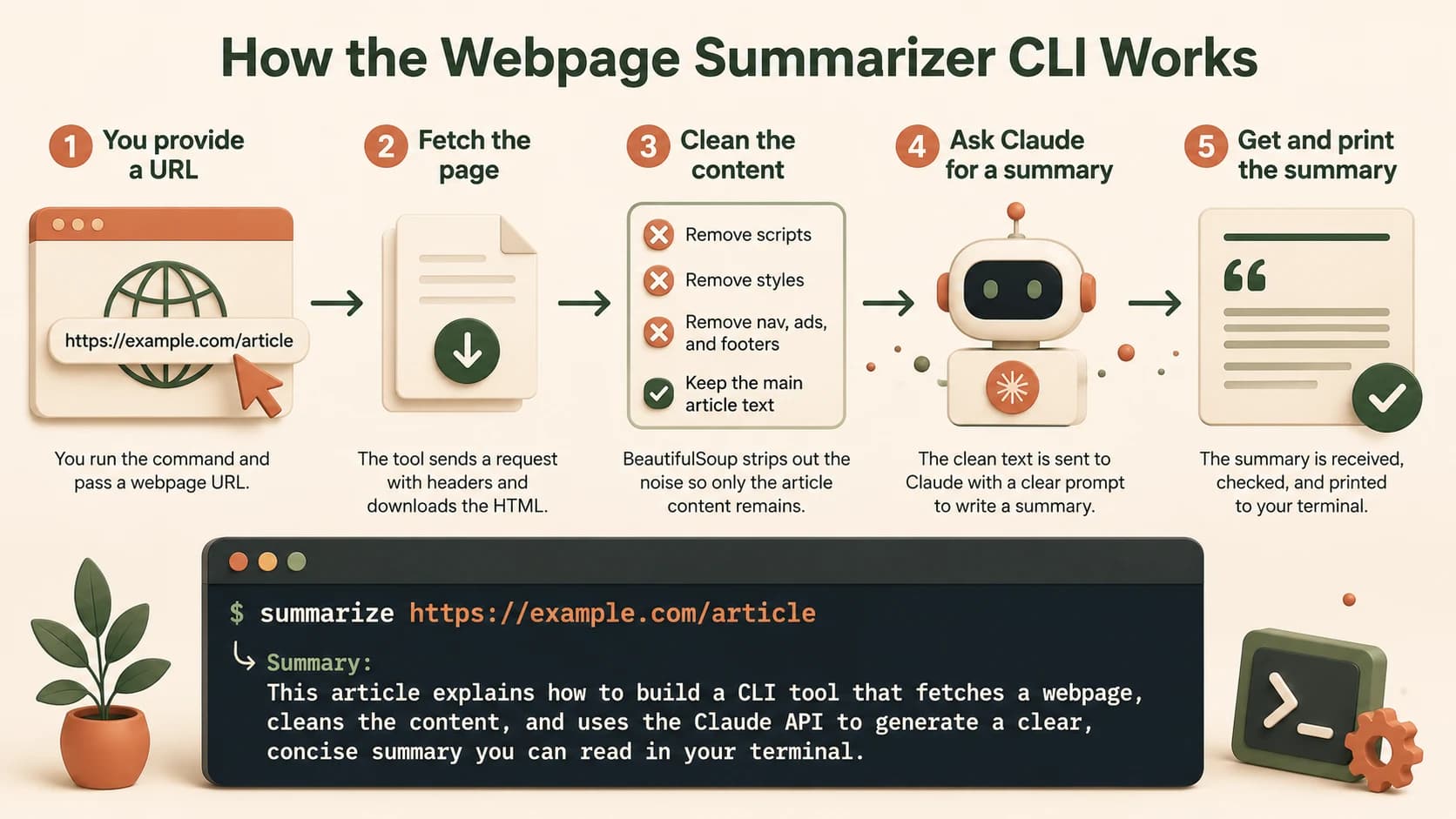
This lesson walks through one full, concrete answer to that brief: a command-line tool that takes any URL, fetches the page, strips out the noise, and asks Claude for a summary you can actually read. It's not the only right answer, it's one worked example, so you can see what "designing the decision point" looks like end to end before you go build your own version.
Key Takeaways
- This is a worked example of the open-ended Project 1 brief, not a second unrelated project
- The build is four pieces: fetch the page, clean the HTML, send it to Claude, wrap it in a working CLI with
argparse- The most common failure is a 403 error from sites that block requests with no
User-Agentheader- Stripping scripts, styles, and navigation before sending text to Claude keeps the prompt focused and the summary sharp
- The agentic decision point here is small on purpose: check the summary's length and re-prompt if it runs too long
What This CLI Tool Needs Before You Start
The finished tool takes one argument, a URL, and prints a clean summary of that page to your terminal. Under the hood it needs three libraries: requests to fetch pages, beautifulsoup4 to parse HTML, and anthropic to talk to Claude.
pip install requests beautifulsoup4 anthropic
Your API key should already be loaded from a .env file, not typed directly into the script. If you skip this, the key ends up sitting in plain text the moment you commit the file to GitHub. The anthropic package on PyPI is the official SDK this whole build runs on.
Step 1: Fetch the Page (and Survive the 403)
Here's the failure almost everyone hits first. You write the simplest possible fetch and test it against your own blog, and it works. Then you try it on a real news site and get a 403 Forbidden with no explanation.
import requests

def fetch_page(url):
    headers = {"User-Agent": "Mozilla/5.0 (compatible; SeekvanaBot/1.0)"}
    response = requests.get(url, headers=headers, timeout=10)
    response.raise_for_status()
    return response.text
The fix is one line: send a User-Agent header. Without it, requests identifies itself honestly as a Python script, and plenty of sites block anything that doesn't look like a browser. I've hit this exact 403 on the second URL I ever tested, not the first, which is worse: it makes you think your code is broken when the actual problem is one missing header. The timeout and raise_for_status() calls matter too, since a script that hangs forever on a dead server or silently swallows a 404 is the kind of thing that breaks in front of you weeks later.
Some sites block scraping entirely in their robots.txt or terms of service. Check before you point this at anything beyond your own testing pages.
Step 2: Strip the Noise Before It Reaches Claude
Raw HTML is mostly not the article. It's navigation menus, footer links, ad script tags, and CSS, all sitting in the same soup as the three paragraphs you actually want summarized.
from bs4 import BeautifulSoup

def clean_html(html):
    soup = BeautifulSoup(html, "html.parser")
    for tag in soup(["script", "style", "nav", "footer", "header"]):
        tag.decompose()
    return soup.get_text(separator=" ", strip=True)
Skip this step and two things go wrong. The summary quality drops, because Claude is now weighing menu text and cookie-banner copy alongside the actual content. And your prompt gets needlessly long, which costs more tokens for no benefit. A page that's 80% boilerplate turns into a summary that's 80% confused about what the page is actually about.
Step 3: Send It to Claude and Get a Summary
With clean text in hand, the API call itself is short. Skip cleaning the text first and this call still works, but you'll pay for it in wasted tokens on every single request, not just this one.
from anthropic import Anthropic

client = Anthropic()

def summarize(text, max_words=150):
    message = client.messages.create(
        model="claude-opus-4-8",
        max_tokens=500,
        messages=[{
            "role": "user",
            "content": f"Summarize this webpage in under {max_words} words:\n\n{text[:12000]}"
        }]
    )
    return message.content[0].text
The text[:12000] slice is a simple safety net, not a real chunking strategy. It caps how much raw text you send on a single call so one enormous page doesn't blow past a sane request size while you're still testing. message.content comes back as a list of content blocks, and for a plain text response the summary lives in the first one. Anthropic's own Python quickstart covers this same messages.create() pattern in more depth if you want the full reference.
Step 4: Wire In argparse So It's a Real CLI
Right now you have three functions you'd otherwise have to edit by hand every time you wanted a new URL, opening the file and swapping out a hardcoded string. That's fine solo, but it breaks the moment you want to hand this to a teammate, or just to your own future self in six months who won't remember which line to change. argparse turns that into a tool someone else could run without reading the source first. Real Python's argparse guide is worth bookmarking if you want to go past the basics used here.
Add the argument parser
Import argparse and define one positional argument for the URL, plus an optional --words flag for summary length:
import argparse

parser = argparse.ArgumentParser(description="Summarize a webpage with Claude")
parser.add_argument("url", help="The URL to summarize")
parser.add_argument("--words", type=int, default=150, help="Max summary length")
args = parser.parse_args()
Wire the functions together
Call fetch_page, clean_html, and summarize in sequence from the parsed arguments, using the functions from the sections above, then print the result. You'll swap in the retry-aware version of summarize in the next section, once the decision point is in place.
Run it against a live page
Test it from your terminal:
python summarize.py https://example.com/some-article --words 100
What Makes This Agentic, Not Just a Script?
A script counts as agentic when your code reads Claude's response and picks between at least two different next actions, not when it just prints whatever came back and stops. A tool that fetches a page, sends it to Claude, and prints the summary is a useful script, but by 10.01's own rule, it isn't agentic, because nothing in it branches on what the response actually contains.
Here's a small, real decision point: check the returned summary's word count, and if it's noticeably longer than the --words limit you asked for, send one follow-up request asking Claude to tighten it. That's your code reading the response and choosing a different next action based on what's actually in it, not just printing whatever came back.
def summarize_with_retry(text, max_words=150):
    result = summarize(text, max_words)
    if len(result.split()) > max_words * 1.3:
        result = summarize(result, max_words)
    return result
This retry loop is deliberately small. The Project 1 checklist doesn't ask for a clever decision point, just a real one, and "the summary came back too long, so ask again" clears that bar honestly.
Testing It and Checking Off 10.01's List
Before you call this done, run it against the same checklist the open-ended project asked for:
- Real functions instead of one long script
- Handling for a bad URL or a request that fails
- An API key loaded from
.env, with a.gitignorefile already in place - A commit history with at least three separate, meaningful commits rather than one dump-everything push
Test it against a URL that doesn't exist and confirm your code prints something readable instead of a raw traceback. That single test tells you more about whether this CLI tool is real or a demo than a dozen successful runs against pages you already knew would work.
Done? You've completed Lesson 10.02. In this build you let Claude do the summarizing and wrote code for everything else — the final project asks you to justify that split by solving one task with a prompt and with code and measuring which you'd trust.
FAQ