Python Try Except for Beginners: Fix Errors Fast
Python try except for beginners: learn to catch errors, read tracebacks, and handle API failures without panicking. Start writing safer code today.

In the last lesson, you learned to parse JSON from an API response. Now let's make sure a bad response doesn't crash your script. When a Python script crashes, it prints an error message. Most beginners either panic or ignore it. This is python try except for beginners, explained simply: try/except is how you handle errors in Python instead of letting them crash everything.
New to this course? Start from the beginning.
Key Takeaways
try/exceptlets Python attempt risky code and respond intelligently if it fails, instead of crashing- Three errors show up constantly in AI API code:
AuthenticationError,RateLimitError, andAPIConnectionError- A catch-all
except Exception as ealways goes last, after the specific except blocks- A traceback has two lines that matter: the last line (error type) and the second-to-last (which line caused it)
What try/except actually does
Think of it as: "try this. If it fails with this specific error, do this instead."
try:
    # code that might fail
    response = client.messages.create(...)
except SomeError:
    # what to do if it fails
    print("Something went wrong")
Python runs the try block first. If it succeeds, every except block is skipped entirely. If it fails with a matching error, Python runs that except block instead of crashing the whole script. This matters because one failed API call shouldn't take down an entire program, it's the core of how you handle errors in Python.
The three errors you'll see constantly in Python error handling
These three cover almost every failure in Anthropic API code.
AuthenticationError, wrong or missing API key:
except anthropic.AuthenticationError:
    print("API key is wrong, check your .env file")
Shows up when the key is misspelled, .env was never loaded, or the key was revoked. Check the .env file first, and confirm load_dotenv() ran before os.getenv().
RateLimitError, too many requests too fast:
except anthropic.RateLimitError:
    print("Rate limit hit, waiting before retry")
    time.sleep(30)
Your account tier has a limit on requests per minute. Hitting it means you're calling faster than that limit allows. Adding a short delay, or reducing request frequency, fixes it.
APIConnectionError, a network problem:
except anthropic.APIConnectionError:
    print("Connection failed, check your internet")
No internet, a firewall block, or Anthropic's API being temporarily down all raise this one. Check your connection before assuming your code is broken. See Anthropic's full error reference for every error type the API can return.
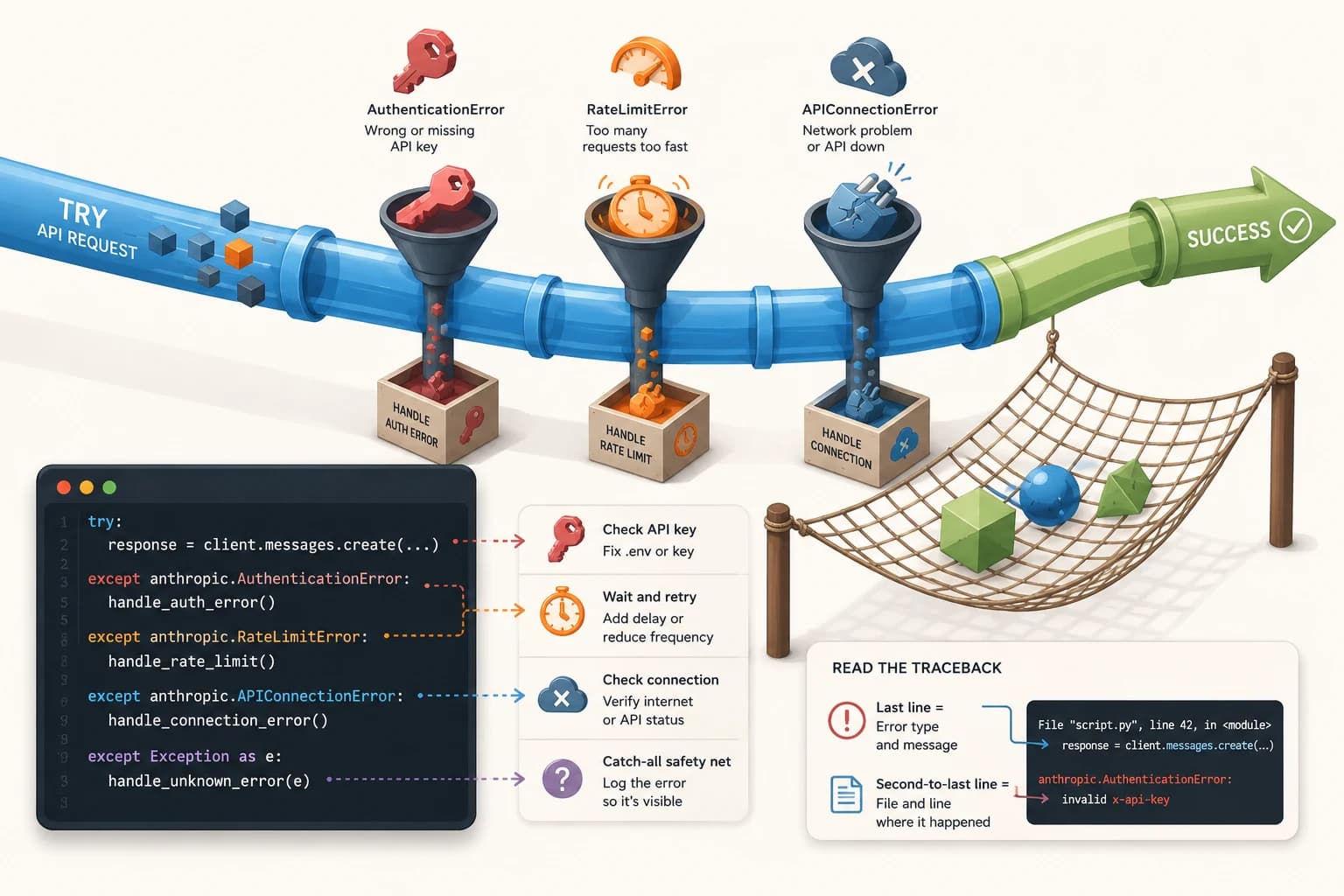
Always add a catch-all except Exception as e: after your specific except blocks. Exception catches anything the specific ones missed, and as e stores the error object so you can print its message. It's your safety net for errors you didn't anticipate.
What professional error handling looks like
Here's a wrapped API call with all four pieces together:
try:
    message = client.messages.create(
        model="claude-haiku-4-5-20251001",
        max_tokens=256,
        messages=[{"role": "user", "content": prompt}]
    )
    return message.content[0].text

except anthropic.AuthenticationError:
    print("Check your API key in .env")
    return None
except anthropic.RateLimitError:
    print("Rate limit, wait and retry")
    return None
except Exception as e:
    print("API error:", e)
    return None
Notice the order: specific errors first, broad catch-all last. If you flip that order, except Exception would catch everything before the specific blocks ever get a chance to run. I still write it in this order out of habit, even for quick scripts, because it saves so much debugging time later.
How to read a Python error traceback
When a script crashes without try/except, Python prints a traceback. It looks intimidating, but only two lines matter.
The last line is the error type and message. Read this first.
anthropic.AuthenticationError: invalid x-api-key
The second-to-last line tells you which line in your code caused it.
File "script.py", line 12, in <module>
Everything in between is Python's internal stack, which you can safely ignore. Once you know what happened and where, the fix is usually short.
Don't catch too broadly too early. except Exception as e: at the top of your except chain catches everything, including errors you should be handling specifically. Write the specific exceptions first, and only add the catch-all at the end.
Your Task
Read a real traceback
Find any Python error traceback (search "python authenticationerror traceback example" if you don't have one handy, or trigger one yourself by misspelling a model name in an old script). Identify just two things: the last line (error type and message) and the second-to-last line (file and line number). Write both down in your own words.
Done? You've completed this lesson on python try except for beginners, Lesson 05.11.
FAQ