Frontend vs Backend Deployment: What's the Difference?
Frontend vs backend deployment explained: static files need one kind of host, a running program needs another. Here's the simple test to know which.

Your index.html opens fine when you double-click it. Your FastAPI server answers every request the moment you type uvicorn main:app in your terminal. None of it exists anywhere except your own laptop, though. The second you try to make any of it public, a new question shows up: deploy what, exactly, and where?
You already know what deployment means from the last lesson. Here's the part that trips up almost everyone next: frontend vs backend deployment isn't one process, it's up to three different ones, depending on what you actually built. This lesson gives you a simple test to figure out which your own project needs.
Key Takeaways
- Frontend deployment copies static files (HTML, CSS, JavaScript) to a host built to serve files fast, with no ongoing computation and often a free-forever tier
- Backend deployment keeps a real program, like a FastAPI server, running continuously and listening for requests, which needs more compute and has tighter free-tier limits
- Full-stack deployment means both together, usually on two different platforms connected by a live URL instead of
localhost- A three-question test tells you exactly which type your project needs, no matter how it grows later
What Is Frontend Deployment?
Frontend deployment means moving static files, your HTML, CSS, and JavaScript from lessons 06.01 through 06.04, onto a server built specifically to serve files fast to a browser. Nothing runs continuously and nothing gets computed on the fly.
The server's whole job is handing out the exact files you gave it, the same way a librarian hands you a book instead of writing one for you on the spot. That's why frontend hosting is usually the simplest and cheapest option in this whole module, often free with no real limits for a small project.
Skip understanding this distinction, and you'll end up reaching for a full backend server (or paying for one) just to host a page that never changes. Lesson 09.03 walks through deploying your own index.html to exactly this kind of host, using Vercel.
MDN's explainer on how the web works covers this same file-serving model in more technical depth, if you want it.
What Is Backend Deployment?
Backend deployment means putting an actual running program, like the FastAPI server you built in lesson 07.01, on a server that keeps a process alive and listens for requests around the clock. This is not handing out files. It's actively running your code every single time someone visits.
That constant activity is exactly why backend free tiers tend to be tighter than frontend ones. A file host pays almost nothing to store a page nobody's viewing right now. A backend host is paying to keep your program awake and ready, whether anyone's using it or not.
I've watched this exact mistake happen more than once: someone tries to run a live Python process on a plain static file host, and nothing ever loads. A file server has nowhere to actually execute your code. Lesson 09.04 walks through the fix, how to deploy a backend to Render so a real process stays running. AWS's explainer on what a cloud server is is a good plain-English reference if the "always-on process" idea still feels fuzzy.
What Is Full-Stack Deployment?
Full-stack deployment means both of the above, together. A frontend serves your interface, and a backend handles real logic, like calling the Claude API or reading from the Supabase database you set up in lesson 07.03. Some platforms can host both pieces in one place, but often you'll use two platforms connected by real, live URLs.
Here's the failure mode almost everyone hits the first time: you deploy your backend, it gets a shiny new URL, and your site still doesn't work. Your frontend code is still pointed at localhost, the address that only ever existed on your own laptop.
Local development and production aren't the same address. When you deploy your backend, you have to update your frontend's code to call the live backend URL, not the local one you were testing against. This is the single most common "it works on my machine but not live" bug in a first full-stack deploy.
Full-stack deployment is the one that takes the most pieces working together correctly. It's also the one this entire module is building you toward.
Frontend vs Backend Deployment: The Three-Question Test
You don't need to memorize any of the above to use it. Skip this test and you'll guess your way into the wrong platform, wasting an afternoon fighting a host that was never built for what you're asking it to do. Run any project, yours or anyone else's, through these three questions, in order, and stop at the first "yes."
The three-question deployment test
| Question | If yes, you need |
|---|---|
| Does it have only static files (HTML, CSS, JavaScript, no server code)? | Frontend-only hosting |
| Does it need to run a program continuously, listening for requests? | Backend hosting |
| Does it need both, together? | Full-stack, likely two connected platforms |
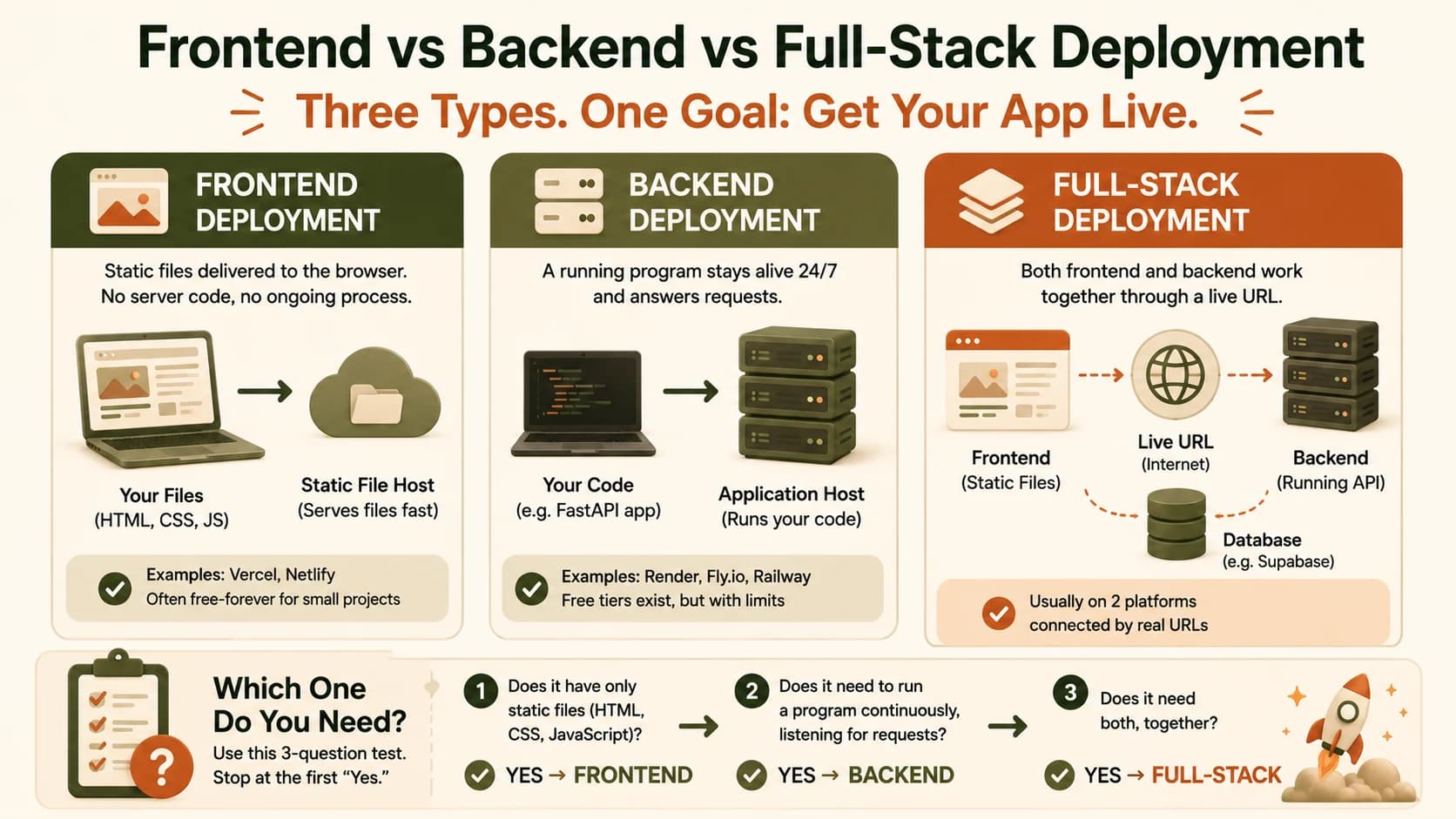
A portfolio page with your bio and project links stops at question one. A Python API that just returns a Claude-generated answer, with no visual interface, stops at question two. A full AI chat app, with a text box, a server calling Claude, and a database saving conversation history, needs all three questions answered together.
If any of this still feels shaky, the Getting Started path walks through the basics again from the top.
Your Task
Classify three projects by deployment type
For each project below, decide: frontend-only, backend-only, or full-stack deployment? Write your answer and one sentence explaining why for each.
- A static portfolio website with your bio and project links, no data changes, no server logic.
- A Python API that takes a question and returns a Claude-generated answer, with no visual interface, just the endpoint itself.
- A full AI chat app with a text input the user types into, a server that calls Claude, and a database storing conversation history.
Done? You've completed Lesson 09.02.
FAQ