What Python Import Statements Actually Do (Beginner's Guide)
Python import explained for beginners: the three import patterns, three library types, and how to read any AI script's imports block.
The first few lines of almost every AI Python script look like this:
import os
import anthropic
from dotenv import load_dotenv
These lines aren't doing anything yet, they're loading tools. Once you can read them, you'll know exactly what a script depends on before running a single line of logic.
Key Takeaways
import xloads a whole library, you access its tools withx.something.from x import ypulls one specific thing out, so you useydirectly, no prefix.import x as ygives a library a shorter nickname, common in data science code.- Standard library imports (
os,json) come with Python, third-party imports (anthropic,dotenv) needpip installfirst.- Recognizing which type an import is tells you what happens if that line, or the install behind it, is missing.
What a library actually is
The same way you learned to trace a file operation line by line, you can learn to trace an import line by line, once you know the pattern, you'll never see it as a mystery block again.
A library, also called a package or module, is someone else's code you can use in your own program. Instead of building every tool from scratch, you import tools that are already made and tested. import anthropic says: go find the anthropic library, which I installed earlier, and load all its tools so I can use them.
The import runs once, at the top of the script. After that, every tool the library provides is available for the rest of the file. You never have to re-import it mid-script.
The three import patterns
You'll only ever see three shapes. Once you can name them, you can read any imports block.
Pattern 1, import the whole library
import anthropic
Access its tools with dot notation: anthropic.Anthropic(), anthropic.APIError. Use this when you need multiple things from the library.
Pattern 2, import one specific thing
from anthropic import Anthropic
Access it directly: Anthropic(), no anthropic. prefix needed. Use this when you only need one class or function and don't want to type the full path every time.
Pattern 3, import with an alias
import numpy as np
Access it as np.array(...) instead of numpy.array(...). Use this when a library's name is long and you'll type it constantly. Less common in simple AI scripts, but you'll see it often in data science code.
The three types of libraries
Every import falls into one of three buckets, and the bucket tells you what breaks if the import fails.
Standard library comes with Python, no install needed. import os gives you operating system functions like file paths and environment variables. import json parses and generates JSON. These never need pip install, they're always available.
Third-party packages are installed via pip. import anthropic needs pip install anthropic first. from dotenv import load_dotenv needs pip install python-dotenv. If you haven't installed it, the import fails with ModuleNotFoundError, that's your signal the pip install step was skipped. The other cause of that same error is installing into the wrong environment, which is what virtual environments exist to keep straight.
Local files are your own code in the same project. from utils import build_prompt imports from a file you wrote called utils.py. No install needed, Python finds it because it's sitting in the same folder.
Decode a real imports block
import os # standard library, access environment variables
import json # standard library, parse API responses
import anthropic # third-party, the Claude SDK
from dotenv import load_dotenv # third-party, load .env files
Two standard, two third-party. This exact block, or something close to it, sits at the top of most beginner AI scripts. I've seen this four-line pattern open more Claude scripts than almost any other combination, it's worth being able to read on sight.
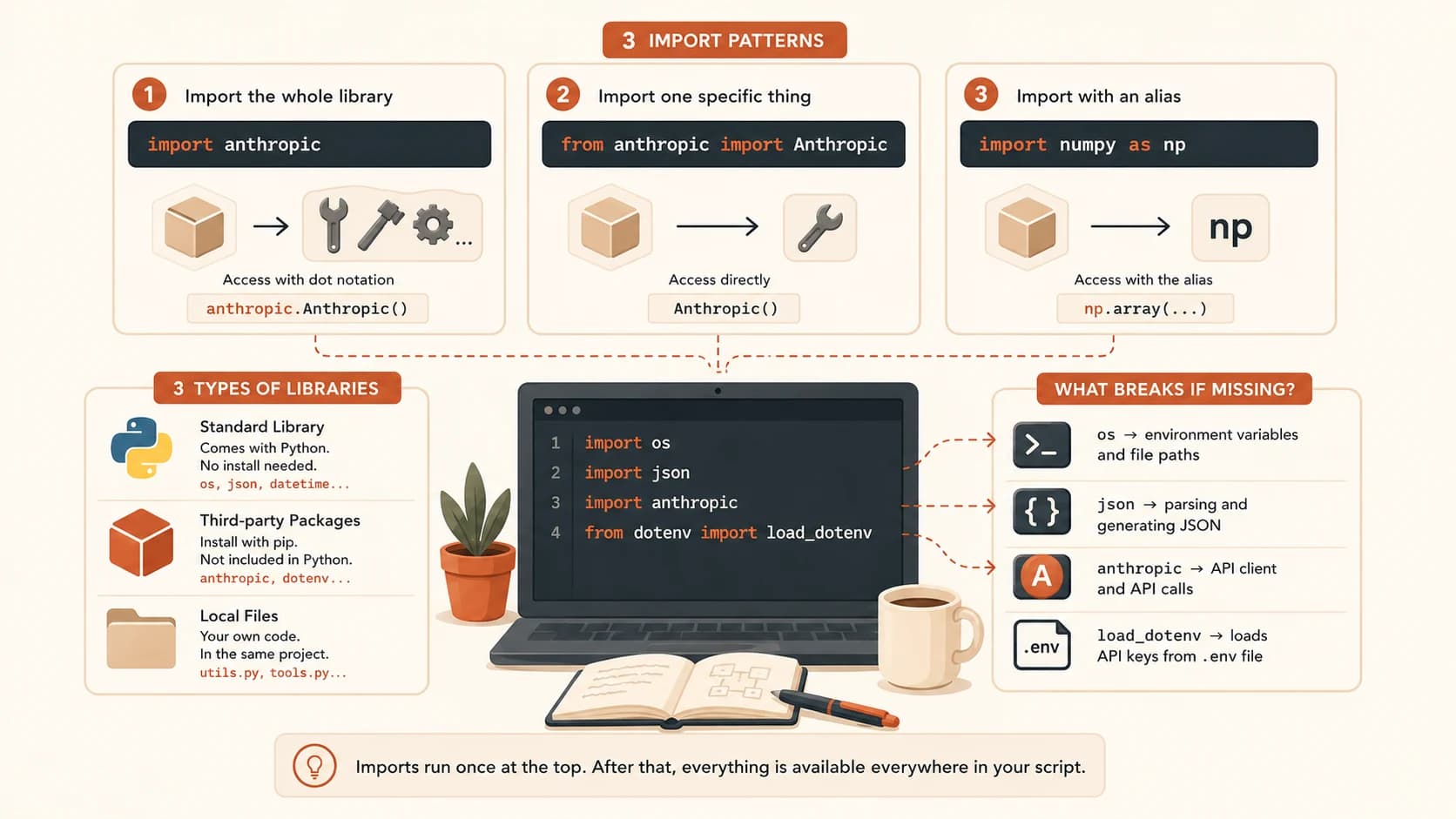
Import order is convention, not enforcement. By convention, imports go standard library first, then third-party, then local files. Python doesn't require this, the script runs fine either way. But every professional codebase follows it, and linters flag violations. When reading someone else's code, the position of an import tells you roughly what type it is before you even check.
Match the Import
Six real import lines. For each, work out the type and what removing it would break before checking the answer.
import os
Standard library. Removing it breaks any line that reads environment variables (os.getenv) or handles file paths.
import anthropic
Third-party. Removing it breaks every line that creates a client or makes an API call, anything mentioning anthropic. fails.
from dotenv import load_dotenv
Third-party. Removing it means load_dotenv() isn't defined. Your API key won't load from the .env file, and every API call fails with an authentication error.
import json
Standard library. Removing it breaks any line calling json.loads() or json.dumps(), common when parsing API responses or config files.
from tools import web_search
Local file. There's a file called tools.py in the same folder. Removing this import means web_search() isn't available in the script.
import datetime
Standard library. Removing it breaks any line that creates timestamps, often used for logging when an API call happened.
The imports block is the ingredient list. Once you can read it, you know exactly what a script depends on, and what breaks, before running a single line of logic. That's the same skill you'll keep building through the rest of the Launchpad path.
Quick Check: Fix the Crash
Three scripts just crashed. Each error points to exactly one fix.
A script has `import anthropic` at the top and crashes with: ModuleNotFoundError: No module named 'anthropic'. What fixes it?
A script calls `os.getenv('API_KEY')` but never has `import os` at the top. What error shows up, and what fixes it?
A script has `from dotenv import load_dotenv` but python-dotenv was never installed. What error type is this?
Your Task
Trace a real imports block
Find any Python script that uses import (a repo, a tutorial, an AI SDK example, any will do). Pick one import line and answer three questions without running the code: is it standard library, third-party, or local; would it need pip install; and what would break in the script if that line were deleted. Write your three answers down.
Done? You've completed Lesson 05.07.
FAQ