GitHub Portfolio for Beginners: Why Your Repos Matter
Your GitHub profile is your developer CV. Learn how to build a GitHub portfolio as a beginner, what to pin, and why AI learner projects matter.
Imagine a hiring manager has two candidates with identical resumes. One has a GitHub profile with a working Claude API chatbot and commits going back three months. The other has nothing. The choice is obvious before a single interview question is asked.
That's what your GitHub profile does for you. It shows, not tells.
In this lesson, you will learn how to build a GitHub portfolio for beginners: what makes a profile worth looking at, and what to put on it as an AI learner. By the end, your profile will be set up and public.
If you just finished GitHub Desktop, this is the next step: making the work you have done visible.
Key Takeaways
- GitHub is the developer CV: a resume says you know something, GitHub proves it
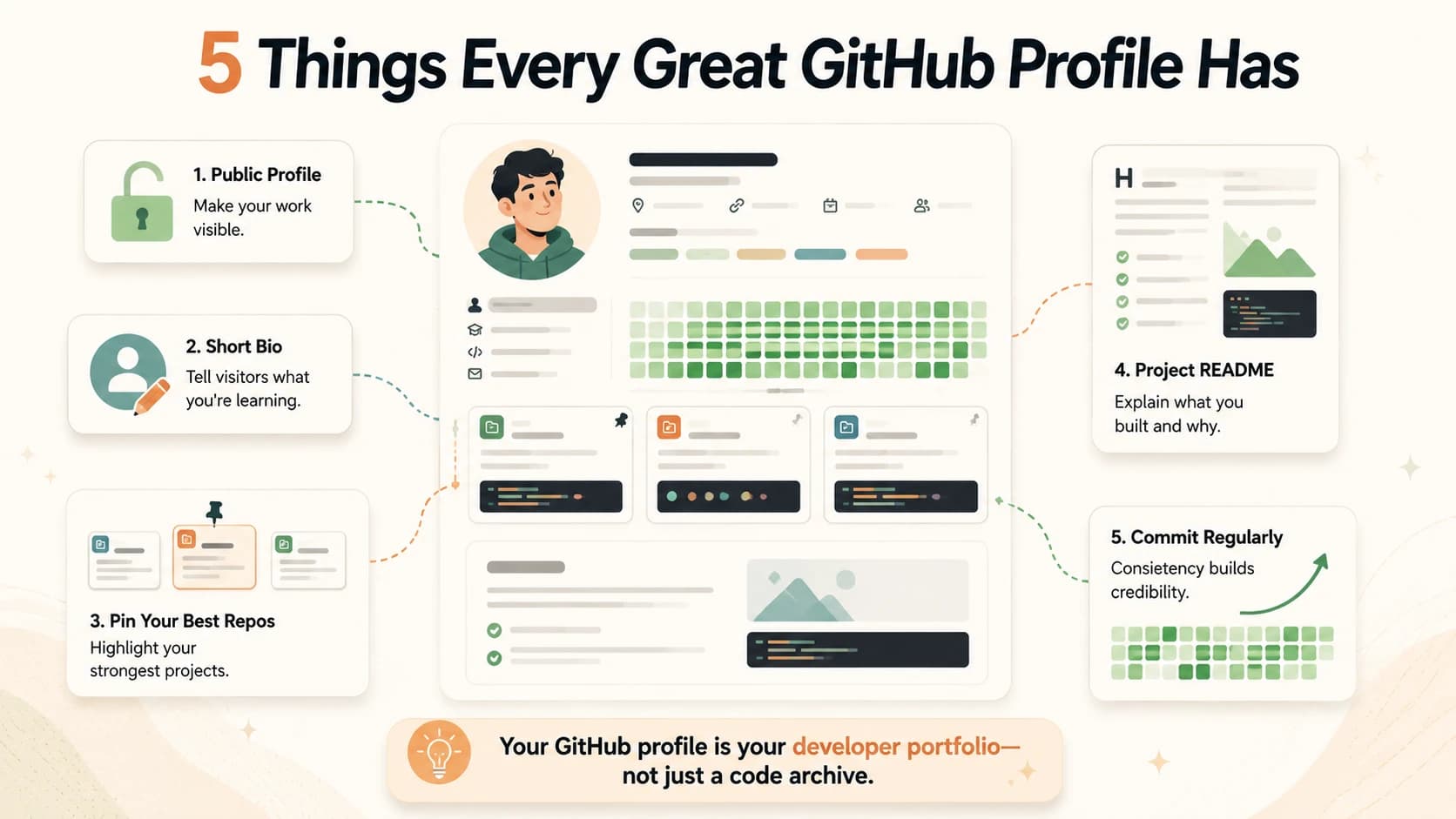
- Five things make a profile work: public visibility, a short bio, pinned repos, READMEs, and regular commits
- Even beginner AI projects count: a Claude API script with a clear README tells a story no bullet point can
Why GitHub Is Your Developer CV
When you apply for an AI role, a freelance gig, or even a collaboration with another developer, people will look at your GitHub. Not always. But often enough that an empty profile is a missed opportunity.
What they're looking for isn't polish. It's evidence. Evidence that you actually build things, that you write code regularly, and that you can explain what you made. A resume can claim anything. A GitHub repo is verifiable.
Resume vs. GitHub: what each one shows
| What you claim | What GitHub proves |
|---|---|
| "Proficient in Python" | Python code you wrote, running and committed |
| "Built a chatbot" | The actual repo, README, and commit history |
| "Fast learner" | Regular commits showing steady progress over weeks |
| "Can work with APIs" | A script that calls a real API, documented |
The green contribution squares at the top of your profile, the ones that fill in every time you commit, are not just decoration. They show whether you are actively building or whether you touched code once and disappeared.
Five Things That Make a GitHub Profile Work
You don't need to build something impressive before you start. You need to set up the profile so that what you do build is visible. Here are the five things that matter.
1. Make your profile public. This sounds obvious, but check it. Go to Settings > Profile and confirm your profile visibility is set to Public. If no one can see your repos, the portfolio does not exist.
2. Write a short bio. One sentence. Something like: "Learning Agentic AI development, building in public." It tells a visitor what you are working on and signals that you are active. Do not leave it blank.
3. Pin your best repos. GitHub lets you pin up to six repositories to the top of your profile. Use it. Click "Customize your pins" on your profile page and choose the repos that show something useful. If you only have one repo from this module, pin that one. A curated profile with one good repo looks better than ten unorganized ones.
If you are thinking "my code isn't ready to show anyone", that is the wrong frame. The README is what people read first. A repo with a clear README that says what you built and what you learned is worth more than perfectly written code with no explanation.
4. Write a README for every project. One paragraph is enough. Answer three questions: what does this do, why did you build it, and how do you run it. That is a complete README for a beginner project.
5. Commit regularly. You don't need to commit every day. But a profile with commits spread across weeks and months looks like an active developer. One burst of activity followed by six weeks of nothing looks like a tutorial you finished and abandoned.
There is a special GitHub trick worth knowing: if you create a public repository named exactly your GitHub username (for example, hasnat/hasnat), GitHub uses the README from that repo as the "About Me" section at the top of your profile. It's a great place to introduce yourself in a few sentences.
What to Put on GitHub as an AI Learner
Here's the angle that most portfolio guides miss: you're learning AI development. That's a specific, valuable signal right now. And the bar for what counts as a portfolio project is lower than you think.
A repo that contains a simple Python script that calls the Claude API and returns a response, with a README explaining what it does, tells an employer or collaborator something meaningful. It says: this person has set up an API key, written code that talks to an AI model, and shipped something functional. That is more than most people claiming to "know AI" have done.
What counts as an AI learner portfolio project:
- A Claude API script that does anything (summarize text, answer questions, classify data)
- A simple chatbot you built following a tutorial, with your own modifications
- A prompt library you have been testing and documenting
- An agent tool you built as part of this course
- Even a well-documented
my-first-repofrom lesson 04.03
The goal is not to impress. The goal is to start building a visible record of what you are learning. Every project you add from here makes the profile more useful. Starting early is the whole point.
I find that the developers who look most credible on GitHub are not the ones with the most stars or the cleanest code. They are the ones who have a clear trail of curiosity: they tried something, documented it, and kept going.
If you are following the full Getting Started path, the next module will give you plenty of new repos to add here.
Your Task
Set up your public GitHub profile
Go to github.com and click your avatar, then Settings, then Profile.
Fill in these fields:
- Name: your real name (or a consistent handle)
- Bio: one sentence, for example: "Learning Agentic AI development, building in public"
- Location: optional, but adds credibility
Make sure your profile visibility is set to Public.
Go back to your profile page. Click "Customize your pins" and pin your my-first-repo from lesson 04.03 (or any other repo you have created).
That is your portfolio started. Every project you build from this course adds to it.
Done? You have completed Lesson 04.10.
FAQ