Frontend vs Backend Explained for Beginners: Full Guide
Frontend vs backend explained simply: frontend is what users see, backend handles data and API keys. Learn how both work together in AI apps.

You paste your Anthropic API key straight into your chat widget's JavaScript so it can call Claude. It works, the widget replies, you feel great about it. Then you open the Network tab from last lesson, or someone else does, and there's your key sitting in plain text for anyone to copy.
That's the exact mistake this lesson exists to prevent. The frontend is what a user sees and touches in their browser. The backend is the part working behind the scenes, and it's the only place a secret like an API key should ever live. Here's what each one actually does, and why keeping them separate is not optional once real users and real API keys are involved.
Key Takeaways
- The frontend is everything that runs in the user's browser: HTML, CSS, and JavaScript
- The backend is server-side code that handles data, logic, and anything that needs to stay private
- Every AI chat message travels frontend → backend → AI API → backend → frontend
- An API key placed in frontend code is visible to anyone who opens the browser's Network tab
- The backend exists specifically to be the one place a secret key is safe
What Is the Frontend? (And How It Differs from the Backend)
The frontend is everything running inside the user's browser. It's HTML for structure, CSS for style, and JavaScript for behavior, the same three layers you learned about earlier in this module. All of it ships to whoever opens the page.
Anything that lives in the frontend is visible to the user, no exceptions. Every line of JavaScript your browser runs can be read with View Page Source or the DevTools tabs from last lesson. If a value is sitting inside frontend code, anyone who opens that page can see it too.
That's not a flaw. It's just what "frontend" means: code that ships to, and runs on, someone else's computer. AWS describes this split the same way: frontend is the client side, backend is everything that happens on the server.
What Is the Backend?
The backend is code that runs on a server you control, not on the user's machine. It handles the work a user should never see directly: looking things up in a database, checking permissions, and calling other APIs on the app's behalf. You can see this made concrete in a real running backend server built with FastAPI, and later traced end to end with a database added in.
Remember the waiter-and-kitchen model from what an API is? The frontend is the dining room, where the customer sits and places an order. The backend is the kitchen, where the actual work happens, out of sight. And the kitchen holds something the customer never sees: the restaurant's private recipe. For an AI app, that recipe is the API key.
Nothing in the backend ships to the user's browser. It stays on your server, which is exactly why secrets belong there. Put an API key in the frontend instead, and it's no longer a secret. It's just text sitting in a file every visitor's browser already downloaded.
How a Chat Message Actually Travels
Here's the full round trip for something as simple as sending one message to an AI chat app:
- User types a message → sent to the frontend
- Frontend sends a POST request → carries the message as its body, straight to the backend
- Backend calls the Claude API → attaches the secret API key that only the backend has
- Claude generates a response → sends it back to the backend
- Backend forwards the response → to the frontend
- Frontend displays it → to the user
The user never talks to Claude's API directly, not even once. Every AI chat interface you've used, no matter which company built it, runs this same handoff. The frontend only ever talks to your own backend, and your backend is the only thing that ever talks to the AI provider. That handoff is how every AI app is structured, whether it's a simple chatbot or a full product.
The first time I built something like this, I skipped the backend entirely and called the AI API straight from a browser script, just to see it work faster. It did work, for about a day, until the key showed up in a public repo and someone else's usage bill started climbing on my account. That's the mistake this whole flow exists to prevent.
Why the API Key Never Lives in the Frontend
This is the part that turns into a real incident if skipped. An API key proves to Claude, or any AI provider, that a request comes from an account allowed to use it. That account also pays for every call the key makes.
If an API key ships inside frontend JavaScript, anyone who opens the Network tab or views the page's source can copy it. From there, they can make unlimited calls that your account pays for, and you'll have no way to tell their requests from your real users'.
This is exactly why .env files and .gitignore matter as much as they do. Keep a key in a .env file on your backend server, never commit it to a public repo, never send it to the browser, and it stays private. Paste that same key directly into a frontend script, and it's a public key the moment the page loads.
The fix is always the same shape: the frontend asks your backend to do the work, and only the backend holds the key that talks to the AI provider. Auth0's own security guidance puts it plainly: embedding a key in a frontend application means any user can find it just by viewing the page source. Once you can explain the difference between frontend and backend in one sentence, you're ready to build safely: the frontend never gets the key.
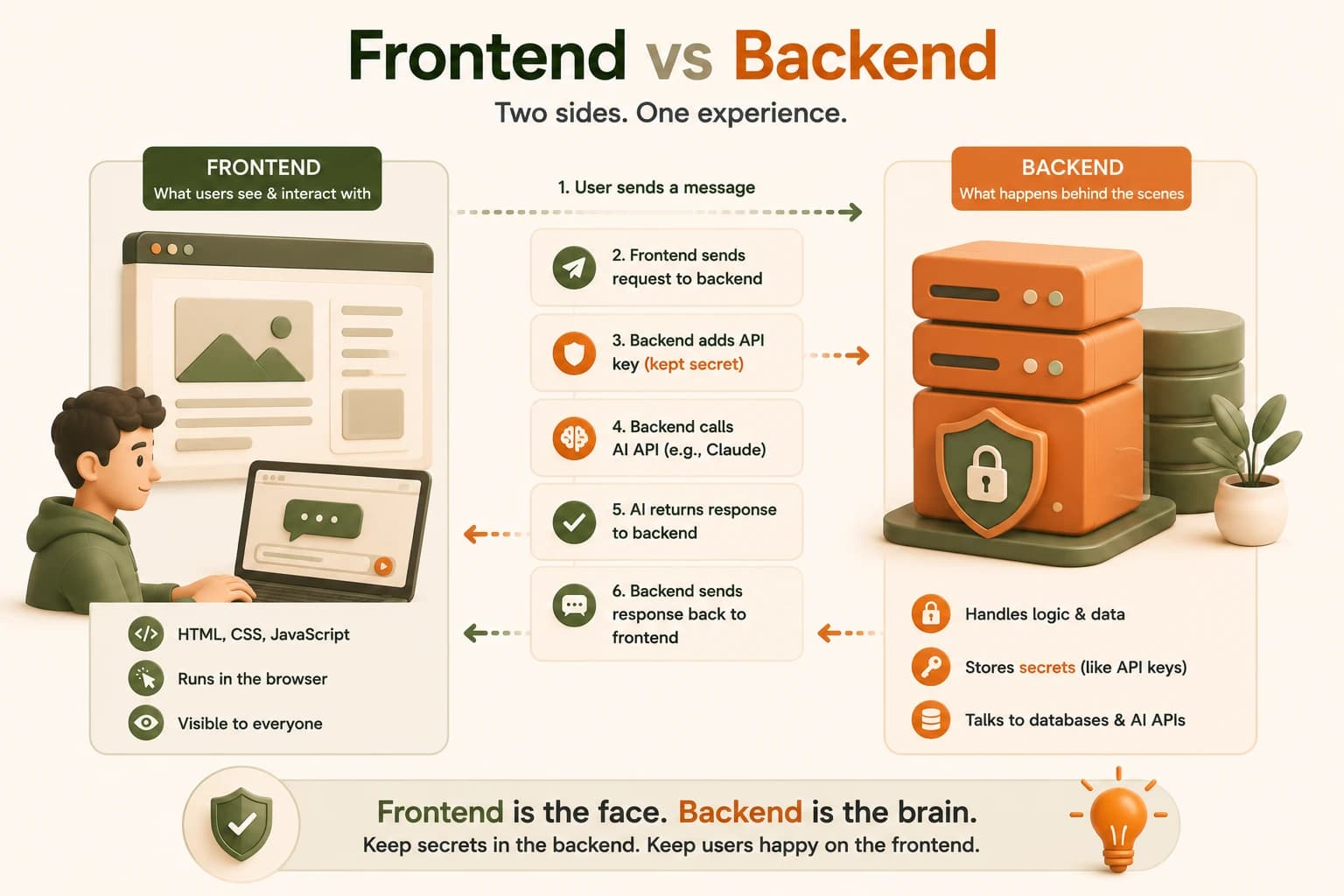
Every arrow in this flow ends at the same place: whatever you actually typed into that message. Writing better AI prompts is what decides whether that final response is actually useful.
This same frontend/backend split is exactly what determines how each side gets deployed later. Frontend vs backend deployment walks through that difference once you're ready to put a project live.
Your Task
Draw the request flow for an AI chat app
On paper or in a notes app, draw five boxes left to right: User, Frontend, Backend, AI model, and back to User.
Draw an arrow between each box in the direction data actually flows when someone sends a message in an AI chat app.
Label each arrow with what's being sent: for example, "user's message" between User and Frontend, "prompt + API key" between Backend and AI model, "Claude's response" going back through Backend, and "displayed text" from Frontend back to User.
Done? You've completed Lesson 06.09.
FAQ