How AI Agents Use Databases to Remember Every Message
How do AI agents use databases? A messages table with id, role, and content stores every turn, so conversations survive after the script restarts.

Your script keeps a messages list while it runs, the user asks a question, gets an answer, asks a follow-up that only makes sense because of what came before. Then the terminal closes. Run it again, and the agent has no idea who you are or what you just asked, because that list only ever lived in memory, and memory doesn't survive a restart.
A database fixes this: it's the durable version of the list your script forgets. For a refresher, see what a database actually is. This is what an AI agent memory database looks like in its simplest form: a messages table stores every turn of the conversation as a row. That row survives after the script ends, so you can pull it back out any time with a query you already know.
Key Takeaways
- A
messagestable needs three columns:id,role, andcontent, the same shape as the Python message dicts you already send to the Claude API.- INSERT a new row every time a message happens, SELECT the rows back when you need conversation history.
- A database row and a Python dict hold identical information, they're just two different containers for it.
- This is the exact mechanism that turns a Python list into memory that survives after the script ends.
What a Messages Table Actually Looks Like
Here's the database table structure explained in full: three columns, built one at a time. id is a unique number Supabase generates automatically for every row, you never set it yourself. role is text, either "user" or "assistant", the same key you've already used inside every Python message dict since Module 05. content is text too, whatever was actually said.
A messages table with two rows
| id | role | content |
|---|---|---|
| 1 | user | What is an AI agent? |
| 2 | assistant | An AI agent is a system that acts autonomously. |
Look at that shape again. It's the exact same three fields as {"role": "user", "content": "What is an AI agent?"}, the dict shape from Module 05, just sitting in a table instead of a Python variable.
Skip this and a beginner ends up inventing a weirder schema: extra columns the API doesn't even use. Or they miss the role column entirely and lose the ability to tell who said what. Three columns is genuinely enough.
How AI Agents Use Databases to Remember Conversations
AI agents use databases by writing every message to a table as it happens, then reading that table back before each new request, that round trip is the entire memory mechanism. Every time a user sends a message, INSERT a new row into messages. That's how agents store conversation history: one INSERT per turn. Every time the agent needs that history back, SELECT the rows back out, filtered with WHERE to the right conversation. That covers both the next Claude API call and just showing the user their own past turns.
INSERT INTO messages (role, content) VALUES ('user', 'What is an AI agent?');

SELECT role, content FROM messages WHERE session_id = 'abc123' ORDER BY id;
That SELECT result becomes the messages array you build in Python and hand to the Claude API. The database is the persistent version of that list, it survives after the script ends, the in-memory list never did. See how this fits the full request alongside the frontend and backend.
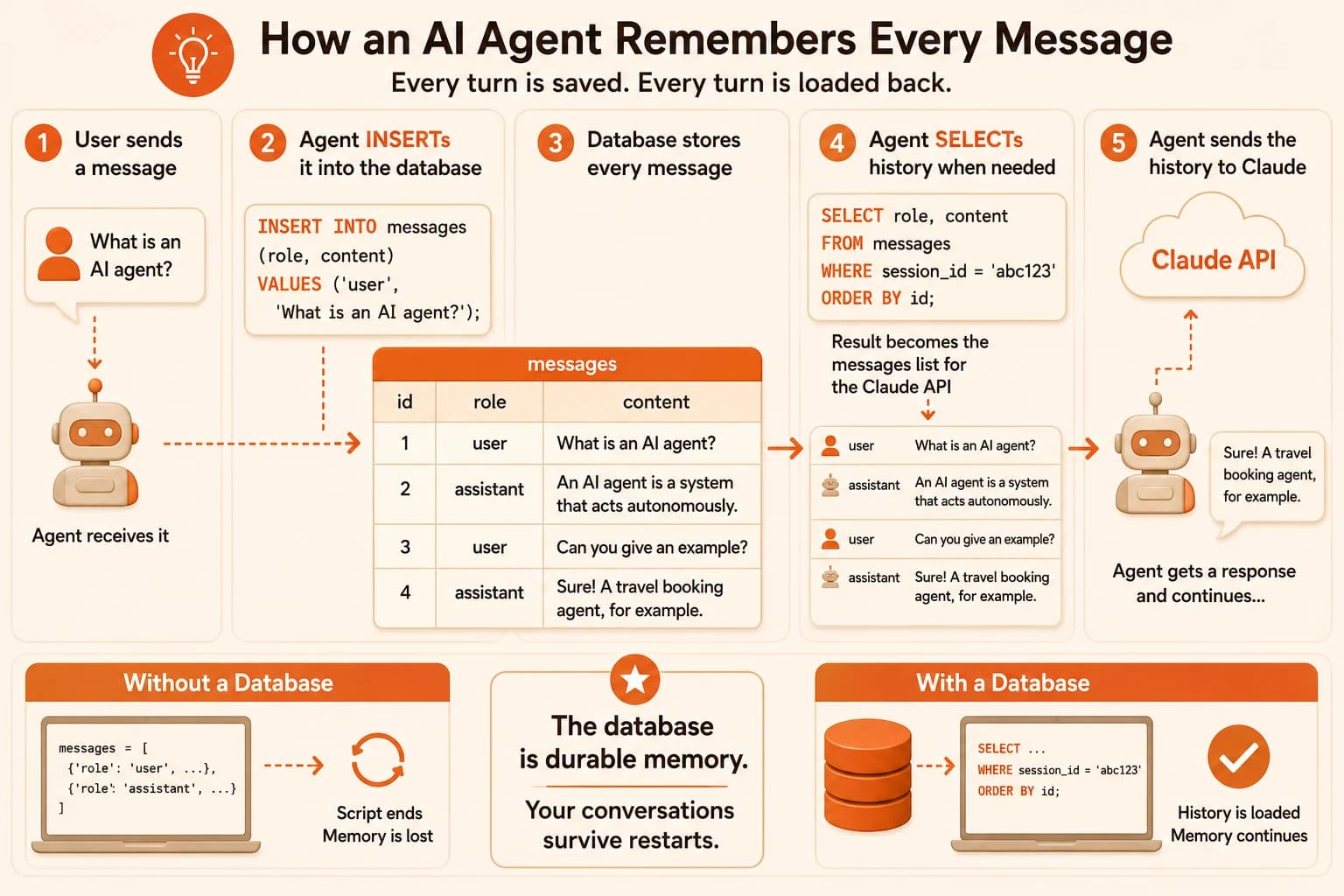
If a conversation stops making sense to the model partway through, check whether every turn actually got INSERTed before the next SELECT ran. A missing row is invisible until you go looking for it.
Miss this mechanism and your agent breaks in a specific, confusing way. It answers the first message fine, then acts like the second message came out of nowhere, because nothing ever wrote the first exchange down anywhere durable.
How Does a Database Row Become a Python Dict?
A database row and a Python dict hold identical information, they're just two different containers for it. Reading a row out of the table and turning it into something Claude's API accepts is a direct, one-to-one translation, not a complicated conversion.
Here's the row, straight from the table:
{id: 1, role: 'user', content: 'Hi'}
And here's the exact same information as the Python dict that goes into the messages array:
{"role": "user", "content": "Hi"}
Same two pieces of real information, role and content. The id stays behind, the database needed it to keep rows distinct, the API never asked for it.
I still walk through this translation slowly, even after writing plenty of SQL. It's easy to assume a database row is some fundamentally different object than a Python dict. It isn't. Same information, different home, and once that clicks, INSERT and SELECT stop feeling like memorized commands and start feeling like exactly what they are: writing a dict down, and reading it back.
When you build the messages array for an API call, you're just looping over SELECT results and reshaping each row into {"role": row["role"], "content": row["content"]}. That's the whole translation.
Skip understanding this, and every agent project starts to feel like two separate, unrelated languages: one for the database, one for Python. Really, it's one shape wearing two outfits.
Ready to see how this table, your Python code, and the Claude API all connect end to end? Head to the Claude Messages API docs to see the exact role/content shape this lesson's table mirrors.
Check Your Understanding
Which three columns does a basic messages table need?
Every time a user sends a new message, what should the agent do?
A database row reads back as {id: 1, role: 'user', content: 'Hi'}. What does the matching Python dict look like?
Done? You've completed Lesson 07.07.
FAQ