SQL SELECT, INSERT, WHERE Explained (With Real Examples)
SELECT shows data, INSERT adds it, WHERE filters it. Learn to read basic SQL queries with real examples, no memorization required.

Your script hits Supabase, runs a query you copied from a tutorial, and the terminal spits back a wall of red text: syntax error at or near "user". You stare at the line. It looks fine. It looks exactly like the example. Except the example had quotes around 'user' and yours doesn't, and Postgres genuinely cannot tell the difference between "the word user" and "a column named user" without them.
That one missing character is the whole lesson, in miniature. SQL isn't hard. It's just unforgiving about a small number of very specific rules, and the three commands you'll use constantly, SELECT, INSERT, and WHERE, follow all of them. If you haven't yet seen how a database actually stores this kind of data, a quick look back will make the rest of this click faster, but it's not required. By the end of this lesson you'll be able to read any basic SQL query and know exactly what it's asking for, without memorizing a syntax chart.
Key Takeaways
- SELECT means "show me data",
SELECT * FROM messages;reads as "show me every column from the messages table"- INSERT means "add new data", you specify which columns and which values go in them
- WHERE means "but only rows matching this condition", it narrows SELECT, UPDATE, or DELETE down to specific rows
- Text values need quotes in a WHERE clause; column names never do
- An agent "remembering" your last conversation is almost always a SELECT with a WHERE clause behind it
What Does SELECT Mean in SQL?
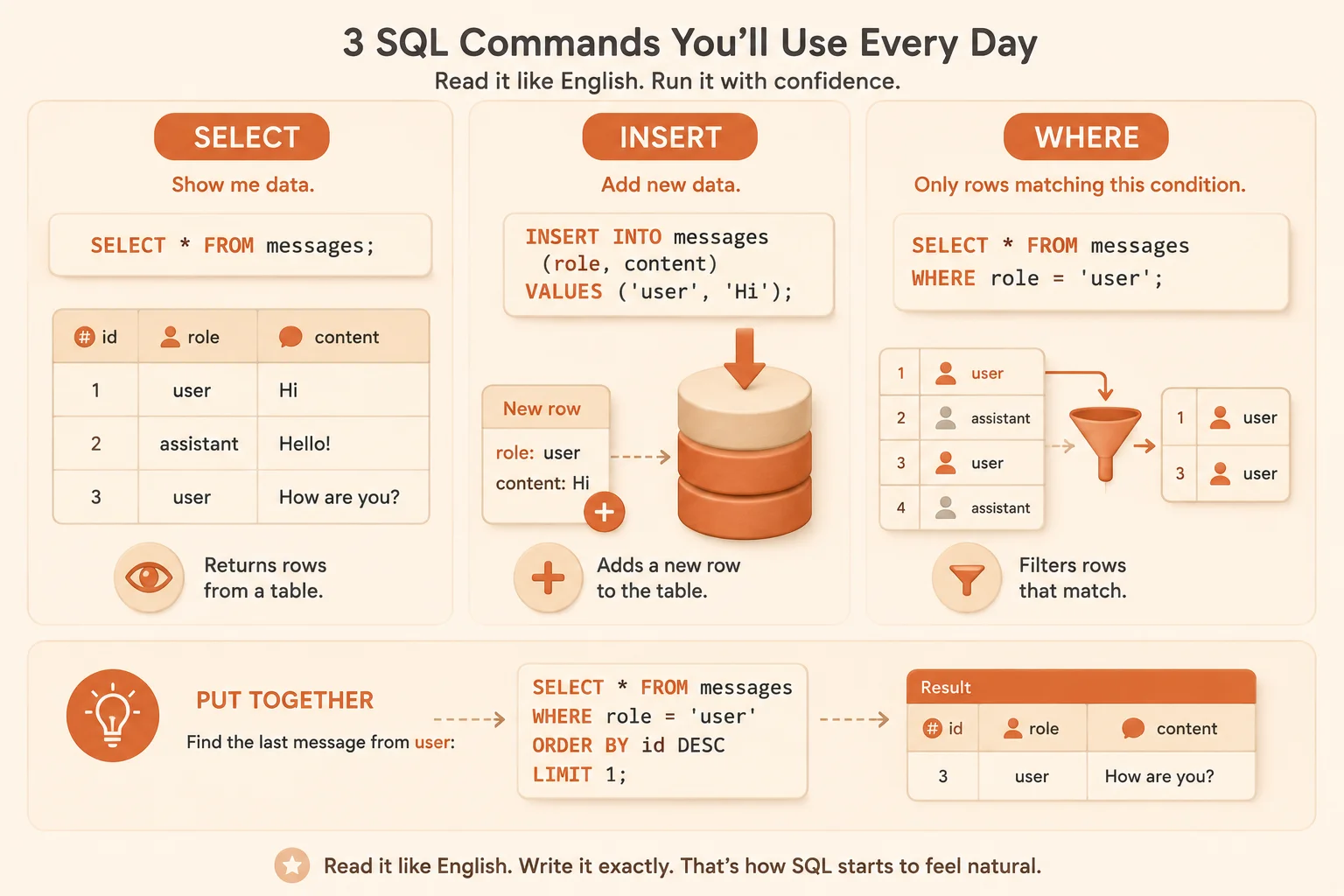
SELECT means "show me data." SELECT * FROM messages; reads, left to right, as "show me every column, from the messages table." The * is shorthand for "all columns", swap it for specific column names, like SELECT role, content FROM messages;, when you only want a couple of them back.
SELECT * FROM messages;
Get the table name wrong and Postgres won't guess what you meant, it'll tell you the relation doesn't exist. Get a column name wrong inside SELECT role, cotnent FROM messages; and you'll get the same kind of error, immediately, loudly. That's actually a feature: a typo in a SELECT fails fast and obviously, instead of quietly returning wrong data. The full syntax, including sorting and limiting results, is in the official PostgreSQL SELECT documentation, worth a bookmark once you're past the basics.
This lesson picks up straight from SQL vs NoSQL, where you decided SQL was the right fit for structured data like this. These three commands are what that decision actually looks like day to day.
What Does INSERT Mean in SQL?
INSERT means "add new data." It always names the table, then the columns you're filling in, then the values in the same order:
INSERT INTO messages (role, content) VALUES ('user', 'Hi');
Read that as: "into the messages table, in the role and content columns, add this new row: user, Hi." The order matters. Swap the values (VALUES ('Hi', 'user')) and the database won't stop you, it'll just cheerfully insert "Hi" as the role and "user" as the message content. Nothing errors. The row just silently ends up wrong, which is a much sneakier failure than a SELECT typo, because you often won't notice until something downstream breaks. I've shipped that exact mistake to production once, a whole afternoon of "why does this chat log say the assistant said 'Hi'" before I found the swapped column order.
Where Does WHERE Fit In?
WHERE means "but only rows matching this condition." It attaches to SELECT, and it also attaches to UPDATE and DELETE, which is where it gets genuinely important. Here's the same query from earlier, now filtered:
SELECT * FROM messages WHERE role = 'user';
Read it as: "show me messages, but only the ones where role equals user." Notice the quotes around 'user', they mark it as a piece of text, not a column name. Drop them and Postgres tries to read user as a column, which usually doesn't exist, which is exactly the error from this lesson's opening. The official Postgres reference on comparison operators covers other conditions WHERE can check beyond simple equality, like BETWEEN and IS NULL.
A quick rule that prevents most WHERE-clause errors: quote text values ('user', 'active'), never quote numbers (id = 4), and never quote column names. If you're getting a "column does not exist" error on a value that's clearly text, missing quotes are the first thing to check.
WHERE isn't optional to think about once you move past SELECT. Run DELETE FROM messages; with no WHERE clause and every row in the table is gone, not just the one you meant to remove. The exact same filter logic you use to narrow a SELECT is what stops an UPDATE or DELETE from touching rows it shouldn't.
Putting It Together: A Real Example
Picture a messages table with four rows already in it:
Sample messages table
| id | role | content |
|---|---|---|
| 1 | user | Hi |
| 2 | assistant | Hello! How can I help? |
| 3 | user | What's the weather today? |
| 4 | assistant | I don't have live weather data. |
Run SELECT * FROM messages WHERE role = 'user'; against that table and only rows 1 and 3 come back. Rows 2 and 4 have role = 'assistant', so they don't match the condition and get skipped entirely, not deleted, not hidden permanently, just excluded from this one query's result.
That's the entire mental model: SELECT decides which columns you see, WHERE decides which rows qualify, and INSERT is how new rows like these got there in the first place.
Why This Matters for AI Agents
An AI agent that "remembers" your last conversation isn't doing anything mysterious behind the scenes, it's running a SELECT with a WHERE clause, filtered down to your specific user ID or session ID: SELECT * FROM messages WHERE session_id = 12;. Skip the WHERE clause in that query and the agent doesn't just forget you, it potentially pulls back everyone's conversation history at once, which is both a broken feature and a real privacy problem.
Every "the AI remembers what I said earlier" feature you've used runs on some version of this exact pattern: rows get INSERTed as the conversation happens, and a WHERE-filtered SELECT pulls the right ones back out later. That's most of what the Getting Started path builds toward: a working app, one query at a time.
Write a filtered SQL query
Using a table in your Supabase project (a messages table if you have one from an earlier lesson, or any table with at least one text column), open the SQL Editor and write a query that selects all rows where a specific column equals a specific value:
SELECT * FROM messages WHERE role = 'user';
Run it and check the result, only rows matching your condition should appear. Then change the value inside the quotes and re-run the query, watch the result set change with it.
Done? You've completed Lesson 07.06.
FAQ