Python Variables for Beginners: Strings, Numbers & Booleans
Python variables explained for beginners — what they are, the four basic types, and how to spot them in real Anthropic SDK code without writing a single line.

Every line of AI code is either storing a value, moving a value somewhere, or doing something with a value. Variables are how you store values. Once you understand them, half of any Python script becomes instantly readable.
In this lesson, you'll learn what a variable is and how to recognise the four basic data types, using real parameters from the Anthropic SDK, not toy examples.
Key Takeaways
- A variable is a named container that stores a value, like a sticky note with a label and a value written on it
- Python has four basic types: strings (text), integers (whole numbers), floats (decimals), and booleans (True/False)
- You can recognise the type of any variable by looking at its value: quotes mean string, no quotes means number or boolean
- Real AI code uses all four types constantly,
model,max_tokens,temperature, andstreamare textbook examples
What a variable actually is
A variable is a sticky note. That's the whole mental model.
name = "Ashley" is a sticky note labelled "name" with "Ashley" written on it. Anywhere your code needs that name, it looks up the sticky note and finds the value.
That's it. Nothing more complicated than that.
The label on the left is the variable name. The value on the right is what's stored. The = sign in the middle means "write this value on this sticky note." (More on that = sign in a moment, it doesn't mean what you think it means.)
Python lets you name your sticky notes almost anything. Good names describe what's stored: model, max_tokens, temperature. You'll see these exact names in every AI script you read.
The four types you'll see in every AI script
Python values come in four basic flavours. Every value in every script is one of these four. The good news: you can identify which type a value is just by looking at it.
String, text, always in quotes
model = "claude-sonnet-4-6"
system_prompt = "You are a helpful assistant."
Strings are text. They're always wrapped in quote marks, either double (") or single ('). The quotes are the tell. If you see quotes around a value, it's a string.
In AI code, strings show up everywhere: model names, prompts, system instructions, and the text of Claude's responses. The model name "claude-sonnet-4-6" is a string — the exact name listed in the Anthropic SDK documentation. If you misspell it, even one character off, the API returns an error, because it's looking for an exact string match.
Recognise it by: quote marks around the value.
Integer, whole numbers, no quotes
max_tokens = 1024
Integers are whole numbers. No decimal point, no quotes. max_tokens = 1024 means Claude's response can be at most 1,024 tokens long. Tokens are roughly word-pieces; 1,024 tokens is about 750 words.
In AI code, integers control limits and counts: token limits, retry counts, timeouts. They're always plain numbers with no punctuation.
Recognise it by: a plain number with no decimal point.
Float, decimal numbers, no quotes
temperature = 0.7
Floats are numbers with decimal points. The name comes from "floating point", the technical term for how computers store decimals. You don't need to remember that; just know that any number with a . in it is a float.
temperature = 0.7 controls how creative vs. predictable Claude's responses are. At 0.0, Claude gives near-identical answers every time you ask the same question, fully predictable. At 1.0, responses vary more and feel more creative. 0.7 is a common default for general-purpose tasks. I think temperature is the most interesting of the four parameters to experiment with once you start building.
Recognise it by: a number with a decimal point.
Boolean, True or False, nothing else
stream = False
Booleans are on/off switches. There are exactly two possible values: True or False. Both are capitalised; lowercase true is a Python error.
stream = False controls whether Claude's response arrives all at once or word by word. Set it to True and you get the typing effect you see in Claude.ai. Set it to False and your code waits for the complete response before continuing.
Recognise it by: the words True or False, always capitalised.
Reading them together
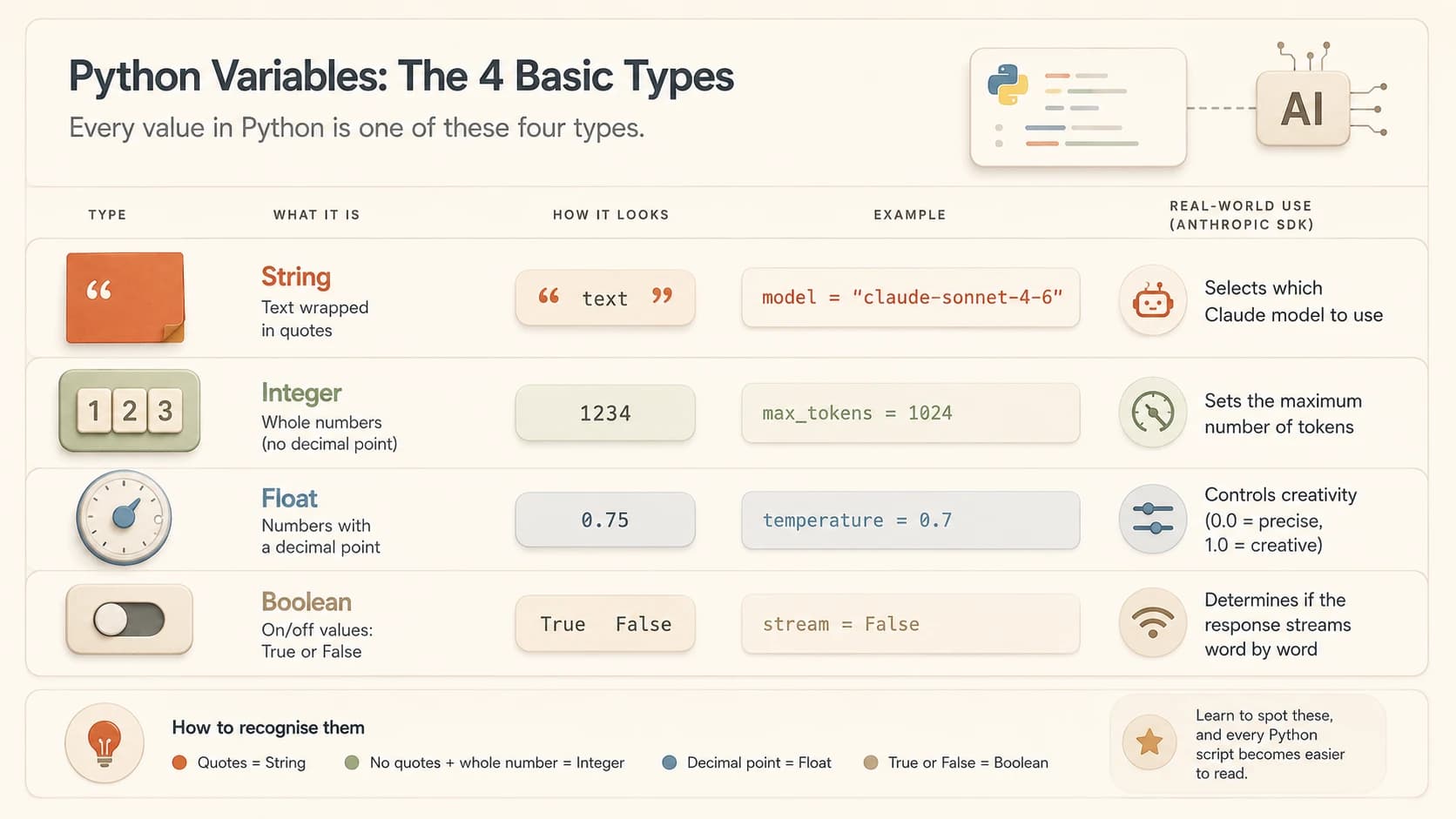
Here's the setup block you'll find near the top of almost every AI script:
model = "claude-sonnet-4-6"
max_tokens = 1024
temperature = 0.7
stream = False
Read each line using what you just learned:
model, string (quotes), stores which Claude model to usemax_tokens, integer (whole number), sets the response length limittemperature, float (decimal), controls creativity vs. predictabilitystream, boolean (True/False), controls delivery mode
Four lines. Four types. Four things you can now name and explain. That's the setup block of a real API call, decoded.
Quick reference: the four Python types in AI code
| Type | How to recognise it | AI code example | What it controls |
|---|---|---|---|
| String | Quote marks around value | model = "claude-sonnet-4-6" | Model name, prompts, text |
| Integer | Plain whole number | max_tokens = 1024 | Token limits, counts |
| Float | Number with decimal point | temperature = 0.7 | Creativity, probability |
| Boolean | True or False (capitalised) | stream = False | On/off switches |
The assignment operator: = doesn't mean equals
This trips up almost everyone the first time, so let's name it directly.
In maths, = means "these two things are equal." In Python, = means "store this value in this variable." It's an assignment, not a comparison.
max_tokens = 1024 doesn't say "max_tokens equals 1024." It says: "Create a sticky note called max_tokens. Write 1024 on it."
When you read Python code and see =, translate it as "gets the value of" or "is set to." stream = False means "stream is set to False." Once you make that mental shift, the syntax stops feeling strange. Misreading = as a comparison becomes much less likely, which matters when you're debugging a script that isn't behaving as expected.
The most common beginner confusion
Strings need quote marks. Numbers don't.
model = claude-sonnet-4-6 (no quotes) is a Python error, Python thinks claude-sonnet-4-6 is a variable name, not a text value. max_tokens = "1024" (with quotes) makes it a string, not a number, the API will reject it because it expects an integer.
The rule: quotes = text. No quotes = number or True/False. One character wrong and the script fails.
Your Task
Change the Lever
Look at this code block and answer each question below. For each, think through what would change, and why.
model = "claude-haiku-4-5-20251001"
max_tokens = 256
temperature = 0.9
stream = False
What if you changed temperature to 0.1?
Claude's responses would become much more predictable and conservative. Ask the same question ten times and you'd get nearly identical answers. Good for factual tasks, not great for creative writing.
What if you changed max_tokens to 10?
Claude would be cut off mid-sentence; it can only use 10 token-pieces to respond. Most coherent answers need at least 50 to 100 tokens. This is a common bug when you're seeing truncated responses and can't figure out why.
What if you changed model to a misspelled name?
The API would return an error: model not found. Model names are exact strings. One wrong character and it fails. This is one of the most common copy-paste bugs in AI scripts.
What if you changed stream to True?
Instead of waiting for the full response, you'd receive it token by token as Claude generates it, the typing effect you see in chat interfaces. The code to handle streaming responses works differently, but the variable change itself is just one word.
Done? You've completed Lesson 05.02.
FAQ