What Is a Domain Name and DNS? Here's How They Work
A domain name is a rented address like seekvana.com; DNS is the phonebook that turns it into a real server location. Here's how both actually work.

You just deployed your app, and you're proud of it, so you send the link to a friend: my-project-a8f3k2.vercel.app. They squint at it. "Wait, is this actually done?" It works fine, but it doesn't look finished, and you can't quite explain why a real product gets myproject.com instead of a string of random characters.
A domain name is a human-readable address, like seekvana.com, that you rent yearly from a company called a registrar. DNS, short for Domain Name System, is the internet's phonebook: it's what translates that readable name into the actual server address computers use to find your app. You need both, and this lesson explains what each one actually does before you connect a custom domain for real in the next lesson.
Key Takeaways
- A domain name is rented yearly from a registrar, you never own it outright
- DNS translates a domain name into the server address a computer actually needs
- The phonebook analogy: your domain is a name, DNS is what looks up the matching address
- Your app already works fine without a custom domain, this is about how it looks, not whether it functions
- Connecting a domain later is a configuration step, not a coding one
What Is a Domain Name?
A domain name is the readable address people type into a browser instead of a long string of numbers. seekvana.com is a domain name. my-project-a8f3k2.vercel.app is also a domain name, just one your hosting platform generated for you automatically and for free.
Here's the part that surprises most beginners: you don't buy a domain name outright. You rent it, yearly, from a company called a registrar, places like Namecheap or Google Domains, and confirmed via Network Solutions' own explainer on domain ownership. The rules for this come from ICANN, the organization that governs the domain system. They exist so no one can permanently lock up a name forever without paying to keep it. Skip a renewal payment, and your domain becomes available for anyone else to register, no matter how long you've had it.
Skip understanding this now, and the next lesson's setup screen, a page full of unfamiliar terms like "A record" and "nameservers", will feel like it's asking you to do something new. Really it's just showing you a receipt for something you already understand: a name you're renting, pointed at your server.
What Is DNS?
DNS, the Domain Name System, is the internet's phonebook. Computers don't actually know what "seekvana.com" means. They only know how to reach other computers by numeric IP addresses, something like 76.76.21.21. DNS is the system that looks up a domain name and hands back the correct IP address, the same way a phonebook looks up a person's name and hands back their address.
Every time someone types your domain into a browser, this lookup happens automatically, in a split second, entirely invisibly. Nobody has to remember raw server addresses. DNS handles the translation behind the scenes, for every domain, every time.
Without DNS, using the internet would mean memorizing strings of numbers for every site you visit. Life would be harder too if you had to remember everyone's exact home address instead of just their name. Skip understanding DNS now, and the next lesson's talk of "records" and "nameservers" will sound like configuring something abstract instead of just telling the phonebook where your app actually lives.
How a DNS Lookup Actually Happens
When someone types your future domain into their browser, a few things happen in order, all within milliseconds:
- Their device checks whether it already has the answer stored from a recent visit.
- If not, the request goes out to a resolver, usually run by their internet provider, which asks around on their behalf.
- That resolver gets pointed toward the right authoritative server, the one that actually holds your domain's records.
- The authoritative server replies with your server's real IP address.
- The browser connects to that address, and your app loads.
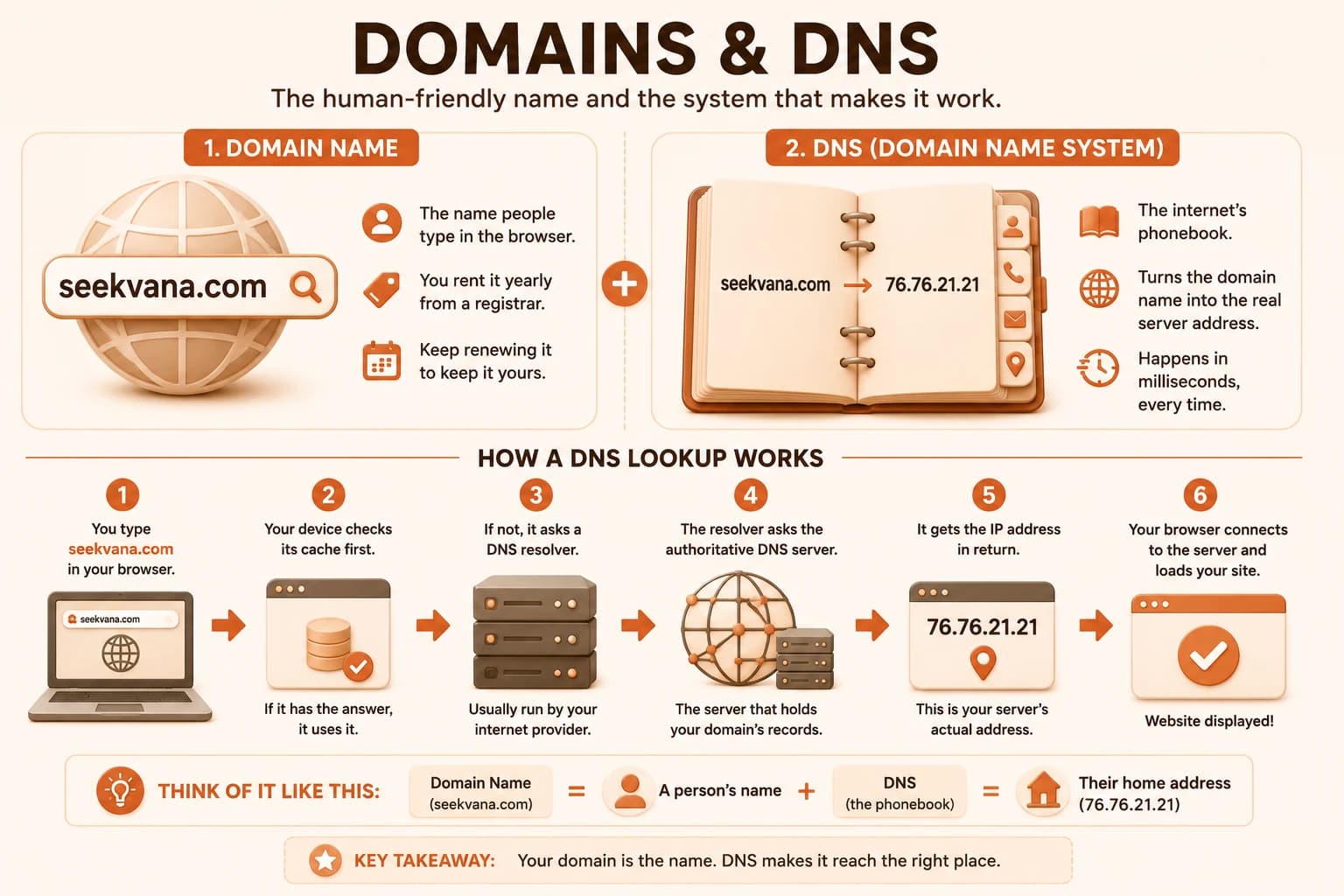
None of this is something you'll ever watch happen. It's built into how every browser and every internet connection works. It resolves fast enough that the other person just sees your site appear, as AWS's own explainer on DNS puts it, a lookup process invisible enough that most people who use it daily have never heard of it.
I still find it a little wild that this happens, every single time, for every domain on the internet, and yet almost nobody outside of engineering ever has to think about it. If this step ever misfires after you set up your own domain in the next lesson, that's the layer to picture: not your code, just a phonebook entry that hasn't updated yet.
Why Your App Needs Both
Skip understanding this, and the next lesson (actually connecting a domain to your live app) will feel like following unexplained instructions instead of doing something you already get. A domain without DNS pointed at anything is just a name sitting unused. A server without a domain pointed at it is only reachable by its raw IP address, and almost nobody will ever type that in.
Connecting a domain to your deployed app is a configuration step, not a coding one. You won't be writing any code in the next lesson. You'll be telling DNS "when someone looks up this domain, send them to my server" through a settings page at your registrar.
Your app already works perfectly well right now at its free platform URL. A custom domain name doesn't make it work better once DNS is pointed at it correctly, it just makes it look and feel like a real, standalone product instead of something still living under someone else's subdomain.
Ready to actually set one up? The Getting Started path has the rest of the sequence waiting. If you haven't been through it yet, the deployment logs lesson is worth a look first, since it's what got your app live in the first place.
Search for a domain name for a future project
Go to any domain registrar, Namecheap, Google Domains, or a similar site, and search for a domain name you'd like for a future project. It doesn't need to be this course's project.
Note whether it's available, and its price per year.
Try two or three variations, different endings like .com, .dev, or .io, and compare prices. You don't need to buy anything, this is just to see what real domain shopping looks like before doing it for a real project.
Done? You've completed Lesson 09.11.
FAQ