Vercel & Render Free Tier Limits (2026): What You Get Free
Vercel Hobby gives 100 GB bandwidth, 1M function calls and 4 hours of CPU a month; Render gives 750 instance hours. What each cap means and when you pay.

You just shipped your first app for free. It's live, it works, and it cost you nothing. Then you scroll past a headline: "I woke up to a $500 hosting bill." Your stomach drops. You look back at your own tiny project, still sitting there on its free URL, and a small voice asks: is that going to happen to me?
Here's the honest answer, up front: almost certainly not, and not for a long time. For a personal or hobby project, free hosting stays free far longer than most beginners expect. Free tiers cap three things (bandwidth, compute time, and build minutes), and when you hit a cap the platform either pauses the feature or asks you to upgrade. It does not quietly run up a bill behind your back. This lesson explains exactly where those free tier limits sit and what actually happens when you reach one.
Key Takeaways
- Free tiers cap three things: bandwidth (traffic), compute time (how long your backend runs), and build minutes (how often it rebuilds)
- Vercel's free Hobby tier includes 100 GB of bandwidth a month; Render's free tier includes 750 instance hours, 100 GB bandwidth, and 500 build minutes a month
- A hobby project shared with friends rarely comes close to any of these limits
- Cross a free limit and the platform pauses the feature or prompts an upgrade, it does not auto-charge you
- The surprise-bill horror stories come from paid pay-as-you-go plans, not free tiers
When Do You Actually Have to Pay for Hosting?
You start paying when your project stops being a hobby and becomes something real people use in volume, and not a moment before. For a portfolio, a personal tool, or an app you share with a handful of friends, every platform in this module stays comfortably free. The trigger for cost is sustained traffic from hundreds or thousands of regular users, which is a good problem to have and one you solve when it arrives.
To put "a long time" in real terms: a light static page might be a few hundred kilobytes per visit. Against Vercel's 100 GB monthly bandwidth, that's on the order of a hundred thousand visits before the limit is even in view. Most first projects see a few dozen. The gap between what you use and what's allowed is enormous, and it's supposed to be.
That's the whole answer. The rest of this lesson is just detail so you can tell whether you're at 1% of a limit or 90% of one, instead of guessing.
Why does knowing this matter? Because the alternative is low-grade dread. Not knowing where the limits sit is what makes people hesitate to share their work, or waste an afternoon migrating off a free tier they were never close to outgrowing. Once you can see the actual numbers, the fear has nowhere to live.
What Free Tiers Actually Limit
Free tiers don't cap "how good" your project is. They cap three specific resources, and it helps to know which is which.
Bandwidth is how much data your site sends to visitors in a month. Every page load, image, and API response counts. The Vercel Hobby plan includes 100 GB a month, which sounds abstract until you realize a light static site can serve that to tens of thousands of visits before it's a concern.
Compute time is how long your backend actively runs. This one matters most for the Render backend you deployed earlier. Render's free web services spin down after about 15 minutes of no traffic, which is also why the first request after a quiet spell takes 30 to 60 seconds to wake up. That slow first load looks like a bug, but it's the free tier saving compute, not something breaking or billing you.
Build minutes are how much time the platform spends rebuilding your project each time you push. Every deploy runs the build step from the last lesson, and that time is metered. Render's free tier includes 500 build minutes a month. Since a small project's build takes a minute or two, you'd need to push dozens of times a day to feel it.
Here are the exact Vercel Hobby allowances per month, from Vercel's fair use guidelines (checked October 2026):
- Fast Data Transfer (bandwidth): 100 GB
- Function invocations: 1,000,000
- Active CPU: 4 hours
- Fast Origin Transfer: 10 GB
- Image optimization: 5,000 transformations
Vercel's Hobby plan is for non-commercial personal use only. Per Vercel's own rules, a site that shows ads (including Google AdSense), sells something, or exists mainly for affiliate links needs the Pro plan. A portfolio or learning project is fine on Hobby.
Skip this section and the numbers on your dashboard are meaningless noise. Know these three, and you can read your usage at a glance.
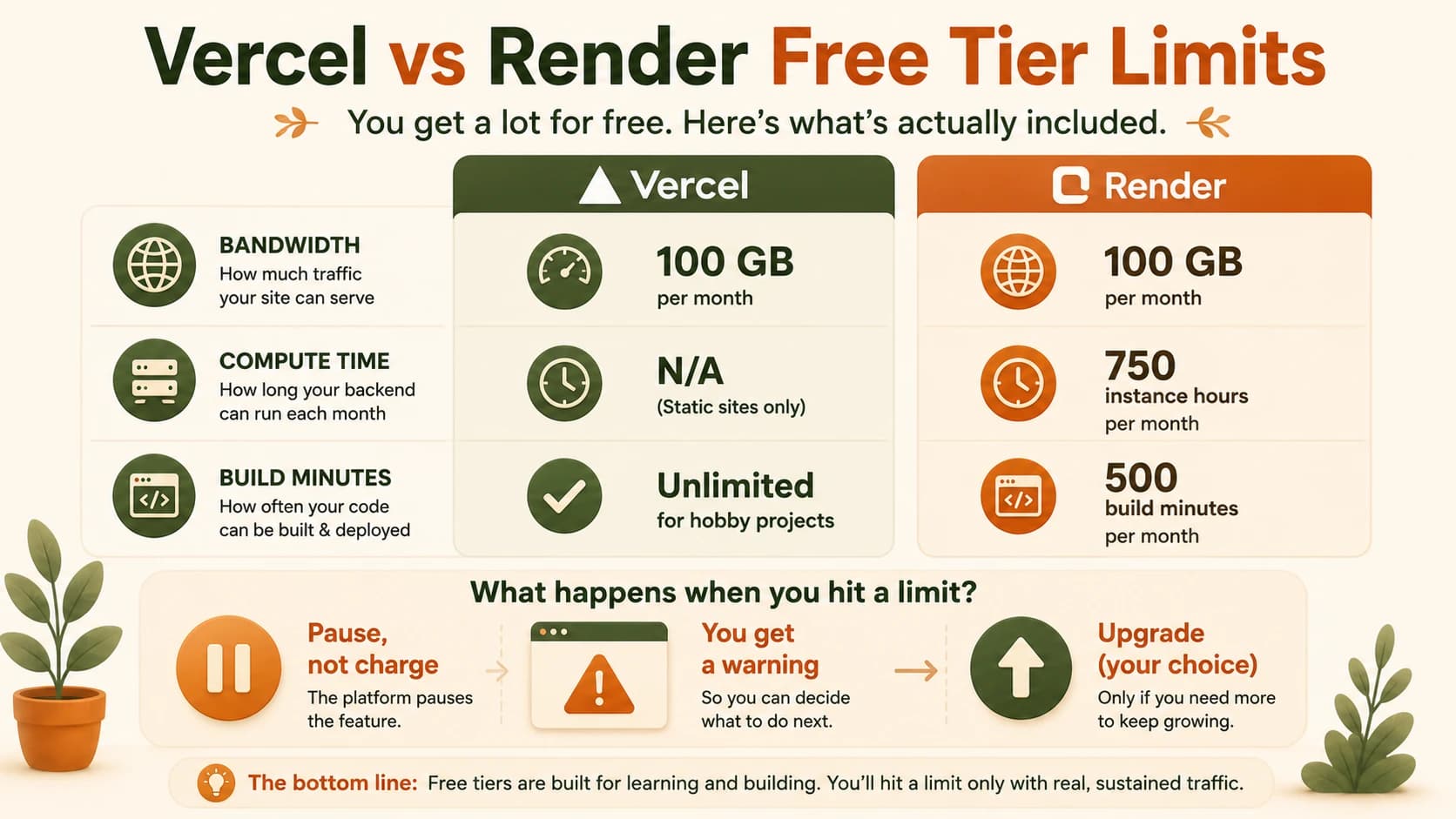
Free tier limits at a glance
Vercel Hobby vs Render Free (2026)
| What the free tier caps | Vercel (Hobby) | Render (Free) |
|---|---|---|
| Bandwidth per month | 100 GB | 100 GB |
| Compute / running time | Serverless functions, generous limits | 750 instance hours per month |
| Build minutes | Included, generous | 500 minutes per month |
| Sleeps when idle? | No, static files always served | Yes, after ~15 min (30-60s to wake) |
| Credit card to start? | No | No |
| If you exceed a limit | Feature pauses until reset | Service suspended until next month |
Does the Database Count Too?
It's a fair worry: you deployed a frontend and a backend, but your data lives somewhere too. Does that rack up its own charges?
Good news, and it echoes a point from the Supabase in production lesson: your Supabase database was never something you deployed, so it isn't billed the way your frontend and backend hosting is. It has its own free tier, with its own generous allowances (storage, and a cap on how many connections can talk to it at once). For a project at your stage, you're nowhere near either.
The reason this matters: people assume "more moving parts" means "more bills." It doesn't. Each layer has its own free tier, and none of them is watching for an excuse to charge you. A full-stack hobby app can run end to end without a single paid plan.
What Happens When You Hit a Limit
This is the part that should put the $500-bill fear to rest for good. As long as you haven't added a card, a free tier has no payment method attached to your account, so the platform has nothing to charge. When you cross a limit, one of two calm things happens: the affected feature pauses until your usage resets (Vercel does this, usually within about 30 days), or the service is suspended until the next month (Render's approach when you exhaust instance hours). In both cases you get a dashboard banner telling you exactly what happened.
So what about those horror stories? They're real, but read the fine print. The developer who woke up to a $500 bill after a project went viral, and the one hit with thousands after a traffic spike, were both on paid, pay-as-you-go plans that bill for whatever you use. A free Hobby project can't do that. It pauses instead. The free tier's inability to charge you is the exact safety net those developers had turned off.
Free tiers don't auto-bill, but policies do vary and do change. Before you rely on a free tier for something that genuinely matters (a client demo, a launch), read the platform's current limits yourself: the Vercel Hobby plan docs and the Render free tier docs both list exactly what's included. Reassurance is good; verifying the specific plan you're on is better.
The practical habit here isn't worry, it's a glance. I'll admit that on my first deployed project I checked the usage dashboard far more often than it deserved, half-expecting some number to have spiked overnight. It never did. It sat near zero for months. Open yours every so often, see how far you are from the limits, and let that be the end of it. For most beginner projects the answer stays reassuringly far away, and checking takes ten seconds.
Check your real usage against the free limits
Log into your Vercel dashboard and find the "Usage" section (usually under your account or project settings). Then do the same in your Render dashboard.
Note the free-tier limits shown for each (bandwidth, build minutes, instance hours) and your actual current usage next to them.
Now estimate: roughly how much more traffic or activity would it take to reach one of those limits? Write one sentence with your guess. For most beginner projects, the honest answer should feel reassuringly far off.
Done? You've completed Lesson 09.13.
FAQ