Prompt Engineering for Production: Cost, Caching, A/B Tests
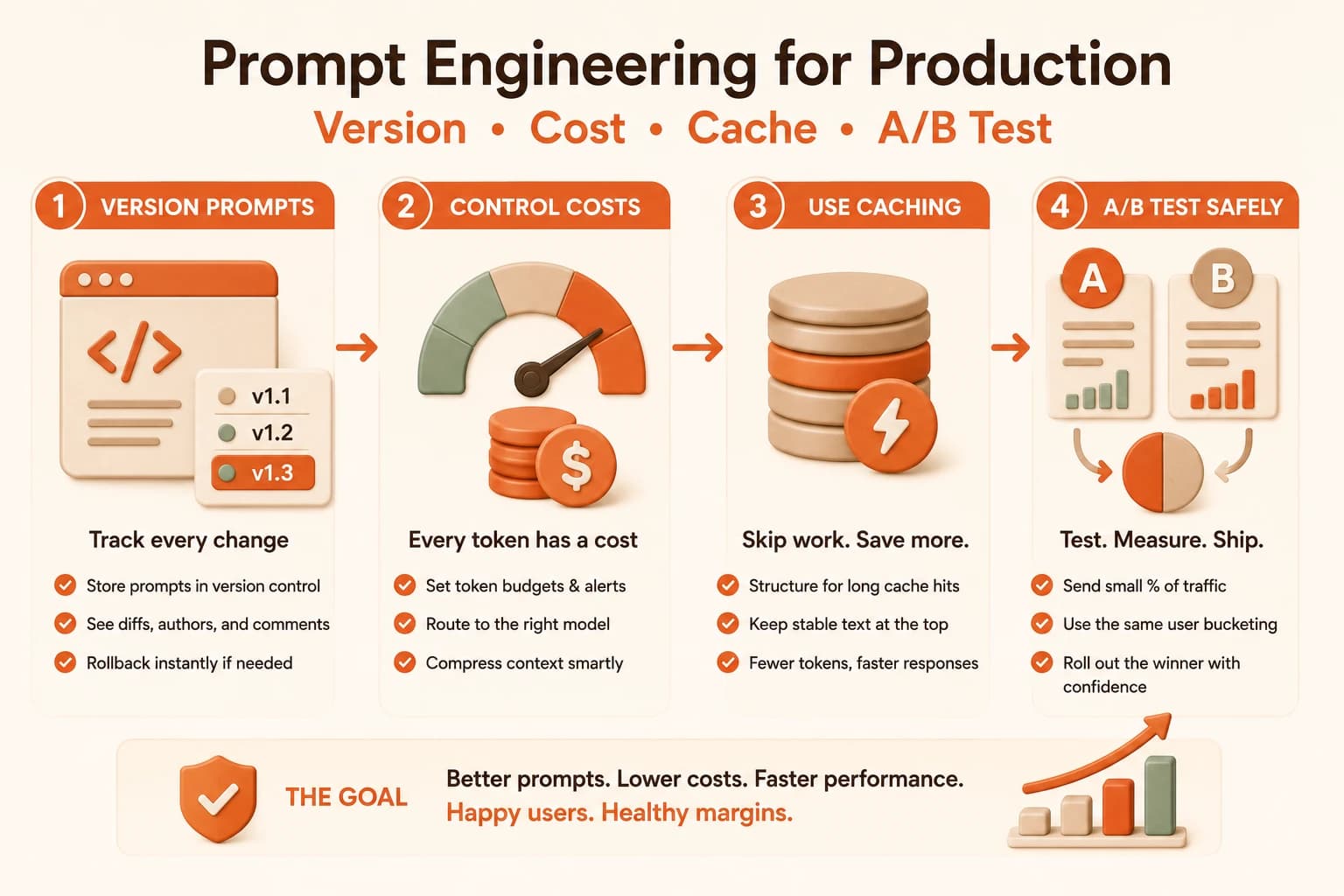
Prompt engineering for production means versioning prompts, capping token costs, structuring for caching, and A/B testing variants safely.

It's 2am, your on-call phone buzzes, and the alert says the API bill just crossed three times its normal daily rate. Nothing in the code changed. What changed was one line in the system prompt: a developer added a timestamp near the top so responses would feel more "aware" of the current date.
That single line broke the cache for every request behind it. Every call that used to reuse a stored prefix started paying full price again, and nobody noticed until the invoice did.
Prompt engineering for production means treating a prompt as a piece of software: version it, watch what it costs, structure it so caching actually works, and test changes safely before they reach every user. In a prototype, a prompt is a string you tweak until it feels right. In production, it's a live system with a bill, a latency budget, and real users depending on it not breaking.
Key Takeaways
- Prompts belong in version control with authors, diffs, and rollback, exactly like application code
- The three-pillar cost framework is Cache, Route, Compress, and caching alone can cut costs 40 to 90 percent
- Prompt structure decides whether caching works at all: stable content first, variable content last
- A/B testing prompts safely means small canary traffic and the same user always seeing the same variant
- None of these four practices work in isolation, they form one connected production workflow
What Changes When a Prompt Goes to Production?
A prompt in a notebook only has to work once, for you, right now. A prompt in production has to keep working for thousands of different users hitting your large language model, at a predictable cost, without anyone rewriting it from memory each time it needs a tweak.
That shift creates four new jobs a prototype never asked for.
Someone needs to track what changed and when. Someone needs to watch the token bill before it becomes a surprise. Someone needs to make sure repeated requests aren't recomputed from scratch every time. And someone needs a safe way to test a new version before it reaches everyone at once.
Skip any one of these and the failure mode is the same: a change that looked fine in testing quietly costs real money, breaks for some users, or can't be traced back to who changed what. This lesson walks through all four, in the order you'd actually build them.
Prompt Versioning: Treat Prompts Like Code
A prompt that lives only in a config variable or a hardcoded string has no history. Nobody can say which version is live, who last touched it, or what to roll back to if the new one performs worse.
The fix is to treat prompts as versioned artifacts, the same way you'd treat a function. If you haven't yet worked through the fundamentals of context construction, that's worth doing before you start versioning prompts you don't fully understand yet.
Every change gets an author, a diff, and a comment explaining why. Every version gets a rollback path. Experimental prompts live on a branch until they've proven themselves, so the version currently serving real users stays stable.
Review prompt changes in the same pull request as the product behavior they support. A prompt change that isn't reviewed alongside the code that depends on it is how a "small wording tweak" ends up breaking a downstream parser nobody remembered was reading the output.
This matters because without it, a regression is nearly impossible to diagnose. If three prompt versions have shipped this month with no record of which is live, "why did quality drop on Tuesday" becomes a guessing game instead of a five-minute diff review.
Token Budgeting and Cost Control for Production Prompts
Every token you send and receive costs money, and at scale that adds up fast. The production-grade approach to keeping it in check follows three moves: Cache, Route, Compress.
Cache means reusing the computed result of a repeated prompt prefix instead of paying for it again, covered in detail below.
Route means sending simple requests to a cheaper model and reserving your most expensive model for the requests that actually need it. Teams that do this well can route 75 to 85 percent of a workload's cost away. They send only the hardest 15 to 25 percent of requests to the flagship model, while keeping close to full quality.
Compress means trimming what you send. A 20-turn conversation can accumulate 5,000 to 10,000 tokens of history when the last 500 to 1,000 tokens would carry the same meaning. This gets trickier once you're prompting reasoning models, since their longer internal reasoning traces change how much you can safely trim.
Rough cost tiers for context
| Model tier | Typical use case | Relative cost per token |
|---|---|---|
| Budget/small model | Classification, extraction, simple formatting | Lowest, often 15 to 50x cheaper than flagship |
| Mid-tier model | General chat, moderate reasoning | Moderate |
| Flagship/reasoning model | Complex reasoning, high-stakes output | Highest |
Skip budgeting and the failure isn't dramatic, it's slow. A feature that quietly sends every request to your most expensive model can triple your bill within a week of launch, and nobody notices until finance asks about it.
Prompt Caching: Static First, Variable Last
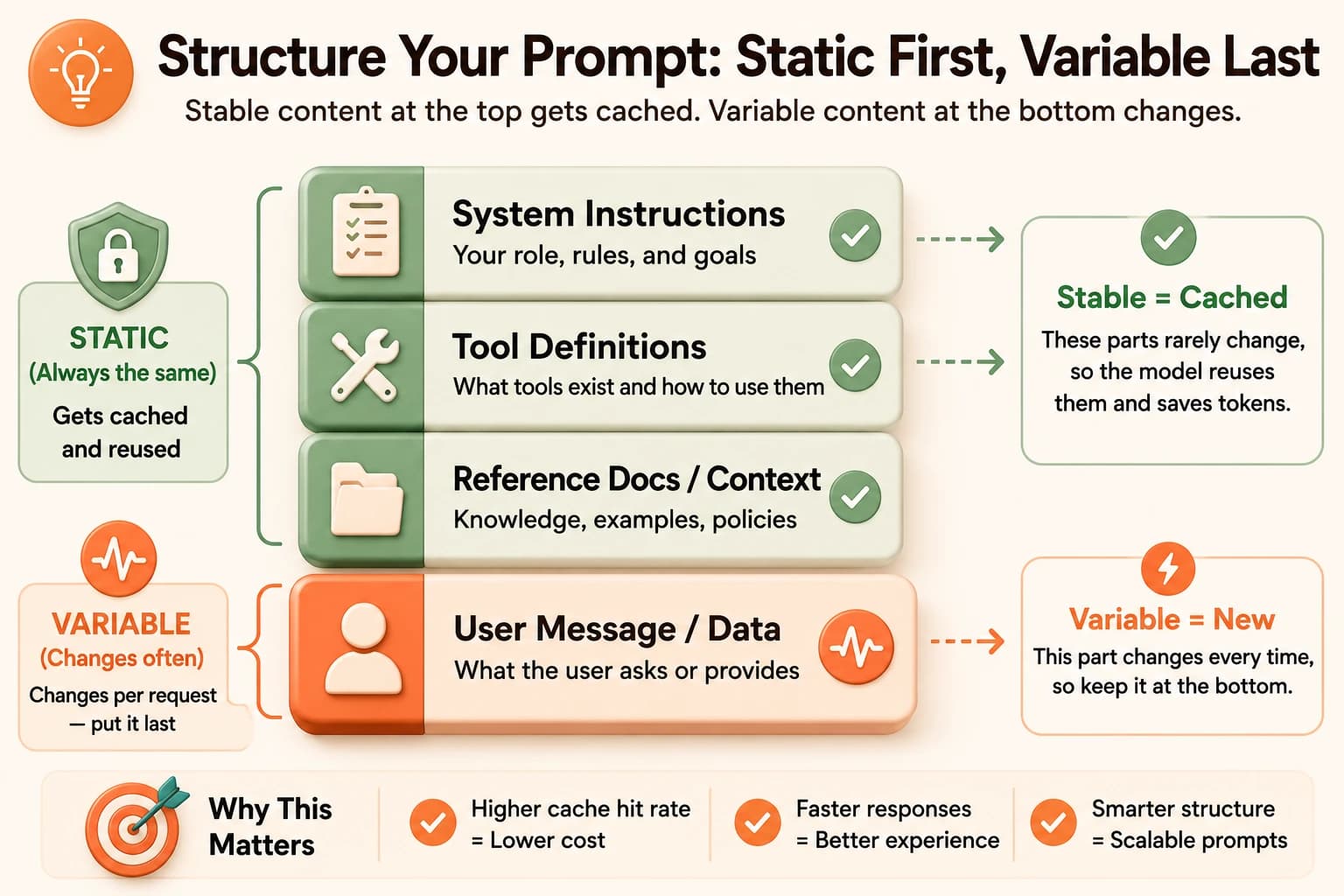
Prompt caching stores the computed representation behind a repeated prefix. The static part of your prompt, your system instructions, tool definitions, and reference documents, then bills at a steep discount on every repeat request instead of being recomputed from zero.
The rule that makes or breaks this: put everything stable at the top of the prompt, and everything that changes per request at the bottom. A system prompt, then tool definitions, then reference material, then finally the user's specific message. Anything variable placed before the stable content, like our 2am timestamp example, invalidates the cache for everything that follows it.
How the two major providers handle it
| Provider | Cache read discount | Cache write cost | Minimum size |
|---|---|---|---|
| Anthropic | About 90% off (0.10x normal) | 1.25x normal | No strict minimum |
| OpenAI | About 50% off, automatic | No write premium | 1,024+ tokens, 128-token increments |
One real production example, documented by ProjectDiscovery's own engineering team: they raised their cache hit rate from 7 percent to 84 percent purely by moving dynamic content after the static prefix, and cut total LLM costs by 59 to 70 percent as a result. I still find that number a little hard to believe given how small the actual code change was, moving a few lines to the bottom of a prompt, but that's exactly the point: the fix wasn't a new tool, it was reordering a prompt.
Don't assume caching everything is automatically faster. Naive full-context caching can paradoxically add latency in some setups. Measure your actual hit rate rather than assuming the cache is helping.
A/B Testing Prompts Safely in Production
Once you have a promising new prompt version, the temptation is to ship it to everyone and watch the metrics. That's how you find out it was worse for 100 percent of users instead of 10 percent.
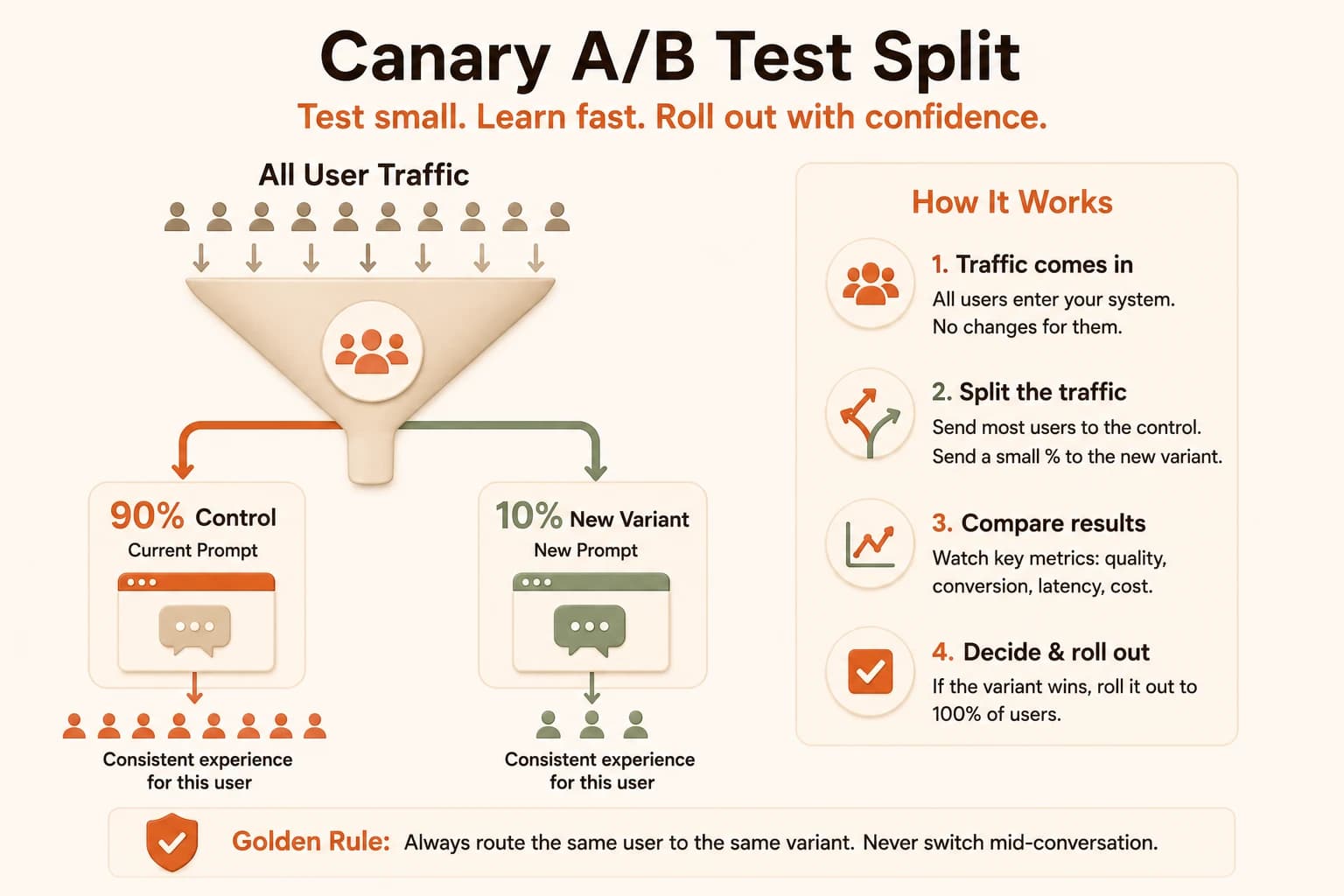
The safer pattern is a canary rollout: send a small slice of traffic, often around 10 percent, to the new variant while the rest keeps seeing the current one. Track quality, cost, and latency for both side by side. The one non-negotiable rule is that a single user must consistently see the same variant for the whole test. If someone gets variant A on one request and variant B on the next, you can't tell whether a quality change came from the prompt or from the switch itself.
Inconsistent bucketing is the most common way a valid-looking A/B test produces garbage conclusions. Bucket by a stable user ID, not by request, and keep that assignment for the duration of the test.
Tools like Langfuse, Traceloop, and Braintrust exist specifically to handle this traffic splitting and the per-variant tracking, so you're not building bucketing logic from scratch. Growthbook's guide to testing multiple prompts in production walks through the canary pattern in more depth if you want to go further.
Your Task
Put all four pieces of prompt engineering for production together on one small example before you use them on something real.
Write two versions of one prompt
Pick a prompt you're already using, or write a short one for a simple task like summarizing a paragraph. Write a second version with one deliberate change, either a different instruction or a reordered structure with static content first.
Run both and record raw numbers
Call each version with the same input three times. Write down the token count, approximate cost, and response time for each run using whatever your API response returns for usage.
Compare and log a decision
In a plain text file, note which version had the better cost-to-quality tradeoff and why. That one-line decision log is the same habit a production prompt versioning system automates for you.
Done? You've completed Lesson 13.07.
FAQ