Git vs GitHub: What's the Difference? | Seekvana
Confused about Git vs GitHub? Git is a tool on your computer. GitHub is the website where you store and share it. Clear, beginner-friendly explanation.

Git and GitHub are not the same thing; they just sound like they are. Git is a tool you install on your computer. GitHub is a website where you store and share the projects you manage with Git. In this lesson, you'll learn exactly what each one does and how they work together. (Need just the quick definition? See the GitHub glossary entry.)
Key Takeaways
- Git is a version control tool that runs locally on your computer, no internet required.
- GitHub is a website that hosts Git repositories online, adding cloud backup and collaboration.
- You can use Git without GitHub. You cannot use GitHub without Git.
- Most AI tools, SDKs, and starter templates you'll use as a developer live on GitHub.
What Is Git?
Git is a version control program you install once. After that, it runs entirely on your machine.
Its job is simple: track every change you make to every file in a project. When you save a new version, Git records what changed, when it changed, and why you said it changed. You can go back to any earlier version at any time.
You use Git through terminal commands, things like git add, git commit, git push. It has no interface, no website, no account. It's just a tool sitting quietly on your computer.
You don't need a GitHub account to use Git. Git works completely offline.
Git was created by Linus Torvalds in 2005, the same person who created Linux. It's free, open-source, and used by virtually every professional developer in the world. This matters practically: Git works without any internet connection. You can write code, commit changes, and build a full history on a plane with no wifi.
What Is GitHub?
GitHub is a website: github.com. It hosts Git repositories online, meaning your project files, plus their full history, stored in the cloud.
Think of it like Google Drive, but built specifically for code. Once your code is on GitHub, you can back it up, share it with anyone, collaborate with a team, and show it off as part of your portfolio.
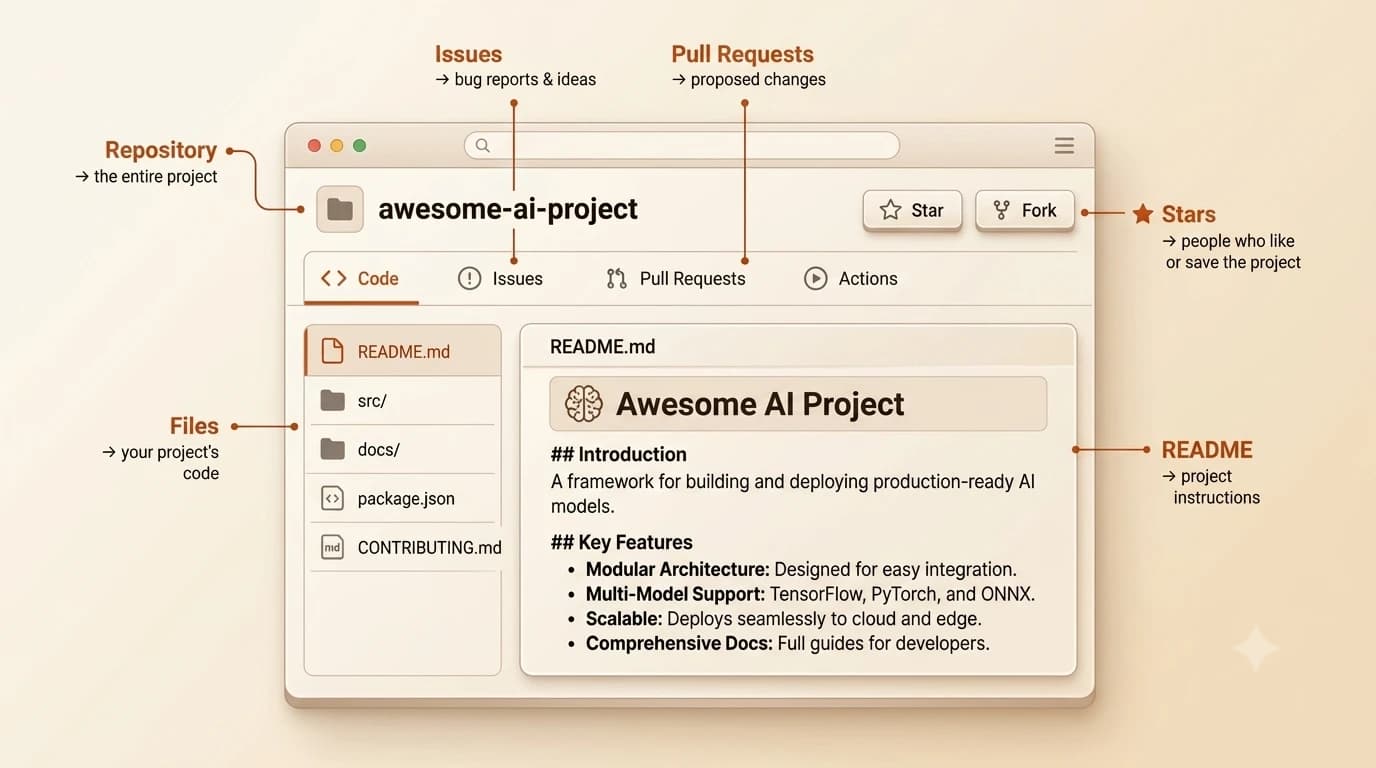
GitHub adds a layer of features that Git alone doesn't have:
- Pull requests, a way to propose and review changes before merging them
- Issues, a bug tracker and project board
- Stars and forks, so others can save or copy your work
- GitHub Actions, automated workflows that run when code changes
Here's the relationship in one sentence: Git is the engine. GitHub is the garage.
GitHub is the most popular remote host, but it's not the only one. GitLab and Bitbucket do the same job, GitHub just has the largest community and is where most open-source projects live.
Git vs GitHub at a glance
| Feature | Git | GitHub |
|---|---|---|
| Where it runs | Your computer (local) | github.com (online) |
| Needs internet? | No | Yes |
| What it does | Tracks file changes | Hosts and shares repositories |
| Collaboration | None built-in | Pull requests, issues, teams |
| Cost | Free (open-source) | Free tier + paid plans |
| Made by | Linus Torvalds (2005) | Founded 2008, owned by Microsoft |
Git vs GitHub: How They Work Together
The standard workflow looks like this:
- You use Git on your computer to track changes as you work.
- When you're ready to back up or share, you run
git pushto upload your commits to GitHub. - Teammates (or your future self on another machine) use
git pullto download the latest version.
The key asymmetry: you can use Git without GitHub, many solo developers do. But you cannot use GitHub without Git. GitHub is built on top of Git; Git is the foundation.
If you read the previous lesson on version control, you already understand why tracking history matters. Git is the tool that does the tracking. GitHub is where that history lives in the cloud.
Why GitHub Matters for Building with AI
Almost every AI tool, SDK, and starter project you'll encounter as an AI developer lives on GitHub. When a tutorial says "clone this repo," it means use Git to download a project from GitHub. When Anthropic releases a new Python SDK, it goes on GitHub first.
Your GitHub profile will also become your portfolio. Every project you push shows up there. As you build through this course, each project you commit and push is evidence of your skills.
This matters because GitHub is not just storage, it's infrastructure for the entire AI development ecosystem. Understanding the git vs github distinction tells you exactly what you're doing every time you open a terminal.
Your Task
Explore a real GitHub repository
Go to github.com. You don't need an account to browse.
Search for anthropic in the search bar and open the anthropic-sdk-python repository (an SDK is a pre-built code package that makes it easier to use an API — you'll learn more about both later in the course).
Spend two minutes exploring: look at the file list, open the README, check how many stars it has.
Notice: what you're looking at is a Git repository hosted on GitHub. The code lives on developers' computers and is synced here. That's the whole relationship, Git (the tool) managed locally, GitHub (the platform) hosting it online.
Done? You've completed Lesson 04.02.
[Start the Getting Started path to work through every lesson in sequence.]
FAQ