Evaluating Prompts: Build a Golden Dataset and LLM Judge
Evaluating prompts means testing them against a golden dataset with an LLM judge, not eyeballing outputs. Build a 20-case regression sheet here.

A team shipped a "cleaner" version of their support-ticket prompt. It read better, nobody flagged anything in a quick manual check, and it went live the same afternoon. Three weeks later, someone noticed refund tickets were quietly getting misrouted to the wrong queue, and had been since the day of that change. Nobody had a way to prove the new prompt was actually worse, because nobody had built anything to test it against.
Evaluating prompts means scoring a prompt's output against a curated set of known-good examples, not judging it by how it reads. This matters most once a prompt is doing real work inside a larger system, an AI agent deciding what to do next, or a large language model generating the actual response a user sees. In this lesson, you'll build a 20-case regression sheet, set up an LLM judge and check that it agrees with human judgment, then use both to score two real prompt versions side by side. By the end, you'll have a repeatable answer to "did this prompt actually get better," instead of a guess dressed up as a code review.
Key Takeaways
- A golden dataset is a small, deliberately curated set of test cases, not a random sample of production traffic.
- An LLM judge is only trustworthy once you've checked it agrees with human labels on the same cases, roughly 75% or higher.
- Twenty to thirty well-chosen cases beat a hundred easy ones; pick cases that have broken your prompt before.
- This is the missing half of automatic prompt optimization: an optimizer can't tell a better prompt from a worse one without a score built this way.
What Is a Golden Dataset?
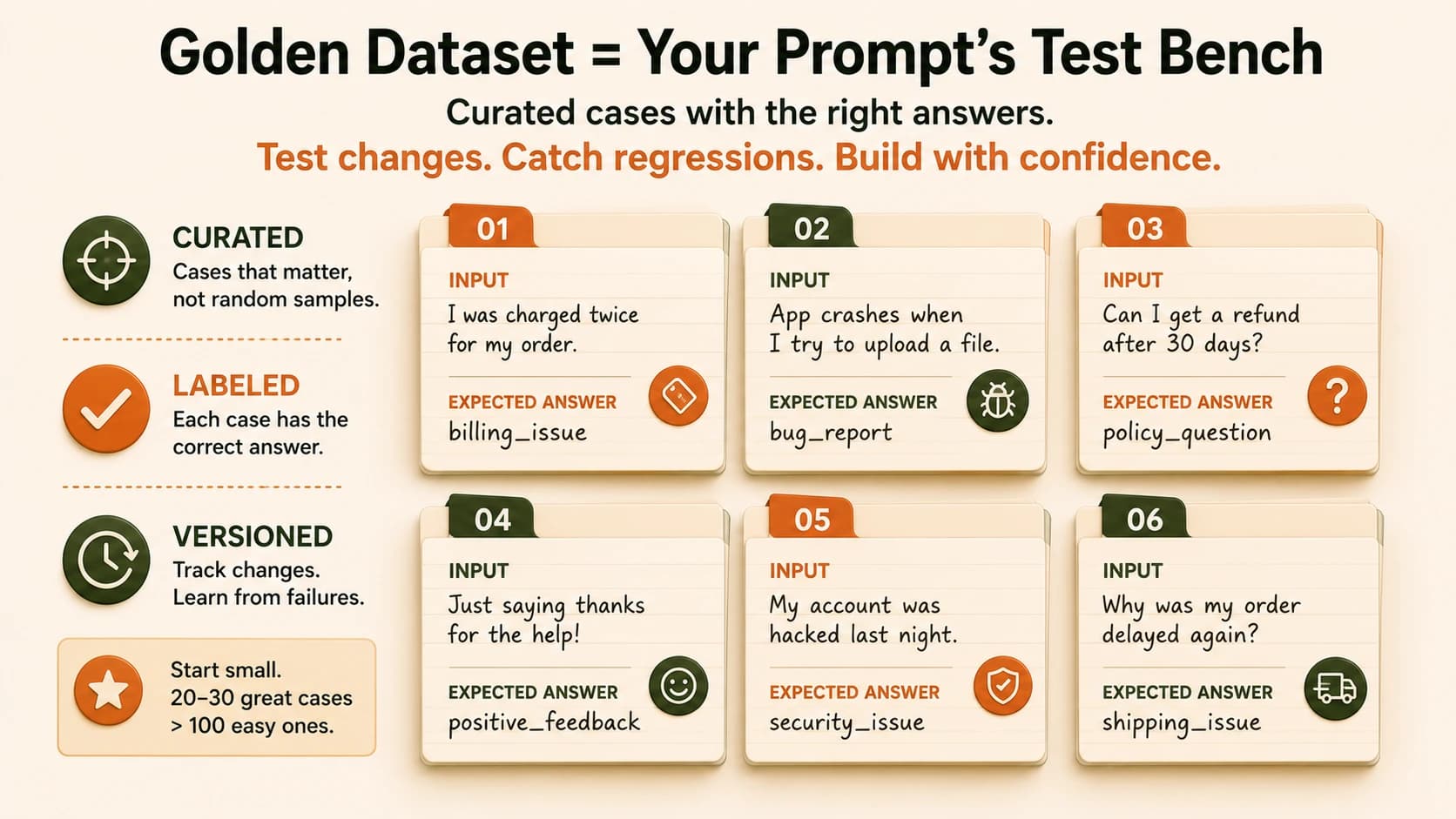
A golden dataset is a small, versioned set of test inputs paired with the correct or acceptable output for each one, built by hand so it represents the cases that actually matter, not whatever traffic happened to show up. It's the fixed ruler you measure every prompt change against, before and after.
Skip this and you're the team in the opening story. A prompt read fine, nobody had a ruler to measure it against, and the mistake stayed hidden for three weeks. That's what "the number is meaningless if you never built a proper dataset to evaluate against" actually means in practice: a score with no dataset behind it isn't a measurement, it's an opinion with a decimal point.
Two properties matter more than size. First, curation: every case earns its place because it's a common scenario, a known edge case, or something that broke your prompt before, not because it was easy to grab. Second, versioning: the dataset needs a history, so when you add a case after a real failure, you can see exactly when and why it was added.
Watch for one honest limitation here too. A curated set only tells you how the prompt handles cases already in it, and production traffic has a much longer tail than twenty or thirty examples can cover. A golden dataset catches known failure modes. It doesn't guarantee there are no new ones.
A golden dataset is different from a random sample of production logs, and that difference is the whole point. Pull a hundred random support tickets and most of them will be easy, straightforward billing questions your prompt has never once gotten wrong. Score high against that set and you've learned almost nothing, you've just confirmed the easy cases are easy. A golden dataset deliberately over-represents the hard 10%, the ambiguous wording, the tickets that could plausibly belong to two categories, the ones a new teammate would also hesitate over. That's where prompts actually break, and that's what you want a test measuring.
Think of it the same way you'd think about a code test suite. Nobody writes unit tests only for the code path that obviously works. You write them for the null input, the empty list, the string that's technically valid but weird. A golden dataset is that same instinct applied to a prompt instead of a function.
Building Your 20-Case Regression Sheet for Evaluating Prompts
Here's how to build one without any framework, just a spreadsheet and the prompt you're already testing. It comes down to four moves: pull 8-10 common scenarios from real use, add 5-8 edge cases from your own history, add 3-5 adversarial cases designed to push the prompt toward the wrong answer, then label every row by hand so you have real ground truth to score against. You'll walk through this exact build as the hands-on task at the end of this lesson.
Twenty to thirty rows is the right size to start. It's small enough to build in an afternoon and re-run in seconds, and it's exactly the range where the classic mistake gets made: teams either stop at five cases that don't cover anything hard, or try to build two hundred cases upfront and never finish. Start small, deliberate, and expand only when a new failure shows you a gap.
Put the sheet in an actual spreadsheet, not a notes doc, with one column for the input, one for the expected output, one for the category or tag (common, edge, adversarial), and one you'll fill in later for the judge's score. That last column is what turns this from documentation into a test you can re-run. Every time you change the prompt, you paste the new outputs into a fresh column next to the old ones, so you can see exactly which rows flipped from correct to wrong, not just a single aggregate number that hides where the damage happened.
Here's a mistake worth naming directly: building the sheet from cases you already know your prompt handles well. It feels productive, the sheet fills up fast, and it tells you nothing. The whole value of this exercise comes from the rows that make your prompt sweat, the ones where a careless rewording is most likely to slip through unnoticed.
I built my first regression sheet this way, twenty clean, easy cases my prompt already nailed, and it felt great for about a week, right up until a real edge case broke production and I realized my sheet would never have caught it. I rebuilt it around the cases that actually confused the prompt before, and it's caught two real regressions since that a quick read-through would have missed.
LLM-as-Judge, Done Properly
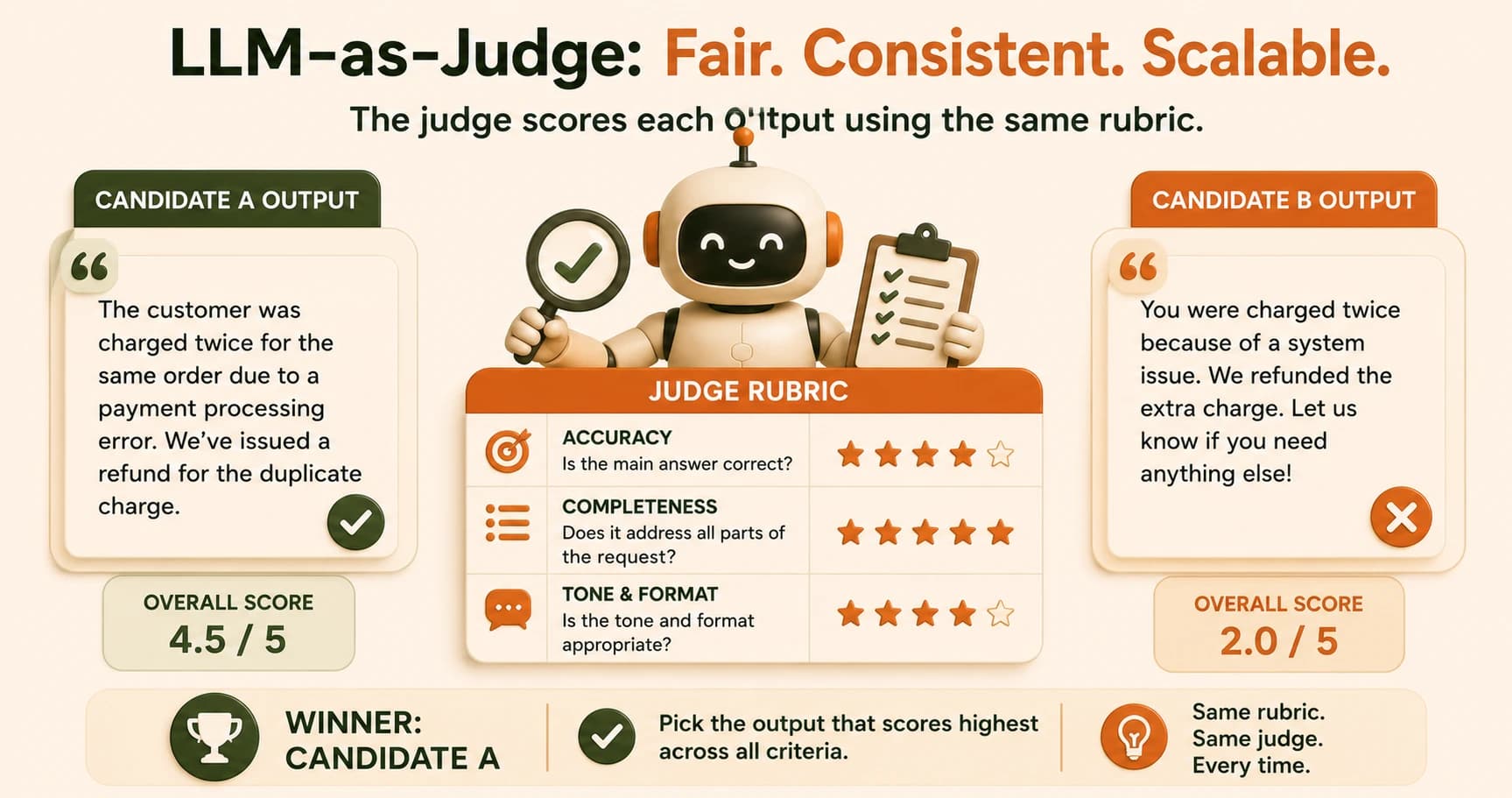
Once you have labeled cases, running a human against every prompt change forever doesn't scale, that's where an LLM judge comes in: a model prompted with a clear rubric, given the input, the prompt's actual output, and asked to score how well it matches the expected answer. Evidently AI's guide to LLM-as-a-judge covers several scoring approaches in more depth if you want to go further than the rubric method below.
Judge rubric criteria worth scoring separately
| Criterion | What it checks | Example failure it catches |
|---|---|---|
| Accuracy | Does the output match the expected label or fact? | Ticket labeled "billing" when it was a "bug" |
| Completeness | Did the output address the full request, not just part of it? | Answers one of two questions asked |
| Tone/format | Does it follow the required structure or voice? | Correct answer, wrong format for downstream parsing |
Here's the step most beginner guides skip: before trusting the judge for anything, check that it agrees with your own human labels on the same 20-30 cases. Run the judge, compare its scores to what you wrote by hand, and calculate the percentage where they match. Somewhere around 75-90% agreement is the bar worth trusting; below that, the judge is adding noise, not signal, and any downstream score is just noise wearing a number.
If agreement comes in low, the fix usually isn't a better model, it's a more specific rubric prompt. "Score this response" invites the judge to invent its own standard. "Score whether the ticket category exactly matches the expected label, ignoring wording differences" gives it one job to do.
There's a bias worth watching for once the judge is running: a judge built on the same model family as the prompt it's scoring tends to rate that model's own outputs a little more generously than a human would, the same way it's hard to catch your own typos. It's not a reason to avoid LLM judges, they're still far faster than a human reviewing every case by hand, it's a reason to keep spot-checking a handful of judge scores against your own read every few weeks, not just once at setup.
Also worth deciding upfront: what the judge does when it's genuinely unsure. A rubric that forces a clean pass or fail on every case will quietly guess on the hard ones. Better to let the judge return "uncertain" and route those cases to a human, so your regression sheet doesn't drown in silent, low-confidence guesses.
Scoring Two Prompt Versions Against the Same Sheet
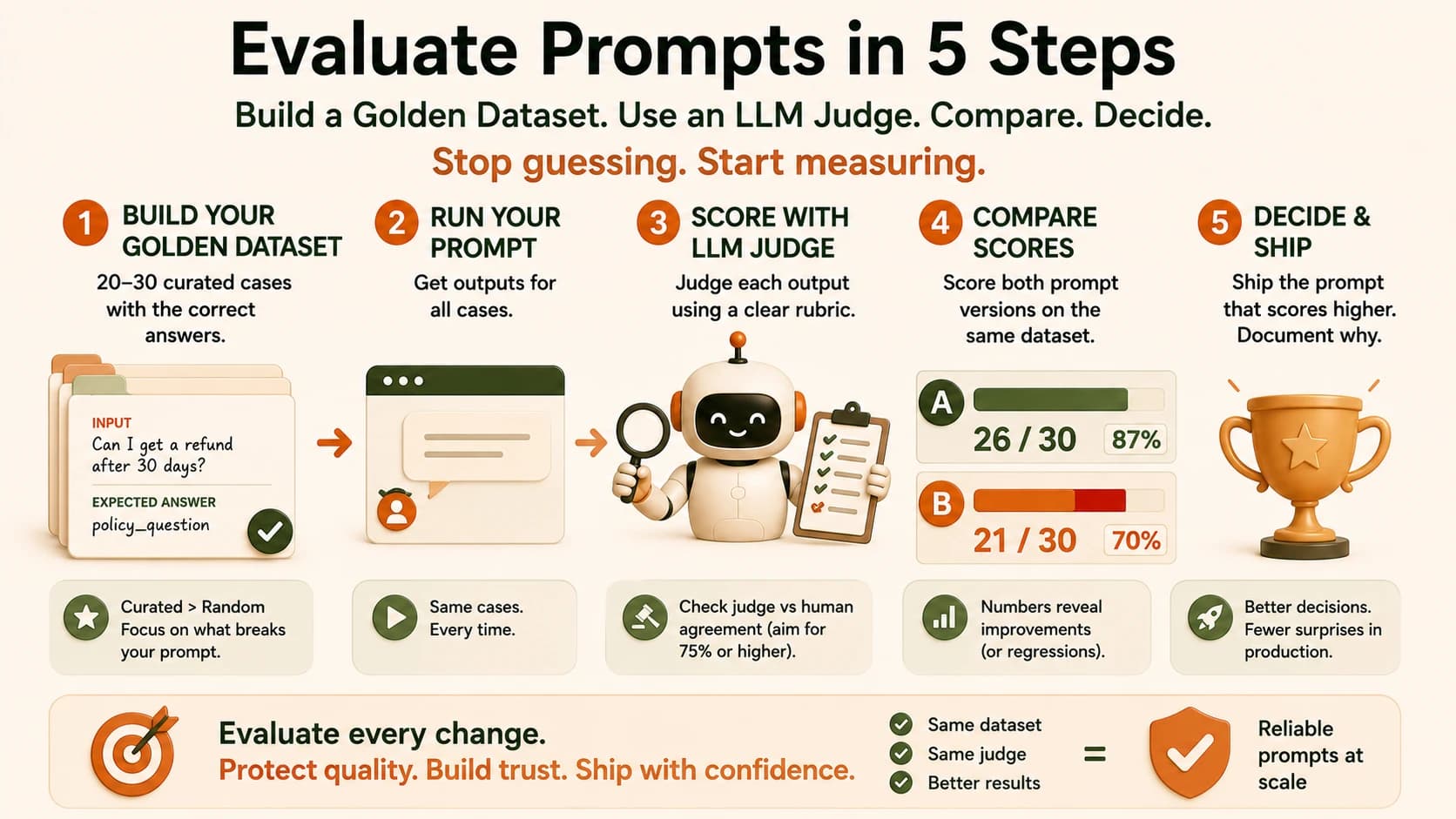
This is the payoff: running your old prompt and your new prompt through the exact same 20-30 cases, and letting the scores, not your read of the wording, decide which one wins.
Say Prompt A, the current version, scores 26/30 on your sheet. Prompt B, the "cleaner" rewording someone proposed, scores 21/30, worse specifically on the adversarial cases you added. Without the sheet, B would have shipped, it read better out loud. With it, you have a concrete reason to reject it: five of your hardest cases just started failing.
This is the exact connection back to automatic prompt optimization: an optimizer generating five candidate prompts is only as good as the score deciding which one wins. Hand it a flawed or missing eval set and it will happily overfit to whatever you measure, promoting a prompt that scores well on paper and fails in production. The regression sheet and judge you just built are what make that optimization loop trustworthy instead of decorative.
Worth doing one more pass here: don't just look at the aggregate 26 versus 21. Open the five rows where Prompt B lost points and read them yourself. Nine times out of ten you'll spot a pattern, maybe it's specifically the adversarial cases where the wording sounds like billing but the real issue is a bug, and that pattern tells you exactly what to fix in the next candidate instead of guessing again.
When to Gate on This
You don't need a full CI pipeline to get value from this. The lightweight version: any time someone proposes a prompt change, run it against the regression sheet before it ships, and treat a drop past an agreed threshold, say more than 5% below the current score, as a blocker, not a suggestion.
This is a genuinely different habit than most teams have around prompts today. Code changes get a test suite by default, nobody ships a pull request without CI running. A one-line prompt tweak, though, often ships with nothing more than someone reading it and thinking it looks fine.
That gap is exactly how the three-week refund misrouting from the opening story happens. The same team that would never merge untested code merged an untested prompt without a second thought, because prompts don't feel like code, even though they drive the same production decisions.
As your team grows, this naturally becomes an actual gate: a pull request that touches a prompt triggers a run against the golden dataset automatically, and a regression past the threshold blocks the merge the same way a failing unit test would. OpenAI's Evals documentation walks through wiring this into an API-based pipeline once you're ready for that step. Until then, a spreadsheet and five minutes before every prompt change catches most of the damage.
One more habit worth building in: every time a judge or a user catches a real failure in production, add that exact case to your golden dataset with the correct label. That's how a 20-case sheet earns its keep over a year instead of going stale the week you built it. Evaluating prompts this way turns a one-time gut check into a test you can run again every time the prompt changes.
If you're building this discipline into a broader agentic AI system, the same golden-dataset approach applies to every prompt a tool-calling step depends on, not just a single classifier.
Your Task: Build Your Own Regression Sheet
Pull 8-10 common scenarios
List the inputs your prompt handles most often in real use. For a support-ticket classifier, that's typical billing questions, typical bug reports, typical "just checking in" messages. Write the input and the correct expected label or output for each.
Add 5-8 edge cases
Pull from your own history: inputs that once confused the prompt, ambiguous wording, very short or very long messages, anything a real user has actually sent that isn't a clean textbook example.
Add 3-5 adversarial cases
Inputs designed to push the prompt toward the wrong answer on purpose, things phrased to look like one category while actually belonging to another. These are the cases most likely to catch a regression that "reads fine" but scores worse.
Label every row by hand
For each of your 20-30 rows, write the correct output yourself, or with a colleague who knows the domain. This human label is your ground truth. Nothing downstream matters if this step is sloppy.
Done? You've completed Lesson 13.06.
FAQ