Automatic Prompt Optimization: Stop Hand-Tuning Prompts
Automatic prompt optimization uses eval scores, not guesswork, to improve prompts. Learn how APE and DSPy find better wording than tuning by hand.

A support bot prompt scored well in testing. Someone tightened the wording for style, nothing dramatic, just a cleaner sentence. Two weeks later it started misreading refund requests. Nobody could say exactly which change caused it, because nobody had re-tested it.
I've made that exact mistake myself: rewording a prompt because it read better out loud, then finding out a week later that "reads better" and "scores better" are not the same claim.
Automatic prompt optimization fixes that by making an eval score, not a person's gut feeling, decide whether a prompt got better or worse. In this lesson, you'll learn how that loop works and run one before/after comparison yourself. By the end, you'll have a real number showing whether your prompt actually improved.
Key Takeaways
- Automatic prompt optimization replaces "does this read better to me?" with "does this score higher on real examples?"
- The core loop is three steps: generate candidate prompts, test each one, keep the winner.
- Frameworks like DSPy automate this loop at scale using an optimizer called MIPROv2, but you can run a tiny version by hand with five examples.
- A prompt with no eval set is a prompt nobody can prove got better or worse when it changes.
What Does Automatic Prompt Optimization Actually Mean?
Automatic prompt optimization means treating your prompt's wording as something you test and measure, not something you polish by ear. Instead of you rewriting a prompt and hoping it's better, a scored set of examples tells you whether it is. Skip this step and you're the person in the opening story: shipping a "cleaner" prompt with no way to know it just got worse.
This is the same shift as Automatic Prompt Engineer (APE), one of the earliest systems to formalize it. APE has a language model generate a batch of candidate instructions, runs each one against a task, and keeps whichever candidate scores highest on held-out examples. Nobody hand-picked the winner; the scores did.
That's the whole mental shift this lesson asks you to make. Your prompt is a parameter you tune against data, the same way you'd tune a setting in code, not prose you polish until it feels right.
What an APE Run Actually Looks Like
Here's a concrete version of the APE loop, not just the concept. Say you're building a prompt that classifies support tickets as "billing," "bug," or "other."
You start with one instruction: "Classify this support ticket." You ask a model to generate five rewordings of that instruction. Two examples: "Read this ticket and label it billing, bug, or other" and "Categorize the following customer message into exactly one of three buckets." Three more variants follow the same pattern. That's the generate step.
Next, you run all five candidate instructions against the same ten real tickets you've already labeled by hand, the ones you know the correct category for. Each candidate produces ten predictions. You score each candidate as a percentage correct against your known answers, for example candidate 3 gets 9/10 while candidate 1 gets 6/10. That's the test step.
APE then keeps the highest-scoring candidate: "Categorize the following customer message into exactly one of three buckets." It discards the rest, even though candidate 1 might read more naturally to a human. The win isn't about which instruction sounds best. It's about which one produced the most correct labels on data you already trust.
This is the exact shape you'll reproduce by hand in this lesson's task below, just with five examples instead of ten and one rewrite instead of five.
How the Optimization Loop Works
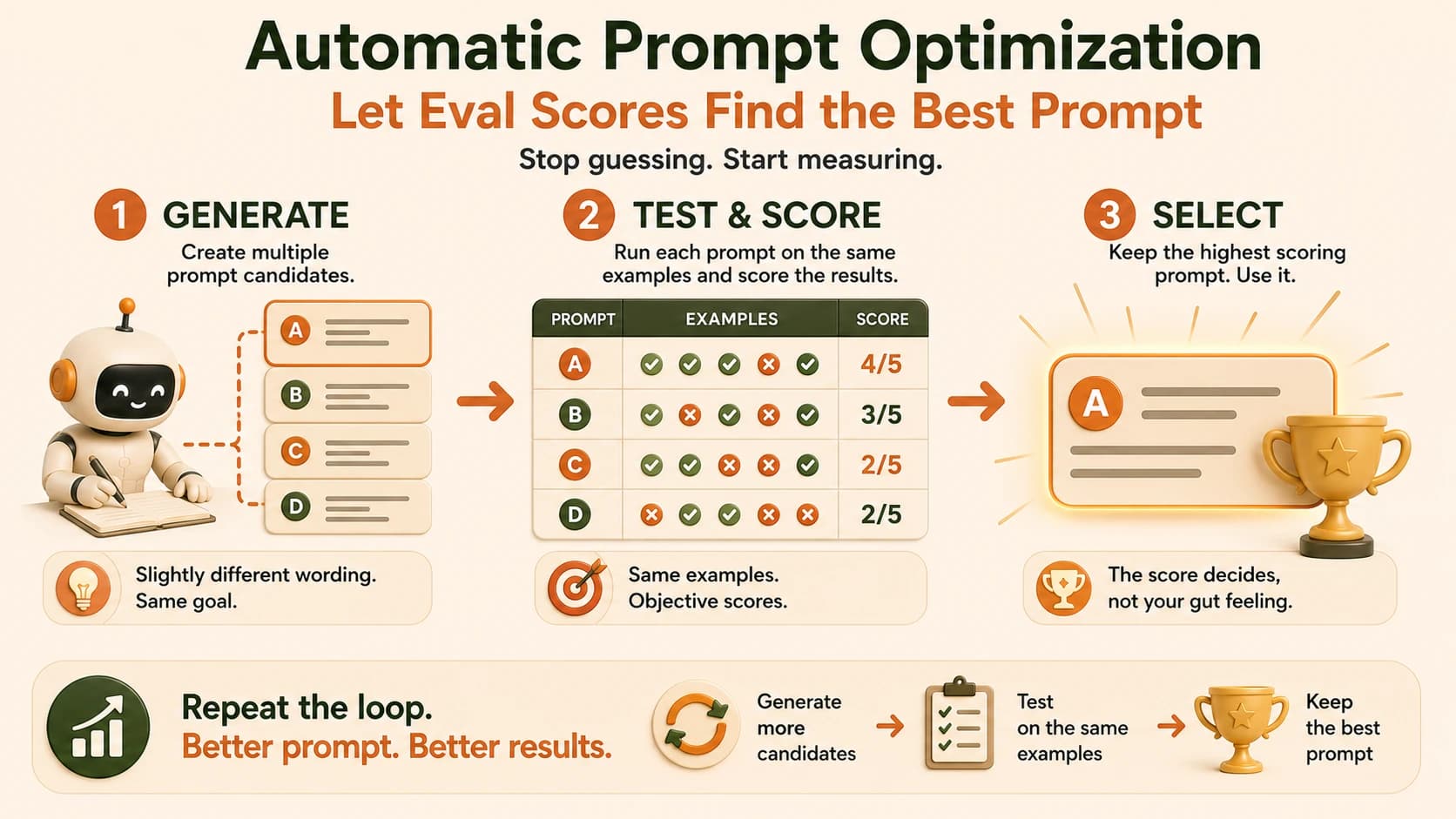
Every automatic prompt optimization system, from a five-line script to a full DSPy pipeline, runs the same three-step loop.
Generate. Produce more than one candidate version of the instruction. This can be a model rewriting your prompt several different ways, or you writing two or three variants yourself.
Test. Run every candidate against the same small set of real examples, and score each output against a known correct answer or a clear pass/fail rule.
Select. Keep whichever candidate scored highest, and throw the rest away, even if one of them "reads" better to you.
Start with five to ten examples, not fifty. A small, well-chosen eval set that includes the cases your prompt has actually failed on catches more real problems than a large, easy one.
At production scale, this is what DSPy's MIPROv2 optimizer automates. It bootstraps example candidates from your own data. Then it generates several instruction variants and searches for the combination of instruction plus examples that scores best, all without a person manually comparing outputs. Skip the eval step and you're back to guessing which of ten rewrites is actually better, one comparison at a time, by memory. You don't need DSPy to learn the idea, but it's worth knowing the same three-step loop is what's running underneath it.
What Running This in DSPy Looks Like
You don't need DSPy to learn this lesson's task, but seeing the same three-step loop as real code makes it less abstract. A minimal DSPy setup for the ticket-classifying prompt above looks roughly like this:
import dspy

classify = dspy.Predict("ticket_text -> category")

def is_correct(example, prediction, trace=None):
    return prediction.category == example.category

optimizer = dspy.MIPROv2(metric=is_correct)
optimized_classify = optimizer.compile(
    classify,
    trainset=labeled_tickets,  # your ten hand-labeled examples
)
labeled_tickets is just your hand-labeled examples in DSPy's format, the same ten tickets from the APE walkthrough above. is_correct is the scoring rule, the same pass/fail check you'd run by hand. MIPROv2.compile() is the part that replaces you. It generates instruction variants, tests each one against labeled_tickets using is_correct, and hands back optimized_classify: a version of the prompt that scored best. Same generate, test, select loop. It just runs unattended across more candidates than you'd realistically try by hand.
The part worth remembering isn't the syntax. It's that trainset and metric are doing the same job your five examples and your pass/fail column do in the manual task below. A framework with no real eval set is still just a guess, automated faster.
Why This Matters Once Prompts Are Part of a Real System
A prompt that only lives in a chat window can get rewritten on a whim with no real cost. A prompt wired into agentic systems, a support flow, or anything a real user depends on is different: every change is a change to production behavior, whether you tested it or not.
Skip the eval step and three things go wrong. First, a "cleanup" edit silently breaks an edge case nobody re-checked, the way the support bot in the opening did. Second, you burn API spend re-running a prompt change across thousands of calls with no evidence it actually helped. Finally, when something regresses, you have no before/after number to point to. You end up debugging by memory instead of by data. A proper regression sheet turns that five-example eval set into something you can trust at scale.
A prompt change with no eval score attached is a guess wearing a confident sentence. Treat any "I cleaned this up" edit to a production prompt the same way you'd treat a code change: it doesn't ship until something measures it.
This is also where the habits from comparing answers for consistency and advanced reasoning frameworks connect. Both of those lessons taught you to check an answer against something other than your own first impression. This lesson applies that same idea to the prompt itself, not just its output.
Write five test examples
Pick a prompt you already use (or write a short one, like "Summarize this email in one sentence"). Write five short input examples it should handle, including at least one tricky or edge case. Save each as a line in a text file, one input per line.
Run your current prompt and score it
Run your five inputs through your current prompt using whatever tool you already have access to (Claude, ChatGPT, or an API call). For each output, give it a plain pass or fail based on whether it's actually correct, not whether it sounds good. Write down the score, for example 3/5.
Write one alternate version of the prompt
Reword the instruction once, changing something real, not just style, like adding a constraint or an example. Don't touch anything else.
Run the same five examples through the new version
Score the new version's outputs the exact same way you scored the original. Write down the new score, for example 4/5.
Compare the two numbers
You now have a real before/after: an eval score for your original prompt and an eval score for the rewrite. Whichever number is higher is the version worth keeping, regardless of which one reads better to you.
Done? You've completed Lesson 13.05.
FAQ