Agentic Prompting: How AI Agents Act on Your Prompts
Agentic prompting means writing system and tool prompts an AI agent can act on, not just reply to, using ReAct and plan-and-execute patterns.

You write a great prompt. It's clear, it's specific, it even includes an example. You paste it into your agent and hit run. And the agent just... describes what it would search for. It never actually searches anything.
That happens because a prompt written for a chatbot and a prompt written for an agent are not the same document. Agentic prompting is the practice of writing system and tool prompts that tell an AI system what tools it has, when to use them, and when to stop, not just what to say back to you. A chatbot prompt only has to produce good words. An agentic prompt has to produce a good decision, over and over, without you in the loop.
By the end of this lesson, you'll know the two core agent reasoning patterns, ReAct and plan-and-execute, and you'll write a full system and tool prompt for a working web-research agent.
Key Takeaways
- Agentic prompting tells an agent when to act and when to stop; chatbot prompting only shapes what it says
- ReAct (Reason + Act) has the agent think, take one action, look at the result, then think again
- Plan-and-execute has the agent commit to a full plan up front, then run through it step by step
- A working system prompt needs identity, tool rules, and a stopping condition, missing any one makes behavior unpredictable
- Most agent bugs (wrong tool, infinite loops, hallucinated arguments) trace back to a vague prompt, not a broken model
What Is Agentic Prompting?
Agentic prompting is writing instructions for an AI system that plans, calls tools, and iterates on its own, instead of instructions for a system that just replies to you. Where a chatbot prompt is a script, an agentic prompt is closer to a runbook: it names the available tools, the rules for using each one, and what "finished" looks like.
This matters the moment your AI has to do something in the world, not just describe it. Searching the web, reading a file, sending an email, querying a database: any of these turns a chatbot into an agent, and turns your prompt into a set of operating instructions instead of a conversation starter.
Agent vs. Chatbot: Why Agentic Prompting Is Different
A chatbot prompt only shapes what a model says back; it has no way to act on the world between your message and its reply. An AI agent reads, decides, acts, and observes the result of its own actions, often several times, before it ever replies to you.
I've watched this exact failure happen more times than I can count while testing agent prompts: you write a chatbot-quality prompt ("find the three most recent reviews of this product") and hand it to an agent with a real search tool attached. The agent, following old habits, writes a nice paragraph describing what it would search for. It never calls the tool, because nothing in your prompt told it "when you need information, call the search tool, don't guess."
The fix isn't a better sentence. It's a structurally different prompt, one that treats the model less like a conversationalist and more like a new hire on their first day: here's your job, here are your tools, here's how you'll know you're done. This is the exact gap between agents and chatbots that trips up almost everyone moving from prompt engineering into agent building.
If your "agent" only ever writes text and never actually calls a tool, check your system prompt first. Nine times out of ten, nothing in it explicitly instructs the model to call a tool instead of describing one.
The ReAct Pattern: Think, Act, Observe, Repeat
Quick disambiguation before we go further: ReAct here has nothing to do with React, the JavaScript framework. ReAct stands for Reasoning + Acting, a prompting pattern from a 2022 research paper that's become the default loop for AI agents. If you search "ReAct" and only find frontend tutorials, add "prompting" or "agent" to your query.
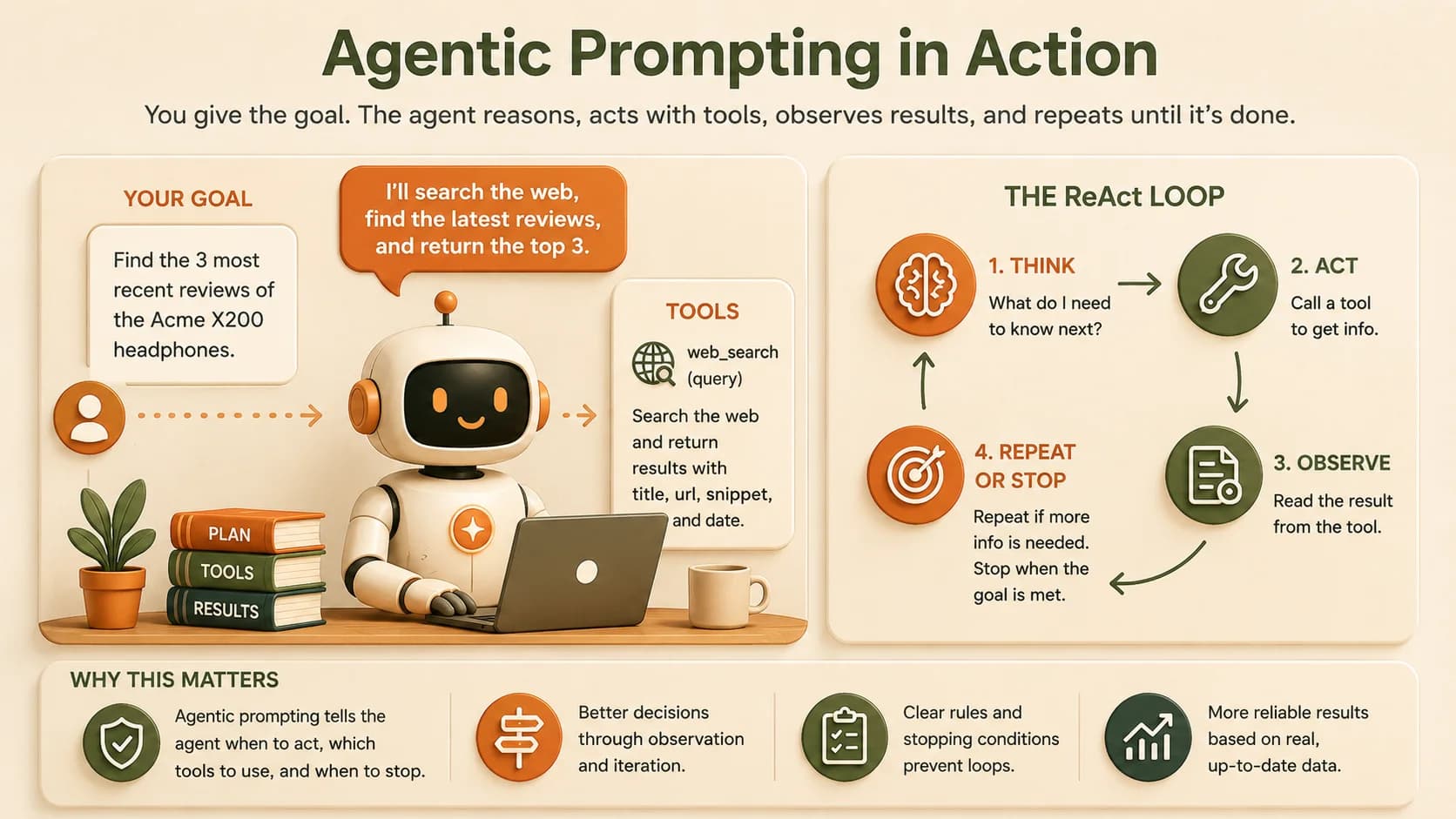
The ReAct loop works like this: the model reasons about what to do next, takes one action (usually a tool call), observes the result, then reasons again with that new information. It repeats until the task is done.
Here's why it matters: without an explicit ReAct instruction, a model tends to reason once, guess an answer, and stop, skipping the "observe" step entirely. That's how you end up with an agent confidently reporting search results it never actually retrieved. ReAct earns its keep on exploratory tasks, where you can't know the right next step until you've seen the last one.
Plan-and-Execute: Deciding the Whole Route First
Plan-and-execute takes the opposite approach: the model writes out a complete plan before doing anything, then works through each step in order, only stopping to re-plan if something fails.
ReAct vs. plan-and-execute at a glance
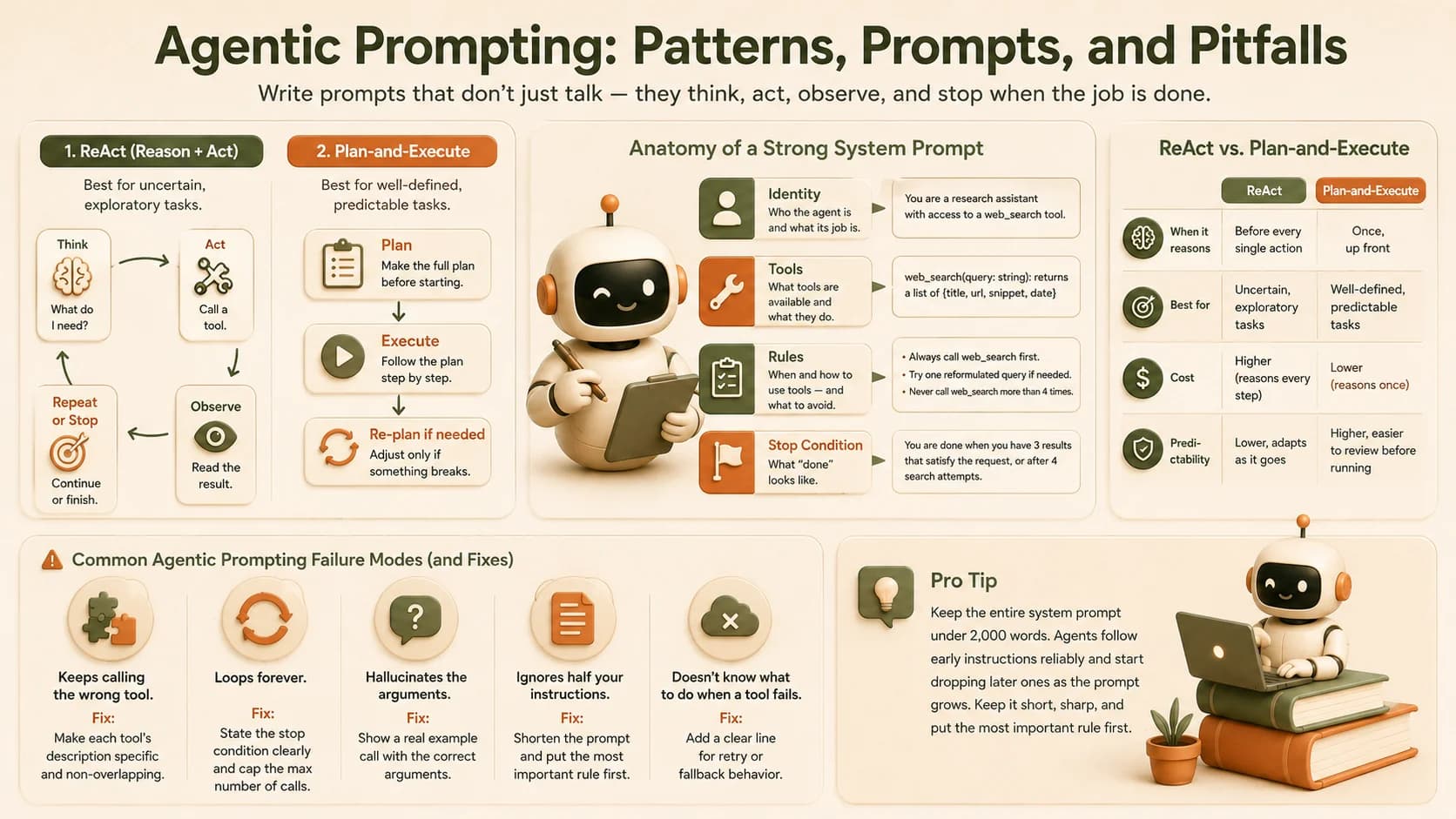
| ReAct | Plan-and-execute | |
|---|---|---|
| When it reasons | Before every single action | Once, up front |
| Best for | Uncertain, exploratory tasks | Well-defined, predictable tasks |
| Cost | Higher (reasons every step) | Lower (reasons once) |
| Predictability | Lower, adapts as it goes | Higher, easier to review before running |
Pick the wrong one and it shows fast: use plan-and-execute on a genuinely unpredictable task (say, debugging a live error) and the agent will charge through its fixed plan even after step two reveals the plan was wrong. Use ReAct on a simple, well-known task and you'll burn extra reasoning tokens re-deciding something that never needed re-deciding. Match the pattern to how much the task can surprise you.
Writing a System Prompt for Tool Use
Let's build one for real: a web-research agent whose job is finding the three most recent reviews of a product.
A chatbot-style prompt fails here:
Find the three most recent reviews of the Acme X200 headphones.
Nothing in it says an actual tool exists, or that calling it is mandatory. An agentic system prompt fixes that by naming the identity, the tools, the rules, and the stopping condition explicitly:
SYSTEM PROMPT:
You are a research assistant with access to a web_search tool.
Your job is to find real, current information — never answer from memory alone.

TOOLS:
- web_search(query: string): returns a list of {title, url, snippet, date}

RULES:
1. Always call web_search before answering any factual question about current events, products, or prices.
2. Use the actual dates in search results to judge recency — never assume based on your training data.
3. If a search returns no useful results, try one reformulated query before giving up.
4. Never call web_search more than 4 times for a single task.

STOP CONDITION:
You are done when you have 3 results that satisfy the request, or when
you've made 4 search attempts and must report what you found instead.

OUTPUT FORMAT:
A numbered list of results, each with title, source, date, and one-line summary.
Each block is doing one job: identity ("research assistant"), a hard rule about when to call the tool, a limit that prevents runaway loops, and a stop condition that defines "done" in plain language. This is the core of good agentic prompting, and it's what production agent-building guides consistently recommend: identity, tool rules, and clear stop conditions, in that order of importance.
Keep the whole system prompt well under 2,000 words. Agents follow early instructions reliably and start dropping later ones once a prompt gets bloated, so trim ruthlessly and put your most important rule first.
Common Agentic Prompting Failure Modes (and Fixes)
Most agent bugs aren't model failures, they're gaps in the agentic prompting itself. Here are the ones beginners hit most often, and the fix for each.
- Keeps calling the wrong tool. Your tool descriptions overlap or are too vague. Fix: make each tool's description name a specific, non-overlapping use case.
- Loops forever. No stopping condition exists in the prompt. Fix: state exactly what "done" looks like, and cap the maximum number of tool calls. If this is already happening to you, see the three specific loop failures and their fixes.
- Hallucinates the arguments. The tool's parameters aren't documented with an example. Fix: show one real example call in the prompt, not just a parameter list.
- Ignores half your instructions. The system prompt is too long, or buries the important rule near the bottom. Fix: shorten it, and put the rule that matters most first.
- Doesn't know what to do when a tool fails. No failure-handling instruction exists. Fix: add one explicit line, like rule 3 in the example above, that names the retry behavior.
Per the original ReAct research paper and plan-and-execute pattern analysis, nearly every one of these failure modes traces back to a gap in the agentic prompting, not a weaker model. Fix the prompt and the behavior follows.
Your Task
Write a system prompt for your own web-research agent
Pick any factual, current-events question (a product comparison, a recent news event, anything you'd normally Google). Write a full system prompt for an agent answering it, using the four blocks from the example above: identity, tools, rules (including one line for what happens if a tool call fails), and stop condition. Save it as a plain text file named research-agent-prompt.txt.
Trace your own ReAct loop
In a few quick lines, write out what the ReAct loop would look like for your question: Think, Act, Observe, and whether it Repeats or Stops. That's the loop your system prompt from Step 1 needs to produce, and it's the fastest way to check your agentic prompting actually holds up.
Done? You've completed Lesson 13.02.
FAQ