Context Engineering, Part 2: Production Memory Systems
AI agents lose track of earlier context long before their window is full. Here's how compaction, tool clearing, and memory tools solve it in production.

Fifty turns into a coding session, your agent stops remembering why it opened a file thirty turns ago. It re-reads the same config three times. It contradicts a decision it made an hour earlier. Nothing crashed. The context window just filled up with the wrong things.
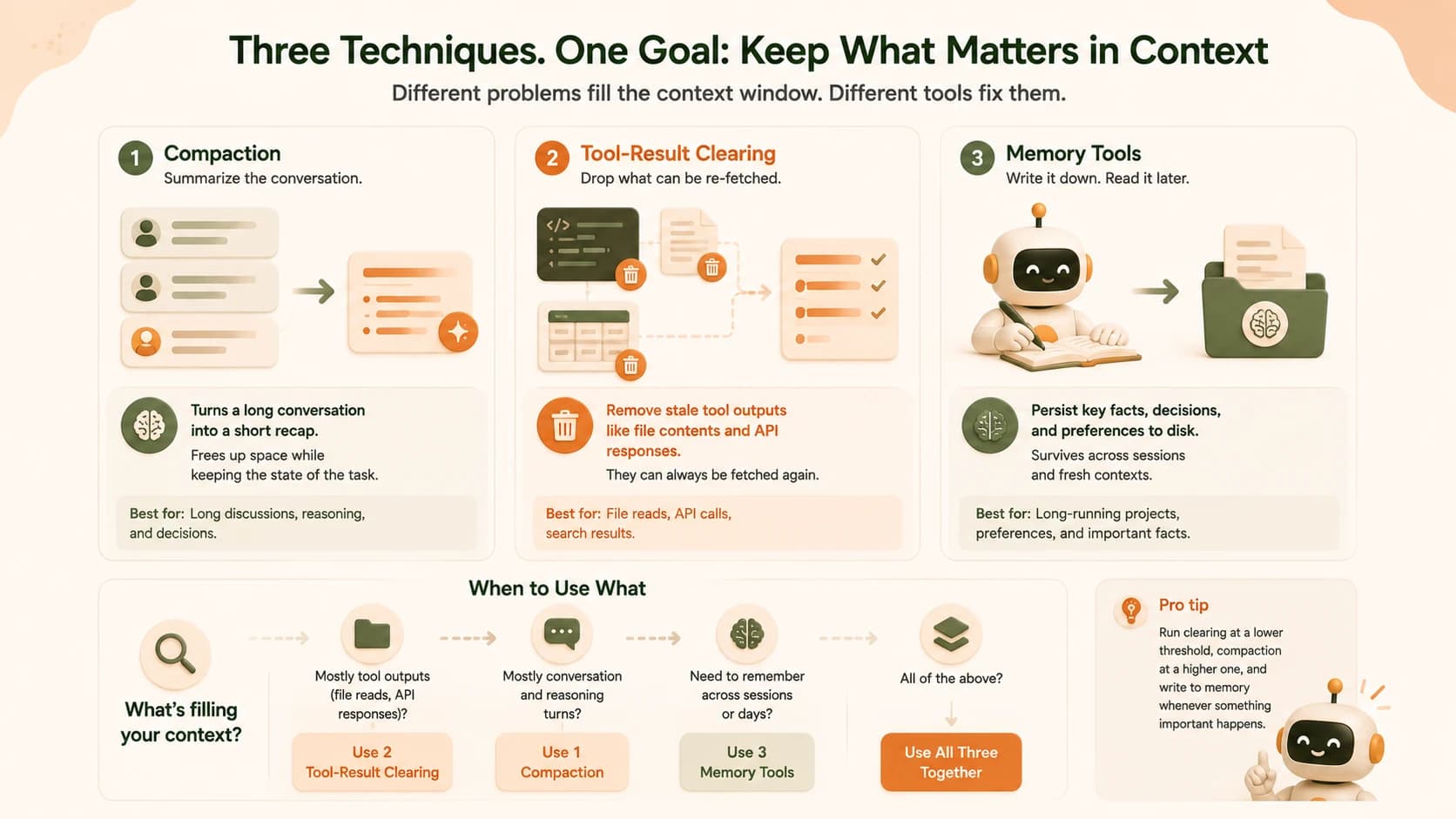
Production AI agents solve this with three techniques. Compaction summarizes old turns instead of keeping them verbatim. Tool-result clearing drops re-fetchable data once it's been used. Memory tools write key facts to a file the agent can read back in a future session. None of these are exotic. Together, they're what separates a demo agent that falls apart after twenty minutes from one that can run all day.
Key Takeaways
- Context windows degrade well before they fill up, research shows a 30%+ accuracy drop when relevant information sits in the middle of a long context, not the start or end
- Compaction replaces old conversation turns with a dense summary, usually triggered once input tokens cross a threshold like 150,000
- Tool-result clearing drops re-fetchable outputs (file reads, API responses) once the agent no longer needs them verbatim, one benchmark showed a 67% token reduction
- Memory tools let an agent write notes to disk and read them back in a later session, so nothing has to be rediscovered from scratch
- Most production agents combine all three, choosing the right one based on what's actually filling up the context
If you read Part 1 of this series, you already know what tokens and context windows are. This lesson is about what happens once a single conversation runs long enough that "just fit more in" stops working. It also builds on prompt security fundamentals, since a memory file an agent writes to is itself a surface worth protecting.
Why a Full Context Window Still Isn't Enough
A context window doesn't fail like a hard drive running out of space. It fails gradually, and it starts failing long before it's full.
Researchers studying how language models use long contexts found something counterintuitive. Performance is strongest when the information a model needs sits at the very start or end of its context. It drops by more than 30% when that same information sits in the middle. This is often called the "lost in the middle" effect. It happens because attention weight naturally concentrates on the newest and oldest tokens, leaving everything in between competing for less of the model's focus.
This is why an agent doesn't need to run out of room to start acting confused. It just needs the important fact from turn 12 to get buried under forty turns of file reads and tool output. Context engineering is the discipline of managing which tokens make it into the model's view on every single turn. Done well, the important stuff never ends up buried.
Say an agent is asked, on turn 3, to always use a specific database column name instead of the default one. By turn 45, after dozens of file reads and test runs, that instruction is still technically in the context window. It's just sitting in the middle of it now, competing with everything that happened in between. The agent doesn't forget it so much as stop paying attention to it, which from the outside looks exactly like forgetting.
This is a different problem than the one Part 1 covered. Part 1 was about how many tokens fit. This lesson is about which tokens deserve to be there. If you haven't read the basics of how AI agents decide their own next action, that's worth a detour before going further here.
What Is Conversation Compaction?
Conversation compaction is the practice of summarizing a conversation's older turns into a dense recap. The verbatim history gets replaced with that summary, so the agent keeps working without carrying every prior message forward at full length.
Here's how it plays out in practice. An agent working through a long debugging session accumulates dozens of turns: file reads, error messages, failed attempts, working fixes. Once the input token count crosses a set threshold (a common default is 150,000 tokens, with a 50,000-token floor), the system runs the entire transcript through the model one more time. The instruction is roughly: summarize the state, the decisions made, and the next steps, then wrap it in a summary block. That summary replaces the raw history.
What survives a compaction pass and what doesn't tends to follow a pattern:
- High-level facts survive well: what the bug was, what fix got applied, what's left to do
- Obscure specifics tend not to: an exact value buried in a debug table, a minor version number mentioned once
- The trade-off is consistent: compaction buys room to keep working, at the cost of some fine-grained detail from earlier in the session
If your agent needs to preserve something very specific (an exact number, an exact file path), don't rely on compaction to carry it forward. Write it somewhere durable instead, which is exactly what the memory section below covers.
For the hands-on workflow, exactly when to trigger a compaction pass yourself and how to verify it kept what mattered, see the walkthrough on triggering compaction in Claude Code and Cursor.
Clearing Tool Output Before It Piles Up
Not every token in a long agent session is a decision or a piece of reasoning. Often, the majority of it is tool output: the full contents of a file the agent read, an API response, a search result. Once the agent has used that information, most of it doesn't need to sit in context anymore. It can be fetched again if it's ever needed.
Tool-result clearing takes advantage of this. Once context crosses a set size, the system drops the body of older tool results. It keeps a record that the call happened, but usually preserves only the most recent few tool uses in full. In one real workload documented by Anthropic's engineering team, a task dominated by repeated file reads went from 335,000 peak tokens down to around 173,000 just by clearing stale tool output. The agent finished more turns of actual work in the process, not fewer.
The trade-off is straightforward. Clearing costs nothing in extra inference (no summarizing model call), but it's a bet that re-fetching is cheap. If an agent needs that file again, it just reads it again. That's usually a fine trade when file reads are fast and free; it's a worse trade when a tool call is slow, rate-limited, or expensive to repeat. I've watched an agent burn a full minute re-fetching the same three files it already had cleared, and it was still a better trade than the alternative: it finished the task, where the uncleared version had stalled out on a full context window an hour earlier.
Giving Agents Memory Across Sessions
You've probably already invented a rough version of this yourself. Maybe you've kept a running notes file next to a long project. A plain text doc where you jot down what you decided and why. If so, you've already built a manual memory system.
A memory tool formalizes that habit for an agent. Instead of a person updating a notes file, the agent itself writes to a small set of files, often something like a /memories directory. It records what it learned, what it decided, and what's still open. The next time a session starts, even a brand-new one, the agent checks that directory first and picks up where the last session left off.
This solves a problem compaction and clearing can't touch: what happens when the conversation itself ends. Compaction and clearing manage context within a session. Memory tools let information survive between sessions, which matters enormously for agents doing research or engineering work that spans more than a single sitting. In Anthropic's own testing, context editing alone cut token consumption by 84% on a 100-turn web search evaluation that would otherwise fail from running out of room. On a separate internal evaluation, combining the memory tool with context editing improved performance by 39% over baseline.
Choosing the Right Technique for the Symptom
These three techniques solve different symptoms, and picking the wrong one for the problem you actually have wastes effort. The table below is a quick diagnostic.
Matching the symptom to the fix
| Symptom | Likely cause | Best fix |
|---|---|---|
| Context is mostly file reads or API responses | Re-fetchable tool bloat | Tool-result clearing |
| Long back-and-forth reasoning, decisions piling up | Dialogue and analysis growth | Compaction |
| Agent re-discovers the same facts every new session | No persistence between sessions | Memory tool |
| All of the above, over a very long or multi-day task | Combined pressure | Clearing + compaction + memory together |
Most production systems don't pick just one. They run clearing at a lower threshold to keep tool bloat in check. Compaction runs at a higher threshold to handle dialogue growth. A memory tool runs independently of either, since it isn't triggered by token count at all.
Sub-Agents as a Context Isolation Strategy
There's a fourth approach worth knowing, and it sidesteps the problem instead of managing it: don't let one agent's context grow unbounded in the first place.
A sub-agent architecture hands a focused task to a separate agent with its own clean context window, like researching one question or making one isolated code change. That sub-agent does its work, then reports back with a condensed summary, often just 1,000 to 2,000 tokens, instead of its entire working transcript. The coordinator's own context stays small no matter how much work the sub-agents collectively did, because it only ever sees the summaries.
This is why a lot of production agent systems look less like one long-running conversation and more like a manager delegating to specialists who each report back briefly. Picture a coordinator agent that needs to check five different files for a naming inconsistency. Instead of reading all five itself and burning context on every line, it hands each file to a sub-agent and gets back a two-sentence answer per file. The coordinator never sees the raw contents at all.
Sub-agents aren't a replacement for compaction, clearing, or memory. They're a way to reduce how often you need those tools in the first place, by keeping any single context window from growing as large to begin with.
Frequently Asked Questions
FAQ