Context Engineering: Why AI Chats Get Worse Over Time
Context engineering is what a model actually sees each call: system, user, and tool context inside a token budget. Here's why long chats degrade.

Forty messages into a coding session, you ask the model to follow a naming convention you set at the very start. It doesn't. Not because it's being difficult: the instruction you gave at message three simply isn't part of what got sent on message forty. Nothing broke. The context just ran out of room, and something had to go.
That's context engineering: the practice of managing what a model actually sees on each call, not just what you type into it. Prompt engineering is the message you send. Context engineering is everything surrounding that message: system instructions, conversation history, and tool outputs, all competing for a fixed amount of space. Get the words right and still feed the model a broken context, and you'll get a broken answer anyway.
In this lesson, you'll learn what's actually inside that space, why longer conversations tend to get worse instead of better, and a simple mental model for managing it yourself.
Key Takeaways
- Context engineering manages what a model sees each call: system, user, and tool context together, not just the prompt.
- Every model has a fixed token budget. Once it's full, something gets trimmed, usually the oldest turns first, silently and without warning.
- Longer context isn't automatically better: a 2025 study found all 18 tested frontier models lost accuracy on information buried in the middle of a long context.
- The model doesn't remember anything between calls. It reconstructs everything from whatever context gets resent each time.
- A basic budgeting habit (keep, trim, drop) prevents most of the "it forgot" and "it got worse" problems you'll run into.
What Is Context Engineering?
Context engineering is the discipline of deciding what information a model receives on each individual call, given that only a limited amount fits. It's the layer beneath prompt engineering: the prompt is one input inside a much bigger package the model actually processes.
The distinction matters because the two skills fail differently. A weak prompt produces a vague or off-target answer even with perfect context. A weak context produces confident, well-written answers built on missing or stale information, which is a harder failure to catch.
Prompt engineering vs. context engineering
| Prompt engineering | Context engineering | |
|---|---|---|
| Controls | The wording of a single message | Everything sent alongside that message |
| Scope | One turn | The whole session, every call |
| Typical failure | Vague or ambiguous instructions | Missing, stale, or overloaded context |
| Fix | Rewrite the message | Manage what gets kept, trimmed, or dropped |
Neither replaces the other. A well-written prompt inside a poorly managed context can still fail, and a well-managed context with a sloppy prompt still underperforms. They're separate layers of the same job.
What the Model Actually Sees Each Call
An AI model has no persistent memory between calls. Each time you send a message, the entire package it can see gets rebuilt from scratch and sent over as one request. That package has three main parts.
System Context
This is the setup layer: instructions about the model's role, tone, and constraints. It's usually set once at the start of a session and resent on every call after that. It's how a role and audience get established and kept consistent.
User Context
This is the conversation itself: your current message plus however much prior back-and-forth the application decides to include. Most chat apps don't resend an entire history forever. Past a certain length, older turns quietly stop being included.
Tool Context
When a model can call tools (searching the web, running code, querying a database), the descriptions of those tools and their recent outputs also take up space in the same package. A model deciding whether to use a tool needs that tool's definition sitting right there in context, every single call.
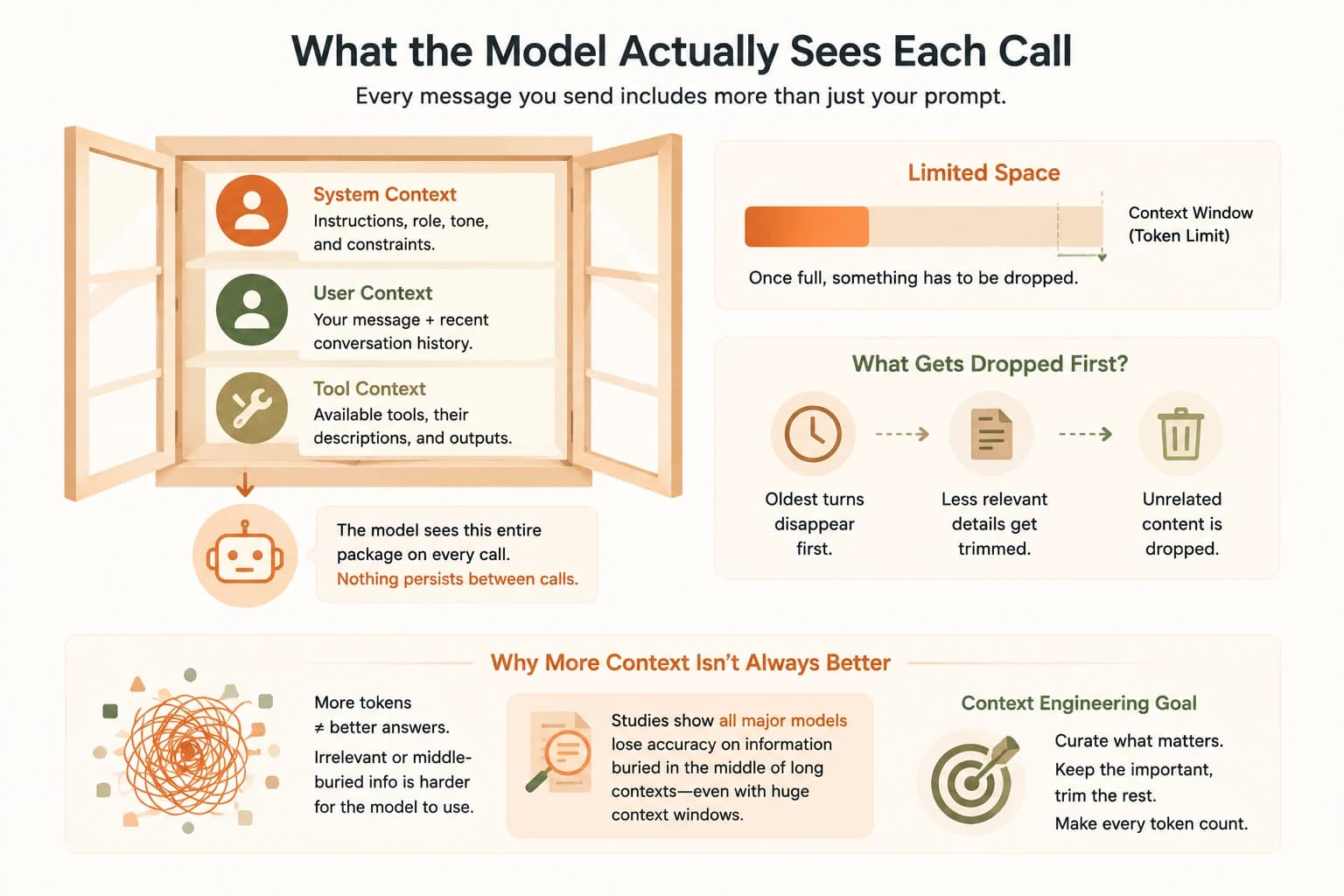
All three share one limited container, measured in tokens rather than words. If system instructions grow, or the conversation runs long, or tool outputs pile up, something inside that container has to shrink or disappear to make room.
Skip understanding this, and every fix you try targets the wrong layer. You end up rewriting a prompt when the real problem is that the instruction you're relying on never made it into this call's context at all.
I've made that exact mistake: spent twenty minutes rewording a prompt that was already fine, when the real issue was a tool result from three turns earlier that had already been dropped. Once I started checking what was actually in context before touching the wording, that specific failure mode mostly disappeared.
Why Longer Isn't Always Better
The instinct once you understand token budgets is to just stuff in more: more history, more background, more detail, just to be safe. That instinct backfires.
Researchers call the resulting slowdown context rot: model accuracy dropping as the amount of context grows, even when the needed information is technically still present. A related pattern is the lost-in-the-middle effect. Models handle information at the very start or very end of a context well, but struggle with the same information buried in the middle.
Chroma's 2025 research tested 18 frontier models, including GPT-4.1, Claude 4, and Gemini 2.5, and found every single one showed this degradation as input length grew. Bigger context windows didn't prevent it. Bigger windows just mean there's more room for the problem to happen in.
This is why "just paste the whole document in" often produces a worse answer than a shorter, curated excerpt. Volume isn't the same as relevance, and the model has to work harder to find what matters when everything is mixed in with everything else.
Skip this and the natural response to "the model got something wrong" becomes "add more context," which, past a certain point, actively makes the next answer worse instead of better.
Basic Window Budgeting: A Context Engineering Habit for Beginners
You don't need to calculate token counts by hand to manage this well. A simple habit does most of the work: for any long-running conversation, periodically ask what should be kept, what should be trimmed, and what should be dropped entirely.
- Keep: the current task, any constraint that's still actively relevant, and anything the model would need to avoid repeating a mistake it already made once
- Trim: long tool outputs or search results you've already extracted the useful part from, summarized down to what you learned instead of the raw output
- Drop: resolved side-conversations, earlier drafts once a later draft supersedes them, and instructions that only applied to a task you've already finished
Skip this habit entirely and a long session slowly fills with material that's no longer useful, pushing out the material that is. That's the exact mechanism behind "it forgot what I told it" complaints: not a memory failure, but a budget that ran out and got spent on the wrong things.
This keep/trim/drop habit is the manual version of what production agent systems automate at scale, using techniques like conversation compaction, tool-result clearing, and persistent memory tools. Part 2 of this series covers how those systems work, and prompt engineering for production covers versioning, cost, and caching once you're shipping this to real users.
Your Task
Pick a long-running AI conversation
Open a chat session you've had going for at least twenty or thirty messages, in whatever tool you already use.
Reread the last fifteen messages
Note anything the model appears to have lost track of: a formatting rule, a constraint, a detail you mentioned early on that's no longer showing up in its answers.
Label what's competing for space
Write down, in your own words, what's likely sitting in context right now: the system setup, the recent conversation, and any tool outputs. Flag one thing you'd trim or drop if you were managing the budget yourself.
Done? You've completed Lesson 12.06 and practiced auditing your own context stack.
FAQ