How to Debug a Bad AI Prompt in 4 Repeatable Steps
Debug a bad AI prompt in four repeatable steps: read the output, isolate the cause, change one thing, test again. Build a simple prompt library as you go.

You fixed the product description prompt from a couple lessons back. It's punchy now, aimed at the right audience, under 80 words. You ship it. Then someone points out it's using the word "revolutionary" in every single description, and you have no idea if that's from the punchier tone you asked for or something else entirely, because you changed the tone, the audience, and the length instruction all at once.
That's the problem this lesson fixes: how to debug a bad AI prompt without guessing which change helped. In this lesson, you'll learn the four-step loop for doing that, the one discipline that makes it work, and how to start a prompt library so you stop solving the same problem twice. By the end, you'll run three real iteration cycles on a failing prompt and have a log to show for it.
Key Takeaways
- Debugging a bad AI prompt follows four repeatable steps: read the output, isolate the issue, fix one thing, test again.
- Changing more than one thing per cycle is the most common mistake. Fix the output and you won't know why; fix nothing and you won't know what to blame.
- "Isolating the issue" means checking specific things: did you leave out a part of the prompt's structure, skip an example, or ask for something that needs more reasoning room?
- A prompt library can be one document with three fields: the prompt, what broke, what fixed it. That's enough to stop re-solving problems you already solved once.
How Do You Debug a Bad AI Prompt?
Debugging a bad AI prompt means running four repeatable steps: read the output closely to name what's wrong, isolate which part of the prompt likely caused it, change that one part, then test again before touching anything else.
Most people skip straight from "this is wrong" to a full rewrite. That's the instinct to resist. A rewrite might fix the problem, but you'll have no idea which of the three things you changed did it, which means you'll be guessing again next time something breaks. OpenAI's own prompt engineering guide makes the same point from the other direction: it recommends tracking how a prompt performs as you iterate, not just judging the latest output in isolation.
"Isolate the issue" is the step people rush past, so make it concrete. Walk through it as a checklist:
- Is a part of the prompt's structure missing entirely, like context or a format instruction, rather than just worded badly?
- Would one clear example fix this faster than another paragraph of instructions?
- Is this a reasoning-heavy task where the model needs room to think through steps, rather than jumping straight to an answer?
Naming the likely cause before you touch the prompt is what turns editing into debugging.
Why Changing One Thing at a Time Actually Matters
Here's the wrong instinct, and it's an easy one to fall into: the output is off, so you add a tone instruction, tighten the length, and swap in a new example, all in the same edit. The new output looks better. You have no idea which change did that, so next time a different prompt breaks, you're back to guessing from scratch.
The right version of that same fix looks smaller and slower on purpose:
Cycle 1: Added "for parents buying strollers" (audience). Output: more relevant examples, still generic tone.
Cycle 2: Added "make it punchier, short sentences" (tone). Output: better rhythm, now too long.
Cycle 3: Added "under 80 words" (constraint). Output: correct on all three counts.
Three small, attributable wins beat one big edit you can't explain. This is also how you tell the two most common failure types apart. If the output is missing information or nuance, you're usually looking at an examples problem: the model doesn't know what "good" looks like until you show it. If the output has the right content but the wrong shape or reasoning, an instruction or format fix is more likely to be the real cause.
Changing one thing at a time costs you a few extra minutes per fix. Changing three things at once costs you the next three times you hit the same bug, because you never actually learned what fixed it.
Building a Prompt Library You'll Actually Use
Once a prompt finally works, the real risk isn't that you'll forget the concept, it's that you'll forget the exact wording, and end up re-solving the same problem in a new chat tab three weeks from now.
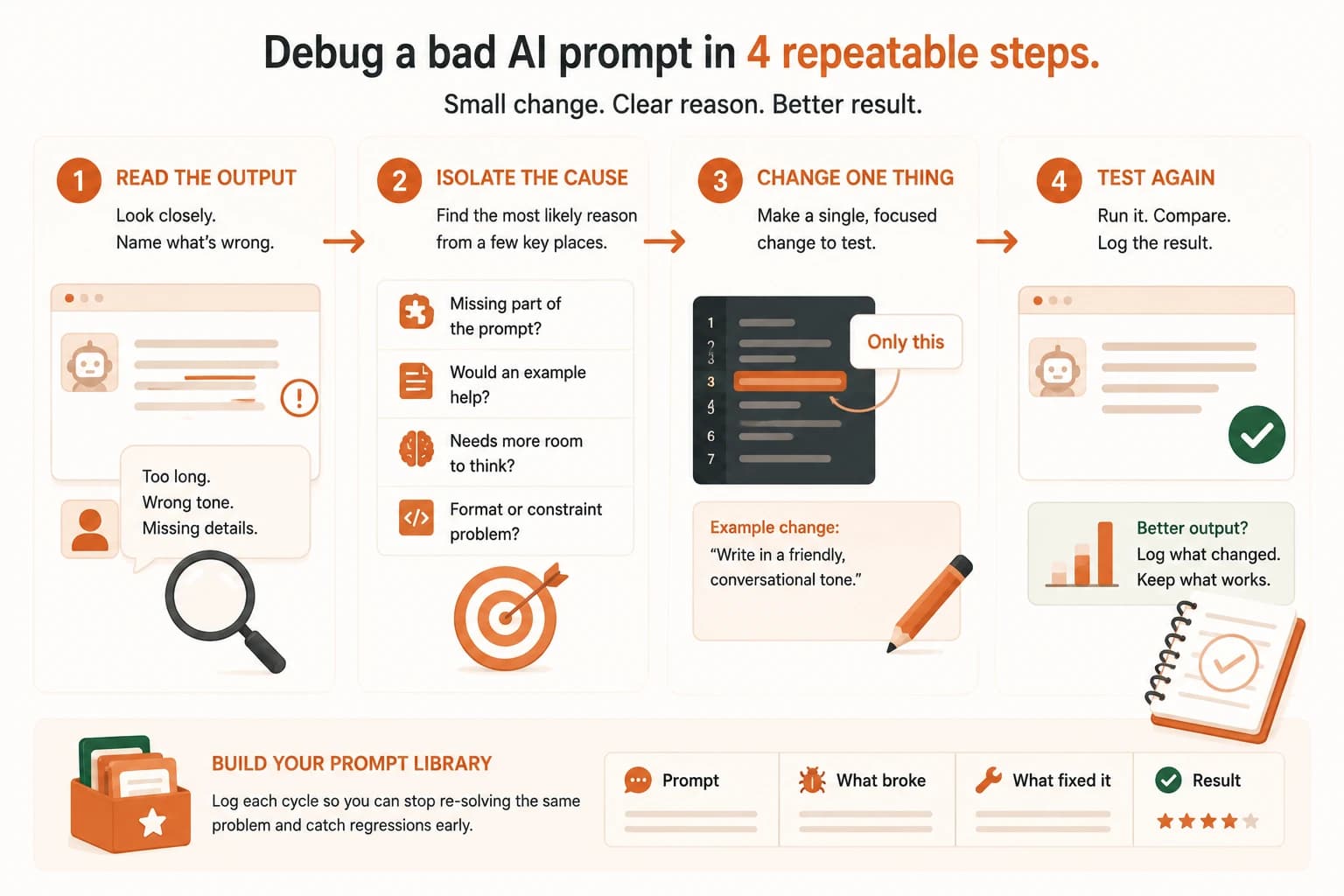
Start with one document and three columns: the prompt itself, what broke the first time you ran it, and what specific change fixed it. That's a complete prompt library. Add a prompt-management tool later, once you're managing dozens of them, not before.
Not every prompt belongs in the library. A one-off question you'll never ask again isn't worth logging. Promote a prompt to a reusable template once you've used some version of it twice, that's the signal it's a pattern in your work, not a one-time task.
One honest caveat: iteration can make things worse, not just better. Adding an instruction to fix one edge case can quietly change how the model handles a case that used to work, a problem sometimes called prompt regression.
I once fixed a support-reply prompt so it would stop signing off with "Let me know if you need anything else!" on every message. Two weeks later I noticed the same edit had also softened how it handled urgent tickets: they stopped getting flagged as urgent at all. I only caught it because I'd logged the exact wording of the fix and could compare it against what came before.
This is exactly why logging each cycle matters. Without a log, "it got worse somehow" is all you'll know. With one, you can see precisely which change to undo.
And you don't need a flawless prompt, you need one that works on the inputs you give it. If it's handled your last several real attempts correctly, log it and move on. Chasing perfection on an input you'll never send is time you could spend on the next problem. Anthropic's prompt engineering docs frame this the same way: before you even start improving a prompt, you need a clear definition of what "working" means and a way to test against it, which is exactly what a logged prompt library gives you.
Your Task
Run three iteration cycles on a failing prompt
Start with this deliberately vague prompt: "Write something for our email newsletter." Run it once and read the output. Then run three separate iteration cycles, changing exactly one thing per cycle, for example the audience, then the tone, then the length or format. After each cycle, write down what you changed and what changed in the output. Budget about 15 minutes total, five minutes per cycle.
Log all three cycles
In a single document, write one line per cycle: the change you made, and the specific difference it made to the output. That three-line log is your first prompt library entry, and the same format works for the next prompt you debug.
Quick check: the debugging loop
You get a bad output from a prompt. What should you do first?
You change a prompt's tone, audience, and length instruction all in the same edit, and the output improves. What's the problem with this fix?
Done? You've completed Lesson 11.08, and the full prompt-engineering foundations module.
FAQ