Controlling AI Output: Format, Prefill, Tone, and Length
Learn how to control an AI's output format, length, and tone with schemas and clear prompts, and why prefilling is fading out of use.

Your script sends a support message to the model and asks for JSON back: sentiment, urgency, an action item. It gets back "Sure! Here's the analysis you requested:" followed by the JSON you actually wanted. Your parser reads the first character, sees S instead of {, and throws.
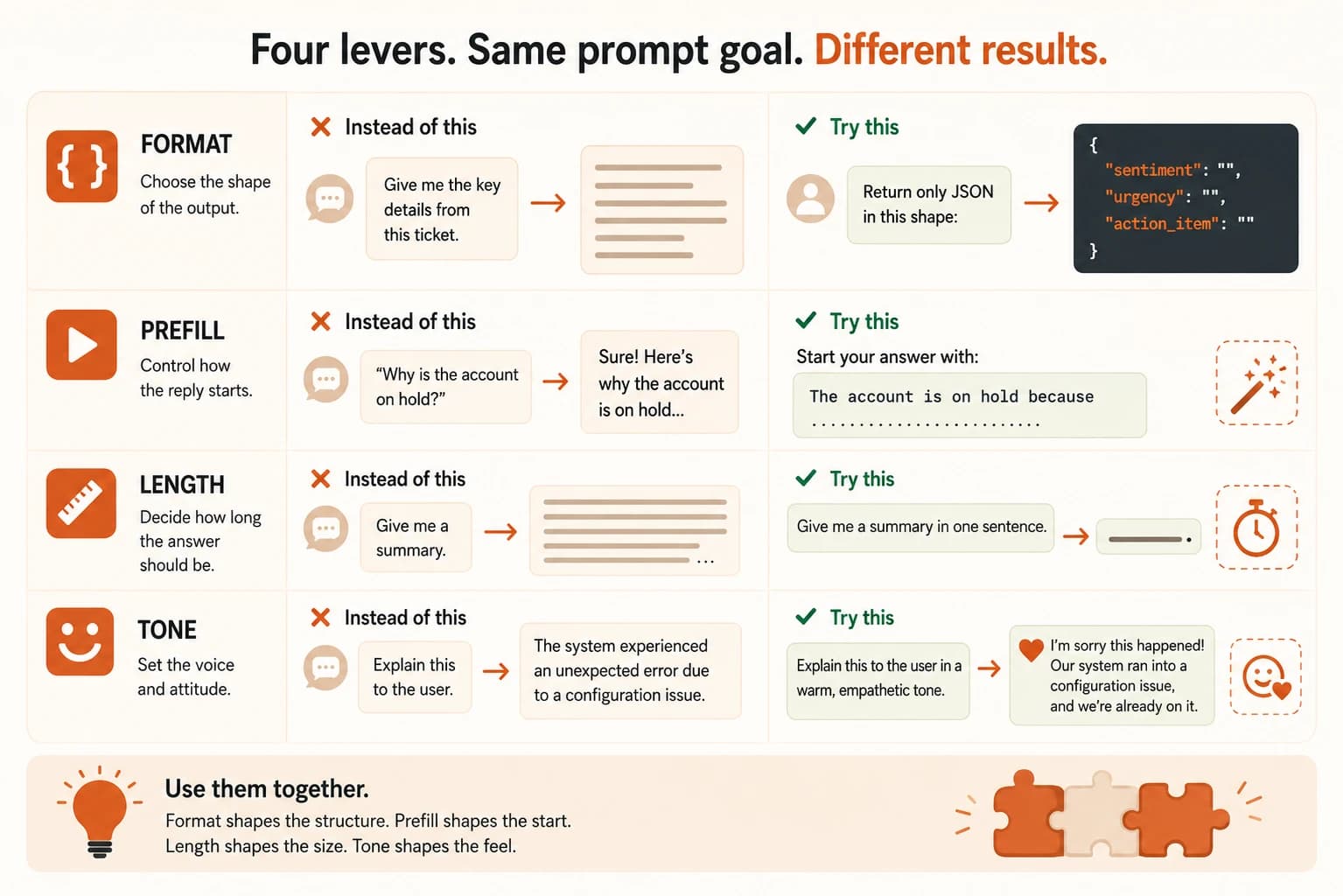
That's not a bug in your code. It's a prompt that never told the model to skip the small talk. Controlling the output means deciding, on purpose, what shape an answer takes instead of hoping the model guesses right. This lesson covers the four levers that do that: format, prefill, length, and tone.
Key Takeaways
- Telling the model the format you want (JSON, markdown, a table) works, but showing one example of that exact format works better
- Prefilling the start of the model's reply is a real technique for skipping preambles, but it's no longer supported on the newest Claude models as of 2026
- Capping output length with a token limit truncates the answer, it does not make the model more concise
- Tone and format rarely conflict, because tone shapes word choice and format shapes structure
What Does It Mean to Control an AI's Output?
Controlling an AI's output means shaping four separate things: the format the answer takes, how the reply starts, how long it runs, and what tone it uses. Each needs its own instruction. Getting one right doesn't fix the others: nail the JSON format and skip length control, and that same script still chokes on a rambling 400-word answer it wasn't built to parse.
You already learned two pieces of the puzzle earlier in this course. The six parts of a prompt named format as one ingredient. The examples you gave the model in the last lesson showed it what good looks like. This lesson is about the output side specifically: what actually happens when your instructions meet the model's habits, and where those habits still win.
Getting Markdown, Tables, and JSON Out of a Prompt
State the format explicitly, then show one example of it. Naming "JSON" isn't enough on its own, the model still has to guess your field names, your nesting, and whether numbers are strings or numbers. One clean example removes almost all of that guessing.
Here's a prompt built around the support-ticket problem from the opening:
Extract sentiment, urgency, and one action item from this message.
Return only a JSON object in this exact shape, no other text:

{"sentiment": "negative", "urgency": "high", "action_item": "Call the customer back today"}

Message: "I've emailed twice about my broken order and nobody has replied. I need this fixed now."
That one-line example does more work than a paragraph of instructions would. The model has something concrete to match instead of an abstract description to interpret.
Wrap the expected output in a delimiter, triple backticks or a custom tag like <result>. That gives your code a clean, predictable place to cut the real answer out of anything the model adds around it.
The best-case version of this skips prompting entirely. A schema is just a spec for your JSON: which fields exist, what type each one is, which are required. Anthropic's Structured Outputs and OpenAI's strict mode both take that spec and use constrained decoding to enforce it. The model is mechanically restricted to valid tokens for your schema as it generates, not just asked nicely to follow it. According to Claude's documentation, this guarantees schema-valid output with no retries needed. Prompt-only formatting, by contrast, is best-effort and can still drift. This is the same reason OpenAI's own documentation now calls its older JSON mode "legacy": valid syntax was never the same guarantee as a valid schema.
Prefilling the Response (and Why It's Fading Out)
Prefilling means you write the first part of the model's reply yourself, and the model continues from there instead of starting from scratch. If you send {"role": "assistant", "content": "{"} as the start of the assistant's turn, the model picks up mid-JSON-object and skips the "Sure, here's your answer" preamble entirely. It's a genuinely clever trick, and for years it was the standard fix for the exact preamble problem from the opening of this lesson.
Quick disambiguation: "prefill" also names something unrelated in how models run internally, the phase where a model processes your entire input at once before generating a reply token by token. That's an inference detail. This lesson is about the prompting technique, writing the start of the reply yourself.
Here's the trick as it works on models that still support it:
User: Give me a JSON object with three famous programming languages and their creators.

Assistant (prefill): {
The model continues from that open brace and lands directly in valid JSON, no lead-in sentence to strip out.
Prefilling is not supported on Claude Fable 5, Claude Mythos 5, Claude Mythos Preview, Claude Opus 4.8, Opus 4.7, Opus 4.6, or Sonnet 4.6, according to Claude's own documentation. If you're building on a current model, use Structured Outputs or a direct system-prompt instruction like "respond without any preamble" instead. A tutorial that still teaches prefill as a universal trick is teaching last generation's workaround.
This is the honest state of things in 2026: prefill still works on some models and still shows up in older tutorials. But the newest, most capable models have moved past needing it, because they now support guaranteed schema compliance directly. I still run into guides from last year teaching prefill like it's a permanent trick you can rely on anywhere. It isn't, and if you're building on a current model, skip straight to Structured Outputs instead of learning a workaround you won't need.
Controlling Length Without Truncating the Answer
The single most common length mistake is treating a token limit as a conciseness setting. It isn't. A max-token cutoff stops generation at a fixed point, it doesn't make the model plan a shorter answer. Say the model was going to write four hundred words and you cap it at one hundred and fifty tokens. You get the first third of that same long answer, cut off mid-sentence, not a tight summary.
If you want a genuinely shorter answer, ask for it directly: "answer in 3 sentences" or "under 100 words" in the prompt itself. Save the token limit for what it's actually for: a hard safety ceiling on cost and runaway generation, not a style instruction.
The two levers aren't interchangeable. Mixing them up is why so many people say the model "ignored my word limit." It didn't ignore anything, it was never told to be brief, only told when to stop.
Controlling Tone Without Losing Accuracy
Tone comes from the same lever you used in the role you hand the model: describing who's speaking and to whom shapes word choice, formality, and warmth. Format and tone rarely fight each other, because format controls structure while tone controls the words filling that structure. You can absolutely get a warm, conversational explanation back inside a strict JSON "summary" field.
The one place they do collide is when a very tight length limit meets an instruction for a warm, elaborated tone. A friendly explanation needs room to breathe; a three-sentence cap doesn't leave much. If you notice the reply "sounds like a robot now" after adding a strict format or length rule, that's usually the tone instruction losing to the format instruction, not a separate bug. Decide which one actually matters more for this specific answer, then say so directly. "Keep it warm, even if that means going slightly over the word count" resolves the tie explicitly instead of leaving the model to guess.
Build a schema-constrained extraction prompt
Write a prompt that extracts three fields from a message: name, request_type, and urgency. Require the output to be a single JSON object in exactly that shape, no other text.
Test it against this message:
"Hi, this is Jordan Reyes. My account got locked out this morning and I have a client call in twenty minutes. Please help ASAP."
Run your prompt in your AI tool of choice. Check two things: does the response start with { with nothing before it, and does it parse as valid JSON with all three fields present? If either check fails, tighten your instruction (add the delimiter tip from earlier, or an explicit example of the exact shape) and run it again.
Done? You've completed Lesson 11.06.
FAQ