Giving the Model a Role and an Audience
Research shows role prompting can drop AI factual accuracy by 5 points while still improving tone. Here's when it helps and when it backfires.

You've typed it a hundred times: "You are a world-class copywriter." "You are an expert Python developer." You picked it up from a tutorial or a Twitter thread months ago. You've added it to almost every prompt since — without ever once checking whether it actually changed the answer.
Role prompting tells the model who to be. An audience prompt tells it who it's talking to. 2026 research shows they're not interchangeable — and neither one is free. Here's what actually happens when you add each one, and when skipping both is the smarter move.
Key Takeaways
- A role prompt ("you are a senior editor") and an audience prompt ("you're talking to a beginner") are two different tools, not two names for the same trick.
- Research on frontier models found expert-persona prompts dropped MMLU accuracy from 71.6% with no persona to 66.3% with a detailed one, so role prompting can actively hurt fact-heavy tasks.
- Role prompting reliably helps tone, style, creative writing, and safety-sensitive tasks, where matching a voice matters more than recalling a fact.
- Audience prompts stay useful across almost every task type, because they calibrate vocabulary and depth instead of pretending the model gained expertise it doesn't have.
What "Give It a Role" Actually Means
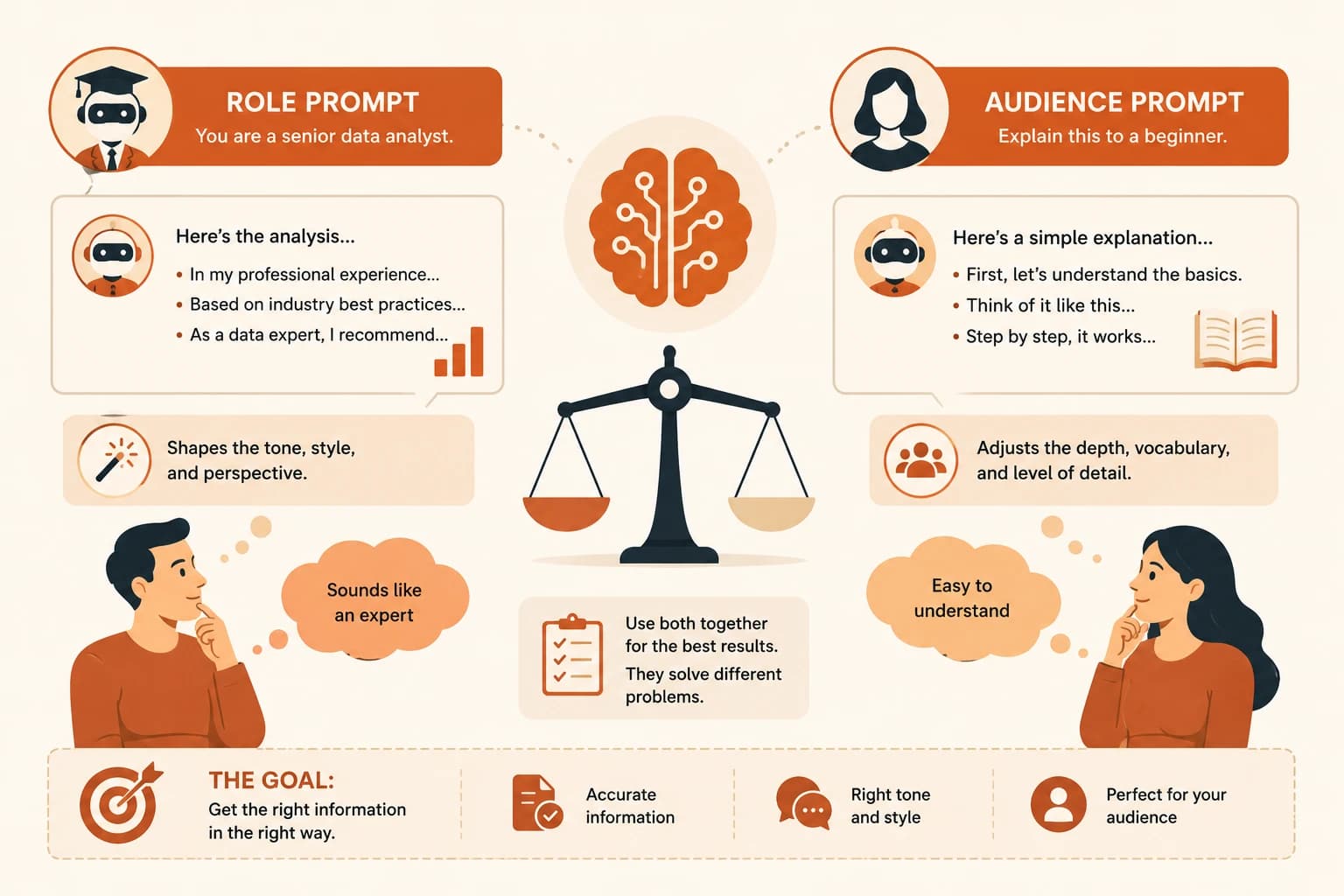
A role prompt assigns the model an identity before the task: "You are a senior data analyst," "You are a patient kindergarten teacher." Role is one of the six reusable parts of a prompt, and naming it pulls in the tone, vocabulary, and conventions associated with that identity.
Role prompting — sometimes called persona prompting — works because it nudges word choice and structure toward what that identity would produce, not because the model actually gains new facts. It read a lot of text written by data analysts during training. Asking it to "be one" points it toward that slice of its training data.
A role changes how the model writes. It does not add anything to what the model knows.
What Changes When You Add an Audience
An audience prompt does the opposite job: instead of naming who the model is, it names who's on the other end. "Explain this to a total beginner." "You're talking to a senior engineer who already knows Python."
This is a genuinely different lever. A role prompt shapes the model's voice; an audience prompt shapes the model's calibration, how much it explains, which words it assumes you know, and how much depth it includes before moving on.
Skip it, and even a perfectly matched role can still explain over a beginner's head or bore an expert with basics they already know. You can use either one alone, or both together, and mixing them up is the single most common source of confusion in prompting advice online.
Does Role Prompting Actually Work?
Yes, but only for some tasks: role prompting reliably improves tone, style, and creative output, while measurably hurting factual accuracy on frontier models. It is not the universal best practice most beginner guides present it as.
A 2026 study on persona routing, published on arXiv, tracked accuracy on the MMLU knowledge benchmark as personas got more detailed. Baseline with no persona: 71.6%. With a minimal expert persona: 68.0%. With a longer, detailed one: 66.3%. A separate study covering 2,410 questions across four model families, summarized by PromptHub, found personas had no effect or a negative one on accuracy-based tasks.
The likely reason: telling the model it's an expert doesn't add a single fact to its training data. Instead, it nudges the model into a "sound like an expert" mode that competes with a "recall the correct answer" mode, and on frontier models, that trade rarely pays off.
When Role Actually Helps
The same research found real wins, just not on factual recall. Role prompting is worth using for:
- Matching a specific voice or writing style, like asking for copy "as a warm, conversational brand voice would write it"
- Creative writing where tone matters more than facts, like fiction or marketing copy
- Safety and guardrail tasks, where a role like "cautious compliance reviewer" keeps output more consistent
- Format and structure adherence, where a role like "meticulous technical editor" nudges toward cleaner formatting
If your task is about how something sounds, a role is a cheap, reliable lever. If it's about whether something is correct, test without one first.
When It's Just Habit
Adding "you are an expert" to a coding or math prompt is the most common version of cargo-cult prompting — a habit copied from old advice, never re-checked against the model you're actually using. Once you know why it happens, it's easy to spot in your own prompts.
Expert personas cost accuracy specifically on math, coding, and fact-heavy questions, exactly the tasks where you can least afford a wrong answer. If you're debugging code or need a real number, drop the persona and ask directly.
This connects back to how the model works under the hood — it's predicting the next likely token, not pulling a verified fact from a database. A persona shifts which tokens look "likely" toward expert-sounding phrasing, which is not the same thing as shifting toward correct phrasing.
If you're not sure whether a task needs a role at all, how AI can draft that role for you usually surfaces the answer faster than guessing — it tends to skip the persona entirely on tasks where the research above shows one would only hurt.
Combining Role and Audience the Right Way
The two tools stack cleanly because they solve different problems. Take: "You are a patient science teacher, explaining this to a curious ten-year-old." That single line sets the model's voice (teacher) and its calibration (a ten-year-old's vocabulary and pace) at the same time.
Used together like this, role and audience rarely conflict, because a role change adjusts vocabulary and tone while an audience change adjusts depth and pacing. Use one without the other and you'll fix half the problem: the right tone with the wrong depth, or the right depth in the wrong voice. The combination is strongest exactly where role prompting shines on its own: writing, teaching, and tone-sensitive tasks, not fact lookups.
Your Task
This takes about ten minutes with whatever AI tool you already have open.
Pick one real task you'd normally ask AI to help with
Choose something you actually need, like explaining a concept, drafting an email, or debugging a short piece of code. Keep it specific enough to compare two answers side by side.
Run it with no role or audience
Type the plain task with no persona at all: just the instructions from the specificity you practiced in the last lesson. Save this answer.
Run it again with a role added
Add "You are a [relevant expert role]" to the front of the exact same prompt. Save this second answer.
Compare the two answers side by side
Ask yourself: did the role change the tone, or did it change the actual facts or logic? Write one sentence naming the real difference, if there is one. A smaller gap than you expected is a real result too — newer models are exactly where that gap shrinks.
Done? You've completed Lesson 11.04.
FAQ