Showing vs Telling: Examples and Few-Shot Prompting
Few-shot prompting means giving an AI examples, not just instructions. Learn how many to use, how to order them, and how to test one for edge cases.

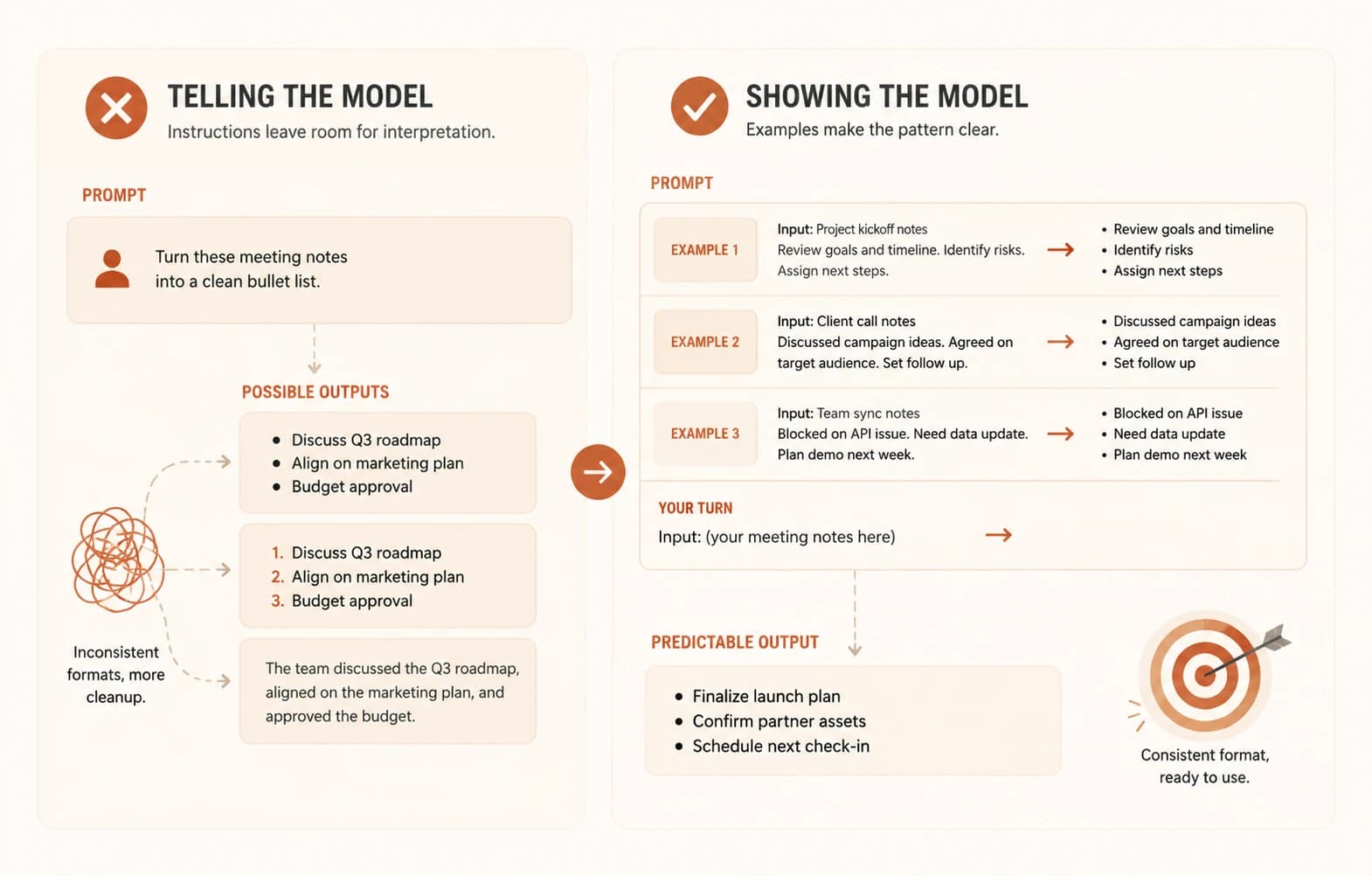
You type the same instruction into three separate chats: "turn these meeting notes into a clean bullet list." The first reply uses dashes. The second uses numbers. The third writes a paragraph and calls it a summary. Same instruction, same model, three different formats, and you still have to fix all three by hand.
That's the gap this lesson closes. You've spent the last few lessons learning to tell a model clearly what you want: naming the parts of a prompt, keeping instructions clear and direct, and giving it a role and an audience when it helps. This lesson is about showing it instead. You'll learn what few-shot prompting is, how many examples to use, and why the order of your examples changes the answer. Then you'll build a 3-example set for a real formatting task and break it on purpose, to see exactly what a good example set can and can't do.
Key Takeaways
- Few-shot prompting means giving the model 2-3 example input-output pairs before your real request, instead of just describing the format in words.
- Most of the benefit shows up by your second example. Past roughly eight examples, accuracy can flatten out or even drop.
- The last example in your prompt carries the most weight, so put your clearest, most representative one there, not your weakest.
- A good example set doesn't guarantee a correct answer on every input. Testing it against an edge case is how you find out where it actually breaks.
What Is Few-Shot Prompting?
Few-shot prompting means giving the model a handful of example input-output pairs directly in your prompt, then asking it to apply the same pattern to something new. Instead of describing the format you want, you demonstrate it.
The name comes from "shots," meaning examples, and this shot-based naming convention splits into three levels: zero-shot is no examples, just an instruction, one-shot is a single example, and few-shot is generally two or more. All three work the same way underneath: the model reads whatever is in your prompt and predicts what comes next, so examples change its prediction just as much as instructions do, sometimes more.
This is why "make it consistent" so often fails as an instruction. Consistent according to what pattern? An example doesn't leave that open. It shows the exact shape you want copied.
Zero-Shot vs One-Shot vs Few-Shot: When Each One Fits
A zero-shot prompt is fine for simple, common tasks the model has seen a thousand times, like summarizing a paragraph or translating a sentence. Adding examples here mostly wastes tokens.
One-shot prompting earns its keep when the task is a little unusual but a single example removes the ambiguity, like showing one properly formatted entry so the model matches your exact style.
A few-shot prompt is worth the extra length when you need a specific, repeatable format, tone, or structure. That's exactly the meeting-notes problem from the opening, and it's what instructions alone kept failing to fix.
Zero-shot, one-shot, and few-shot at a glance
| Approach | Examples given | Best for |
|---|---|---|
| Zero-shot | 0 | Simple, common tasks the model already handles well |
| One-shot | 1 | Removing one specific ambiguity in an otherwise clear task |
| Few-shot | 2 or more | Locking in a consistent format, tone, or structure |
Picking the wrong one has a real cost. Zero-shot on a format-sensitive task gets you three different outputs for the same instruction, like the meeting notes above. Few-shot on a task the model already handles well just burns extra tokens for no gain.
How Many Examples to Use (and Why More Isn't Better)
Research on few-shot prompting keeps landing on the same shape: most of the improvement happens by your second example, then gains flatten out. PromptHub's guide to few-shot prompting puts a rough ceiling around eight examples, past which extra examples mostly add tokens without adding accuracy, and can occasionally make things worse.
There's a second reason to stay lean: reasoning tasks. If your examples include a flawed step in the reasoning, like a slightly wrong arithmetic shortcut, the model can copy that flaw into new answers instead of reasoning through the problem on its own. More examples means more chances to accidentally teach the wrong habit. Showing the model worked reasoning steps instead of just answers is also the basis for chain of thought prompting, covered a couple lessons ahead.
Start with 2-3 examples. Add a fourth only if you're still seeing inconsistent output, and stop well before you reach eight. If it's not working by example three, the problem is usually the examples' quality, not their quantity.
Order Matters: Put Your Best Few-Shot Example Last
Models weigh the most recent thing they've read more heavily than what came earlier in the same prompt. In a few-shot prompt, that means whichever example you place last has outsized influence on the model's answer, more than the instruction floating above all of them.
Put your clearest, most representative example last. If one of your examples is unusual, an edge case, or slightly off-pattern, put it first or in the middle instead. Never put it last, or the model may treat that oddity as the rule instead of the exception.
Watch for two related failure modes. Recency bias means the model over-weights your last example. Majority-label bias means that if 2 of your 3 examples share an outcome, the model leans toward repeating that outcome even when the new input doesn't call for it. Mixing your example outcomes, not just their wording, helps guard against both.
Build a 3-Shot Example Set
Here's the meeting-notes task from the opening, solved with three examples instead of one instruction.
Turn rough notes into a clean bullet list. Each bullet starts with a verb.

Notes: "talked about Q3 budget, need to send numbers to finance by friday, also sarah is out next week"
Bullets:
- Review Q3 budget figures
- Send budget numbers to finance by Friday
- Note Sarah's absence next week

Notes: "client wants a demo, aim for tuesday, prep the slides beforehand"
Bullets:
- Schedule a client demo for Tuesday
- Prepare demo slides in advance

Notes: "reminder to renew the domain, expires end of month, also check ssl cert"
Bullets:
- Renew the domain before it expires this month
- Check the SSL certificate status

Notes: "standup notes, discussed the login bug, assigned to jordan, follow up wednesday"
Bullets:
Notice what the three examples do together that one instruction couldn't: every bullet starts with a verb, every bullet is a complete thought pulled from a fragment, and none of the original casual phrasing survives. That's the pattern the model now has to match on the fourth, unfinished entry.
Testing Few-Shot Prompting Against an Edge Case
A 3-shot example set isn't automatically correct on every input, it's only as good as your testing. Try feeding this prompt a note that doesn't fit the pattern, like: "notes: ugh".
Every one of your three examples had a clear action buried in it. This one doesn't. Depending on the model, you'll usually get one of two failures. Either it invents an action that isn't in the note at all, or it writes a single vague bullet like "Review notes" that technically follows the format but adds no real information.
I ran into this exact failure the first time I tried few-shot on a formatting task. It worked cleanly nine times in a row, then invented an action item out of a note that just said "n/a." The fix wasn't more examples, it was one added instruction: "if no clear action exists, write 'No action needed.'" Examples handle the shape. Instructions still need to handle the exceptions your examples don't cover.
That's the real lesson underneath the task: few-shot prompting is powerful for locking in a format, but it doesn't replace testing. The only way to know where your examples run out is to feed them something they weren't built for.
Your Task
Build your 3-shot set
Pick a real formatting task you actually do, like turning rough notes into bullets, or messy text into a table row. Write 3 example input-output pairs, then run your prompt on a 4th real input and confirm the format matches your examples exactly.
Break it with an edge case
Feed the same prompt an input that doesn't fit your examples' pattern, empty text, a single word, or something with no clear content to extract. Read the output and write down, in one sentence, why it failed. Then add one instruction alongside your examples to handle that specific case, and re-run it to confirm the fix works.
Done? You've completed Lesson 11.05.
FAQ