A Working Catalog of Prompt Patterns (8 to Know)
Prompt patterns are reusable prompt structures like Persona and Chain-of-Thought. Here are the 8 worth learning and how to pick the right one for a task.

You tell the model to act as "a patient senior support rep" and reply to tickets in three parts: acknowledge, explain, next step. For the first four tickets, it works. Then you add one more instruction, something small, like "keep it under 80 words," and the persona quietly evaporates. The replies get shorter, sure, but they also get generic, like the model forgot who it was supposed to be.
It didn't forget anything. You were never actually running two named prompt patterns together, a persona and a fixed output template. You were running something that looked like both for a while, until a new instruction exposed the gap. That's what this lesson fixes: giving you a working set of named patterns, so "sort of works" turns into "I know exactly which piece is missing."
Key Takeaways
- A prompt pattern is a reusable prompt structure with a name, like Persona or Chain-of-Thought, that solves one recurring kind of problem.
- The original academic catalog lists 16+ named patterns. Most day-to-day work only draws from about 8 of them.
- Patterns are usually combined, not used alone. Persona plus Template is one of the most common pairings.
- Picking the right pattern for a task matters more than memorizing all of them: a short decision guide beats a long list you can't apply under pressure.
What Is a Prompt Pattern?
A prompt pattern is a reusable prompt structure with a name, like Persona or Chain-of-Thought, built to solve one specific, recurring problem when you're prompting an AI model. The idea comes directly from software design patterns: instead of solving the same layout problem from scratch every time you code, you reach for "Observer" or "Factory." Prompt patterns work the same way, except the reusable thing is a shape of instructions instead of a shape of code.
Researchers at Vanderbilt formalized this idea in a widely cited prompt pattern catalog that documents 16 named patterns across five categories, from output formatting to error-checking to how you interact with the model turn by turn. That catalog is a good reference. It is not a checklist you need to memorize. Without any name for what you're doing, every fix feels like a one-off trick, and you re-solve the same problem from scratch the next time it shows up wearing a different task. A name is what turns "I got lucky" into "I know which lever to pull."
The Persona and Template Patterns
Persona and Template are usually the first two patterns anyone reaches for, and they solve two different halves of the same problem.
The Persona pattern assigns the model a role, like "act as a patient senior support rep" or "act as a skeptical code reviewer." It shifts the tone, vocabulary, and priorities the model brings to the task, the same way the anatomy of a prompt treats "role" as one of its six reusable components. The Template pattern locks in the exact shape of the output: three sections, a specific word count, a fixed order. On its own, a persona shapes voice but not structure. A template shapes structure but not voice.
The support-ticket example at the top of this lesson broke because the template ("under 80 words") was added without re-confirming the persona was still doing its job. When you add a new constraint to a prompt that's already running two patterns, check both, not just the one you just touched.
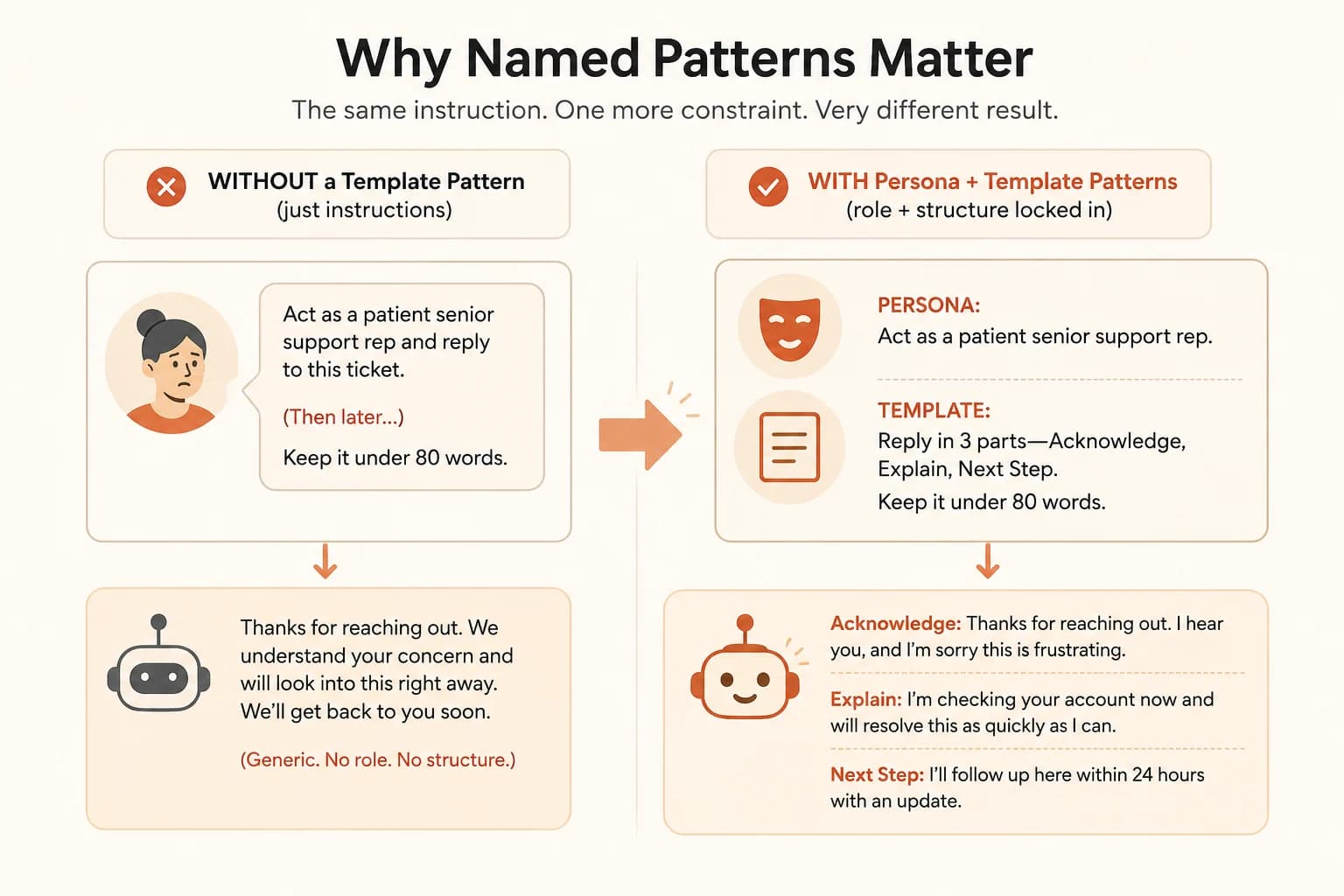
That's why they're almost always paired: Persona gives you the voice, Template gives you the shape, and together they produce output that sounds right and is structured right, instead of just one or the other. Move both patterns into a standing instruction instead of a one-off prompt, and you've got the beginning of a reusable system prompt.
The Few-Shot and Chain-of-Thought Patterns
You already know these two by name from Module 11, just not as "patterns" yet.
Few-Shot is what showing vs telling covered: giving the model two or three worked examples instead of describing what you want in the abstract. It's the right call when you know exactly what good output looks like but describing it in words is clunky, like a specific tone or formatting quirk that's easier to show than explain.
Chain-of-Thought is what giving the model room to think covered: asking the model to reason through a problem step by step before giving a final answer, instead of jumping straight to it. It earns its cost on multi-step math, logic, or planning tasks, and it's often wasted breath on simple lookups or short-form writing where there's nothing to reason through.
The two combine well: few-shot examples that themselves show the reasoning steps, not just the final answer, teach the model both what "good" looks like and how to get there. That combination is sometimes called few-shot chain-of-thought, and it tends to outperform either pattern running alone on genuinely hard tasks.
The Decomposition and Self-Consistency Patterns
Decomposition means breaking one large task into smaller, ordered subtasks instead of asking for everything in a single pass, the same instinct behind prompt chaining. Ask for a research summary in one shot, and you'll often get something shallow. Ask the model to first list the subtopics, then research each one, then synthesize, and each step gets the model's full attention instead of a fraction of it. Anthropic's prompt engineering docs list prompt chaining alongside clarity and examples as one of the core techniques worth having in the toolkit, not a niche trick.
Self-Consistency takes a different approach: instead of trusting one chain-of-thought answer, you generate several independent reasoning paths for the same question and take whichever answer shows up most often. Prompt Engineering Guide's writeup on self-consistency walks through this with an age-calculation example: three attempts produce two answers of 67 and one of 35, so 67 wins as the final answer.
Self-consistency costs more, since it means running the same prompt multiple times instead of once. It earns that cost on arithmetic, logic, and other tasks with a single checkable right answer. It's not worth it for open-ended writing, where there's no "majority answer" to converge on, or for simple factual lookups where one clean pass is already reliable.
The Reflection and Cognitive Verifier Patterns
Reflection asks the model to check its own work before you do: "review your answer above for errors before finalizing it." It's a cheap way to catch obvious mistakes, though it's not a substitute for actually checking sensitive or high-stakes output yourself. Skip it on anything you're about to ship unread, and the mistake it would have caught ships too.
Cognitive Verifier flips the order of operations: instead of answering your question directly, the model first generates a set of clarifying sub-questions, answers those, then combines them into a final response. It's useful when your original question was broader than you realized, and breaking it into pieces first produces a more complete answer than tackling it head-on. Skip it and ask the broad question straight, and you'll usually get a broad, thin answer back, one that technically responds to what you typed but misses the part you actually needed.
Both patterns share the same underlying move: making the model check itself, either after the fact (Reflection) or before committing to an answer (Cognitive Verifier). I still read the output myself either way. A model catching its own obvious errors is useful, but I've seen reflection pass something that reads confidently and is still wrong, it's a net, not a guarantee.
How to Pick the Right Prompt Pattern for a Task
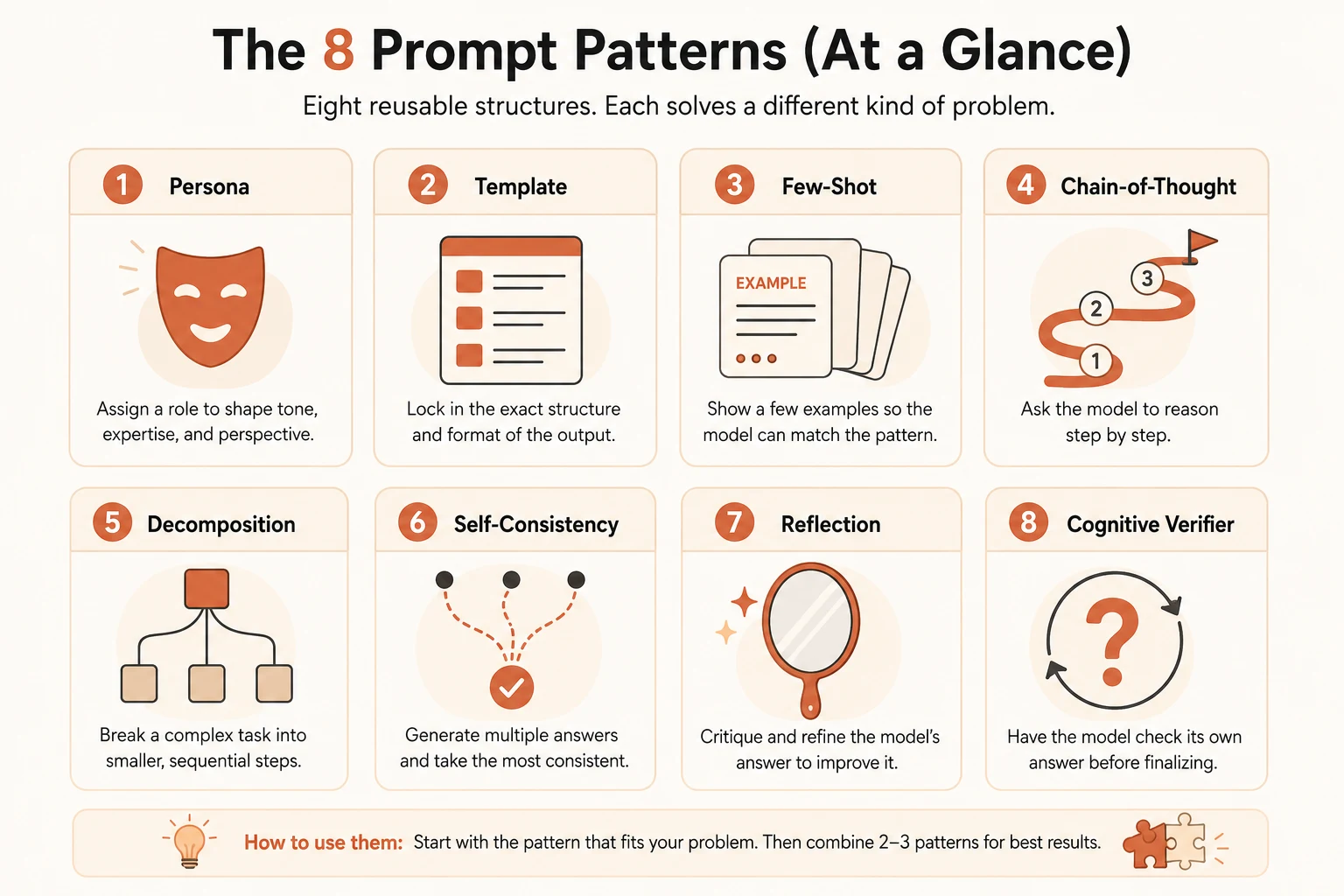
Knowing eight names doesn't help under a deadline if you can't tell which one applies. Match the task type in front of you to a starting pattern, then stack a second one if the first isn't enough:
Which pattern fits which task
| Task looks like this | Start with |
|---|---|
| You need a consistent voice or role across replies | Persona |
| You need the same output shape every time | Template |
| You know what good output looks like but it's hard to describe | Few-Shot |
| The task needs multi-step reasoning, not a lookup | Chain-of-Thought |
| The task is big enough that one pass produces something shallow | Decomposition |
| There's one checkable right answer and it's worth extra API calls to confirm it | Self-Consistency |
| You want the model to catch its own mistakes before you do | Reflection |
| Your own question might be broader than you first framed it | Cognitive Verifier |
Most real prompts end up stacking two or three of these, not running one in isolation. Persona plus Template for anything customer-facing. Few-Shot plus Chain-of-Thought for anything genuinely hard. Start with whichever single pattern matches your task best, then add a second only once you've seen where the first one falls short.
Once you're reaching for the same pattern combination on every new task, it's worth letting AI draft that combination for you instead of assembling it by hand each time.
Your Task
Match 6 tasks to their pattern
For each task below, write down which pattern (or pair of patterns) from this lesson fits best, and one sentence on why:
- Writing customer replies that always sound like the same brand voice
- Solving a multi-step word problem correctly
- Getting a model to format output as a specific 4-field record every time
- Double-checking a single numeric answer you need to be right
- Answering a question you suspect is broader than you first asked it
- Teaching the model a formatting quirk that's easier to show than explain
Check your answers
Compare your six answers against the decision table above. For any task where you picked something different from the table, write one sentence on what made your reasoning different, that's often a sign of a real edge case worth remembering.
Quick check: matching patterns to tasks
You need a model to answer customer emails in the same warm, specific brand voice every single time, with the same three-part structure. Which pair of patterns fits best?
A task has one checkable right answer, and getting it wrong is costly. You're willing to pay for a few extra model calls to be more confident. Which pattern is built for exactly this?
Done? You've completed Lesson 12.01 and have a working set of prompt patterns to reach for.
FAQ