What Is Model-Specific Prompting? A Clear, Honest Guide
Model-specific prompting means writing prompts for how each model interprets instructions. See what changes across Claude, GPT, Gemini, and open models.

You copy a prompt that worked perfectly in ChatGPT, paste it into Claude, and the output ignores half your instructions. Nothing crashed. There's no error message. The formatting is just gone, the JSON you asked for came back as a paragraph, and you're left wondering if the model got dumber overnight.
It didn't. Model-specific prompting means writing (or adapting) prompts to match how a particular model was actually trained to respond. It's not safe to assume instructions that work on one model will transfer cleanly to another. Claude, GPT, Gemini, and open models like Llama each reward different instruction styles, so a prompt engineered for one is not automatically a good prompt for the rest. The fix isn't picking a "better" model, it's learning what to change when you move between them.
Key Takeaways
- Prompts are not portable by default: reusing a GPT-tuned prompt on Claude (or vice versa) reliably produces worse output, not because a model is "worse," but because it wasn't trained to respond to those specific instruction patterns
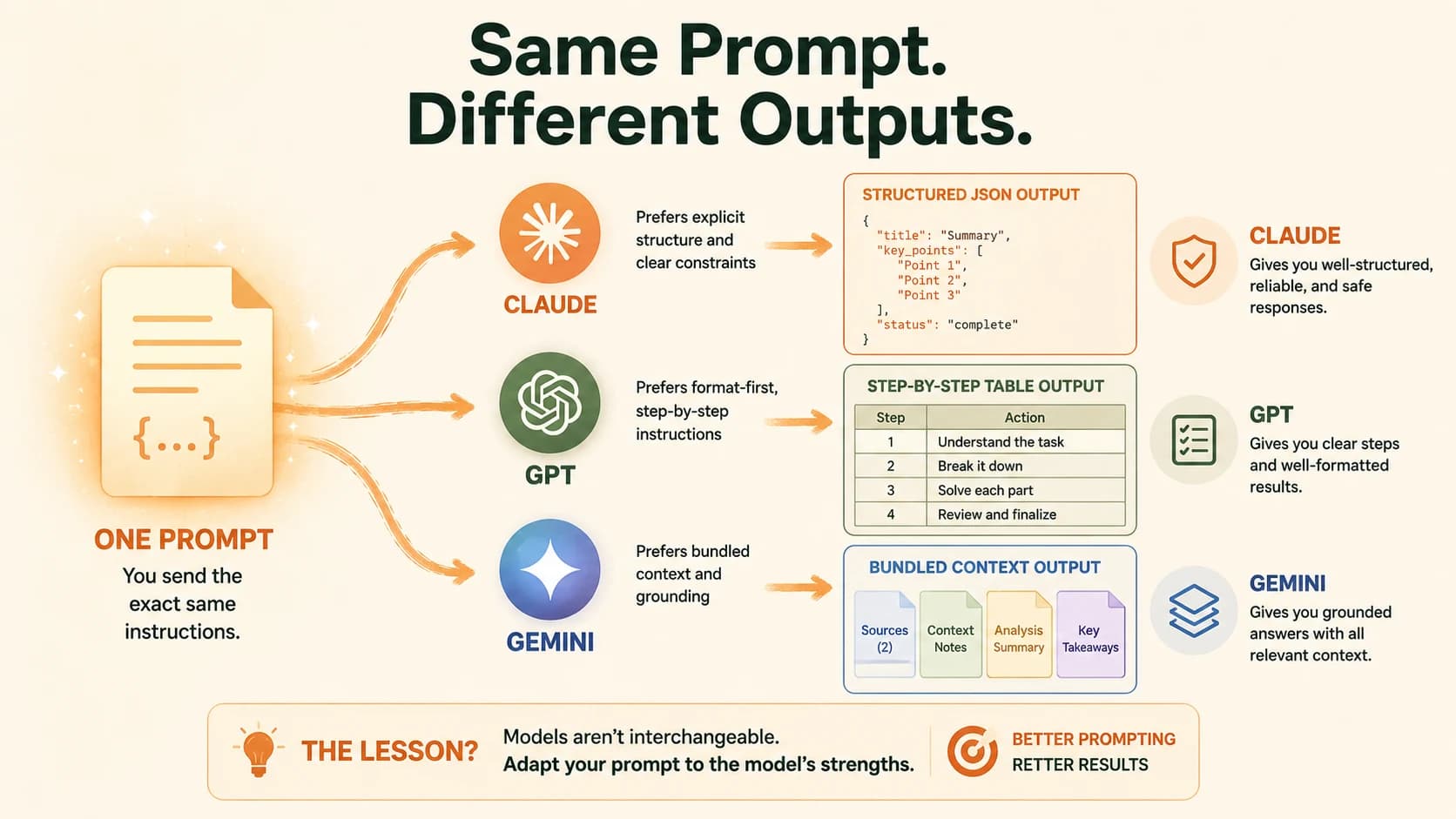
- Claude rewards explicit structure (XML tags, stated success criteria); GPT rewards format-first, step-by-step instructions; Gemini rewards bundled context and grounding
- Open models like Llama and Mistral need shorter, more direct prompts with explicit examples, since they lack the heavy instruction-tuning layer hosted models ship with
- Porting a prompt across models is a real skill: rebuild it for the target model's habits, then log what actually changed instead of guessing
What Actually Changes Between Models
Skip this and you'll keep blaming the model when it's really the prompt.
The differences between Claude, GPT, and Gemini aren't just about raw capability. They're about how each one was fine-tuned to interpret instructions. Anthropic trained Claude with a method called Constitutional AI. That's why it's especially responsive to explicit constraints and role framing. OpenAI went a different direction, leaning GPT toward strong agentic and tool-use behavior, which is why it wants the output format spelled out before anything else. Google tuned Gemini around grounding and multimodal context. Hand it everything relevant up front, and it performs best; drip-feed instructions, and it doesn't.
Claude vs GPT vs Gemini vs open models: prompting traits
| Model family | Responds best to | Common failure if you skip it |
|---|---|---|
| Claude | XML-tagged structure, explicit success criteria, direct instruction | Ignores nuance in a wall of unstructured prose |
| GPT | Format stated first, step decomposition, hard constraints | Produces reasonable but loosely formatted output |
| Gemini | Context and source material bundled together, grounding instructions | Answers narrowly instead of using full context provided |
| Open models (Llama, Mistral) | Short, direct prompts, explicit examples, tight constraints | Drifts off-task without a built-in helpfulness layer to fall back on |
None of this means one model is smarter. It means each one is listening for different signals, and a prompt that only speaks one model's language will underperform everywhere else.
How Claude Prompts Differently
Claude was trained to treat explicit structure as a strong signal, not decoration. Wrapping your source material or task in XML tags, and stating exactly what "done" looks like, consistently gets better results than a long paragraph of instructions.
Weak Claude prompt: "Look at this meeting transcript and pull out the action items please, thanks so much."
Stronger Claude prompt:
<transcript>
[meeting notes here]
</transcript>

Extract every action item from the transcript above. Output a JSON array
of objects with "owner" and "task" keys. Do not include commentary outside
the JSON.
The second version gives Claude a clearly bounded input, a stated output schema, and an explicit constraint. That specificity is doing the real work, not the politeness of the first version. Skip this and a Claude-powered feature will "work" in your manual testing, then quietly return prose instead of JSON the first time a real user's transcript is messier than your test case, and whatever's parsing that output downstream just breaks. If you haven't yet, it's worth reviewing prompt structure basics before layering model-specific habits on top. Claude's structure sensitivity just amplifies whatever foundation you're already building on.
I'll admit I resisted the XML-tag habit for longer than I should have. It looked like unnecessary ceremony for what felt like a plain-English instruction. It isn't ceremony, it's the one signal Claude reliably treats as a hard boundary instead of a suggestion.
Anthropic's own prompting best practices confirm this directly: Claude performs best with clear success criteria, structured inputs, and explicit output constraints, not extra politeness framing.
Once you're maintaining several prompts like this across a team, system prompt design covers how to keep that structure consistent instead of rebuilding it from scratch each time.
How GPT Prompts Differently (Model-Specific Prompting in Practice)
GPT tends to want to know the shape of the answer before it starts reasoning about the content. State the format up front: table, JSON, numbered list, whatever you need, then give the task.
Weak GPT prompt: "Summarize this and give me the key points and also make it structured somehow."
Stronger GPT prompt: "Return a markdown table with columns Point and Why It Matters. Summarize the text below into exactly five rows. Text: [content]."
OpenAI's own structured outputs guidance confirms this pattern: giving GPT an explicit schema up front removes the need for strongly worded prompts to get consistent formatting, since the model no longer has to guess at the shape you want.
GPT also responds well to being asked to check its own output against your rules before finishing, a lightweight self-check pass that catches format drift before you see it. This matters more the longer your task gets: split a multi-part request into smaller explicit steps rather than one long paragraph asking for everything at once. Skip the format-first instruction and you'll usually still get a readable answer, the actual risk is a spreadsheet import or a downstream script expecting five columns and getting three, silently, with no error to catch it.
How Gemini Prompts Differently
Gemini was built multimodal from the ground up, and it performs best when you hand it everything it needs in one bundle rather than assuming it will infer missing context. If you're asking it to reason about a document, an image, and a question together, put all three in the same prompt instead of referencing "the file I mentioned earlier."
Grounding instructions help too: tell Gemini explicitly to base its answer only on the material you've provided, especially for research-heavy tasks where you don't want it filling gaps with general knowledge. This is where Gemini's strength shows up most: tasks that combine real-time information, documents, and visual content in a single request. Skip the grounding instruction on a research task and Gemini won't refuse, it'll just blend your source material with its own background knowledge, and you won't notice the seam until someone fact-checks a detail that was never actually in your documents.
Open Models Are a Different Game Entirely
Running Llama, Mistral, or Qwen locally through something like Ollama changes the rules again. These models typically use raw instruction-tag formats under the hood. And they don't carry the same heavy layer of reinforcement learning from human feedback that Claude, GPT, and Gemini ship with in their hosted, consumer-facing versions.
Practically, that means shorter and more direct prompts, with explicit examples, work better than the conversational, somewhat forgiving style that hosted models tolerate. Think of it less like talking to a well-trained assistant and more like giving very precise instructions to someone capable but literal. A vague instruction that a hosted model would gracefully interpret can send a local open model straight off-task.
That lighter safety layer also means open models need more of your own adversarial testing before you trust them with real users, since they won't catch as many hostile prompts on their own.
Don't assume a prompt that works well on a small local model will scale up cleanly to a larger one in the same family. Model size changes instruction-following reliability even within the same architecture, so retest before you trust it in production.
Porting a Prompt Without a Rewrite: The Exercise
Here's the practical version of everything above, using one real prompt across three models.
Starting prompt (built for GPT): "Return a JSON list of action items from these meeting notes. Format: []. Notes: [transcript]."
Run this exact prompt in Claude with no changes, and it commonly comes back as a bulleted list with commentary wrapped around it, not clean JSON. Claude wasn't ignoring you, it just doesn't treat a bracketed format hint the same way GPT does. Wrap the notes in <transcript> tags and state the output constraint as its own sentence, as shown in the Claude example above, and the JSON comes back clean on the first try.
Run the same original prompt in Gemini, and results are inconsistent depending on how much surrounding context it has. Bundling the transcript, the format spec, and an explicit "use only the notes below" instruction into one block fixes it.
Portability report: same prompt, three models
| Model | What broke with the original GPT prompt | Fix that worked |
|---|---|---|
| Claude | Output wrapped in prose instead of clean JSON | Wrapped notes in XML tags, stated the schema as its own instruction |
| GPT | Nothing, this was the native prompt | No fix needed |
| Gemini | Inconsistent structure depending on context ordering | Bundled notes, format spec, and grounding instruction together |
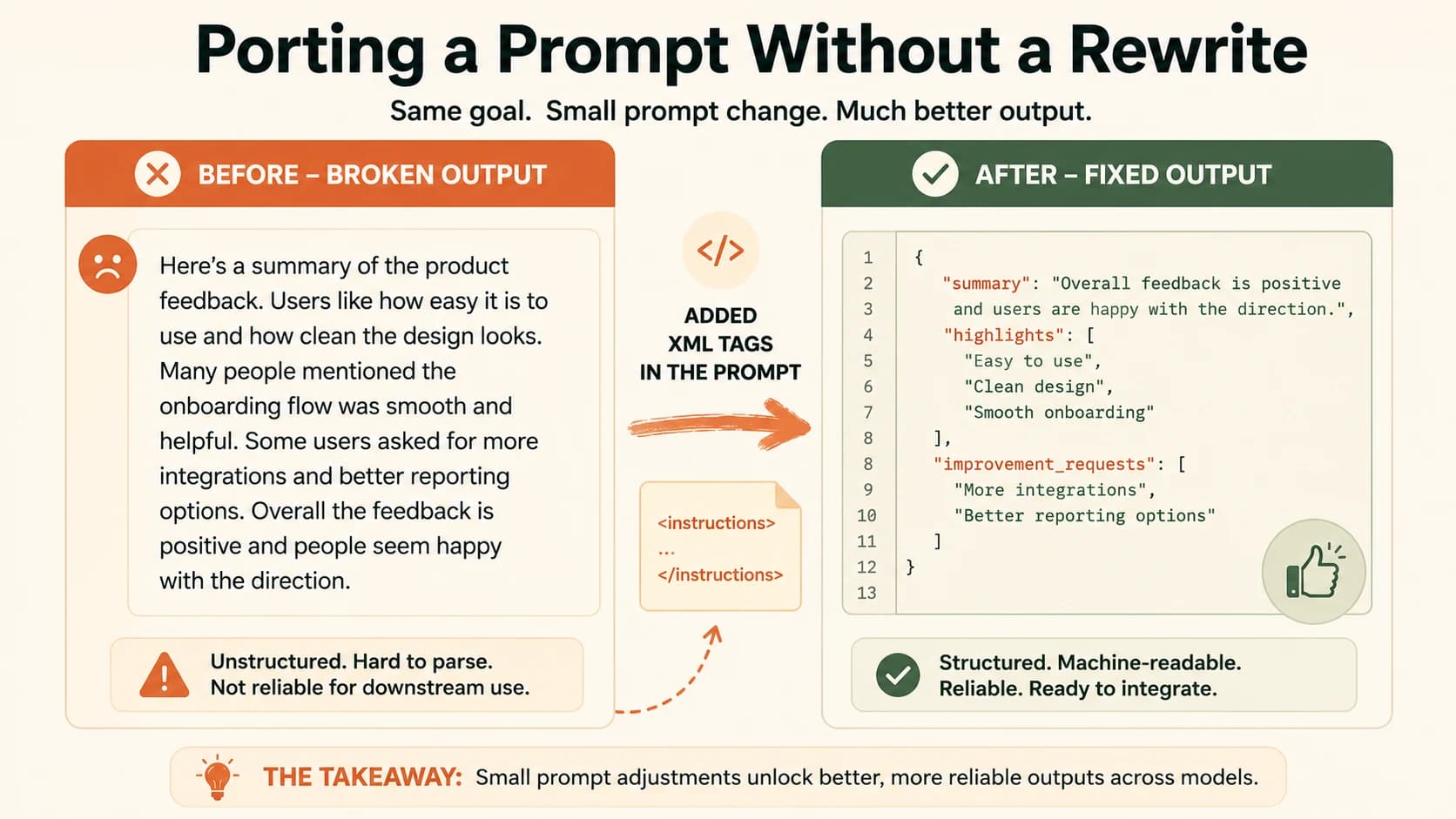
That's the whole exercise: pick one real prompt you use regularly, then run it unmodified on two other model families. Write down exactly what changed, tone, structure, accuracy, before you touch anything. The gap you find is more instructive than any general rule in this article. Don't copy-paste a prompt across models and hope, rebuild the parts that model actually listens for. Once you've logged a few of these, you'll start predicting the fix before you even run the test. For a wider set of reusable structures to draw from when rebuilding, this catalog of prompt patterns is a good next stop.
What Is Model-Specific Prompting?
Model-specific prompting is the practice of adjusting a prompt's structure, phrasing, and constraints to match how a particular AI model was fine-tuned to interpret instructions, rather than assuming one prompt works identically across every model. It matters because the same request can produce a clean, on-format answer in one model and a messy, off-format one in another, even though nothing about the underlying task changed.
This connects directly to a topic covered earlier in this path: if you're prompting a reasoning model like OpenAI's o-series or DeepSeek R1, the model-specific differences go even deeper, since those models actively want less instruction, not just differently structured instruction.
Pick a prompt and run it unmodified on a different model
Pick a prompt you actually use, ideally one with a structured output requirement like JSON or a table. No prompt of your own handy? Reuse the meeting-notes JSON example from this lesson.
If you only have access to one model family, that's fine, use two different tools from the same provider (for example, the web chat version and the API playground) since prompt behavior can already shift between interfaces.
Run the prompt unmodified on a model family you don't normally use it on. Note exactly what broke: wrong format, missing constraint, extra commentary, or a tone shift.
Rebuild the prompt for that model and log the fix
Rebuild the prompt using the traits from the comparison table above, then rerun it on the new model.
Write one line naming what you changed (for example, "added XML tags around the input") and one line naming what changed in the output. That's your portability report, done.
Done? You've completed Lesson 13.08.
FAQ