System Prompts That Scale: A Template You Can Reuse
System prompts break down as you add features. Here's the reusable structure and copy-paste template that keeps yours working at scale.

Your support bot's system prompt worked fine for weeks. It answered FAQs, stayed on topic, sounded right. Then you added an order-lookup feature and wired it into the same prompt. Within a day, it was quoting refund policy to people asking about shipping times. Nothing in the code broke. The prompt just wasn't built to hold two jobs at once.
A system prompt is the standing instruction an AI follows for an entire conversation, set once by you, invisible to the person chatting with it. Unlike a regular message, it doesn't get typed fresh each time: it sits underneath every reply the model gives. Here's the structure that keeps one working as you add more to it.
Key Takeaways
- A system prompt is a standing instruction set once, not a message typed fresh each turn: it shapes every reply underneath the conversation.
- The instructions inside it aren't equal: identity and scope carry the most weight, and the model gives less attention to whatever comes last.
- A reusable system prompt has five parts in order: identity, scope, tone, format, and tool-use rules.
- A system prompt is a request the model tries to follow. A guardrail is a rule your code enforces regardless of what the model decides.
What Is a System Prompt?
A system prompt is a separate instruction slot most AI tools give you, set once before the conversation starts, that shapes tone, scope, and behavior for every reply that follows. It's different from a regular prompt, which is just one message in the back-and-forth.
Think of it as the job description you hand the model before the shift starts, not something you repeat every time it does a task. Get the job description right once, and every reply after it inherits the same behavior. Get it vague or missing entirely, and every reply inherits that too, which is why a bot with no real system prompt tends to drift: answering in a different tone from one reply to the next, or forgetting what it's supposed to stay out of.
I've rewritten a system prompt from scratch more times than I'd like to admit, and it's almost never because the first version was badly written. It's because it was written for one job and then quietly asked to do two.
The Instruction Hierarchy: What Goes Where
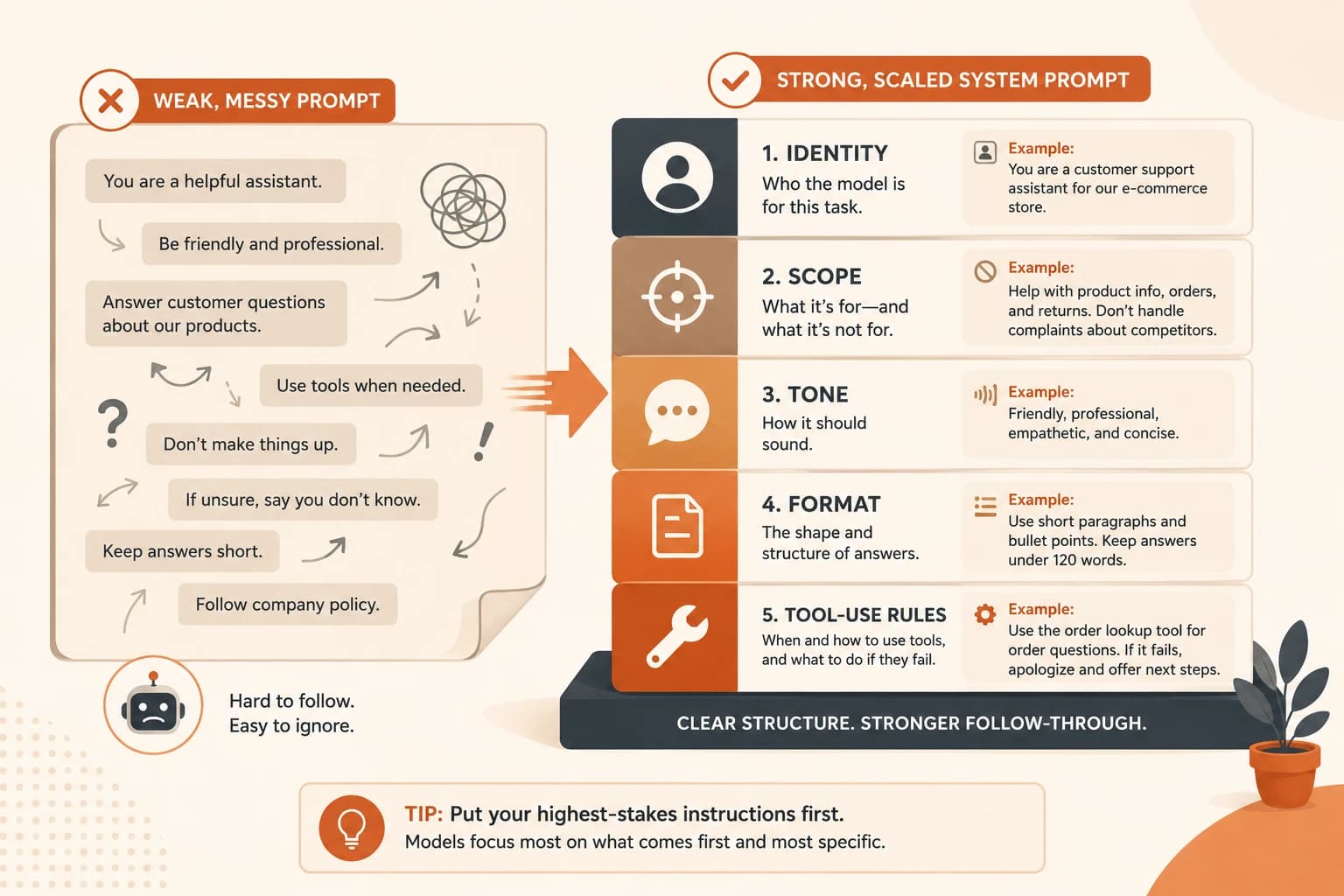
Not every instruction in a system prompt carries equal weight. Models pay closest attention to what's stated first and most specifically, and instructions buried near the end of a long prompt are the first to get ignored under pressure. A prompt that scales puts the highest-stakes instructions first, in this order:
- Identity: who the model is for this task, in one or two sentences. Naming a role here works the same way it does in a regular prompt, it shapes voice and tone, not knowledge.
- Scope: what it's for, and just as important, what it's not for. This is the line that would have stopped the support bot from answering order questions with refund policy.
- Tone: how it should sound: formal, casual, brief, detailed.
- Format: the shape every answer should take: plain text, a specific structure, a length limit.
- Tool-use rules: if it can call tools or act as an agent, exactly when to use each one and what to do if a tool fails.
Skip this order and write a flat wall of instructions instead, and the model treats your most important rule the same as your least important one. That's exactly how a scope violation like the refund-policy mix-up happens. Anthropic's own prompting documentation confirms this: clear, structured system prompts get followed more reliably than long unstructured ones. The system message slot itself also carries more weight than instructions typed into a regular turn.
A Reusable System Prompt Template You Can Copy
Here's a template built from that five-part order, in the same spirit as a working catalog of prompt patterns: something you copy once and adapt, not rewrite from scratch. Fill in the brackets for your own use case:
You are [identity — one or two sentences on the role and what it's expert at].

Scope: You help with [what it's for]. You do not [what it's explicitly not for].

Tone: [formal / casual / brief / detailed — pick one, don't stack adjectives].

Format: [plain text / bullet list / a fixed structure]. Keep answers under [length].

Tools: If you have access to [tool name], use it when [specific trigger]. If it fails, [fallback instruction] instead of guessing.
Filled in for a support bot that only handles FAQs, not order lookups:
You are a support assistant for an online store, focused on answering
questions about shipping, returns, and product details.

Scope: You help with general store questions. You do not look up specific
orders, process refunds, or quote order numbers back to a customer.

Tone: Warm and brief, like a helpful store employee.

Format: Plain text, 2-3 sentences per answer.

Tools: If you have access to the order-lookup tool, use it only when a
customer provides an order number directly. If it fails, tell the customer
to check their email confirmation instead of guessing a status.
Notice the scope line does the real work here. It's the one sentence that would have kept the two features from bleeding into each other.
Guardrails Live Outside the Prompt, Not Just Inside It
A system prompt is a request the model tries to follow. A guardrail is a rule your code enforces no matter what the model decides to do. That distinction matters more than it sounds like it should.
Say your prompt includes "never quote a price without a confirmation step." That's a polite ask. A hostile input, a confusing multi-part question, or a plain model mistake can still slip past it. A guardrail is the same rule enforced in code: your app checks the model's reply before sending it. If the reply contains a price with no confirmation flag set, the app blocks it, no exceptions. As security researchers studying AI guardrails put it, a prompt-only rule is a negotiation the model might lose. A code-enforced check doesn't negotiate at all.
Put anything you genuinely can't afford to get wrong, pricing, safety, PII, in a code-level check. Save the system prompt for behavior where a mistake is annoying, not costly.
Why It Breaks When You Reuse It
The support-bot scenario at the top of this lesson is the most common failure mode: a system prompt written and tested for one job silently misbehaves once you bolt a second job onto it. The prompt didn't get worse, the number of things it's responsible for just grew past what its structure could hold.
The fix is two habits, not a rewrite every time:
- Version it. Treat every change to a system prompt like a code change, save the old version before editing, so a regression has something to compare against.
- Test it against a small set before shipping. Keep 5 to 10 sample inputs that represent your real use cases, run them against any prompt edit, and check the outputs before it goes live. This catches a scope leak in minutes instead of after a customer notices it. Prompt engineering research confirms there's no universal formatting that works across every model, so a small test set is also what catches a prompt that stops behaving the same way after you switch models or upgrade one.
Your Task
Write a 3-line system prompt for one real task
Pick something you'd actually use: a study helper, a writing assistant, a coding helper. Write just the identity and scope lines from the template above, three lines total.
Test it against two different inputs
Run your prompt in whatever AI chat tool you have open, once with a question clearly inside your scope, once with a question that's clearly outside it. Check whether the model respects the boundary you set in line two.
Done? You've completed Lesson 12.10.
FAQ