Meta-Prompting: How AI Writes Better Prompts For You
Meta-prompting means using AI to write and refine your prompts instead of drafting every instruction by hand. Here's the technique plus a reusable template.

You write a prompt that asks a model to summarize a support ticket in three sentences. It works. You run it again on the next ticket and get one sentence. Then a paragraph. Then a summary that answers a question nobody asked. Nothing about your instructions changed, but the output is a different length and tone every single time.
That inconsistency is not bad luck. It's a symptom of a prompt with no real structure underneath it, the kind you write once, in a hurry, and never touch again. Meta-prompting and prompt generation fix this: using an AI model itself to write, critique, or rebuild that prompt into something that behaves the same way twice.
Key Takeaways
- Meta-prompting means using an AI model to draft, refine, or critique a prompt, instead of writing every instruction by hand.
- It's structurally different from few-shot prompting: fewer specific examples, more reusable shape.
- Anthropic's own Console prompt improver measured a 30% accuracy gain on a real classification task by adding structure this way.
- The highest-use move is treating a prompt like a function you write once and call with different inputs, not a message you retype from scratch.
- It has a real limit: it assumes the model already understands the task category, so it can misfire on genuinely novel problems.
What Is Meta-Prompting?
Meta-prompting is the practice of using an AI model to write, critique, or improve a prompt, instead of writing that prompt entirely by hand. Instead of going straight from goal to output, you add a step in between: describe what you want, and let the model draft the actual instructions.
People usually stumble into this by accident. Someone types "can you write me a better prompt for this?" into a chat window, and the model comes back with something more specific than what they had. Often it adds a role, a format, or a request to think step by step. That's meta-prompting in its simplest form: prompting about a prompt, rather than prompting about a task.
A Prompt as a Reusable Function
Here's the mental model that makes this click if you've ever written code: think of a prompt as a function, not a message. It has inputs, it has a fixed shape it always returns, and you version it when you improve it, instead of throwing away the old one and starting over.
Most people write prompts more like a chat message they compose fresh every time. That's why the same summarization task above gives different results — there's no fixed "signature" telling the model what shape of output to always return, regardless of which support ticket goes in. A meta-prompt's job is to help you author that signature once: what goes in, what comes back, and what stays constant across every call.
If you've built a function that takes a config object instead of five loose arguments, you already understand why a structured prompt template beats a fresh message every time. Same idea, different language.
Once a prompt has that shape, assigning the model a role or adding a format constraint doesn't quietly break something else, because you're editing one clearly defined piece instead of untangling a paragraph of run-on instructions.
Meta-Prompting vs Few-Shot Prompting
These two get confused because both aim to make a prompt more reliable. Few-shot prompting and meta-prompting do it in opposite ways.
Meta-prompting vs few-shot prompting
| Meta-prompting | Few-shot prompting | |
|---|---|---|
| What it provides | A reusable structure or reasoning template | Specific, solved example inputs and outputs |
| Best for | A whole category of similar tasks | One task with a clear, demonstrable pattern |
| Token cost | Lower, since it skips lengthy examples | Higher, scales with number of examples shown |
| Weak point | Assumes the model already knows the domain | Needs good examples to have been written first |
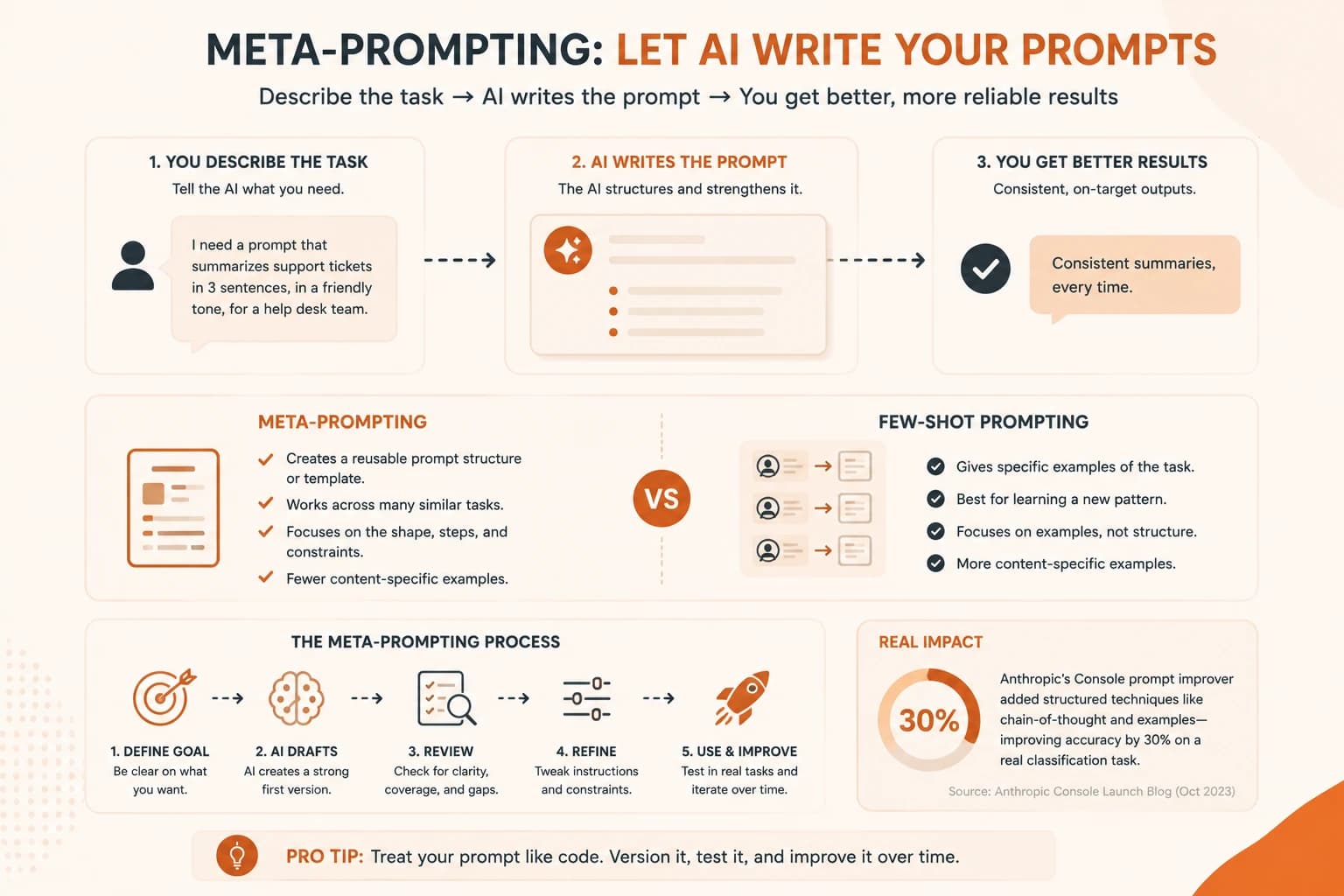
In practice, they stack. A named prompt pattern like Persona often gets generated by a meta-prompt, and that generated prompt might still include one or two examples to lock in tone. Structure and examples are not rivals, they're two different tools for the same reliability problem.
Mixing them up has a real cost. I've watched someone spend an hour hand-writing five near-identical examples for a task that just needed one clear structural rule, then get frustrated when a sixth input still broke the pattern because none of those examples happened to cover it. A meta-prompt would have named the rule once and covered every input, not just the five they thought to write down.
How to Write a Meta-Prompt
You don't need a special tool to start. Skip this step and you end up back where the opening example started: a one-line instruction that quietly makes a different decision every time it runs, and no clear record of what any of those decisions were. A reliable meta-prompt template looks roughly like this, filled in with your own task:
State the task and audience
Describe what you want the AI to do, who will read the output, and what platform or context it runs in. Be as specific about the audience as you would be about the task itself.
Name your constraints
List the failure modes you've already hit: wrong length, wrong tone, missing a required field. These become the guardrails the generated prompt needs to include.
Ask for the prompt, not the answer
Tell the model explicitly: "Write a prompt I can reuse for this task, don't answer the task itself." This one line is what most people forget, and it's the difference between meta-prompting and just asking a normal question.
Ask it to explain its choices
Have the model briefly justify why it added each constraint or example. This is where you learn what makes prompts more reliable, instead of just collecting a working prompt you don't understand.
Worked Example: Before and After
Here's the actual summarization prompt from the opening of this lesson, and what a meta-prompting pass does to it.
Before
Summarize this support ticket.
That's the entire prompt. No length target, no tone guidance, no instruction for what to do with a ticket that has no clear resolution yet. The model is filling in every one of those gaps on its own, differently, every time.
After, generated via meta-prompting
You are summarizing a customer support ticket for a busy team lead
who has 10 seconds to read this and decide if it needs escalation.

Return exactly three sentences:
1. What the customer's core issue is, in plain language.
2. What has already been tried or answered.
3. Whether this needs escalation, and why, or "No escalation needed."

If the ticket has no clear resolution yet, say so directly in
sentence 2 instead of guessing at one.
The second version isn't longer because more words make it better. It's longer because it removed every ambiguous decision the model was previously making differently on each run: audience, format, and what to do with the edge case of an unresolved ticket. That's the entire value of meta-prompting in one example: it surfaces the gaps you didn't know you'd left open.
Where Meta-Prompting Breaks Down
Meta-prompting assumes the model already understands the category of task you're describing. On a genuinely novel or niche problem, an AI-generated prompt can look confident and structured while quietly missing the one constraint that actually matters, because the model is drawing on patterns from similar tasks it has seen, not on your specific situation.
The practical fix isn't to avoid the technique — it's to treat every AI-generated prompt as a strong draft, not a finished one. Run it against a handful of real inputs before trusting it the way you'd trust a prompt you wrote and tested by hand.
Tools That Do This For You
You can meta-prompt inside any chat window, but a few tools have turned it into a dedicated feature. Anthropic's Console includes a prompt generator that drafts a full, structured prompt from a plain-language task description, and a separate prompt improver that takes a prompt you already have and strengthens it with chain-of-thought reasoning and better examples. In testing, Anthropic measured a 30% accuracy gain on a multilabel classification task after running it through the improver.
That gap between "written by hand" and "refined by a model built for exactly this" is the whole case for learning meta-prompting. It's the same underlying principle covered in structure-over-content research on the technique, just packaged as a button instead of something you apply manually.
Once you're comfortable writing prompts this way, the full path covers where this goes next: automatic prompt optimization at scale, and evaluating whether a "better" prompt actually performs better on real data, not just on the one example you happened to test.
Pick one prompt you've reused more than twice
Find a prompt you've copy-pasted and lightly edited for more than one task. That repetition is the signal it's a good meta-prompting candidate.
Write the meta-prompt
Using the four-step template above, ask a model to generate an improved version. Explicitly tell it not to answer the task, only to write the prompt.
Run both versions on the same input
Compare the original prompt's output against the generated version's output, on the exact same input, side by side.
Write down what changed
In one or two sentences, note which specific gap the new version closed, length, tone, an edge case, a missing constraint. That's your before-and-after.
Done? You've completed Lesson 12.11.
FAQ