Prompting as It Evolves: Adapt as AI Models Change
Learn to read model cards and system prompts, then adapt your prompts when new AI models ship, keeping what's durable and cutting what's a trick.

A prompt that gave you clean, reliable answers for three months suddenly starts coming back vague, or ignoring half your formatting instructions, the week after you switch to a new model version. Nothing broke. There's no error in your logs. The provider shipped an update, didn't tell you what changed in plain language, and your prompt just quietly stopped working the way it used to.
That gap, between "my prompt worked" and "my prompt still works after the model underneath it changed," is what this lesson closes. Adapting your prompts as models evolve means reading what a provider actually publishes about a new model, re-testing your prompts against it, and telling apart the parts of your prompt that are genuinely durable from the parts that were always just a trick the old model happened to respond to.
Key Takeaways
- A model card documents the model itself (training, capabilities, limits); a system prompt configures how a specific app uses that model. Both change more often than most people check.
- "Prompt engineering is dead" really means magic-phrase tricks stopped working, not that structuring a task well stopped mattering
- The fix for a prompt that degrades after a model update is never "add a stronger magic word." It's rebuilding on explicit steps and stated output schemas, then re-testing
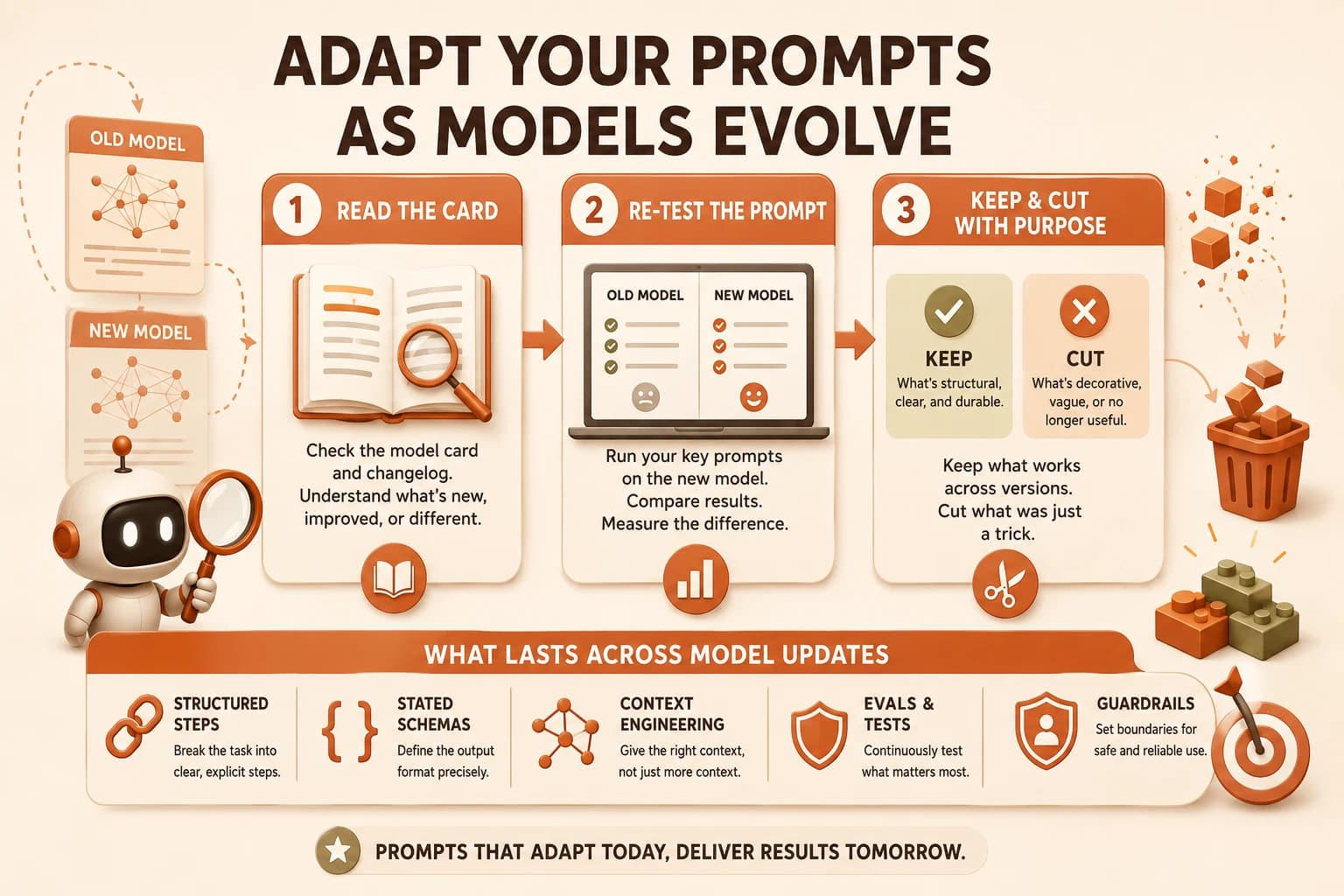
- The 3-step habit: read the card, re-test the prompt, keep what's structural and cut what's decorative
- A production-grade prompt system holds up over time because it leans on chaining, context engineering, evals, and guardrails, not on any single clever sentence
What Is a Model Card (and Why You Should Actually Read One)?
A model card is the document a provider publishes describing what a model actually is: what it was trained on, what it's good and bad at, and what changed since the last version. Skip reading one and you're guessing at why your prompt's behavior shifted, instead of knowing.
Most model cards cover the same ground: training approach, benchmark performance, known limitations, and safety evaluations. Anthropic, OpenAI, and Google all publish these for major releases, and as of August 2026 the EU AI Act's transparency requirements made structured documentation like this a legal obligation for high-risk systems, not just a courtesy.
The part people skip, and shouldn't, is the changelog or "what's new" section. That's where a provider actually tells you the model got better at following structured output, or got more conservative about certain requests, or changed how it weighs system instructions versus user instructions. If your prompt leaned on the old behavior, that's exactly where the break happened.
You don't need to read a model card cover to cover every time. Skim the summary and the changelog section first. If nothing there touches instruction-following, formatting, or safety behavior, your existing prompts are probably fine.
What Is a System Prompt, and Why It Keeps Changing
A system prompt is the standing instruction sent to a model before any user input, the thing that tells it "you are a customer support agent for X, always respond in this tone, never do Y." It's different from a one-off prompt because it applies to the entire session, silently, in the background.
Here's the part that surprises people: providers update the default system prompts baked into their consumer products more often than most users realize. A recent leak of Claude, GPT, and Gemini system prompts showed just how much standing instruction sits underneath every conversation, adjusted release to release, without a public announcement.
If you're building your own application on top of a model, this matters twice. Your own system prompt needs updating as your product evolves, and the model's underlying tuning shifts underneath you at the same time. This is also exactly why prompting differs by model: a system prompt tuned for how Claude interprets structure won't carry its behavior over cleanly to GPT or Gemini. Skip tracking either one, and a support bot that used to refuse a certain request politely might start refusing it rudely, or stop refusing at all, and you won't know why until a user complains.
The Tricks That Stopped Working (and Why)
For a while, certain phrases reliably improved output: "take a deep breath and think step by step," "you are the world's best [role]," "I'll tip you $200 for a good answer." These worked because early models hadn't seen enough examples to distinguish a genuinely useful instruction from a persuasive one.
That gap closed. Every one of those phrases got written about, discussed, and folded back into training data through reinforcement learning and constitutional AI methods, the same tuning process behind how large language models actually work. The models learned what those phrases were doing and stopped needing, or responding to, the trick itself.
I kept a "magic phrase" in my own prompts for months longer than I should have, mostly out of superstition. It had worked once, so I never tested whether it was still doing anything. The day I finally deleted it and reran the same prompt, the output didn't change at all. That's the real tell that something was a trick, not a principle: removing it changes nothing. As one 2026 retrospective on the shift put it, the craft moved up the stack, from clever phrasing to schemas, evals, and structured task design.
A trick, not a principle: "You are the world's best data analyst. Take a deep breath and carefully extract the action items from this transcript."
Miss this shift and you'll keep tweaking the wrong lever, adding more flattering adjectives to a prompt, when the actual fix is rebuilding around explicit structure instead.
The Principles That Never Do
The same prompt, rebuilt around structure instead of persuasion, looks like this:
Extract every action item from the transcript below. Output a JSON array
of objects with "owner" and "task" keys. Include nothing outside the JSON.

<transcript>
[meeting notes here]
</transcript>
Nothing here is trying to flatter the model into trying harder. It states exactly what counts as done, exactly what shape the output takes, and exactly what input it's working from. Sam Altman has said he doesn't expect "prompt engineering" as a phrase to survive another five years, but the underlying skill isn't going anywhere: making your intent legible to a model is the same durable core, whatever the terminology becomes. That doesn't age out with a new model version.
Before vs after, same task
| Version | Instruction style | What happens after a model update |
|---|---|---|
| Trick-based | Flattery, persona framing, "think step by step" as decoration | Effect fades or disappears; you're left with a plain instruction and no fallback |
| Structure-based | Explicit steps, stated output schema, bounded input | Mostly holds up; new model still has to parse and follow an explicit constraint |
This is also why a well-built prompt survives a model swap better than a clever one. Explicit constraints are something every model, old or new, has to respect to be useful at all. A persuasive phrase is something only a specific model's specific training happened to respond to.
A 3-Step Habit for Adapting Your Prompts to Any New Model
Skip this habit entirely, and you find out your prompts broke from a confused user or a silent quality drop, days or weeks after the model actually changed.
- Read the card. Skim the summary and changelog for anything touching instruction-following, formatting, or safety behavior before you switch.
- Re-test the prompt. Run your highest-stakes prompts unmodified against the new model. Note exactly what changed: format, tone, accuracy, refusals.
- Keep what's structural, cut what's decorative. If a prompt still relies on persuasive phrasing rather than explicit constraints, that's the moment to rebuild it, not just patch the symptom.
This habit takes minutes per prompt, not hours. The cost of skipping it shows up later, in a support ticket or a bad output a user actually saw.
Capstone Project, Build a Production-Grade Prompt System
Everything in this prompt engineering path comes together here. Adapting prompts as models change isn't a one-time fix, it's an ongoing habit, and a production-grade prompt system is what makes that habit sustainable instead of exhausting. A prompt that survives real usage and real model updates isn't one clever instruction. It's a small system with four parts working together:
Capstone checklist
| Component | What it does | Why it matters here |
|---|---|---|
| Chaining | Breaks one big task into smaller prompts, each handling one step | Smaller steps are easier to re-test individually after a model update than one giant prompt |
| Context engineering | Controls exactly what information reaches the model, and in what order | Keeps behavior predictable across model versions that weigh context differently |
| Evals | Automated checks that catch when output quality drifts | Turns "did the update break something?" from a guess into a measurable answer |
| Guardrails | Constraints that catch a bad output before a user ever sees it | Limits the damage when a model update changes behavior in a way your evals missed |
Your capstone build: take one real prompt-based task you use regularly, ideally the same one from an earlier lesson in this module. Break it into a short chain of two or three steps.
Write one eval that checks the final output against a rule you actually care about (right format, required field present, no banned phrase). Add one guardrail that stops a bad output before it reaches a user. That's a production-grade prompt system at small scale, and the version of it that survives the next model update.
Pick a real prompt and read the current model card
Choose a prompt you use regularly. Find the model card or release notes for whichever model currently runs it, and skim the summary and changelog for anything touching instruction-following or output formatting.
Separate the trick from the structure
Read your prompt line by line. Mark any phrase that's persuasion or flattery rather than an explicit instruction. Rewrite those lines as explicit steps or a stated output schema.
Add one eval and one guardrail
Write one check that verifies your prompt's output meets a real requirement (a required field, a format, an absence of a banned word). Add one guardrail rule that blocks the response if that check fails, instead of letting it reach a user unchecked.
Done? You've completed Lesson 13.11.
FAQ