GET vs POST Request Explained: What's the Difference?
GET asks a server for data with no side effects; POST sends data to create or change something. See both explained with a real example.

You open a page of API documentation and it just says GET /users and POST /users, like you're supposed to know what that means. Nothing on the page explains why there are two words here instead of one, or what happens if you pick the wrong one. You scroll for an example. There isn't one.
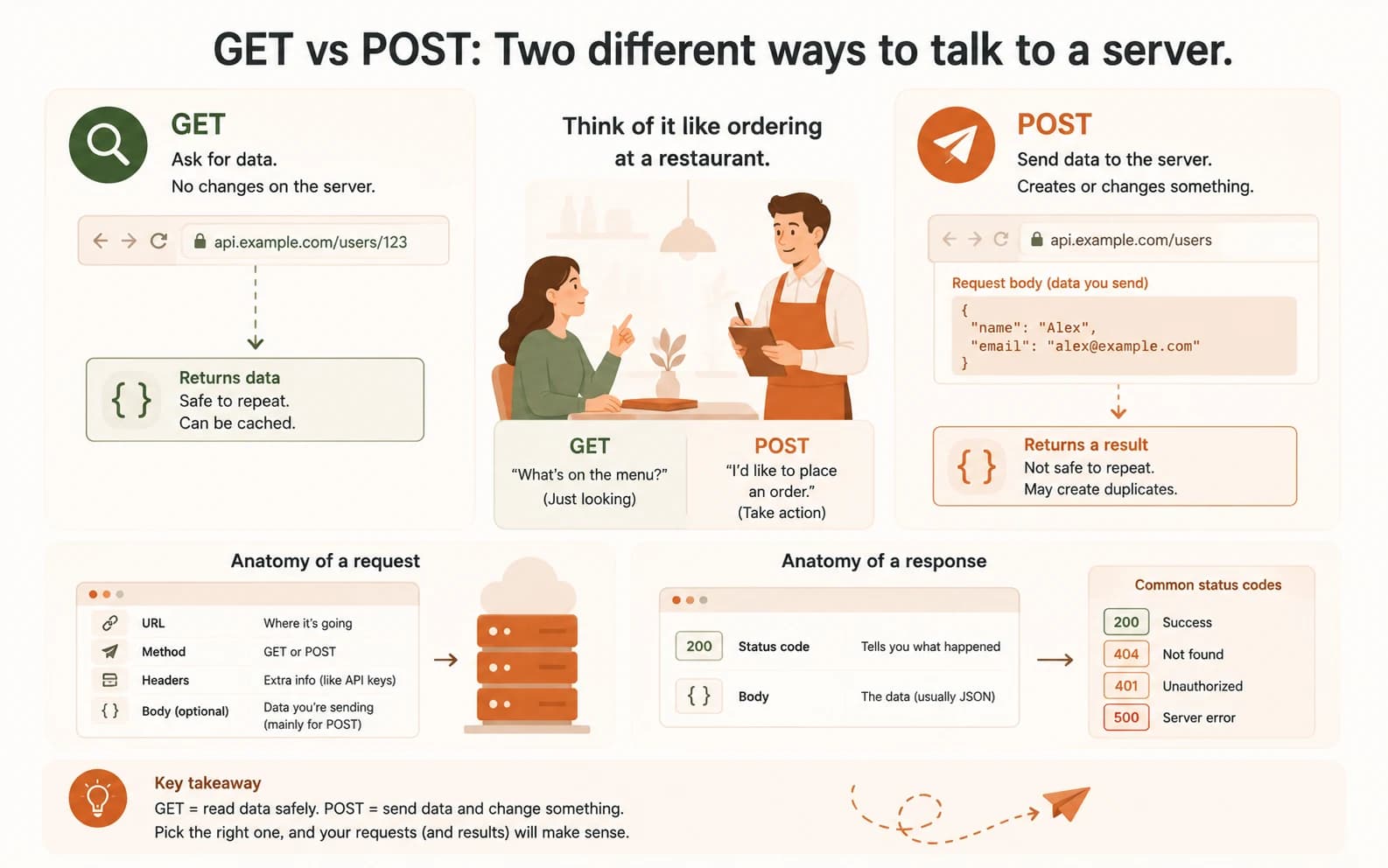
A GET request means "give me information," and it never changes anything on the server. A POST request means "here's information, do something with it," usually to create or change something. Everything else in this lesson is filling in the details of that one distinction.
Key Takeaways
- GET requests read data and have no side effects, you can repeat one safely as many times as you want
- POST requests send data to create or change something, repeating one can duplicate an action
- Every request has a URL, a method, headers, and sometimes a body
- Every response has a status code (like 200 or 404) plus a body, usually JSON
- You can see a real GET response in your browser right now, no code required
What Is a REST API?
A REST API is an API that follows a shared set of rules for how requests and responses are structured. You send a request to a URL, with a method that says what you want, and a response comes back with a status code and data.
That shared shape is why you can look at almost any REST API's documentation and recognize the pattern. Without it, every new API you touched would need its own separate tutorial just to get started.
GET vs POST: The Two Ways to Place Your Order
Think back to the waiter analogy from the last lesson. You place an order, the waiter takes it to the kitchen, and a response comes back. GET and POST are the two most common ways of placing that order.
GET means "give me information," and nothing changes on the server because of it. Loading a webpage, checking a weather forecast, or viewing a GitHub profile are all GET requests. You could make the same GET request a thousand times and nothing bad happens. That's why browsers cache GET responses and safely retry them if a connection drops.
POST means "here's some information, do something with it." Submitting a form, posting a comment, or sending a prompt to Claude through the API are all POST requests. This is also the part that trips people up: why not just use GET for everything? The answer is that POST is built for side effects.
Say your browser refreshes a page and silently resends that POST. You could end up submitting the same form twice: two duplicate comments, two duplicate orders. That's exactly why browsers warn you before resending a POST, but never bother warning you about a GET.
What's Inside a Request
Every request you send is built from the same four pieces. Learn them once and API documentation stops looking like a foreign language.
- URL, where the request is going, like
api.github.com/users/octocat - Method, what you want to do, GET or POST being the two you'll see the most
- Headers, extra information attached to the request, like an API key proving who you are
- Body, the actual data you're sending, only present on requests like POST
A GET request usually only needs a URL and a method. A POST request adds a body, since it has something to deliver. When something I've built breaks and the reason isn't obvious, I check the headers first. A missing or wrong API key is an easy thing to overlook.
What's Inside a Response
A response comes back with two parts: a status code telling you what happened, and a body holding the data itself, usually formatted as JSON. Miss the status code and a failed request can look identical to an empty successful one. That's the single most common source of "why isn't this working" confusion for beginners, and it's exactly what trips people up when calling an API from JavaScript with fetch().
Common status codes and what they mean
| Code | Meaning | Example |
|---|---|---|
| 200 | Success | You requested a user's GitHub profile and got their data back |
| 404 | Not found | You typo'd a username and the server has no matching profile |
| 401 | Unauthorized | You forgot to include your API key, or it's invalid |
| 500 | Server error | Something broke on the server's end, not yours |
A 401 and a 404 can look similar at a glance: both mean "you didn't get what you wanted," but they point to completely different fixes. A 401 means fix your credentials. A 404 means fix your URL.
The full list of status codes is longer than this, but 200, 404, 401, and 500 will cover almost everything you run into as a beginner. The MDN status code reference is worth bookmarking for anything outside that list. The MDN HTTP methods reference covers GET, POST, and the less common methods you'll meet later.
Read a real GET response in your browser
Open a new browser tab and go to https://api.github.com/users/octocat
(replace "octocat" with your own GitHub username if you have one).
You just made a GET request. Your browser asked GitHub's API for information about a user, and it responded.
Look at the JSON that appears. Find the "name", "public_repos", and
"followers" fields. That's the same shape every API response comes in:
a body full of fields like this. You didn't even have to check the status
code this time, because it worked.
If you see a message about rate limits instead of JSON, wait a few minutes and try again. That's GitHub temporarily limiting requests, not a mistake on your end.
Done? You've completed Lesson 06.06.
FAQ