Python Functions Explained: How to Read Any Function
Learn what a Python function is, how to read one, and how to call it. Uses real Anthropic SDK examples. By the end, you can decode any AI code wrapper.

Whenever you see the word def in Python code, a function is being defined, a named, reusable block of code that does one specific job. In this lesson, you'll learn to identify any function's name, inputs, and output. By the end, you can read any AI SDK wrapper without losing the thread.
Key Takeaways
- A function is a reusable block of code with a name, inputs, and an output
defmarks the start of a function definition, nothing runs until you call it- Every function has three readable parts: name, parameters, and return value
- Default parameters mean a function can be called with fewer arguments than it defines
A Function Is a Named Recipe
Think of a function as a recipe. The recipe has a name, a list of ingredients, and a set of steps that produce something.
def make_request(prompt):
 # steps here
 return result
make_request is the recipe name. prompt is the one ingredient. The return statement is what comes out at the end.
The recipe lives in one place. You can follow it as many times as you want, you just call it by name each time. You don't rewrite the steps; you call them.
This is why functions appear constantly in AI code. An API call has six or seven lines of setup. Wrapping those lines in a function means you write them once and call the wrapper everywhere else.
The def keyword stands for "define." It tells Python: "I'm about to describe a function. Store this for later." Nothing runs at this point, the function is just being registered.
The Three Parts of Every Function
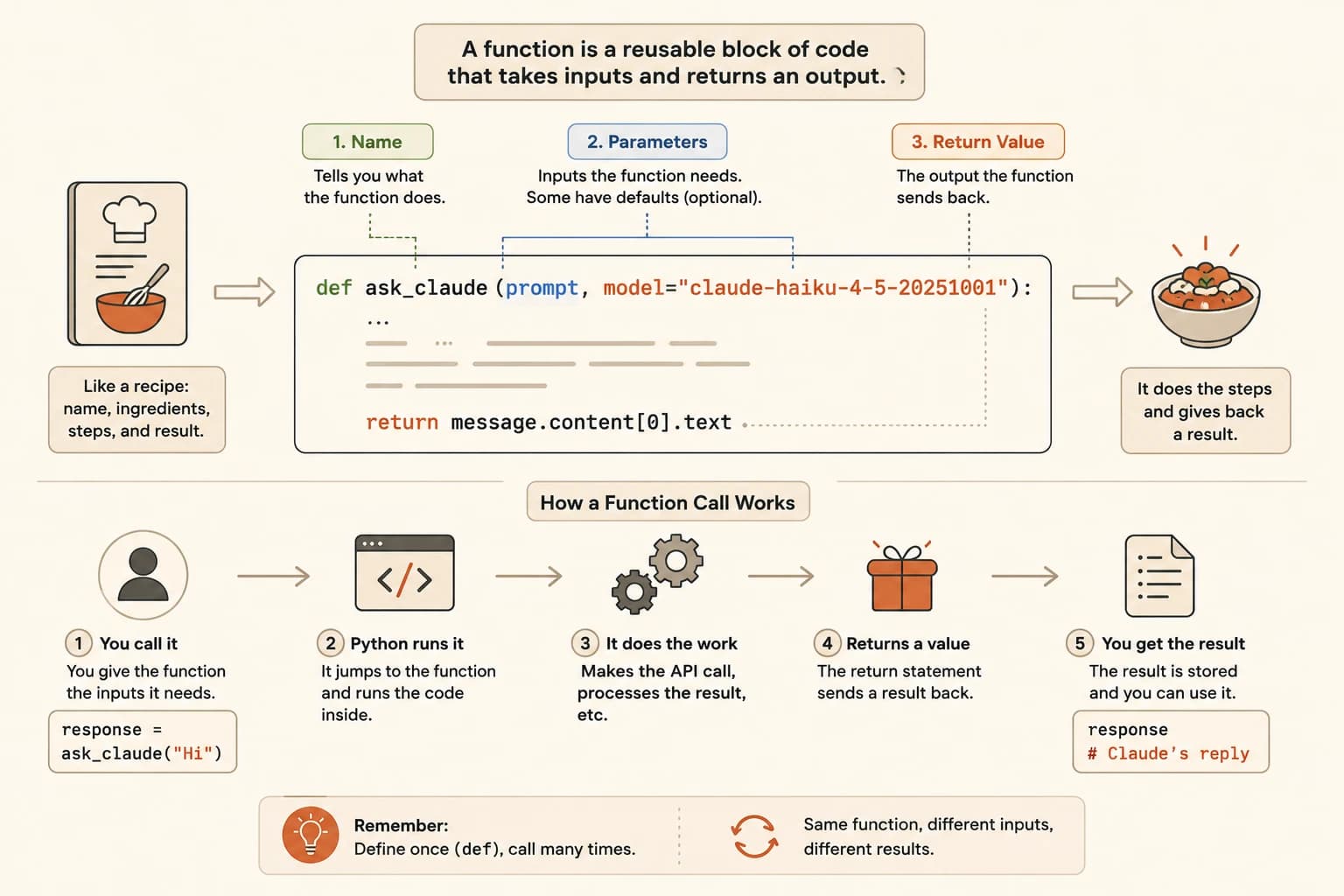
Every Python function has exactly three readable parts. Once you can spot them, you can decode any function you encounter.
Part 1, The Name
The name comes right after def:
def send_to_claude(...):
Good function names are verbs: send, get, build, process, load. If the name is clear, you already know the purpose before reading a single line of the body. send_to_claude sends something to Claude. That's all you need to know to start reading.
Part 2, The Parameters
Parameters live inside the parentheses:
def send_to_claude(prompt, model):
This function takes two inputs: a prompt and a model name. When you call it, you provide both. Parameters are the ingredient list, the function won't do its job without them.
Some parameters have defaults:
def send_to_claude(prompt, model="claude-haiku-4-5-20251001"):
model is now optional. If you don't pass one, Haiku is used automatically. You'll see this pattern constantly in AI agent code; sensible defaults that can be overridden.
Part 3, The Return Value
The return statement is what the function hands back:
return response.content[0].text
Whatever calls this function will receive this value as the result. If there's no return statement, the function does its work and gives back nothing, useful for functions that save files or print output but don't need to pass a value along.
Reading a Complete Function
Here's a real AI SDK wrapper. Everything you need to read it is in the three parts above. (This is adapted from the Anthropic Python SDK quickstart pattern.)
def ask_claude(prompt, model="claude-haiku-4-5-20251001"):
 client = anthropic.Anthropic()
 message = client.messages.create(
 model=model,
 max_tokens=256,
 messages=[{"role": "user", "content": prompt}]
 )
 return message.content[0].text
Let's walk through every line:
def ask_claude(...), the function is namedask_claudeprompt, required input; you must provide a prompt when calling itmodel="claude-haiku-4-5-20251001", optional input with a default; if you don't specify a model, Haiku is usedclient = anthropic.Anthropic(), creates the API client inside the functionclient.messages.create(...), makes the API call using the inputsmessages=[{"role": "user", "content": prompt}], builds the conversation structure from the lists and dictionaries lessonreturn message.content[0].text, sends back just the text of Claude's response
The function takes a question in and hands a text answer out. Everything in between is the setup to make that happen.
How to Call a Function
Defining a function and calling a function are two different things. The def block stores the recipe. A call runs it.
response = ask_claude("What is an AI agent?")
This calls ask_claude with one argument. The result, Claude's text response, is stored in response. Haiku is used because we didn't specify a model.
To override the default:
response = ask_claude("What is RAG?", model="claude-sonnet-4-6")
Same function. Different model. The second argument overrides the default.
You can call the same function dozens of times in the same script, with different prompts each time. That's the point. The six lines of API setup live once inside ask_claude and never again.
I find this is the moment when Python stops feeling like noise. One function replaces six scattered lines of setup code, everywhere you need it.
Defining vs calling. def ask_claude(prompt): defines the function, nothing runs. ask_claude("Hello") calls it, this is when it executes. If you wrote a def block and nothing happened, that's why. Both lines are needed.
Your Task
Read the function below. For each question, write down your answer before looking at the reveal.
def build_system_prompt(role, instructions, tone="professional"):
 prompt = f"You are a {role}. {instructions} Respond in a {tone} tone."
 return prompt
Name the function
What is this function called? Answer: build_system_prompt, it comes right after def.
Count the parameters
How many parameters does it take, and which ones are required? Answer: Three parameters, role, instructions, and tone. The first two are required (no default). tone is optional, if not specified, it defaults to "professional".
Find the return value
What does this function return? Answer: A string, a formatted system prompt that combines role, instructions, and tone into one sentence.
Trace a call
What would build_system_prompt("teacher", "explain things simply") return? Answer: "You are a teacher. explain things simply. Respond in a professional tone.", tone defaults to "professional" because we didn't pass one.
Done? You've completed Lesson 05.04.
New to Seekvana? Start from the beginning with the Getting Started path.
FAQ