Bolt.new vs v0.dev: Generate a Full App From a Prompt
Bolt.new and v0.dev turn a text prompt into a working app in seconds. Here's what each does, and when a generated app is actually a good starting point.

You type one sentence, "build a simple to-do list app," and thirty seconds later there's a real, clickable app sitting in your browser. No editor to open, no terminal command to run, no file to save. That's the whole pitch of prompt-to-app tools, and it's the most dramatic thing you'll see in this entire module.
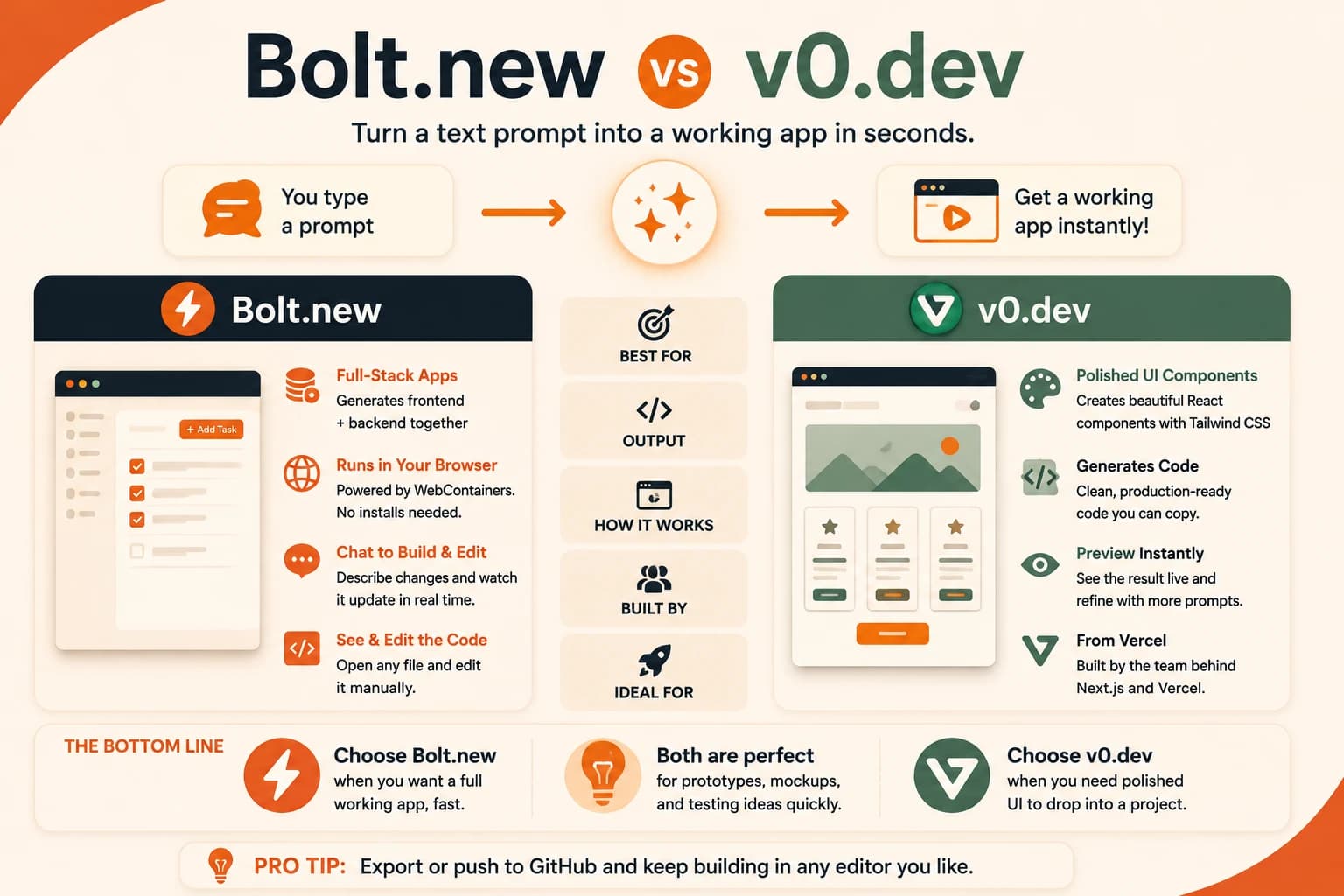
Bolt.new vs v0.dev is the comparison most people land on first, since they're the two best-known tools in this category. Bolt.new generates a running full-stack app, frontend and often backend together, straight in your browser. v0.dev, built by Vercel, started out generating polished frontend components and has been expanding toward full apps too. The first time I watched one of these generate a working app from a single sentence, I still opened the code afterward to see what it had actually written, and that habit is the whole point of this lesson. Both tools skip local setup entirely, and both are useful, as long as you know what they're actually good for.
Key Takeaways
- Bolt.new and v0.dev turn a plain-English prompt into a running app, with no local install required
- Bolt.new leans full-stack (frontend and backend scaffolding); v0.dev started frontend-first and generates React and Tailwind CSS code
- Both are excellent for prototypes and mockups, not a substitute for understanding the code they produce
- Costs can climb fast because every follow-up prompt resends your whole project as context
- You can export or push the generated code to GitHub and keep building it in a real editor
What Is Bolt.new?
Bolt.new is a browser-based AI app builder from StackBlitz that turns a text description into a working, full-stack application you can see and click around immediately. It runs Node.js directly inside your browser tab using a technology called WebContainers, so there's nothing to install on your computer.
You open bolt.new, type what you want in the chat panel, "build a simple to-do list app," and Bolt scaffolds the files, writes the code, and shows you a live preview running right next to the chat. Ask for a change and it edits the code and refreshes the preview again.
The interface has three parts working together: a code editor showing exactly what got generated, a chat panel where you describe changes, and a live preview where you see the app running in real time. You can also click into individual files and edit them by hand if you want more control than the chat gives you.
If a prompt didn't quite work, get specific instead of just repeating yourself. "Make the delete button red" gets a better result than "fix the button."
What Is v0.dev?
v0.dev is an AI tool from Vercel that generates working frontend code, usually React components styled with Tailwind CSS, from a plain-English description. Describe a screen, "a pricing page with three tiers," and v0 generates real, working component code you can preview and then drop into a project. This is one place a quick v0.dev tutorial pays off fast: most of what you need to know is just describing the screen you want, one prompt at a time.
v0.dev started out narrower than Bolt.new. It focused on generating clean, well-structured UI rather than a full running application. That's still its strongest use case: a landing page, a dashboard layout, a form, ready to plug into an existing codebase. It has since expanded toward handling backend pieces and full-project generation too, so the old "v0 only does frontend" rule of thumb is looser than it used to be.
Where v0 still stands out is polish. It's built by the team behind Next.js and Vercel's deployment platform, so the code it produces tends to follow conventions a working frontend developer would already recognize. That matters if you plan to hand the result to a real project later.
Bolt.new vs v0.dev: What's Actually Different
Both tools do the same basic trick, prompt in, running app out, but they lean toward different jobs. Bolt.new is built for "give me a whole working thing," v0.dev is built for "give me a great-looking piece I can use."
Bolt.new vs v0.dev at a glance
| Bolt.new | v0.dev | |
|---|---|---|
| Best for | Full working app, fast | Polished UI components |
| Output | Frontend + backend scaffolding | React + Tailwind CSS code |
| Runs where | Fully in-browser (WebContainers) | Generates code, preview in-browser |
| Built by | StackBlitz | Vercel |
| Good starting point for | Prototype, internal tool, quick MVP | Landing page, dashboard, frontend flow |
If you want to see an entire idea exist as a clickable thing today, start with Bolt.new. If you already have a project and just need a well-built screen to drop into it, start with v0.dev.
Where Bolt.new and v0.dev Fall Short
These tools are excellent for testing whether an idea is even worth building, good or bad, in under a minute. What they are not is a replacement for understanding your own code, and that matters more than it sounds like it should.
Because tools like Bolt.new resend your whole project as context with every new prompt, costs can climb quickly on bigger apps. A failed generation can still use up your usage allowance even when the result is broken. If a fix-it prompt makes things worse twice in a row, open the file yourself and make the small change by hand instead of prompting a third time.
This is the same lesson from HTML, CSS, and JavaScript basics. Reading code you didn't write yourself is a real skill. It's the thing that turns a generated prototype into something you can trust, extend, or debug when it breaks in a way the prompt box can't fix. A good next step after generating something in Bolt.new or v0.dev is opening the result in Kilo Code and asking it to walk you through what was actually built.
Want to keep editing that same code yourself, without installing anything locally? Replit's browser-based editor is worth trying next, real code, zero setup, with its own AI built in.
Your Task
The fastest bolt.new tutorial is just doing this once yourself.
Generate an app from a single prompt
Go to bolt.new in your browser. No install needed.
Type: "Build a simple to-do list app."
Watch what gets generated. Within a minute, a working app with input fields and buttons should appear, live, in the browser.
Try adding a task and marking it complete to confirm it actually works.
Note one thing that surprised you about how fast or how complete the result was.
Done? You've completed Lesson 08.09.
FAQ