What Is Fetch in JavaScript? Calling an API Right
Fetch in JavaScript sends an HTTP request and returns a Promise, but a 404 or 500 won't trigger an error. Here's how to catch it with response.ok.

You call fetch() for a list of users, nothing shows up on the page, and the console is silent. No red error, no .catch() firing, nothing to click. You open the Network tab you learned about last lesson and the request shows a status of 404.
Fetch never told you that. As far as your code was concerned, the request "worked."
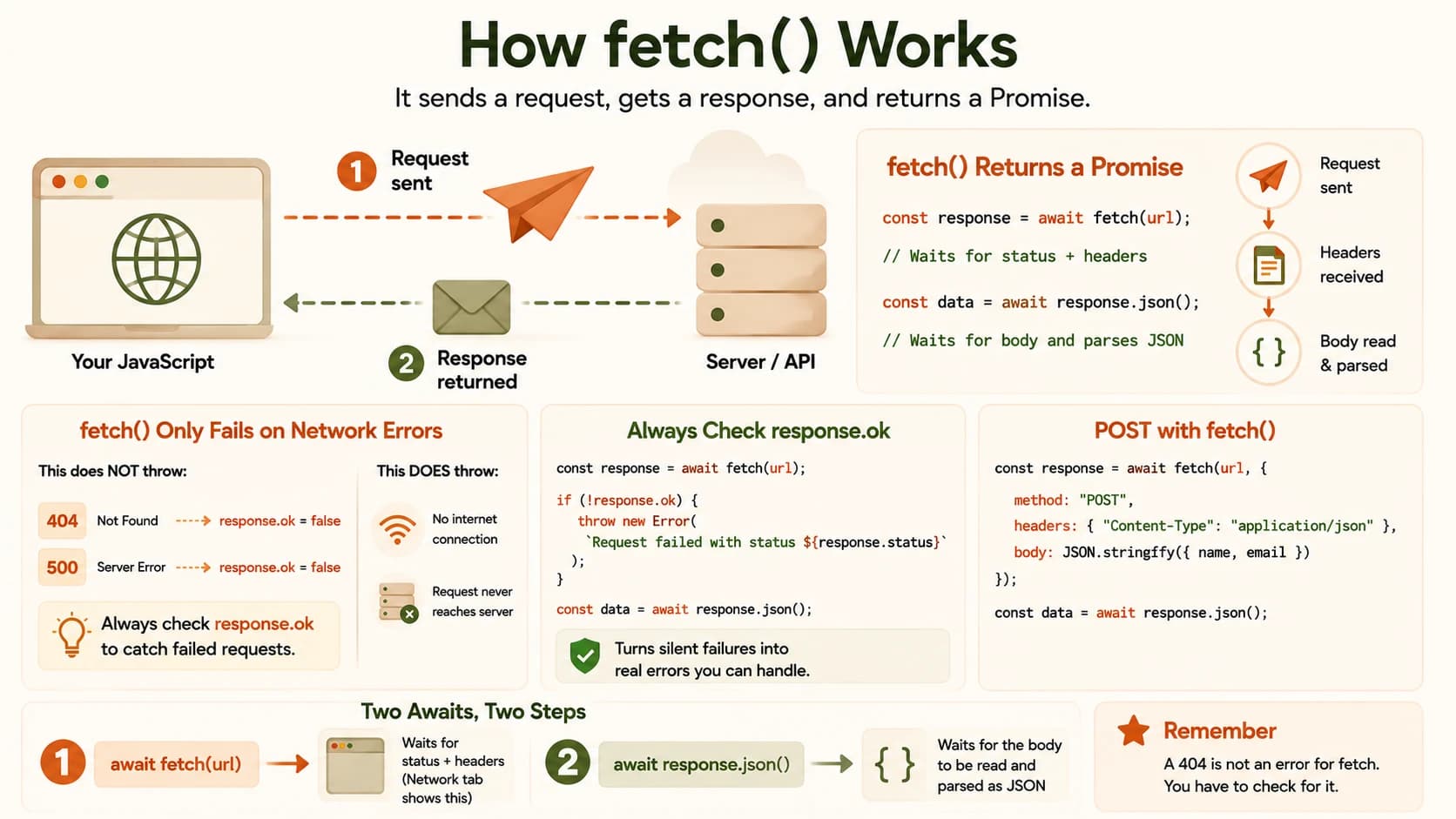
fetch() is JavaScript's built-in way to send an HTTP request from your code and get a response back as a Promise. It's how a webpage calls an API without reloading the page. The part that catches almost every beginner: fetch only fails on a real network problem, never on a bad status code like 404 or 500. That's exactly what happened above.
Key Takeaways
fetch(url)sends a request and returns a Promise you canawaitfetch()does not reject on a 404 or 500, only on a genuine network failure- You must check
response.okyourself to catch a failed request- Reading the body needs a second
await, withresponse.json()- A POST request needs a
method,headers, and abodyyou build withJSON.stringify()
What Is Fetch in JavaScript?
fetch() is a function built into every modern browser and into Node.js 18 and later. You give it a URL, it sends a request over the network, and it returns a Promise that resolves once the response's headers and status arrive.
It's the direct code version of what you watched happen in your browser's DevTools Network tab last lesson. Every request you saw listed there, your code can now send and read for itself.
A Basic fetch() Request, Step by Step
Here's a fetch() call that gets a list of users from a public test API and logs the first one:
async function getUsers() {
  const response = await fetch("https://jsonplaceholder.typicode.com/users");
  const users = await response.json();
  console.log(users[0]);
}

getUsers();
Two separate waits happen here. The first await pauses until the response's status and headers arrive. That's the moment you'd see the request finish in the Network tab. The second await waits for the body to be read and turned from text into a JavaScript array with response.json().
Skip that second await and you'll log a pending Promise instead of your data. It's one of the most common first mistakes with fetch, and one I still catch myself making when I'm moving fast and forget the second wait exists.
Why fetch() Doesn't Throw an Error on a 404
This is the part that breaks real projects silently. fetch() only rejects its Promise when the network itself fails, no internet connection, a broken DNS lookup, a request that never reaches a server. A 404 or a 500 still counts as a completed request as far as fetch is concerned, so your .catch() never fires.
If you skip checking response.ok, a wrong URL or a dead endpoint will fail completely silently: no error, no console message, just missing data on the page.
The fix is to check it yourself, right after the first await:
async function getUser(id) {
  const response = await fetch(`https://jsonplaceholder.typicode.com/users/${id}`);
  if (!response.ok) {
    throw new Error(`Request failed with status ${response.status}`);
  }
  return await response.json();
}
response.ok is true for any status in the 200 range and false otherwise. Checking it before you touch response.json() turns a silent failure into an actual error you can catch and handle. That's exactly the kind of bug the status codes you learned about last time were designed to signal.
Fetch can also fail silently for a second reason: CORS, a browser security rule that blocks a request if the server hasn't explicitly allowed it. A CORS failure shows up as an error in the console, but it's easy to mistake for a bug in your own code instead of a setting on the server you're calling.
Sending Data with fetch() (POST)
A GET request only needs a URL. A POST request needs to say what data you're sending and how it's formatted, which means three extra pieces:
async function createUser(name, email) {
  const response = await fetch("https://jsonplaceholder.typicode.com/users", {
    method: "POST",
    headers: { "Content-Type": "application/json" },
    body: JSON.stringify({ name, email }),
  });
  return await response.json();
}
method tells the server this is a POST, not the default GET. headers tells it the body is JSON, so it knows how to read it. body is where JSON.stringify() matters. Your data starts as a JavaScript object, but a request body has to travel as text. JSON.stringify() is what converts one to the other.
Forget JSON.stringify() and you'll send the literal text [object Object] instead of your actual data. That mistake produces no error either. It just leaves the server with something it can't use.
Your Task
Time to see fetch in JavaScript handle both a working request and a silently broken one, in your own console.
Fetch a real user and log it
Open your browser console (or a .js file run with Node) and paste in the getUsers() function from the "Basic fetch() Request" section above, then call it.
Confirm you see a real user object logged, not a pending Promise.
Deliberately break the URL and watch nothing happen
Change the URL inside the same function to a user id that doesn't exist, then run it again:
const response = await fetch("https://jsonplaceholder.typicode.com/users/9999");
The server returns a 404, but there's no error and no red text. console.log(users[0]) just logs undefined.
Add the response.ok check and see the difference
Add the response.ok check from the "Why fetch() Doesn't Throw an Error on a 404" section above, right after the fetch() line and before you touch response.json().
Run it again against the same broken URL and confirm you now see a real thrown error instead of silence.
Completed all three steps above? You've finished Lesson 06.08.
FAQ