How to Write Better AI Prompts: A Beginner's Guide
Vague prompts get vague answers. See three real prompt versions, from vague to specific, and learn exactly why the best one wins every time.

You type "make this better" into Claude, paste in a paragraph, and hit send. What comes back is fine. Generic. Not wrong, exactly, just not what you actually wanted, and you're not sure why, because you did ask it to make things better.
A good AI prompt works exactly like the API requests you just learned about: the more clearly you specify what you want, the more precisely the response matches it. Here's how to write prompts that actually get you somewhere, and why the fix for that generic answer was never "try again," it was "be more specific."
Key Takeaways
- A vague prompt produces a vague response, this isn't the model failing, it's doing exactly what you asked
- Every prompt is a request, and requests that specify audience, length, format, and tone get more precise responses
- The same content string you send to Claude's API is the "content" field from Module 05's messages array
- Iterating a prompt in two or three rounds beats trying to write a perfect one from scratch
What Makes an AI Prompt Actually Work?
A prompt is a request, and it follows the same rule as the GET and POST requests from lesson 06.06: the more clearly you specify what you want, the more precisely the response matches it. A request with no details gets a generic reply. A request with real constraints, audience, length, format, tone, gets something you can actually use.
This isn't a trick or a hack. It's the same logic behind every API call you've learned about in this module. When you call GitHub's API and ask for a specific user, you get that user's data back, not a random one. When you prompt Claude with specific instructions, you get a specific response back, not a generic one.
If you skip this and stay vague, you'll keep getting the "wall of text I didn't ask for" feeling, and you won't know why, because nothing in your prompt told the model what "better" actually means to you. The model isn't reading your mind, it's reading your words, and vague words are the only input it has to work with.
Three Versions of the Same Prompt
Here's the same request, written three ways, each one sharper than the last.
Vague: "Write about dogs."
Better: "Write a short paragraph about why dogs make good pets for first-time owners."
Best: "Write a 100-word paragraph for a pet adoption website, aimed at first-time owners considering a dog. Cover: low-maintenance breeds, one practical tip, and a warm, encouraging tone. No bullet points, flowing paragraph only."
Run all three through Claude and you'll see the gap immediately. The vague version could be a school essay, a vet blog, or a joke. The better version narrows the topic but still leaves the model guessing about length, tone, and where it's going to be used. The best version leaves nothing to guesswork.
I still write the vague version first, almost every time. It's faster to see exactly what the model gets wrong than to guess up front what details I'll need, and that gap is usually the whole answer.
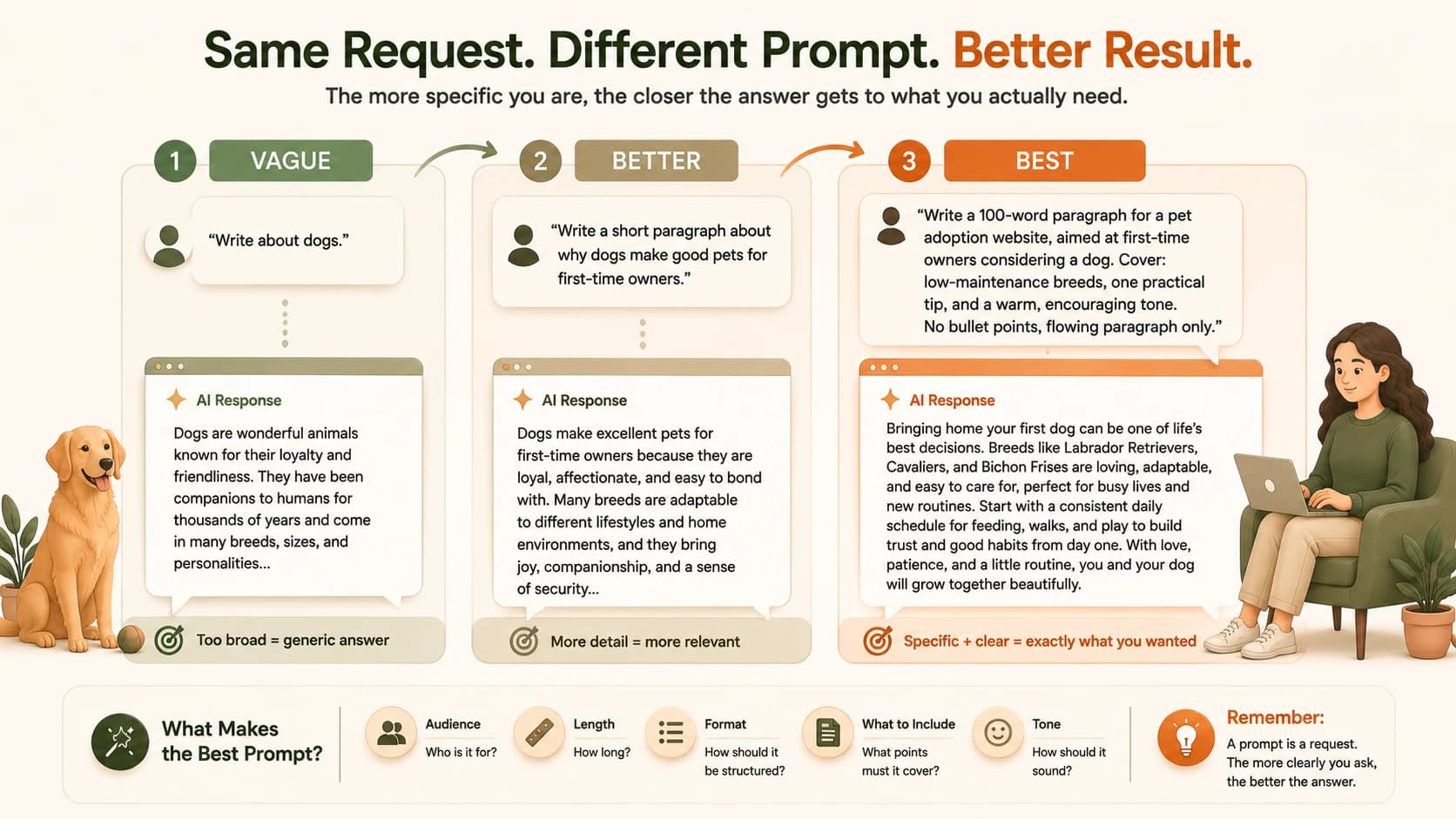
You don't need to write the best version first. Start with vague or better, look at what comes back, then add whatever's missing.
Why the Best Version Wins
The best version works because it answers five questions the model would otherwise have to guess at: who's reading this, how long should it be, what has to be covered, what shape should it take, and what tone fits. Skip any one of those and the model fills the gap with its own default, which is usually generic. Most professional prompting frameworks boil down to a version of the same idea, Atlassian's guide calls its four pillars persona, task, context, and format, different labels, same underlying rule: specify more, guess less.
This is the same specificity principle behind every REST request you saw in lesson 06.06. A GET request to api.github.com/users/octocat returns exactly one user's data, because the URL specifies exactly which user. A vague prompt is like a request with no parameters, technically valid, but returning whatever the server feels like giving you.
One more thing worth knowing: piling five unrelated asks into a single prompt doesn't help either. Something like "write me a marketing paragraph, also suggest three headlines, also check my grammar, also make it funnier" gives the model too many jobs at once, and each one gets done a little worse than if you'd asked for it on its own. A specific prompt about one clear task beats an overloaded prompt trying to do everything at once.
Adding detail only helps if the detail is relevant. Padding a prompt with facts the model doesn't need ("I am 34 years old and live near a park") wastes words without narrowing the response. Stick to details that actually shape the output: audience, length, format, tone, and what to cover.
This Is What's Inside That "content" Field
Back in Module 05, you saw the messages array that gets sent to Claude's API, and inside it, a content field holding a string. That string is exactly what you've been building in this lesson. Whatever you write as your "best" version is precisely what goes inside that field.
Every layer you've learned in Module 06 exists to deliver one thing to the user: a good response to a good prompt. HTML and CSS and JavaScript build the interface someone types into. The API carries that message to a server. The frontend and backend keep the request and the API key moving safely between them. And at the very center of all of it sits the one part you fully control: the words in that content string.
That's the whole system. You've now seen every layer of it, from the button in lesson 06.01 to the prompt in this one, structure, style, behavior, the request, the server, the trusted middleman, and finally the words you choose to send.
Write three versions of the same prompt
Pick any topic you're curious about, a hobby, a recipe, a work task, anything.
Write three versions of a prompt asking an AI (Claude, or any assistant you have access to) about it:
- A vague, one-line version
- A better version that adds a bit of context or purpose
- A best version that specifies audience, length, format, and tone, like the pet-adoption example above
If you have access to Claude, run all three and compare the responses side by side. Notice exactly which words in your best prompt made the biggest difference to the result.
Done? You've completed Lesson 06.10.
FAQ
Common questions
That's the short version of how to write better AI prompts: be specific, expect to iterate, and remember the model only knows what you actually told it. For a deeper look at writing clear, direct prompts, that's the natural next read. And if you're curious where this leads, the agent glossary entry explains systems that decide their own next action instead of just replying to a single prompt.
Since the last lesson, you've now walked the full loop from a static button to a working AI request. If you want to keep building from zero, the Getting Started path has the full sequence in order.