What Is the Cline VS Code Extension? A Beginner's Guide
The Cline VS Code extension is a free, open-source AI coding agent you power with your own API key. Here's what it does and how it beats Copilot on control.

You ask an AI agent to "clean up this file," walk away to grab coffee, and come back to find it read a dozen files, rewrote three of them, and quietly ran up a dollar counter you didn't know was ticking. Nothing broke. But you had no idea what it was doing, or what it cost, until it was done.
That gap between what the tool does and what you can see is exactly what the Cline VS Code extension is built to close. In this lesson you'll learn what Cline is, how it uses your own API key instead of a subscription, and why it shows you its plan before it touches a single line. By the end you'll know when to reach for it.
Key Takeaways
- Cline is a free, open-source AI coding agent that runs as an extension inside VS Code
- It's "bring your own API key": you connect it to Claude, GPT, or other models and pay the provider directly for what you use
- Before editing anything, Cline shows a plan and asks your approval for every file change and terminal command
- The extension costs nothing, but the model behind it has a running meter, and Cline shows the cost of every step
- It's a strong pick if you already have an API key from an earlier lesson and want real control over what the AI does
What Is the Cline VS Code Extension?
The Cline VS Code extension is a free, open-source AI coding agent that lives in a sidebar inside VS Code. You describe a task in plain English, and it reads your files, writes and edits code, and runs terminal commands to get the job done, pausing for your approval at each step.
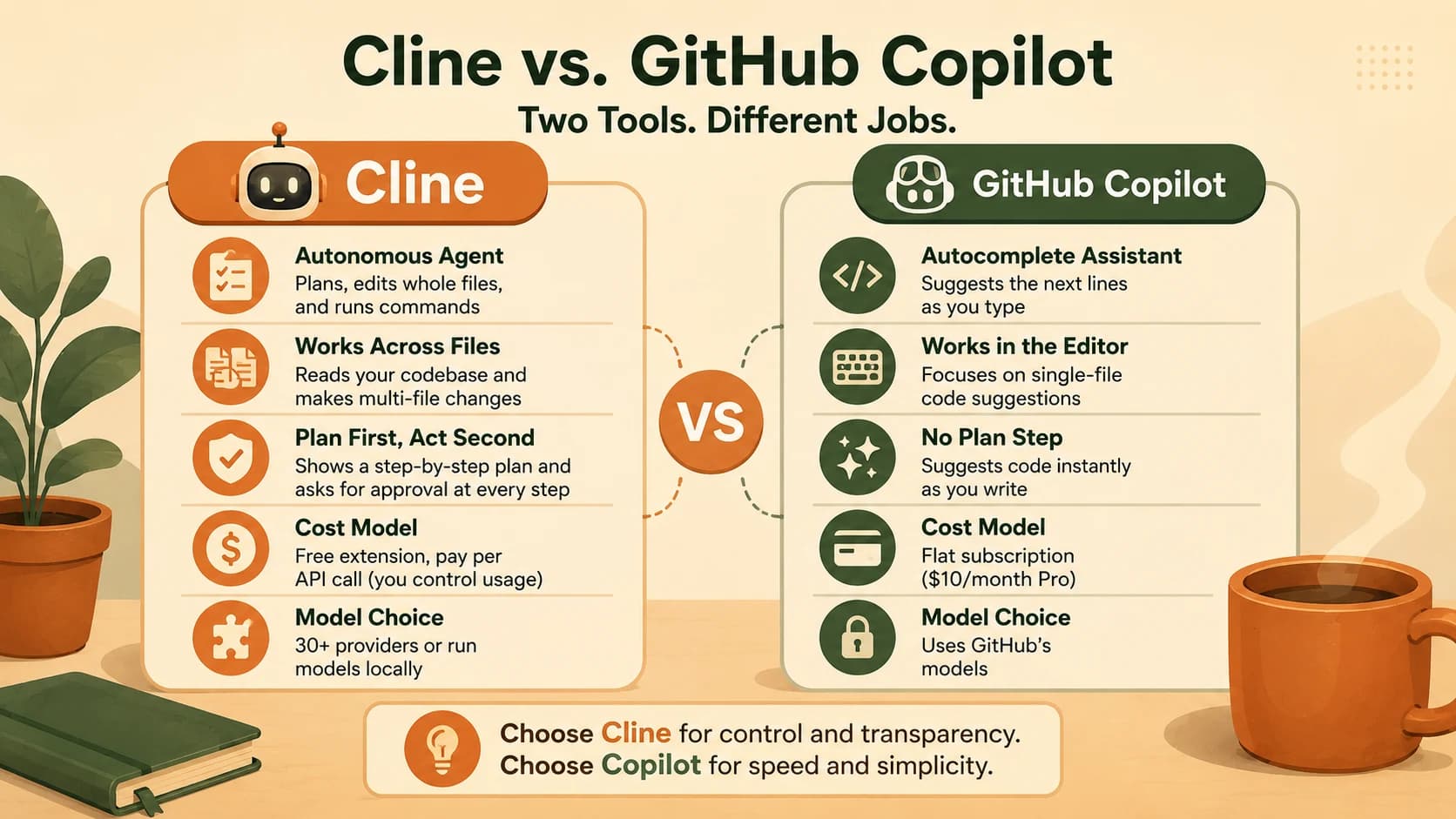
That last part is what separates it from an autocomplete tool like GitHub Copilot. Where GitHub Copilot suggests the next few lines as you type, Cline takes on a whole task and works across multiple files at once. That's closer to handing work to a junior developer than getting a smarter autocomplete.
Cline is genuinely open-source under the Apache 2.0 license, with over five million installs. You may see its old name in the marketplace listing: it started life as "Claude Dev," which is why its extension ID is still saoudrizwan.claude-dev. Same tool, just grown up.
If you expect Copilot-style ghost text and instead get an agent that wants to edit four files, that mismatch is jarring the first time. Knowing which category Cline is in before you install it saves you that confusion.
Bring Your Own API Key: How Cline Differs From Copilot
Here's the real dividing line. Copilot charges a flat monthly subscription. Cline charges you nothing for the extension, and instead asks you to connect your own API key from an AI provider. You pay that provider directly, only for what you actually use.
This is where an earlier lesson pays off. The ANTHROPIC_API_KEY you saved in your .env file back in Module 05 is the exact same API key Cline needs. You've already done the hard part, now you get to use that key in a real coding tool instead of a script you wrote by hand.
Cline isn't locked to one provider either. It works with more than thirty of them, including Claude, GPT, Google's Gemini, and even models running free on your own machine through tools like Ollama. You pick the provider, paste the key, and Cline uses it.
Cline vs. GitHub Copilot
| Cline | GitHub Copilot | |
|---|---|---|
| What it is | Autonomous agent (plans, edits whole files) | Autocomplete + chat assistant |
| Cost model | Free extension, pay per API call | Flat subscription ($10/month Pro) |
| API key | Bring your own | Included in subscription |
| Model choice | 30+ providers, or run local | GitHub's models |
| Open source | Yes (Apache 2.0) | No |
Skip this distinction and you'll stumble at the start. Either you freeze at the setup screen with no key configured, or you assume Cline costs a fixed amount and badly misjudge what a heavy day of use will run you.
If you'd rather work from the terminal than a VS Code sidebar, Aider is another free, open-source, bring-your-own-key option worth knowing about, covered in the next lesson.
Plan First, Act Second: Why Cline Shows Its Work
Cline's signature trait is that it doesn't just start changing things. It has two modes. In Plan mode it explores your codebase, asks clarifying questions, and lays out a step-by-step strategy for what it intends to do. Only when you switch to Act mode does it start executing, and even then, every file edit and terminal command needs your approval before it runs.
This makes its reasoning visible in a way autocomplete tools never are. You see the plan, you see each proposed change as a diff, and you click to allow or reject it. This is your first real taste of how agents work from Module 07: a model that doesn't just answer, but uses tools like your terminal and browser to carry out a goal.
Leave auto-approve off while you're learning. Watching Cline propose each change one at a time teaches you how it thinks, and catches a wrong turn before it touches five files instead of one.
Ignore this and one of two things goes wrong. You rubber-stamp every change without reading it and let a bad edit slip through. Or you distrust the tool so much you never let it act, losing the whole point of using an agent.
What It Actually Costs (And How to Not Overspend)
The extension is free. The model is what you pay for, and because an agent reads files, reasons, edits, and re-checks its own work, it can burn through tokens faster than you'd expect. That's the running meter behind the surprise from the top of this lesson.
The first time I watched a task I thought was tiny tick past a dollar, I started reading the cost line after every session. That one habit is what keeps the bill boring, and it's the reason I trust an agent that shows me the number instead of hiding it.
Real numbers help. One "agent loop," where Cline reads your code, thinks, and makes an edit, costs roughly $0.20 to $0.30 on Claude Sonnet. A small file tweak might be a few cents; a multi-step feature can run $0.50 to $3.00; a big refactor with several rounds of fixing errors can hit $5 to $15.
Rough cost per task on Claude Sonnet
| Task | Typical cost |
|---|---|
| Simple one-file edit | $0.02 – $0.10 |
| One agent loop (read, think, edit) | $0.20 – $0.30 |
| Multi-step feature with testing | $0.50 – $3.00 |
| Large refactor, multiple fix rounds | $5.00 – $15.00 |
For light, learning-scale use this often comes to under $10 a month, cheaper than a flat subscription. The good news is you're never guessing: Cline shows the token count and exact dollar cost of every single step in the chat panel, and you can watch your running total on the Anthropic console.
Costs add up fastest when you run big tasks on autopilot with auto-approve on. While you're learning, keep an eye on the per-step cost Cline prints, and check your provider console after a heavy session so the bill is never a surprise.
Your Task
Time to put the Cline VS Code extension to work with the API key you already have.
Connect Cline to your Anthropic API key
In VS Code, open the Extensions panel (Ctrl+Shift+X, or Cmd+Shift+X on Mac), search for "Cline" by the publisher saoudrizwan, and click Install.
Open Cline from the sidebar. On first launch it shows a provider picker, choose Anthropic.
Paste in your ANTHROPIC_API_KEY, the same value from your .env file in Module 05. Copy only the value, and never commit it to a repo.
Now ask Cline something small: open any Python file from an earlier lesson and type "Explain what this file does."
Watch the step-by-step plan it shows before doing anything. That visible plan is Cline's signature trait, and the whole reason to choose it.
Done? You've completed Lesson 08.06.
FAQ