How to Choose a Deployment Platform (Beginner's Guide)
A simple three-question framework for choosing a deployment platform for your first real project: static, backend, or full-stack, free or paid.

Your project runs. You typed the command, the browser opened, everything works, on your laptop. Then you go to put it online and hit a wall of names: Vercel, Render, Railway, Netlify, Fly.io, GitHub Pages. Which one is yours? It can feel genuinely overwhelming, and most "best hosting" articles make it worse by handing you a ranked list of ten options with no way to tell which row is actually about you.
Here's how to choose a deployment platform without the guesswork. Ask three questions about what you actually built, and the right platform falls out of the answers. No coin-flip, no switching later because you picked blind. This is the last lesson of the Launchpad, so we'll also step back and look at everything you just built.
Key Takeaways
- The right platform depends on one thing first: what you're deploying, static files, a backend, or a full-stack app with a database
- Static sites go on Vercel, Netlify, or GitHub Pages; backends need Render, Railway, or Fly.io; a full-stack app pairs a backend host with Supabase
- For learning and hobby projects a free tier covers you comfortably, just know Render's free service sleeps when idle and Vercel's free tier needs a card on file
- A custom domain is worth the few dollars a year only for public, serious projects; a free platform URL is genuinely fine while you're learning
How Do You Choose a Deployment Platform?
Answer three questions about your project. First, what are you deploying: static files, a running backend, or a full-stack app with a database? Second, what's your budget and expected traffic? Third, do you need a custom domain? Your answers point straight at the right platform, no ranked list required.
That order matters. Most beginner guides start with "here are the top seven hosts," which is backwards, because the answer changes completely depending on what you built. Pick blind and you can burn an afternoon deploying to a platform that physically can't run your code, then tearing it down and starting over somewhere else. Ask the three questions first and that never happens.
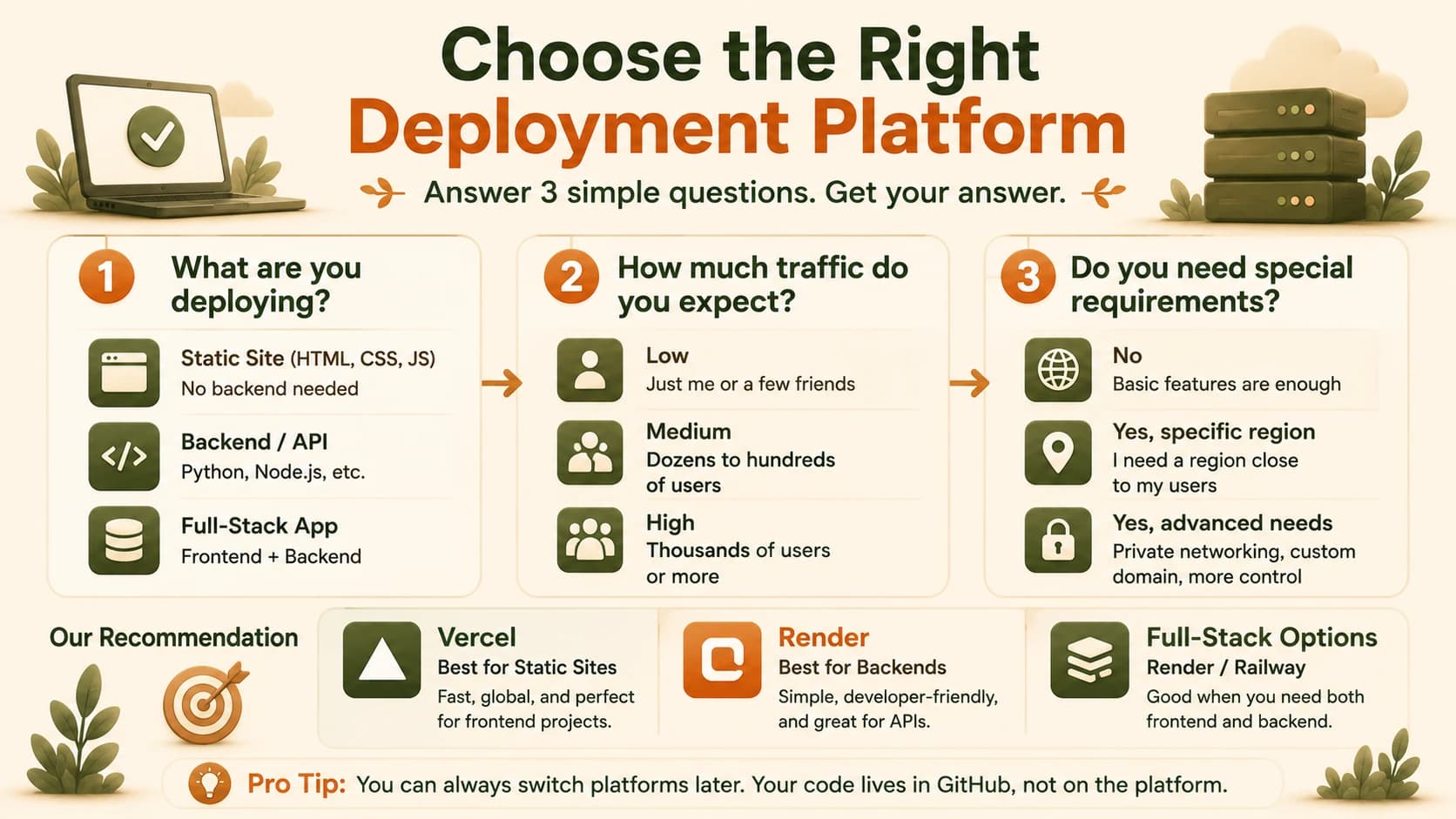
Question 1: What Are You Deploying?
This is the question that decides everything else, and it's the one beginners skip. There are three kinds of project, and each one has its own aisle of platforms.
Static files only, like a portfolio, a landing page, or a docs site with no server behind it, go on Vercel, Netlify, or GitHub Pages. These are free, simple, and need no ongoing compute, because there's nothing running, just files being served.
A real backend process, like a FastAPI or Express server that stays running and answers requests, needs Render, Railway, or Fly.io. The distinguishing job here is keeping a process alive, which static hosts simply don't do.
A full-stack app with a database uses any backend platform above, connected to Supabase. Your database is already hosted and live from lesson 07.03, so there's no separate deploy step for it, you just point your backend at it. If the names above blur together, the platforms in this module breaks each one down.
Matching your project to a platform
| What you built | Platforms | Why |
|---|---|---|
| Static site (portfolio, landing page) | Vercel, Netlify, GitHub Pages | Serves files, no server needed |
| Backend process (FastAPI, Express) | Render, Railway, Fly.io | Keeps a live process running |
| Full-stack with a database | Backend host + Supabase | Database already hosted separately |
Get this one wrong and the failure is quietly confusing. Push a FastAPI backend to GitHub Pages, which only serves static files, and it won't crash with a clear error, it'll just serve your Python file as plain text while your API never runs. You'll stare at a page that "works" and does nothing.
Question 2: What's Your Budget and Expected Traffic?
For learning, hobby, and low-traffic projects, any free tier covered in this module handles it comfortably. A personal site or a small tool you share with a few friends rarely comes anywhere near a free-tier limit. The trigger for paying is real, sustained usage, hundreds or thousands of people using your thing regularly, which is a good problem you can solve when it actually arrives.
Free doesn't mean identical, though, and the differences are worth knowing before they surprise you. Render's free tier needs no credit card, but a free backend sleeps after about 15 minutes of no traffic and takes up to a minute to wake up on the next visit. Vercel's free Hobby tier is generous but asks for a card on file even though you won't be charged. Railway no longer has a permanent free tier at all, just a small one-time trial credit. I got caught by that last one following an older tutorial that promised "free on Railway," the steps were fine, the pricing underneath them was two years stale.
What "free" actually means on each platform
| Platform | Free tier? | The catch to know |
|---|---|---|
| Render | Yes, no card needed | Backend sleeps after ~15 min idle, ~1 min to wake |
| Vercel | Yes (Hobby) | Wants a card on file even though it won't charge |
| Railway | No permanent free tier | One-time trial credit only, then paid |
Check your usage numbers in the dashboard once in a while as a habit, not a worry. Knowing you're at 5% of a limit is calming; discovering it the day a service pauses is not.
Skip this question and you either assume free-forever and get a real project quietly paused mid-use, or you panic-upgrade to a paid plan you didn't need yet. Neither is a disaster, but both are avoidable.
Question 3: Do You Need a Custom Domain?
Not always, and the honest answer depends on who's going to see the thing. For a serious or public-facing project, yes, a custom domain is worth the small yearly cost, a real address like yourname.com reads as trustworthy in a way a platform URL doesn't, and you set it up the way lessons 09.11 and 09.12 walked through.
For a learning project, a demo, or an internal tool, the free platform URL is genuinely fine. A your-app.onrender.com address is not something to spend money fixing while you're still practicing. Don't buy a domain you have no one to share with yet.
The stakes here cut both ways. Pay for a domain on a project that never leaves your laptop and you've wasted money on nothing; hand a real client or a hiring manager a link on a random-looking platform subdomain and a genuinely good project can read as half-finished. Match the domain decision to the audience, not to a rule.
You Built the Whole Thing
Step back for a second, because this is the last lesson of the Launchpad and you've earned the view. You started in the terminal, learned Git so your work couldn't vanish, wrote Python, put something on the web, stood up a backend and a database, brought in AI coding tools, and now you've shipped it live where anyone with the link can use it.
That's not a list of tutorials. That's one continuous skill: taking an idea and turning it into a real, running thing on the internet, by yourself. Every piece connects, which is exactly what what deployment means promised back when Module 09 started. Most people who "want to learn to code" never get here. You did.
From here the road forks toward making software that doesn't just respond but decides and acts, which is where the Agentic AI pillar picks up. If you want to retrace the full sequence or point a friend at it, the Getting Started path lays it out end to end.
Apply the framework to your own first real project
Think of a real project you'd like to build next, even a simple one. Answer the three questions from this lesson for it: (1) What are you deploying, static files, a backend, or full-stack? (2) What's your budget and expected traffic, comfortably free or plan-for-paid? (3) Do you need a custom domain, or is a free platform URL good enough for now? Write down the specific stack your answers point to, for example: "Vercel for the frontend, Render for the backend, Supabase for data, no custom domain yet." That's your deployment plan. You now have every skill from this module to execute it.
Done? You've completed Lesson 09.14.
FAQ