Deploy FastAPI to Render Free: Build & Start Commands
How to deploy FastAPI to Render's free tier: the exact build and start commands, why it works when Vercel doesn't, and the cold-start catch to expect.
You finish your first Render deploy, copy the fresh .onrender.com link, and send it to a friend to show off. They open it, and the page just spins. Ten seconds. Thirty. Almost a full minute of nothing. Your stomach drops: the deploy must be broken. It isn't, and by the end of this lesson you'll know exactly why that happens.
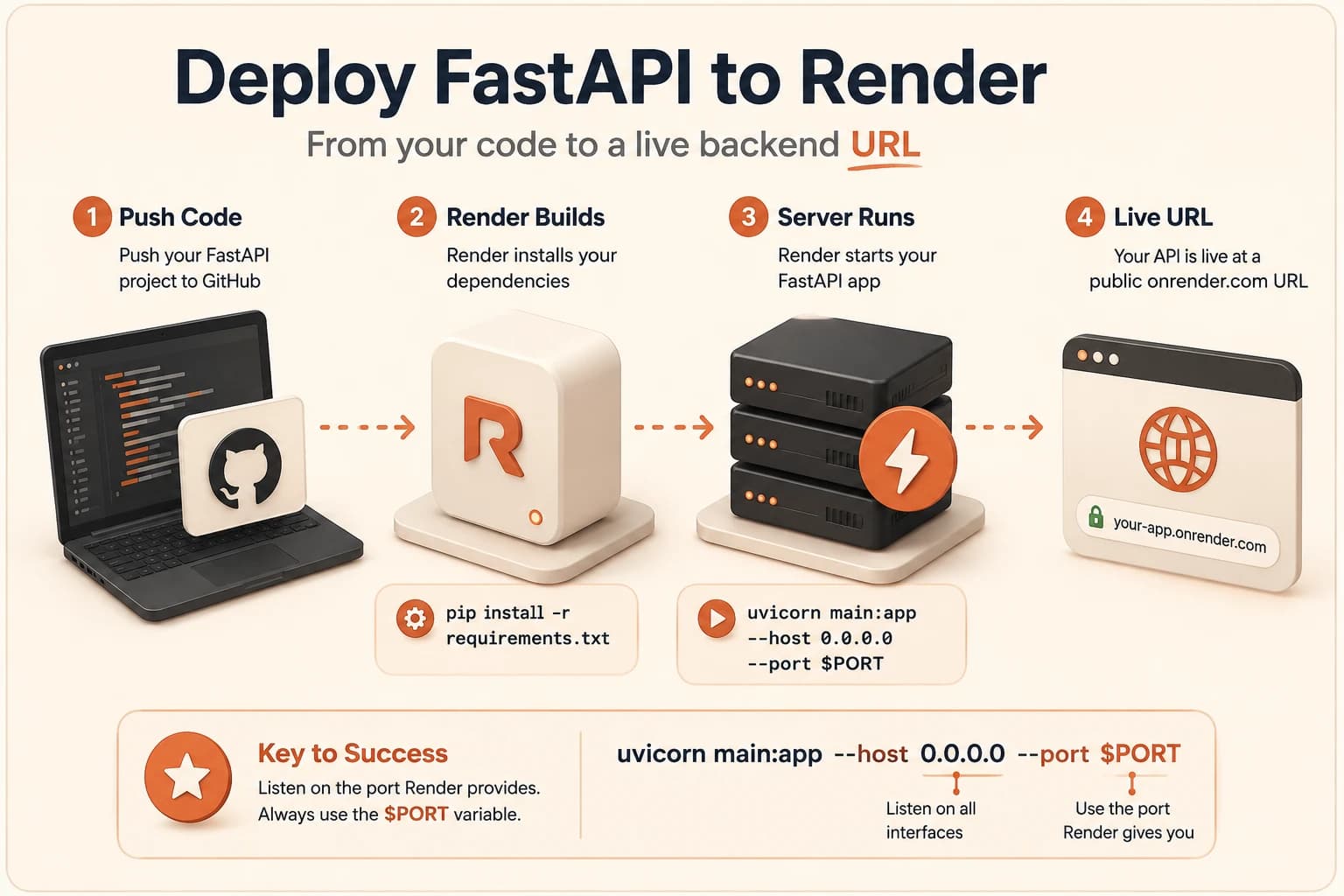
To deploy FastAPI to Render, you connect your GitHub repo, tell Render to build with pip install -r requirements.txt and start with uvicorn main:app --host 0.0.0.0 --port $PORT, and it runs your server on an always-on machine at a public URL. Render works for this when a static host like Vercel doesn't, because a FastAPI server isn't a file to hand out, it's a program that has to stay awake and listen. This lesson takes the hello-world server from Module 07 live.
Key Takeaways
- Render keeps a real Python process running, which is exactly why it can host a FastAPI backend and a static host like Vercel can't
- Two settings do the whole job: build command
pip install -r requirements.txt, start commanduvicorn main:app --host 0.0.0.0 --port $PORT$PORTmust stay a variable, not a fixed number, because Render picks the port itself, hardcode one and you get "No open ports detected"- The free tier sleeps after 15 minutes idle, so the next visit waits 30 to 60 seconds while it wakes, that's expected, not a failed deploy
Why Vercel Couldn't Run Your FastAPI Server
Here's the cleanest way to hold the difference in your head: Vercel hands out files, and Render keeps a program running. A static host is a librarian passing you a book that already exists. Your FastAPI server is not a book, it's a clerk who has to be sitting at the desk every time someone walks up, ready to answer.
That's the exact split from the backend deployment lesson, and this is where it stops being theory. A FastAPI app is a live process. It boots up, opens a connection, and waits for requests, indefinitely. Vercel's model is built around serving static files fast and running tiny functions that finish in a blink, not around babysitting a process that never exits.
So if you push a FastAPI server to a pure static host, nothing loads, and there's no red error telling you why. The machine simply has nowhere to actually run your code. Render is built for the opposite job: it starts your process and keeps it alive, which is why it's the backend half of this course.
How Do You Deploy FastAPI to Render?
You connect your GitHub repository to Render, set two commands, and click deploy. Render installs your dependencies, runs your start command, and hands you a live onrender.com URL, usually within a couple of minutes. That's the whole shape of it.
The mental model is the same GitHub connection you already used for the frontend, with one real change. Instead of copying static files, Render reads your requirements.txt, installs what's listed, and then actually runs your server. For the Module 07 app, that file is just two lines:
requirements.txt
fastapi
uvicorn
Then you give Render two commands. The build command installs those packages. The start command launches your app:
Build:  pip install -r requirements.txt
Start:  uvicorn main:app --host 0.0.0.0 --port $PORT
The one part worth slowing down on is $PORT. You never pick a port number yourself here. Render decides which port to use and passes it in through that $PORT variable, so your job is just to point uvicorn at it. Think of it as letting Render pick the door number and telling your app to stand at whichever door it's given.
Leave $PORT as a variable. If you hardcode a fixed number like 8000, the build can still succeed, but Render can't reach your app on the port it expected, and you'll get a "No open ports detected" failure that looks scarier than it is.
From then on, every git push to that repo redeploys automatically, the same way your frontend host works, a pattern explained fully in how auto-deploy actually works. Render's own deploy a FastAPI app guide lists these exact settings if you want to check them against the source.
Your Free Server Falls Asleep, and That's Fine
Now back to that spinning page. On Render's free tier, a web service that goes 15 minutes without a single request spins itself down to save resources. It doesn't disappear, it powers off and waits. The next person to visit triggers a wake-up, and booting the process back up takes roughly 30 to 60 seconds.
That's the slow first load. It isn't your code, it isn't a failed build, and it isn't something you configured wrong. It's the free tier doing exactly what it promises: free compute in exchange for not staying awake around the clock. Every request after the wake-up is fast, right up until it sits idle long enough to nod off again.
I've watched people lose a whole evening to this: a 40-second first load looks like a failure, so they start re-pushing perfectly good code trying to fix a problem that was never there. Knowing it's coming is the entire fix. If you eventually need it always-on, Render's paid Starter tier removes spin-down for a few dollars a month, worth it once a project actually matters, and genuinely skippable while you're learning. Render documents the exact free tier spin-down behavior if you want the specifics.
Your server is live, but if it talks to a database, that piece has its own story. Supabase in production explains why you didn't have to deploy that part at all.
If any earlier piece feels shaky, the Getting Started path walks the whole build-and-deploy arc again from the top.
Your Task
Deploy your FastAPI hello world to Render
Push your main.py from lesson 07.01 to a GitHub repository, and add a requirements.txt file next to it containing two lines:
fastapi
uvicorn
Go to render.com, create a free account, and connect your GitHub. Click New Web Service, select your repository, and set the start command to:
uvicorn main:app --host 0.0.0.0 --port $PORT
Click deploy and watch the build logs scroll by until it finishes. Open the onrender.com URL Render gives you and confirm you see the same JSON message you saw locally, except this time it's live on the internet.
Done? You've completed Lesson 09.04.
FAQ