Build an MCP Server with FastMCP: A Hands-On Guide
Build a real FastMCP server with tools, a resource, and a prompt, then connect it to Claude Code end to end in this hands-on Python MCP walkthrough.

The first tool I registered on my own MCP server showed up fine in Claude Code's tool list, the model called it without hesitation, and it still failed on the very first real request: the model handed my search_notes function a note's title where the search query was supposed to go, because nothing in the function told it what that argument actually meant.
You build an MCP server with FastMCP out of a handful of Python functions: write a function with type-annotated parameters and a clear docstring, decorate it with @mcp.tool, @mcp.resource, or @mcp.prompt, and FastMCP turns that into a JSON schema, validates the model's input against it, and serves the whole thing over the protocol. Get the type hints and docstring right, and the model calls your function correctly on the first try. Get them wrong, and you get exactly what I got.
Key Takeaways
- FastMCP converts a plain Python function into an MCP tool, resource, or prompt using its type hints and docstring, with no manual schema-writing
- Type hints aren't optional polish: they're the only information the model has about what arguments a tool expects
- As of 2026, "FastMCP" refers to two different projects with a shared history, and the official SDK renamed its bundled version to avoid the confusion
- A single FastMCP server can register multiple tools, a resource, and a prompt in one file, and that's exactly what the reader builds here
- This server is the one the next four lessons in this path extend, not replace, so it's worth committing cleanly the first time
What FastMCP Actually Does
FastMCP turns a plain Python function into a fully described MCP capability by reading its type hints and its docstring, with no schema to hand-write. You write the function the way you'd write any other Python function, add a decorator, and FastMCP does the protocol work.
from fastmcp import FastMCP

mcp = FastMCP(name="Notes Server")

@mcp.tool
def add(a: int, b: int) -> int:
    """Adds two integers together."""
    return a + b
Three things happen the moment @mcp.tool runs: FastMCP reads the function's name and turns it into the tool's name, it reads the docstring and hands that to the model as the tool's description, and it reads the type hints (a: int, b: int) and generates the JSON Schema the protocol requires. If you've read how tools, resources, and prompts differ, this is the concrete mechanism behind the "tool" primitive: a model-controlled capability, described precisely enough that the model can decide when and how to call it.
The docstring isn't decoration. It's the only context the model gets for deciding whether this function solves its current problem, and a vague one produces a model that either ignores your tool or calls it at the wrong moment.
FastMCP vs the Official SDK: Which One You're Actually Installing
As of August 2026, "FastMCP" refers to two different, related projects, and installing the wrong one for the wrong reason is a real, current source of confusion. FastMCP started as an independent project by Jeremiah Lowin, proved the pattern so well that Anthropic folded a version of it into the official modelcontextprotocol/python-sdk in 2024, and then kept evolving on its own as a separate package.
The standalone project, now maintained under PrefectHQ, announced FastMCP 3.0 in January 2026, adding server composition, per-component authorization, and native OpenTelemetry tracing. The official SDK went the other direction: its stable v2 release, shipped July 28, 2026, renamed its own bundled server class from FastMCP to MCPServer, a change made specifically because the two projects kept getting confused for each other in tutorials and bug reports.
Practically, that leaves you two real options, and the difference is a single dimension (which package you install), not a table's worth of tradeoffs:
- The official SDK's bundled server (
mcp.server.fastmcp, now migrating toMCPServer), minimal, Anthropic-maintained, fine for a small server with no extra dependencies. - Standalone FastMCP (
pip install fastmcp), the fuller feature set: middleware, auth providers, a built-in test client, and the decorator syntax nearly every current tutorial assumes.
This lesson uses standalone FastMCP, because it's what the note-taking server needs later in this path and what most of the current ecosystem has converged on. Run pip install fastmcp before continuing, or reuse the Python environment you already set up in Getting Started if you have one.
Building the Note-Taking Server: The Tools
A tool is a parameterized operation the model decides to call, and this server needs two: one to add a note, one to search existing ones. Both live in the same file as the server instance.
from fastmcp import FastMCP

mcp = FastMCP(name="Notes Server")

notes: list[dict] = []

@mcp.tool
def add_note(title: str, body: str) -> dict:
    """Add a new note with a title and body, and return the saved note."""
    note = {"id": len(notes) + 1, "title": title, "body": body}
    notes.append(note)
    return note

@mcp.tool
def search_notes(query: str) -> list[dict]:
    """Search notes by keyword in the title or body and return matching notes."""
    query_lower = query.lower()
    return [
        n for n in notes
        if query_lower in n["title"].lower() or query_lower in n["body"].lower()
    ]
Notice both functions take arguments with explicit types (title: str, body: str, query: str) and return typed data. That's what makes add_note and search_notes legible to the model as two distinct, parameterized operations rather than one vague "do something with notes" capability. The in-memory notes list is intentionally simple: the point of this lesson is the FastMCP mechanics, not a real database, and every one of the next four lessons reuses this exact server without needing a heavier storage layer.
Adding the Resource and the Prompt
A resource is read-only, addressable data the host can load without the model asking for it, and this server's obvious resource is the full note collection.
@mcp.resource("notes://all")
def all_notes() -> list[dict]:
    """Return every note currently stored on this server."""
    return notes
notes://all is a URI, the same way a webpage has a URL, and any MCP host can fetch it without the model spending a tool call to ask "what notes exist." That's the tools-vs-resources split from the three primitives lesson made concrete: search_notes is a parameterized operation the model decides to run, notes://all is static context the host can load on its own.
The prompt is the primitive almost every tutorial skips, and it's the piece that turns a repeatable multi-step request into something a person triggers on purpose.
@mcp.prompt
def summarize_notes() -> str:
    """Generate a request asking for a summary of all stored notes."""
    return "Read every note in notes://all and summarize the recurring themes."
All three primitives live in one file and one running process, you don't need separate servers or separate deployments for tools, a resource, and a prompt. FastMCP registers whatever decorators run at import time, and mcp.run() serves all of them together.
Running It and Registering It in Claude Code
Add a run block at the bottom of the same file, and the server is a single Python script away from being callable.
if __name__ == "__main__":
    mcp.run()
Save the file as notes_server.py and register it in Claude Code with one command, run from your terminal:
claude mcp add notes-server -- python notes_server.py
The -- separates Claude Code's own flags from the command that actually starts your server, and by default this registers over stdio, the local transport MCP's architecture lesson already covered. Start a new Claude Code session, and add_note, search_notes, notes://all, and summarize_notes are all available without any further configuration.
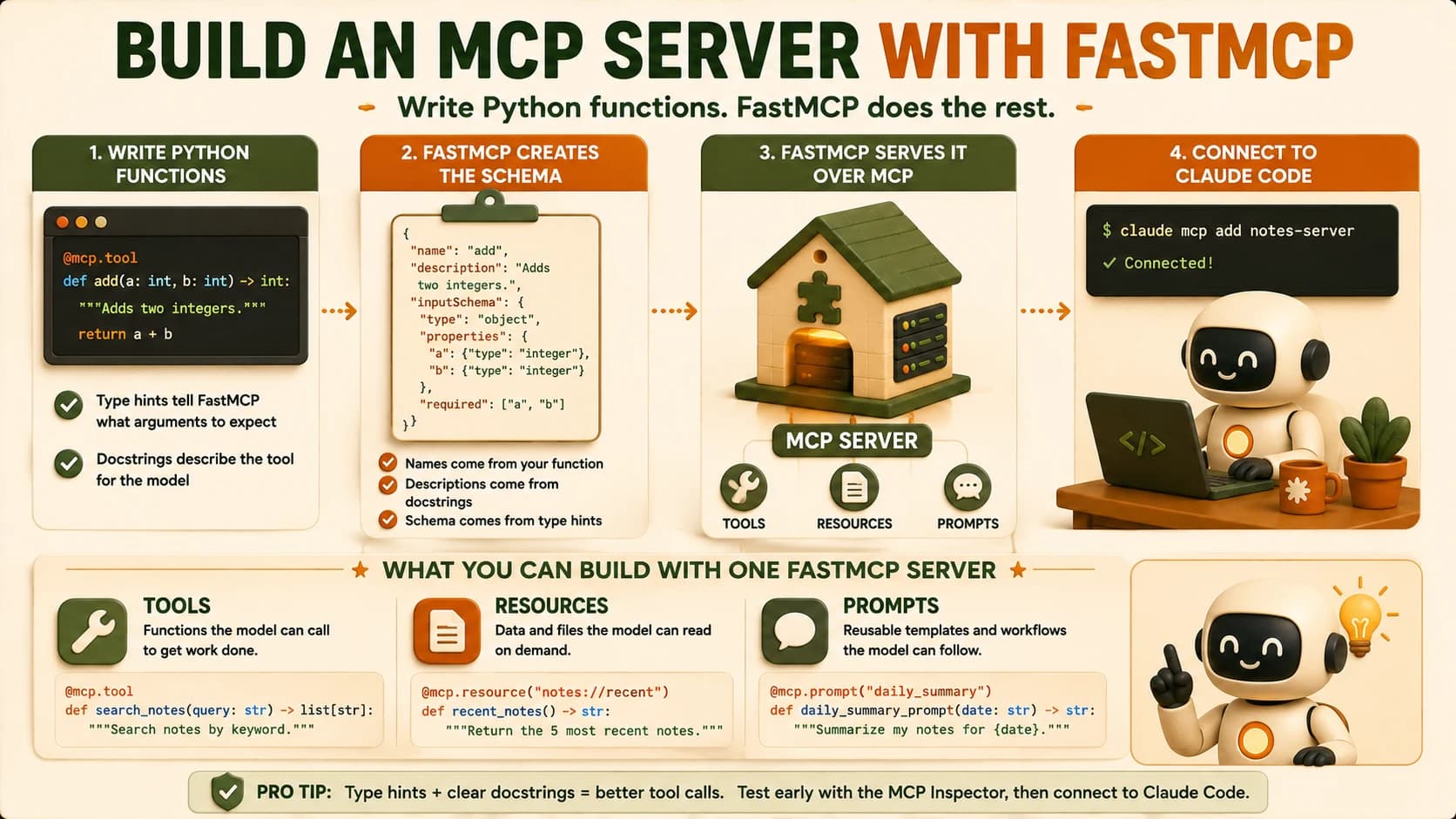
Ask Claude Code to "add a note about tonight's grocery list, then search my notes for groceries," and you should watch it call add_note and then search_notes in sequence, using your server instead of its own memory. That's the whole loop working end to end: a Python function became a tool the model discovered, decided to call, and used correctly.
What Breaks the First Time
The single most common first-run failure, and the one I hit myself, is a tool that registers cleanly, shows up in the tool list, and still fails on real calls because a parameter is missing its type hint. Drop str from def search_notes(query) -> list[dict]: and FastMCP still builds a schema, but a weaker one: the model gets no signal about what shape the argument should take, so it starts guessing, and guessing is exactly how a note's title ends up in the query field.
If a tool call looks wrong in a way that seems like the model "isn't paying attention," check the function signature before you touch the prompt. A missing or vague type hint produces exactly that symptom, and no amount of prompting fixes a schema problem.
The second common failure shows up before you even get that far: "no server object found," thrown when the FastMCP instance isn't a module-level variable FastMCP's own tooling can discover, usually because it got created inside a function instead of at the top of the file. Both failures point at the same underlying lesson: FastMCP's convenience comes from reading your code closely, so the code has to say what it means.
That precision pays off downstream, too. A production postmortem on FastMCP servers found that generic, unstructured tool-error messages triggered three to five retry cycles from the calling model at roughly 2,000 tokens each, while specific, structured error responses cut that to zero or one retry. A clear docstring and a clear error message aren't style points: they're the difference between a tool that costs one call and one that costs five.
Your Lab
Build the note-taking server
In Cursor or Claude Code, create notes_server.py with the FastMCP server from this lesson: two tools (add_note, search_notes), one resource (notes://all), and one prompt (summarize_notes). Run it locally with python notes_server.py to confirm it starts without errors.
Register it in Claude Code
Run claude mcp add notes-server -- python notes_server.py, start a new Claude Code session, and confirm all four capabilities appear in the tool/resource/prompt list.
Call it end to end
Ask Claude Code to add a note and then search for it, using your server rather than its own memory. Confirm in the transcript that it called add_note and search_notes by name.
Commit the server
Commit notes_server.py to a repo you'll keep using, the next four lessons in this path extend this exact file. Save the terminal transcript from Step 3 to learning-log.md and commit it alongside the server.
Done? You've completed Lesson 18.07.
FAQ