How to Design Tools for AI Agents (Without Guessing)
How to design tools for AI agents: clear names, tight schemas, and descriptions that stop your agent from picking the wrong tool. A hands-on guide.

An agent I was testing had two tools: search_docs and query_knowledge_base. Same underlying data, nearly identical one-line descriptions. Half the time it picked the right one. The other half, it picked the wrong one, ran fine, and returned an answer that looked correct and wasn't.
Knowing how to design tools for AI agents comes down to the names, descriptions, and schemas you write, since that's the entire instruction set an agent has for using your systems. A vague one doesn't just confuse the model, it produces confident wrong answers with no error at all. That's the failure mode worth fearing: not a crash, a plausible mistake nobody catches. What follows is how to write tool specs that hold up.
Key Takeaways
- The agent only ever sees your tool's name, description, and schema, never your code, so any ambiguity in those three things becomes the agent's problem
- A vague description doesn't usually cause a visible error, it causes a silent wrong answer that looks fine and isn't
- Write descriptions the way you'd onboard a new hire who's never seen your codebase: what it does, when to use it, and when not to
- Namespacing (grouping related tools under a shared prefix like
asana_search) helps an agent tell similar tools apart once you have more than a handful- Unambiguous parameter names beat flexible ones every time,
user_idoveruser,start_dateoverdate
What Is the Agent-Computer Interface?
The agent-computer interface, or ACI, is the idea that a tool's name, description, and schema deserve the same design effort engineers already put into a human-facing screen, because for an agent, that spec is the interface.
Anthropic put it plainly in its guidance on building effective agents: think about how much effort goes into human-computer interfaces, then invest that same effort in agent-computer interfaces. For decades, API design assumed a human engineer would read the docs, ask a coworker when something was unclear, and infer the rest from context. An agent gets none of that. It gets your description, once, and has to act on it immediately.
That reframing matters because it moves tool design out of "quick afterthought before shipping" and into "the actual interface your product runs on." If you've read how tool calling works, you already know the model only ever emits a tool_use block naming a tool and its arguments. This lesson is about what happens one layer up: how you write the name, description, and schema the model is choosing from in the first place.
Why a Vague Tool Description Wrecks Accuracy
A vague tool description wrecks accuracy because the model has to guess at intent from your words alone, and a guess that lands on the wrong tool, or the right tool with a wrong argument, usually produces no error at all.
That second part is the one people underestimate. It's easy to imagine "the agent picks the wrong tool" as a loud failure: an exception, a visibly broken response, something you'd notice in five seconds.
In practice, the more common failure is quieter. The tool runs. It returns a result. That result gets folded into the agent's answer, and the answer reads as confident and coherent, because the model is good at sounding confident regardless of whether the underlying data was right.
A tool call that "succeeds" is not the same as a tool call that succeeded correctly. If two tools or two parameters are close enough that the model could plausibly confuse them, assume it sometimes will, and design a way to notice when it does, not just a way to prevent it.
This is why the fix for "my agent picked the wrong tool" is almost never a bigger model. It's a description problem, not a model problem: when a request lands on the boundary between two similarly-described tools, the model reads the descriptions and computes which one fits best, and if that signal is ambiguous, the pick is a coin flip dressed up as reasoning.
Writing a Tool Description Like You're Onboarding a New Hire
Write a tool description the way you'd explain the tool out loud to a new hire who has never seen your codebase: what it does, when to use it, and just as important, when not to.
That last clause does more work than it looks like it should. Most descriptions state what a tool does and stop there. But an agent choosing between five tools isn't just asking "does this do the thing," it's asking "does this do the thing better than the other four options here." A description that also says when the tool is the wrong choice actively narrows that decision instead of leaving it to context alone.
Anthropic's team found this out the hard way while dogfooding their own tools: Claude kept needlessly appending the current year to a web-search query, because nothing in the tool's description told it the search engine already handled recency. They didn't touch a line of code. They rewrote the description, and the behavior went away. That's the whole craft in one anecdote: the fix lived in English, not in the implementation.
I've watched the same pattern up close with a scheduling tool that technically supported both single and recurring events. Its description mentioned "events" and left "recurring" as an implementation detail buried in the schema. The agent treated every request as one-off, silently dropping the recurrence the user actually asked for, and nothing about the response looked wrong until someone checked their calendar three days later.
Naming and Namespacing Tools So the Agent Doesn't Guess
Namespacing means grouping related tools under a shared prefix, like asana_search_tasks and asana_create_task, so the boundary between one system's tools and another's is explicit instead of inferred.
Once you're past three or four tools, names alone start doing real work. A tool called search next to another system's tool also called search gives the model nothing to disambiguate on except the description text, and descriptions get skimmed under pressure the same way people skim docs. A shared prefix turns a subtle judgment call into a visible category.
The same logic applies inside a single system. If you have get_user and get_user_details, you've built an ambiguity into the name itself before the description even gets read. Merge them, rename one to be obviously narrower (get_user_summary), or cut the one nobody actually needs. Fewer, more clearly bounded tools consistently beat a sprawling toolkit where three names could plausibly fit the same request.
Schemas: Unambiguous Parameter Names Over Flexibility
An unambiguous schema uses parameter names that state exactly what they expect, user_id instead of user, start_date instead of date, so the model has no reason to guess at type, format, or meaning.
Flexibility sounds like a virtue in API design and is closer to a liability here. A parameter named date could mean a date string, a Unix timestamp, or a natural-language phrase like "next Tuesday," and a model with no way to know which one you meant will pick one, format it accordingly, and hand you an argument that fails silently downstream.
# Ambiguous — invites a guess
def get_records(user, date, format):
    ...

# Unambiguous — the type and shape are in the name
def get_records(user_id: str, start_date: str, response_format: str):
    ...
The second version isn't more code, it's the same function with names that carry their own documentation. Anthropic's writeup makes a related point about the output side of a schema too: return human-interpretable fields like file_type and name instead of raw identifiers like uuid or mime_type wherever you can, because the agent has to reason over whatever comes back, and cryptic values are just as costly to interpret as cryptic inputs. The same discipline, applied to an agent's own output instead of a tool's, is what structured outputs and schema validation cover next.
Before/After: One Rewrite, Measured
A single tool, rewritten once, tested the same way twice, makes the whole idea concrete instead of theoretical.
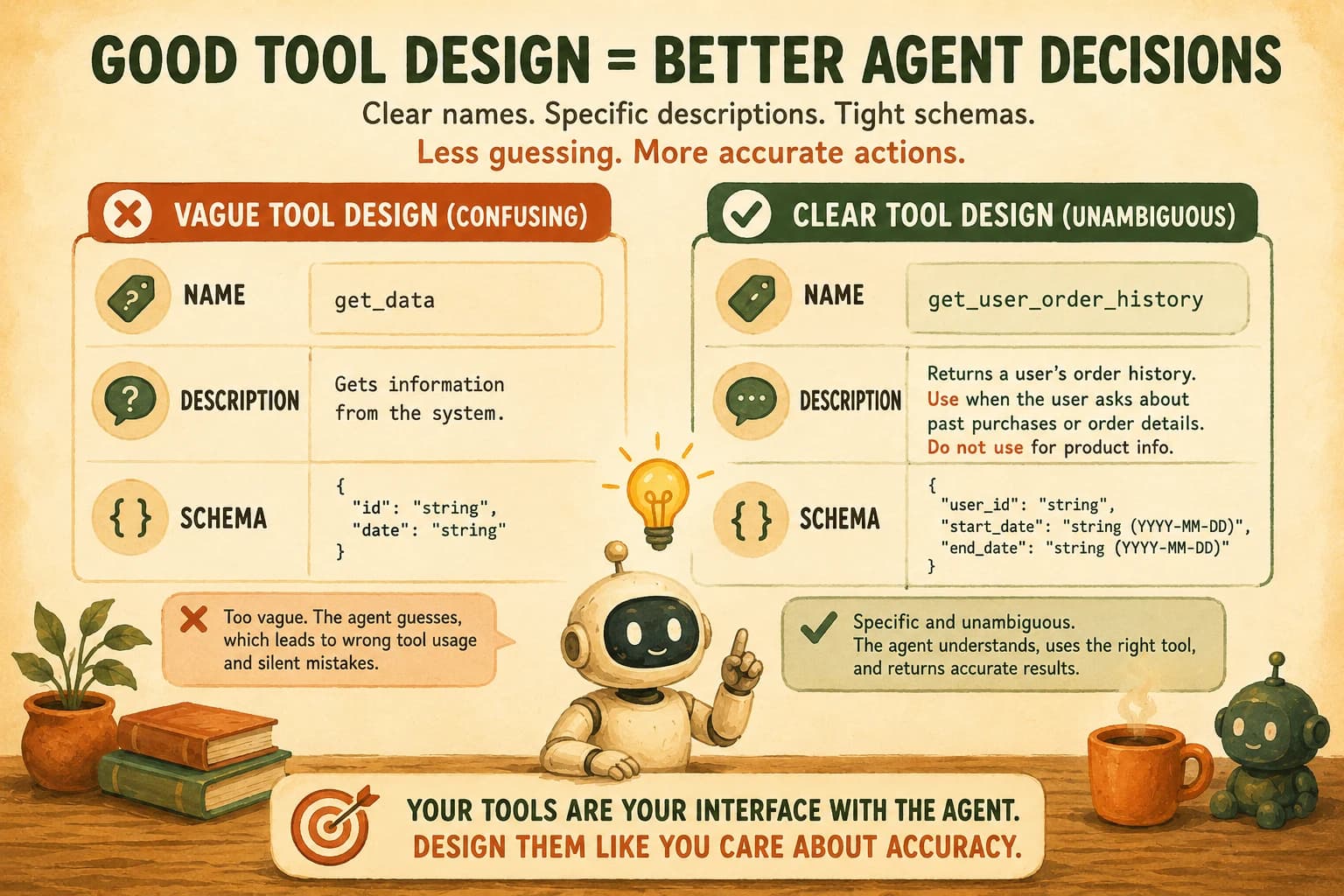
Before:
Name:
get_dataDescription: "Gets data from the system." Parameters:id(string),type(string)
After:
Name:
get_customer_order_historyDescription: "Retrieves a customer's past orders by customer ID. Use this when a user asks about previous purchases, order status, or refund eligibility. Do not use this for current cart contents or live inventory, those come fromget_cart_contentsandget_inventory_levels." Parameters:customer_id(string),date_range(string, optional)
Nothing about the underlying implementation changed between these two versions, only the words a model reads before deciding to call it. That's the entire lesson compressed into one example, and it's also exactly what today's lab asks you to measure for yourself, not take on faith.
Your Lab
Get the poorly-described tool
In your project, create a file called tools.py (or tools.js, your call) with this deliberately vague tool defined for your agent harness of choice (Claude Agent SDK, a raw Messages API loop, or your own framework):
def get_data(id: str, type: str):
    """Gets data from the system."""
    # returns mock data keyed by id and type
    ...
Wire it into an agent alongside at least one other tool with an overlapping purpose, so there's a real choice to make.
Run the 10 provided prompts against the 'before' version
Send these 10 prompts to your agent, one at a time, and log whether it called get_data with the arguments you'd consider correct: "What's the customer's order history?", "Show me current inventory for SKU-4471", "Look up refund status for order 88213", "Get the shipping address on file", "What did they last purchase?", "Pull the account's billing history", "Check if item 4471 is in stock", "Get their support ticket history", "Show me the cart", "What tier is this customer on?"
Rewrite the tool
Rewrite the name, description, and parameter names following this lesson's before/after pattern, split it into narrower tools if needed, and re-run the identical 10 prompts.
Tabulate and commit
Build a simple table in learning-log.md: prompt, before result (correct/incorrect/ambiguous), after result. Commit it alongside your rewritten tool code. If the "after" column isn't a clear improvement, your description still has an ambiguity worth hunting down.
Done? You've completed Lesson 17.02.
FAQ