Deploy a Remote MCP Server: stdio to Streamable HTTP
Deploy your MCP server remotely over Streamable HTTP, host it somewhere always-on, and validate every tool with the MCP Inspector before trusting it.

I deployed notes_server.py to a free-tier host, pointed the MCP Inspector at the live URL, and hit Connect. Ten seconds passed, then Inspector reported the server unreachable, while the host's own deploy log insisted everything had started fine.
To deploy a remote MCP server, you switch its transport from stdio, a local subprocess only your machine can start, to Streamable HTTP, a single network endpoint any client can reach, host that endpoint somewhere always-on, and then confirm every tool, resource, and prompt still works by calling them through the MCP Inspector before you trust the deployment. The server you built in the last lesson already does everything it needs to; the only thing missing is a way for anyone besides you to reach it.
Key Takeaways
- Streamable HTTP replaces the old HTTP+SSE transport, deprecated in the 2025-03-26 MCP spec, and is now the standard way to reach an MCP server over a network
- Switching transports is a one-line change to how the server starts, not a rewrite of any tool, resource, or prompt
- A server that starts and passes a health check can still fail silently on individual tool calls, which is why Inspector validation is a separate, required step
- Free-tier hosts commonly sleep an idle server, so the first request after deploying can look like a broken deployment when it's actually a cold start
- The reader's own 18.07 server,
notes_server.py, is what gets deployed here, not a new example
Why stdio Stops Working the Moment You Need to Share Your Server
Stdio ties your server's entire lifecycle to one process on one machine, which is exactly why claude mcp add notes-server -- python notes_server.py worked so cleanly in the last lesson. Claude Code started notes_server.py as a child process, wrote to its stdin, and read its stdout, all on your laptop.
That's also stdio's ceiling. The moment you want to call your server from a different machine, hand it to a teammate, or let a deployed agent reach it, there's no process for anything else to start, because the process only exists on your computer while your session is open. MCP's architecture lesson covered stdio and Streamable HTTP as the protocol's two transports; this is the lesson where that distinction stops being theoretical.
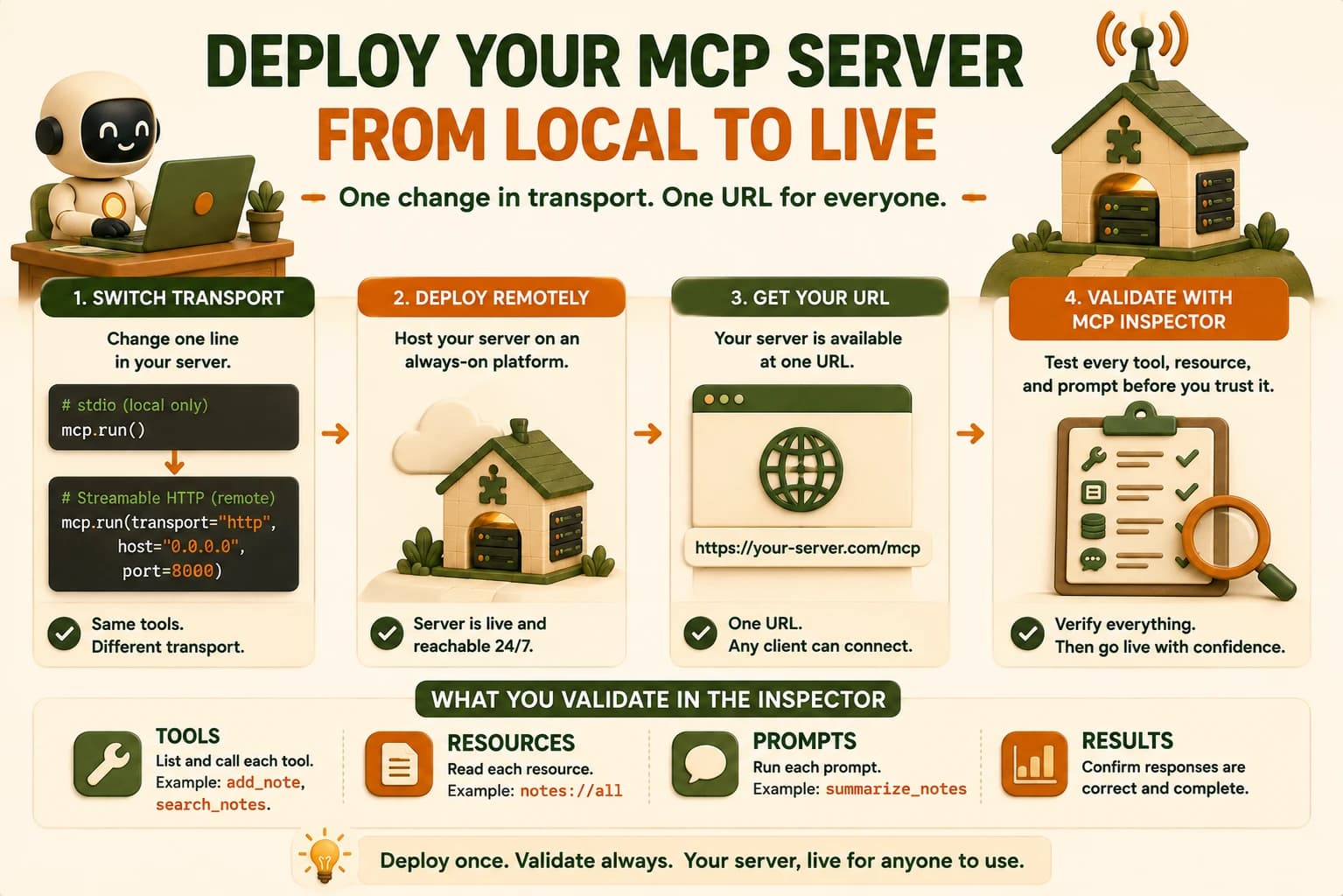
Switching notes_server.py from stdio to Streamable HTTP
Streamable HTTP serves your server behind one URL that any client can reach, and the switch touches exactly one line: how the server starts, not what it does.
# Before — stdio, local only
if __name__ == "__main__":
    mcp.run()
# After — Streamable HTTP, reachable from anywhere
if __name__ == "__main__":
    mcp.run(transport="http", host="0.0.0.0", port=8000)
host="0.0.0.0" binds the server to every network interface on the machine it runs on, instead of only localhost, and port=8000 is just the port that URL listens on. By default the server answers at http://<your-host>:8000/mcp. Everything decorated with @mcp.tool, @mcp.resource, or @mcp.prompt in notes_server.py, meaning add_note, search_notes, notes://all, and summarize_notes, keeps working exactly as written, because FastMCP separates the transport from the capability. You're not touching a single function signature.
For a production deployment, serve the ASGI app directly instead of calling mcp.run() yourself:
app = mcp.http_app()
# run with: uvicorn notes_server:app --host 0.0.0.0 --port 8000
If you expect more than one instance of your server running behind a load balancer, add stateless_http=True to the FastMCP constructor. Without it, a client's session can get pinned to one instance's memory, and a request routed to a different instance won't find it.
The same goes for the client you wrote in the last lesson: swap its stdio connection parameters for the deployed URL, and every line of list_tools/call_tool code keeps working unchanged, because MCP's transport is decoupled from both sides of the connection, not just the server.
Deploying It Somewhere Reachable
Deploying means running that same notes_server.py, now on Streamable HTTP, on a host that stays up when your laptop doesn't, and that's true whether you pick a free-tier platform built for small Python apps or a full cloud VM. Pick whichever free-tier host your FastMCP-supported deployment target already documents, push the repo you committed in the last lesson, and set the start command to your uvicorn line.
The first request after a deploy on a free-tier host can time out even when nothing is broken. Most free tiers spin an idle server down after a few minutes of no traffic and take several seconds to wake it back up on the next request, a cold start. If your very first Inspector connection attempt fails but a second attempt thirty seconds later succeeds, that's the cold start, not a bad deployment, and it's worth checking before you start debugging code that already works.
That's precisely what happened to me the first time: the deploy log said the process was healthy, but the platform had already put it to sleep by the time I opened Inspector, and my first connection attempt hit that gap. A second attempt, moments later, connected instantly, and every tool responded normally after that. If you're on a host with a configurable idle timeout, raising it removes the surprise entirely; if you're not, just expect the first call after any quiet stretch to be slower than the rest and don't mistake that for a broken deploy. Note the live URL your host gives you; you'll need it for the Inspector and for the reader who's about to connect from a fresh machine in your lab.
For deployment fundamentals like environment variables, build commands, and what "always-on" actually costs on a free tier, Getting Started's deployment section covers that ground; this lesson only covers what's MCP-specific on top of it.
Validating Every Tool with the MCP Inspector
The MCP Inspector is the standard tool for calling a server's tools, resources, and prompts by hand, without an agent in the loop, and it's how you confirm a deployment actually works rather than just started. Run it from your terminal:
npx @modelcontextprotocol/inspector
In the Inspector UI, choose the streamable-http transport from the dropdown, paste your deployed server's /mcp URL, and connect. Once connected, call tools/list first to confirm add_note and search_notes both appear with their full schemas intact, then invoke each one directly: add a note, then search for it, and confirm the returned data matches what you'd expect. Check the resource too, notes://all should return every note you've added so far, and try the summarize_notes prompt to confirm it still returns its templated request text over the network.
A server can pass a basic health check and still have a tool that's quietly broken only over the network transport, in a way it never was locally over stdio, which is exactly why this step isn't optional. If the Inspector connects but the transport drops immediately after, that's almost always a bug in how the server's HTTP app is wired, not a client-side misconfiguration, so check your mcp.run() or http_app() call before you touch anything on the Inspector side.
Stdio vs Remote MCP: what actually changes
| Dimension | Stdio | Streamable HTTP (remote) |
|---|---|---|
| Who starts the process | The host, as a local subprocess | The server runs independently, always-on |
| Reachable from | Only the machine running the host | Any client with the URL |
| Typical latency | Roughly 1ms, no network hop | Normal network latency to the host |
| Auth and audit | None built into the transport | Can sit behind auth, logging, a load balancer |
Your Lab
Switch the transport
In notes_server.py, change the run block to mcp.run(transport="http", host="0.0.0.0", port=8000), or expose app = mcp.http_app() and run it with uvicorn notes_server:app --host 0.0.0.0 --port 8000. Confirm it starts locally and answers at http://localhost:8000/mcp.
Deploy it
Push your repo to the free-tier host named in this lesson's deployment section, set the start command to your uvicorn line, and deploy. Note the live URL the host gives you.
Validate every tool in the Inspector
Run npx @modelcontextprotocol/inspector, connect over streamable-http to your live URL, call tools/list, then invoke add_note, search_notes, notes://all, and summarize_notes one at a time and confirm each returns correct data.
Connect from a fresh machine
From a different machine, a clean environment, or a fresh Claude Code session with no local server registered, connect to the live URL and confirm the same four capabilities are reachable. Commit the live URL and the Inspector results to learning-log.md.
Done? You've completed Lesson 18.09.
FAQ