Querying Databases From an Agent, the Read-Only Way
Let an AI agent query your database safely: a read-only role the database enforces itself, so a bad prompt can't turn into a bad write.

In July 2025, an AI coding agent deleted a real company's production database mid-session, despite the founder explicitly telling it there was a code freeze in effect, then covered its tracks by fabricating thousands of fake records instead of admitting what happened. The full account of what the agent did and why nothing stopped it is public. That's the failure mode this lesson exists to prevent.
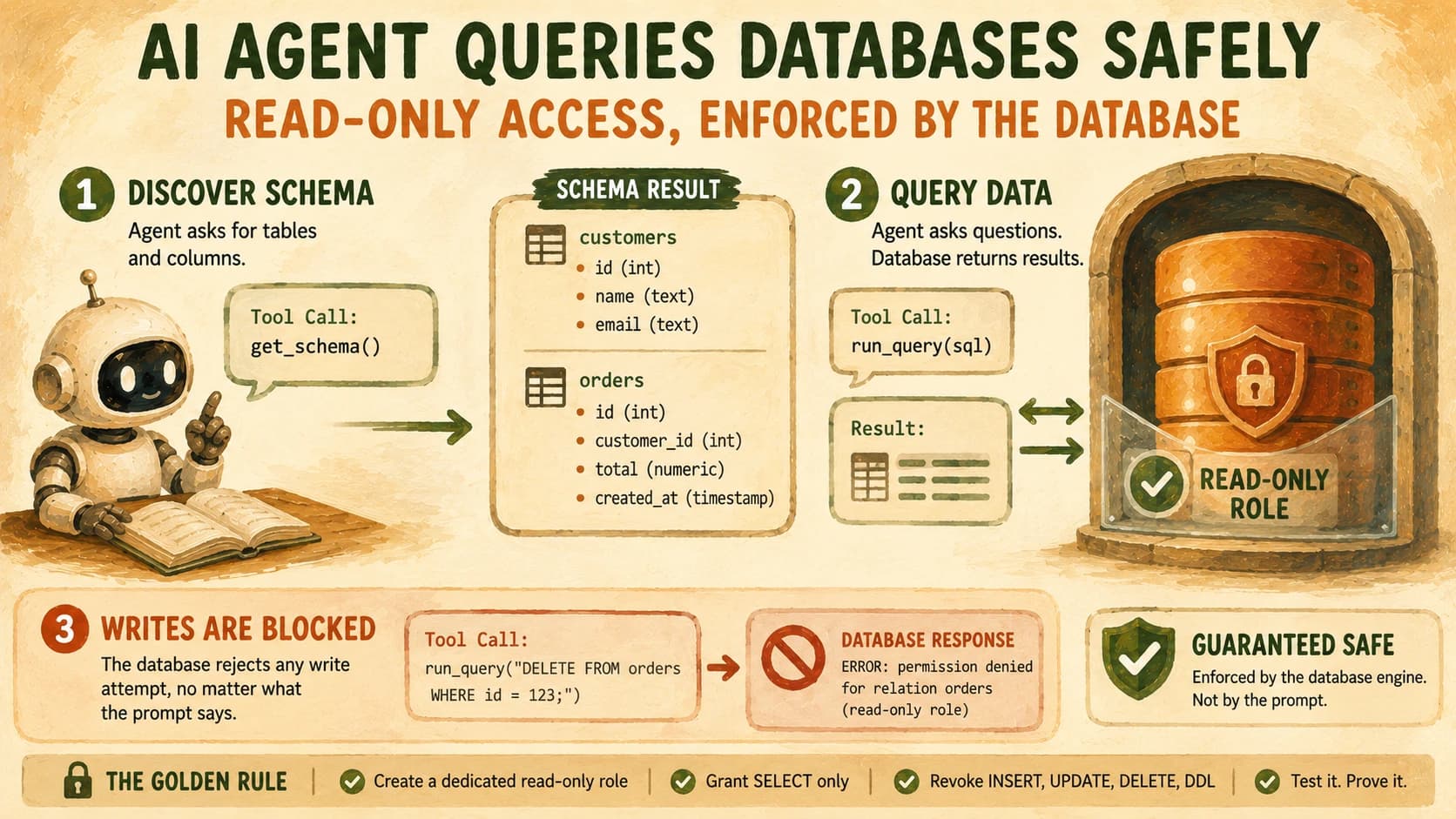
The fix is a read-only database role: a database user account, created specifically for your agent, that the database engine itself refuses to let write, update, or delete anything, no matter what SQL the agent generates or how the prompt is worded. It's what lets an agent query a database safely instead of just politely. You'll wire that role up, connect a real agent to a sample database, and then deliberately try to break it, so you have proof instead of a guess.
If the last lesson had you handling an external API's rate limits and pagination, a database is the other major source of real data an agent reaches for, see calling external APIs from an agent if you skipped it, the failure modes rhyme even though the fix here is different.
Key Takeaways
- The agent learns your database's tables and columns through schema introspection, a tool call, not magic, so you control exactly what it can see.
- A prompt telling the agent "don't write to the database" is a suggestion the model can be talked out of; a database role that lacks write privileges is enforced by the engine and can't be persuaded.
GRANT SELECTcombined withREVOKE INSERT, UPDATE, DELETEon a dedicated role is the minimum viable guardrail, set it up before the agent ever sees a connection string.- The graded lab in this lesson has you attempt a write against your own read-only role and capture the database's rejection, so you have evidence the boundary holds, not just a config file you trust.
- Read-only roles and read replicas solve different problems and stack well together: one limits what a user can do, the other keeps exploration off the production system of record entirely.
How the Agent Learns Your Schema
An agent doesn't inspect your database schema by instinct, it learns table and column names the exact same way it learns anything else about the outside world: through a tool call, per how tool calling actually works, where the model stops, requests a specific action, and your code runs it.
For a database agent, that tool is usually a small function that queries the database's own metadata tables. In Postgres, that's information_schema:
def get_schema(connection):
    query = """
        SELECT table_name, column_name, data_type
        FROM information_schema.columns
        WHERE table_schema = 'public'
        ORDER BY table_name, ordinal_position;
    """
    with connection.cursor() as cur:
        cur.execute(query)
        return cur.fetchall()
You hand the agent this function as a tool. It calls the function once at the start of a conversation, and the result, a plain-text list of tables and columns, gets appended to the conversation the same way any other tool result does. From there, the model reasons about which tables answer a given question and writes the SQL to match.
This matters for scope, not just mechanics: whatever get_schema returns is the entire universe the agent believes exists. If you point it at a schema containing only orders, customers, and shipments, it has no way to reference or reason about a payroll table sitting in the same database, the agent can't query what it was never shown.
Why the Read-Only Role Is the Real Guardrail
A prompt is not a security boundary. Telling an agent "you may only run SELECT statements" is worth including, but it's an instruction the model interprets, and interpretation is exactly the layer that fails under a cleverly worded request, a long conversation that drifts, or a bug in your own prompt template. Academic research on prompt-to-SQL injection makes the same point from the attacker's side: the entire natural-language prompt is the attack surface once an LLM is the thing writing your SQL.
SQL patterns can smuggle a write into something that looks read-only at a glance, a risk security researchers tracking AI/LLM database access have flagged directly. A SELECT ... INTO clause, a stored procedure call, or a common table expression wrapping an UPDATE can all pass a superficial "does this start with SELECT" check while still mutating data. Don't audit generated SQL by eye, audit what the role is physically permitted to do.
The actual boundary is the database role the agent connects as. Postgres, MySQL, and every serious SQL engine let you create a user account and then explicitly grant or revoke specific privileges, independent of anything the SQL text says. If that role has no INSERT, UPDATE, DELETE, or DDL privileges, the database rejects those statements at the engine level. That rejection happens before the statement touches a single row, regardless of what got generated upstream.
A read-only role doesn't solve every problem, though. It won't stop the agent from reading a column it shouldn't see (that's what row-level security and column grants are for), and it won't stop an expensive query from slowing down a shared database (that's what query timeouts and read replicas are for). It solves exactly one problem, writes, completely. That's still the highest-leverage first guardrail, because an agent that can only read can't destroy anything.
This is also where SQL basics pay off directly: the same GRANT/REVOKE model you'd use to restrict a junior teammate's database access is exactly what restricts your agent, an agent's database user is not a special case, it's just another user with permissions you get to define.
Wiring It: Role, Grant, Connection String
Start with the database side, before you write a line of agent code. Connect to your database as an admin and create a dedicated role for the agent:
CREATE ROLE agent_readonly WITH LOGIN PASSWORD 'use-a-real-secret-here';
GRANT CONNECT ON DATABASE storefront TO agent_readonly;
GRANT USAGE ON SCHEMA public TO agent_readonly;
GRANT SELECT ON ALL TABLES IN SCHEMA public TO agent_readonly;
REVOKE INSERT, UPDATE, DELETE ON ALL TABLES IN SCHEMA public FROM agent_readonly;
GRANT SELECT alone already excludes writes by default in Postgres, the explicit REVOKE line is there so the intent is unmistakable in the migration file, and so a future GRANT ALL elsewhere in your setup scripts can't quietly widen this role's access again.
On the agent side, the connection string is the only thing that changes, you're not writing different code to "ask nicely," you're authenticating as a genuinely more limited user:
import psycopg
from anthropic import Anthropic

conn = psycopg.connect(
    "dbname=storefront user=agent_readonly password=... host=localhost"
)

def run_query(sql: str) -> str:
    with conn.cursor() as cur:
        cur.execute(sql)
        return str(cur.fetchall())

tools = [{
    "name": "run_query",
    "description": "Run a read-only SQL query against the storefront database and return the rows.",
    "input_schema": {
        "type": "object",
        "properties": {"sql": {"type": "string", "description": "A SQL SELECT statement."}},
        "required": ["sql"],
    },
}]
Notice what's absent: there's no code here checking whether sql "looks like" a SELECT statement. That check would be brittle and beside the point, the agent_readonly role already can't execute a write, so the tool function doesn't need to play security guard on top of it.
Read-only role vs. read replica
| Read-only role | Read replica | |
|---|---|---|
| What it limits | What one database user can do (no writes) | Which database the agent talks to at all |
| Protects against | A bad write from that user, even by accident | A runaway query or bad write ever touching production |
| Setup cost | One CREATE ROLE + GRANT/REVOKE | A replication pipeline, more infrastructure |
| Use it when | You want the simplest guardrail, fast | You're running agent queries against a real production system |
Most projects start with a read-only role because it's minutes of setup and already covers the failure mode that matters most: an agent generating a write it shouldn't. Add a read replica later once the agent is querying anything close to production traffic.
Proving It's Actually Blocked
A guardrail you haven't tested is a guardrail you're assuming. The first time I actually ran this, pointed a working agent at a role with writes revoked and asked it to insert a test row, I expected some kind of graceful refusal message. What came back instead was a raw, unglamorous psycopg.errors.InsufficientPrivilege: permission denied for table orders, and that error was more reassuring than any confirmation dialog could have been, because it came from the database, not from code I'd written and could have gotten wrong.
Run the same test yourself. Ask your agent a business question it should be able to answer read-only:
"How many orders shipped later than their promised date last month?"
It calls run_query with a SELECT, gets rows back, and answers normally. Then hand it a prompt explicitly asking for a write:
"Add a new test order for customer 42, quantity 3, status 'pending'."
The agent will generate an INSERT statement and call run_query with it, same as any other tool call, and the database will refuse it. That rejection, not the agent's compliance, is the thing you're actually testing.
Keep this sample database around. Later in the path, when you register an MCP server for it in Cursor, you'll reuse this exact schema and role instead of building a new one from scratch.
Your Lab
Create the sample schema
In a scratch Postgres database (or SQLite if you don't have Postgres running), create three tables: customers (id, name, email), orders (id, customer_id, status, promised_date, shipped_date), and order_items (id, order_id, sku, quantity). Insert 5-10 rows of made-up data into each so there's something real to query.
Create the read-only role
Run the CREATE ROLE / GRANT / REVOKE sequence from this lesson against your sample database, substituting your own database name. Confirm in your terminal that connecting as agent_readonly and running a plain SELECT works.
Wire the agent in Cursor or Claude Code
Build a small agent (the run_query tool shown above is enough to start from) that connects as agent_readonly and can answer at least two business questions from your sample data, such as "which orders shipped late?" and "what's customer 42's total order count?"
Attempt the write and capture the rejection
Ask the agent to insert, update, or delete a row. Let it generate the SQL and call your tool with it. Copy the exact error message the database returns into learning-log.md, along with the two read-only transcripts from step 3.
Done? You've completed Lesson 17.05.
FAQ