What Are Agent Skills? Roles and Capabilities Explained
What are agent skills? Named, triggerable behaviors with clear steps and gotchas. See how skills, roles, and capabilities differ before Module 20.

You explain the same deploy checklist to your agent for the third time this week: which branch to check, which command to run, which log line means it actually worked. It follows the instructions fine. It just has no memory of ever being told this before, because it wasn't, not in any form that survived past the last session.
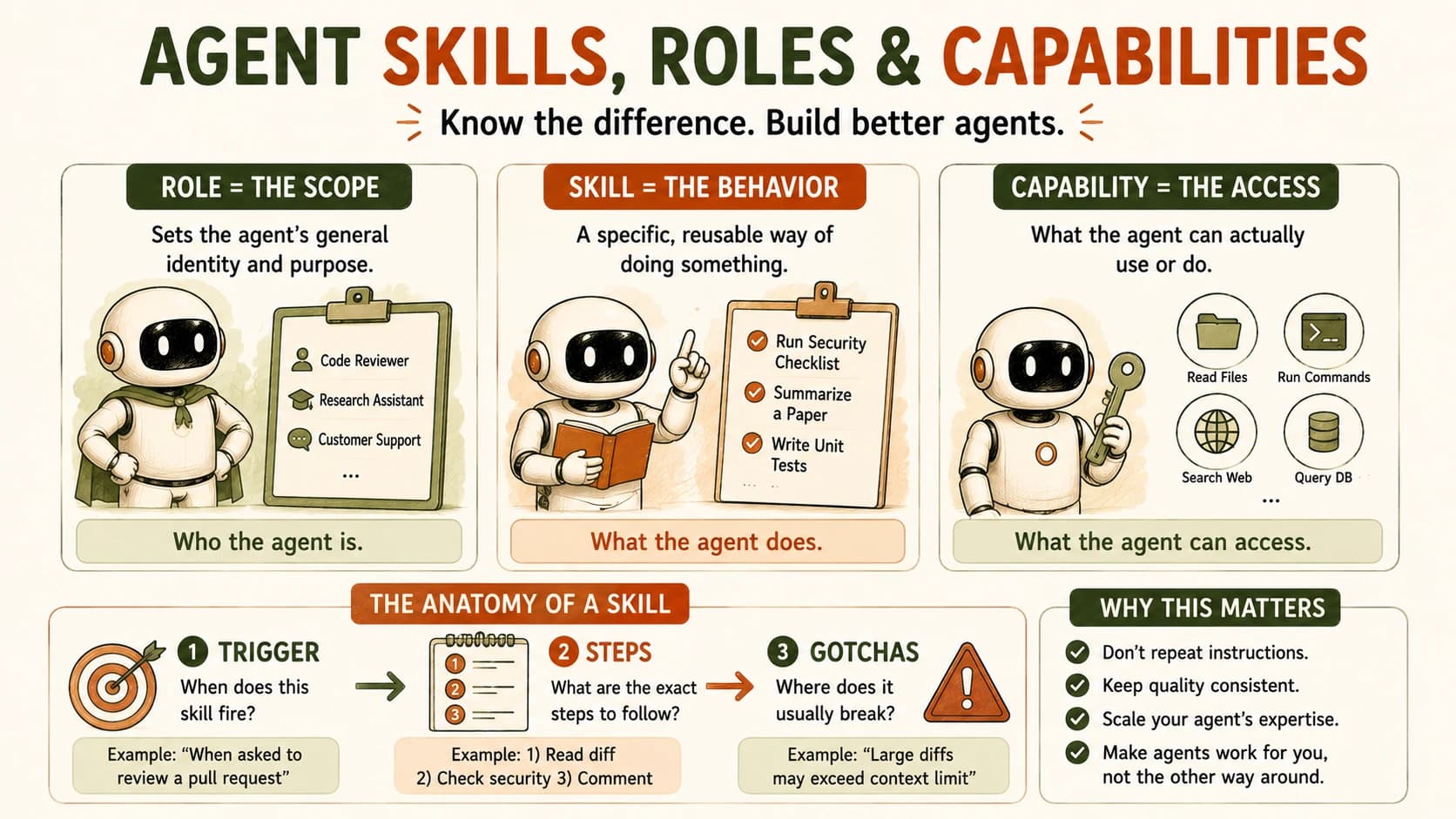
An agent skill is a named, reusable behavior with a clear trigger (when it fires), a set of steps (what it does), and known gotchas (where it breaks). Write it once, in plain language, and any agent that reads it can follow it without you re-explaining the procedure every time. That's different from a role, which sets an agent's general scope, and different again from a capability, which is what an agent can actually access or do.
Key Takeaways
- A skill has three required parts: a trigger, a sequence of steps, and a list of gotchas. Missing any one of them turns a skill into a vague note.
- A role is scope ("you are a code reviewer"); a capability is access ("you can read files and run tests"); a skill is a specific behavior applied inside that scope, using that access.
- Skills exist as a concept independent of any file format. Claude Code's
SKILL.mdis one real implementation of the idea, not the idea itself.- The trigger is the part people skip most often, and skipping it is exactly what produces a pile of installed-but-unused skills nobody actually applies.
- Writing a skill card by hand today is the same discipline you'll use to write a real
SKILL.mdlater in this course.
What Are Agent Skills?
Agent skills are packaged, specialized behaviors an agent can recognize and apply, distinct from a one-off instruction typed into a single conversation. The difference isn't length (a skill can be short); it's persistence and structure. A prompt lives and dies in one exchange. A skill is written down somewhere the agent can find again, and it names, explicitly, when it applies and what it actually does when it fires.
Think about the difference between telling a new coworker how to deploy once, verbally, versus handing them a written runbook. The verbal version works for that one deploy. The runbook works for the fiftieth one too, and it works whether you're in the room or not.
A skill is the runbook version of an instruction, the same durability you got from hand-building the ReAct loop instead of re-deriving it every session. It's not smarter than a good prompt, it's just built to outlive the conversation that produced it.
This matters because the alternative isn't "no structure," it's hidden structure. Without a named skill, the same procedure gets re-typed slightly differently each time, drifts, and eventually produces an agentic AI system that does the deploy checklist one way on Monday and a subtly different way on Thursday, with no record of which version was right.
Trigger, Steps, Gotchas: The Three Parts of Any Skill
Every real skill has three parts: a trigger that says when it applies, a sequence of steps that says what to do, and a list of gotchas that says where it tends to go wrong. Drop any one of the three and you don't have a skill. You have a note that happens to look like one.
Take a "deploy checklist" skill as the running example:
- Trigger: the condition that should make an agent (or you) reach for this skill at all, such as "before merging to main and running the deploy command." A skill with no trigger is a skill nobody ever remembers to use, because nothing tells anyone (human or agent) that this is the moment for it.
- Steps: the actual sequence, specific enough to follow without guessing: check the branch, run the test suite, confirm the migration ran, tail the log for the one line that means it's actually live.
- Gotchas: the failure modes you'd only know from having done this before: the test suite passes locally but not in CI because of a stale cache, or the log line that looks like success but actually means the health check hasn't started yet.
The gotchas section is what separates a skill written by someone who's actually done the task from one assembled from a generic template. It's also, not coincidentally, the hardest part to fake and the most valuable part to an agent reading it cold.
Most confusion about skills traces back to a missing trigger. It's easy to write good steps and forget to say when they apply, and the result is a pile of installed, well-written, never-triggered skills sitting unused because nothing tells anyone when to reach for them.
Roles and Capabilities: How They're Different From a Skill
A role is an agent's general scope, a capability is what it can actually access or do, and a skill is a specific behavior it applies inside that scope, using that access. All three sound similar; they answer different questions.
A role answers "what is this agent generally for?" Think "code reviewer," "research assistant," "customer-support triager." It's a persona, not a procedure.
A capability answers "what can this agent actually do?" Think read files, run shell commands, browse the web, query a database. It's about access, not judgment.
A skill answers "what does it do, specifically, in this one recurring situation?" Think the deploy checklist, the weekly report format, the way you always want a pull request summarized.
One agent, one role, can carry several skills, and each skill leans on whatever capabilities it needs. A code-review role might have a "run the linter and summarize" skill and a separate "flag security-sensitive diffs" skill, both needing the capability to read files and run commands, but firing on different triggers.
Mix these up and you'll waste time in the wrong place. Write a beautifully detailed skill for "flag security-sensitive diffs" and hand it to an agent with no file-read capability, and no amount of clever wording in the skill card fixes it: the problem was never the instructions, it was the missing access.
Skill, role, and capability at a glance
| Concept | Answers | Example | Changes how often |
|---|---|---|---|
| Role | What is this agent generally for? | "Code reviewer" | Rarely, per project or agent |
| Capability | What can it actually access or do? | Read files, run shell commands | Rarely, tied to permissions/tools |
| Skill | What does it do in this specific recurring case? | "Run the deploy checklist" | Often, one per repeatable task |
Why This Matters Before You See SKILL.md
Naming skills as a standalone concept now means the real file format, when you meet it, is recognition instead of a new thing to learn. Later in this course you'll meet Claude Code's actual SKILL.md, a folder with a markdown file describing exactly this: a trigger (when Claude should load it), steps (the instructions), and often a gotchas section written in almost the same words this lesson used.
The official Claude Code skills documentation describes a skill's body as loading only when it's actually needed, which is the trigger concept made literal in how the system works, not just how you write it down.
I'd been writing plain-English "skill cards" for my own repeatable tasks (deploy steps, weekly report formats) months before SKILL.md existed as a real file format, mostly out of habit from working with a coworker who wouldn't remember anything I hadn't written down. When Claude Code's actual skill syntax landed, it took about five minutes to feel obvious, because the shape (trigger, steps, gotchas) was already the shape I'd been reaching for by hand. That's the practical answer to what agent skills are actually for: a way to make specialization stick past a single session.
Skills as a concept generalize past any one tool. Whatever the underlying agent, the same three-part structure (trigger, steps, gotchas) is what turns a one-time instruction into something an agent can carry forward without you present to repeat it.
Your Lab
Pick a task you actually repeat
Choose one real, recurring task you do more than once a month, a deploy checklist, a way you always format a status update, a specific code-review pass. Don't invent a fake example, use something real enough that getting it wrong would actually cost you time.
Open Cursor and create the file
Create a new markdown file, skill-card.md, in a project you're working in. This is a plain-text file, no special extension or tooling required yet.
Write the trigger
In one sentence, write the exact condition that should make you (or an agent) reach for this skill: "before merging any PR that touches the auth module" or "every Friday before the team standup."
Write the steps
List the actual sequence, specific enough that someone with no memory of ever doing this task could follow it without guessing. Number them if the order matters.
Write the gotchas
List at least two things that go wrong, or almost went wrong, when you've done this task before. If you can't think of two, you haven't done the task enough times yet, pick a different one or watch yourself do it once first.
Commit it to learning-log.md
Paste the full skill card into learning-log.md in your repo. You'll turn one of these into a real SKILL.md later in this course, so make it specific enough that Claude Code could actually follow it today.
Done? You've completed Lesson 16.07.
FAQ