Reasoning Models & Test-Time Compute: When to Spend
Test-time compute lets reasoning models think longer before answering, but longer isn't always smarter; it pays off on hard tasks, not easy ones.

You give your coding agent a gnarly bug, flip on the reasoning model's extended thinking because it can't hurt, and watch the test-time compute meter run for ninety seconds, burning ten times the tokens of a normal call. It gets the bug right. Then you ask it to rename a variable, forget to flip the setting back off, and pay the same ninety-second tax for a one-line change.
Test-time compute is the extra thinking a reasoning model does after you send it a prompt and before it answers, on top of whatever it learned during training. Every major lab now exposes a dial for how much of that thinking to spend. The real skill isn't knowing the dial exists; it's knowing when turning it up buys you something and when it just burns money in a loop.
Key Takeaways
- Test-time compute means letting a model reason longer at inference time; every major lab (OpenAI, Anthropic, Google, xAI, DeepSeek) exposes this as a settable parameter, and they all use different names for it.
- More thinking is not automatically better: one 2026 study found simply raising the thinking-token budget is not the most effective use of compute, and strategies like self-consistency or self-reflection can beat a bigger raw budget on the same task.
- Anthropic deprecated its manual
budget_tokensextended thinking on Claude 4.6 and rejects it outright on Claude 4.7+, replacing it with adaptive thinking steered by aneffortlevel. Code written against the old API silently needs updating.- The real agent-design decision is thinking budget vs. tool calls: raise thinking when the model has the facts but might reason its way to a wrong conclusion, add a tool when it's missing a fact it can't think its way to.
What Is Test-Time Compute, Actually?
Test-time compute is what a reasoning model spends at the moment you ask it something, not what it learned once, in advance, during training. It spends part of that budget generating internal "thinking tokens" before committing to an answer, the way you'd sketch scratch work before writing up a clean solution on an exam.
This is a recent shift. Chain-of-thought prompting asked a model to show its steps within one fixed-length response; test-time compute lets the model decide how many steps to take and bills you for exactly that. Before OpenAI's o1 popularized dedicated "thinking" models, almost none of that reasoning length was under your control. You got whatever depth the base model happened to produce. Now it's a lever.
Every Lab Built a Different Test-Time Compute Dial
Five major labs shipped test-time compute for their reasoning models, and five different parameter names.
How the current dial looks by provider
| Provider | Parameter | Values | Notes |
|---|---|---|---|
| Anthropic (Claude) | output_config.effort (adaptive thinking) | low / medium / high (default) / xhigh / max | Affects thinking, text, and tool calls together |
| OpenAI (o-series) | reasoning_effort | low / medium / high | Reasoning trace is fully hidden, never shown to the caller |
| Google (Gemini) | thinkingBudget or thinkingLevel | explicit token count, or an automatic level | Can auto-adjust depth per request if left unset |
| xAI (Grok) | reasoning_mode | provider-defined modes | Newer, less standardized across model versions |
| DeepSeek (R1) | internal chain-of-thought toggle | on/off | R1 shows its reasoning in visible <think> tags |
None of these map cleanly onto each other. "Medium" on one provider is not "medium" on another, and a setting tuned on last quarter's model can behave differently after a version bump. If you're steering a reasoning model with an approach built for a different provider's effort levels, expect to re-tune it, not just port it. Seekvana's guide to prompting reasoning models covers the prompt-level differences; this lesson is about the compute-and-cost lever sitting behind those prompts. If you haven't worked through prompting fundamentals yet, Beyond the Prompt covers that ground first.
Anthropic Changed Its Thinking-Budget Dial Mid-Course
Anthropic's original extended thinking used a budget_tokens parameter: you set a target token count (minimum 1,024), Claude reasoned against it, and every thinking token billed at the standard output rate. That mode is now deprecated on Claude 4.6 and rejected outright, with a 400 error, on Claude 4.7 and later. A request that still specifies thinking.type: "enabled" simply fails on the newer models.
In its place: adaptive thinking, where you don't set a token count at all. Claude decides per-request whether to think and roughly how much, steered by an output_config.effort value from low up through max. Crucially, effort doesn't just control thinking depth. It shapes the entire response, including how many tool calls Claude makes and how much it explains itself along the way.
I hit this migration firsthand mid-project. A script written against budget_tokens for Claude 4.5 started returning errors the moment I pointed it at a newer model, and the fix wasn't a parameter tweak. It was rethinking the whole request shape around effort instead of a token count. If your agent's model config has a budget_tokens value sitting in it, that's worth checking today, not after it breaks in production.
This is the kind of detail that ages fast. Test-time compute APIs are still moving quickly in 2026, so if you're reading this more than a few months after publication, check the docs before copying a parameter name verbatim.
The Real Decision: Spend on Thinking, or Add a Tool
Here's the tension worth naming directly: most teams either ignore the thinking dial entirely or turn it on for everything, and both are wrong. The dial only helps when the problem is actually a reasoning problem.
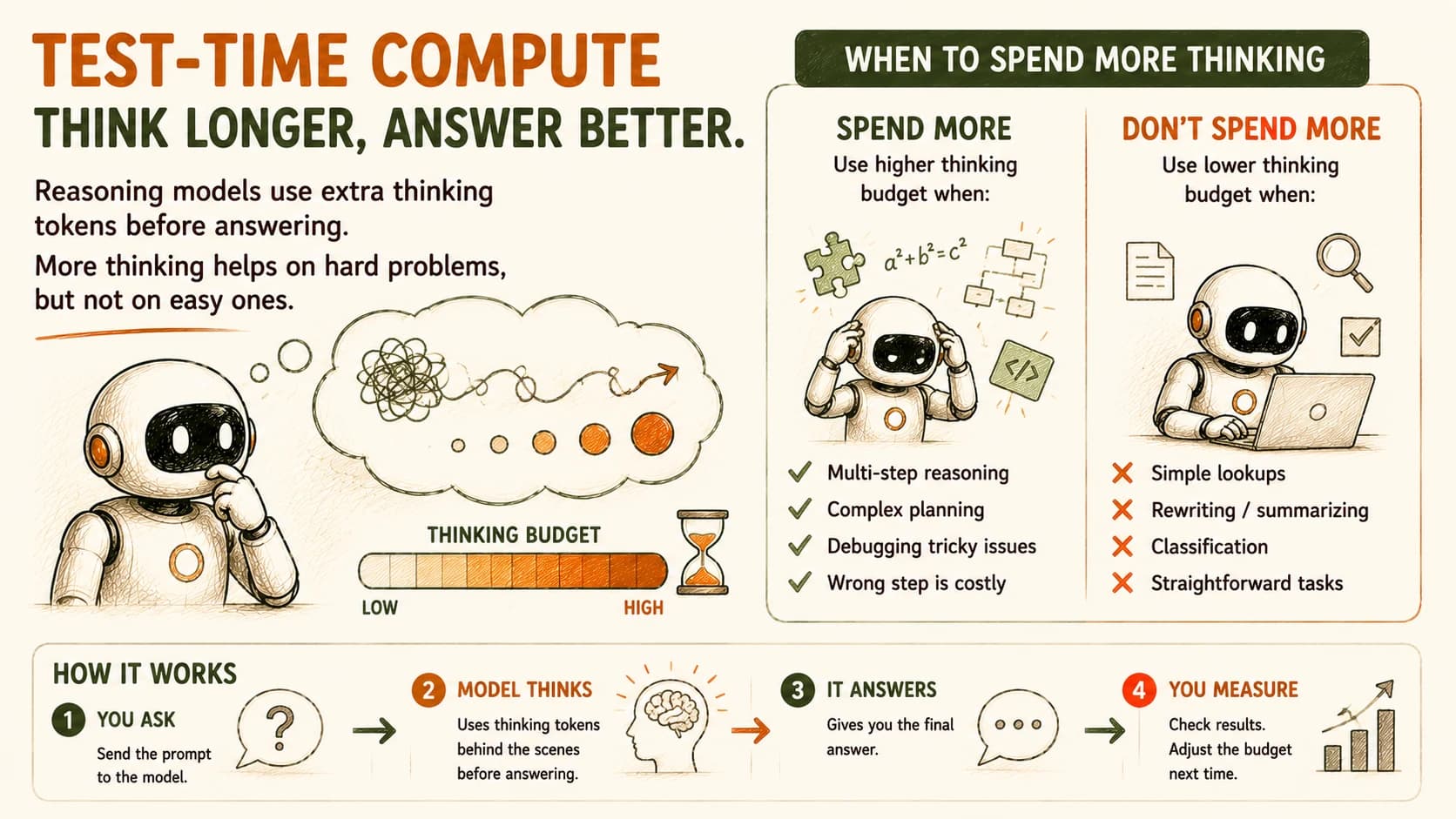
That's exactly the checklist to run before you touch the dial: multi-step reasoning, complex planning, tricky debugging, and tasks where a wrong step is costly all justify spending more. Simple lookups, rewriting, summarizing, and straightforward classification don't.
A wrong intermediate step is the tell. If your agent needs to plan several dependent steps, debug why a test fails, or work through a multi-constraint scheduling puzzle, one bad link in that chain wrecks the final answer. That's exactly what more thinking budget is for. If the task is a lookup, a rewrite, or high-volume classification, extra thinking budget buys you nothing, because there's no chain of reasoning to get wrong in the first place.
But thinking budget has a hard limit: it can't manufacture a fact the model doesn't have. If your agent is confidently wrong about today's exchange rate, no amount of extra thinking fixes that, it just reasons more elaborately from a stale assumption. That's a tool-call problem (fetch the real rate), not a reasoning-depth problem.
The design rule that falls out of this: raise thinking budget when the model has the facts and might reason its way to the wrong conclusion. Add a tool or a step when the model is missing a fact it can't think its way to.
And more thinking isn't even guaranteed to help within its own lane. A 2026 study on thinking-budget scaling found that simply raising the token budget is not the most effective use of compute on a fixed task. Strategies like self-consistency (sampling several short attempts and taking the majority answer) or self-reflection outperformed a plain, bigger raw budget in the same experiments. Thinking tokens also aren't free. They bill at the same rate as regular output tokens, and a single high-effort call can spend three to ten times the tokens of the same request at low effort.
Reading the Reasoning-Effort Quality-vs-Cost-vs-Latency Curve
Effort level vs. quality, cost, and latency by task type (April 2026 benchmark)
| Effort level | Math/reasoning quality | Code-refactor quality | Cost multiplier | Time-to-first-token |
|---|---|---|---|---|
| Low | Baseline (e.g. 69.3% on AIME math) | Baseline | 1× | 0.4–1.5s |
| Medium | +12–15 points vs. low | Peak for this task type | 2–5× vs. low | 4–12s |
| High | +18–22 points vs. low | Regresses 3–5 points from over-engineering | 4–17× vs. low | 18–90s |
Two things in that table should change how you pick a setting. First, quality doesn't rise in a straight line: code-refactoring tasks peaked at medium effort in this benchmark, with high effort producing over-engineered answers that scored worse.
Second, cost multiplier alone reshuffles the ranking you'd expect from raw quality. On the same benchmark's AIME math results (not broken out in the table above, since it tracks effort levels rather than individual models), one lower-cost model at high effort landed at roughly $0.04 per correct answer, while a pricier model at the same effort level landed near $0.78 per correct answer. Judge by cost per correct answer, not sticker price per call.
Latency matters just as much as cost for an agent that's supposed to feel responsive. A high-effort call with a time-to-first-token of 18 to 90 seconds is fine for an overnight batch job and a non-starter for a chat interface a user is staring at.
Your Lab: Measure Your Own Thinking Budget
Reading someone else's benchmark tells you what happened on someone else's task. Your agent's tasks are yours. This lab has you run one hard task through your reasoning model at three test-time compute (thinking-budget) levels, using your own API key, and produce your own numbers on how the tradeoff actually plays out for you.
Pick one genuinely hard task
Choose a task from your own agent work that has a checkable right answer and requires multiple reasoning steps: a multi-file bug you've already fixed once (so you know the correct diagnosis), a scheduling puzzle with several constraints, or a non-trivial math or logic problem. Write out the exact prompt you'll reuse unchanged across all three runs.
Run it at low, medium, and high effort
Using whichever API you have access to (Claude's output_config.effort, OpenAI's reasoning_effort, or Gemini's thinkingBudget), send the identical prompt three times: once at the lowest setting, once at a middle setting, once at the highest. If you're on Gemini, thinkingBudget is an explicit token count rather than a named level, so pick three counts yourself, for example none/0, roughly 2,000, and roughly 16,000, to stand in for low/medium/high. Record the full response for each run.
Score each response against a rubric
Build a short rubric before you look at the answers, for example: correctly identifies the root cause (2 points); explains the reasoning clearly enough for a teammate to follow (1 point); proposes a working fix (1 point); catches at least one edge case (1 point). Score all three responses against the same rubric.
Record cost and latency for each run
Note the token usage and the wall-clock time for each of the three runs. Check your provider's usage or token-breakdown field for a reasoning/thinking-token count; the exact field name varies by provider (OpenAI's Responses API reports it under output_tokens_details.reasoning_tokens, for example). Multiply tokens by your provider's rate to get an actual dollar cost per run.
Chart it and write your recommendation
Plot quality score against cost and against latency for your three points. In one paragraph, recommend which effort level you'd actually ship for this specific task, and justify it using your own numbers rather than the benchmark cited above. Commit your rubric, raw results, chart, and recommendation to learning-log.md.
Done? You've completed Lesson 16.06.
FAQ