Why Your AI Agent Won't Stop Looping (and the Fix)
Your AI agent won't stop looping because of one of three bugs: thrashing, no stop condition, or context bloat. Build, break, and fix a real loop here.

It's 2 a.m. and your Claude Code agent is still running. You gave it one instruction, fix the failing test, and came back to find it had called the same tool eleven times in a row, gotten the same error back eleven times, and tried the exact same thing again on the twelfth. Or maybe it never failed loudly at all. It just kept going, tokens ticking up, until the bill showed up the next morning.
An agent that won't stop is almost always doing one of three things: retrying a failing tool call without adapting, running with no clear stop condition, or dragging around so much accumulated context that it's lost track of what it already tried. I built a real agent loop from scratch, broke it all three ways on purpose, and fixed each one. Here's the whole thing, plus the exact settings in Claude Code and Cursor that do the same job without the hand-rolling.
If you've ever delegated a real multi-step task to an agent, this is the guide for the day it stops behaving.
Key Takeaways
- An agent loop is just reason, then act, then observe, then repeat, with a check at the end of each cycle for whether to stop.
- "Loop engineering," coined in June 2026, is a new name for a mechanism that's almost four years old: the 2022 ReAct pattern.
- A real ~50-line loop breaks three specific ways: tool-call thrashing, a runaway loop with no stop condition, and unchecked context growth.
- The single most effective fix isn't a smarter prompt, it's separating the agent that does the work from the agent that checks the work.
- Every fix here maps directly onto a real flag or command in Claude Code and Cursor.
What Is an Agent Loop, and Why Won't It Stop?
An agent loop is the reason, act, observe cycle that lets an agent use tools repeatedly until a goal is met, instead of answering once and stopping, and it won't stop on its own unless something inside that cycle explicitly tells it to. Loop engineering, a term coined in June 2026, is the practice of designing that cycle on purpose. It means choosing the stop conditions up front. It means deciding what state carries between turns, and what that state costs, rather than writing one prompt and hoping the rest sorts itself out.
The mechanism is older than the name by almost four years. In October 2022, researchers published ReAct, short for Reason plus Act. It describes agents that alternate between a thought, a tool call, and an observation of what came back, repeating until done. If you've already read the think-act-observe loop, that three-step cycle is exactly what's running under every scenario in this guide. And if you've written a system prompt for ReAct-style tool use before, you've already built half of what's about to break.
The next real milestone came in September 2025, when developer Simon Willison wrote about "designing agentic loops," the idea that an agent is just something that runs tools in a loop toward a goal, and that designing that loop well was becoming its own skill. The name itself arrived in June 2026, when several people building agents independently argued the same thing within about a day of each other: stop prompting agents, start designing the loops that prompt them.
So here's the honest version most articles on this topic skip: if you already understand ReAct, you already understand the mechanism. What's new is the vocabulary and a sharper focus on the failure modes, which is exactly what we're building and breaking next.
I Built a Real Agent Loop From Scratch
A working agent loop answers one question every turn: has the model decided it's done, or does it need a tool? Here's a real, runnable loop using the Anthropic API, giving the model a calculator and letting it call that tool as many times as it needs.
import anthropic

client = anthropic.Anthropic()

tools = [{
    "name": "calculate",
    "description": "Evaluate a basic arithmetic expression.",
    "input_schema": {
        "type": "object",
        "properties": {"expression": {"type": "string"}},
        "required": ["expression"],
    },
}]

def calculate(expression: str) -> str:
    try:
        return str(eval(expression, {"__builtins__": {}}))
    except Exception as e:
        return f"Error: {e}"

messages = [{"role": "user", "content": "What's 847 * 23, then add 100?"}]

while True:
    response = client.messages.create(
        model="claude-sonnet-5", max_tokens=1024, tools=tools, messages=messages
    )
    messages.append({"role": "assistant", "content": response.content})

    if response.stop_reason != "tool_use":
        print("".join(b.text for b in response.content if b.type == "text"))
        break

    tool_results = []
    for block in response.content:
        if block.type == "tool_use":
            result = calculate(**block.input)
            tool_results.append({"type": "tool_result", "tool_use_id": block.id, "content": result})

    messages.append({"role": "user", "content": tool_results})
That while True: is the entire agent. Everything that makes it feel intelligent, deciding when to call the tool, when to stop, how to chain steps, is the model reasoning inside that loop. Everything that makes it reliable is what you build around it. That's the part almost nobody shows, so let's build it and then break it.
Then I Broke It, On Purpose
I swapped the real model for a stand-in decider function so I could force specific behaviors without burning API credits. Same reason, act, observe structure, just with a fake tool and a turn counter I could watch tick up in real time.
Failure 1: tool-call thrashing. Point the loop at a decider that never adapts, it keeps retrying the exact same failing call, ignoring the error it just got back:
=== Scenario 1: Tool-call thrashing (no failure handling, no cap) ===
  turn 1: read_config({'path': 'config.yml'}) -> ERROR: config.yml not found
  turn 2: read_config({'path': 'config.yml'}) -> ERROR: config.yml not found
  turn 3: read_config({'path': 'config.yml'}) -> ERROR: config.yml not found
  turn 4: read_config({'path': 'config.yml'}) -> ERROR: config.yml not found
  turn 5: read_config({'path': 'config.yml'}) -> ERROR: config.yml not found
  [STOPPED] hit max_turns=5, forced exit, no natural completion
That's the exact shape of the 2 a.m. scenario from the top of this guide. The tool keeps returning an error, and the loop keeps sending the identical request, because nothing in the loop ever tells the model "this isn't working, try something else." Swap read_config for a scraping tool hitting a 403 and you get the same transcript with different names. A 403 means you're missing a header or you're rate-limited, and retrying the same request definitely won't fix either.
Failure 2: the runaway loop. Point the same harness at a decider with no goal check at all, it just keeps finding one more thing to look at:
=== Scenario 2: Runaway loop (no stop condition, capped here so the demo ends) ===
  turn 1: list_dir({}) -> app.py, settings.yml, README.md    [context: ~51 chars]
  turn 2: list_dir({}) -> app.py, settings.yml, README.md    [context: ~102 chars]
  turn 3: list_dir({}) -> app.py, settings.yml, README.md    [context: ~153 chars]
  turn 4: list_dir({}) -> app.py, settings.yml, README.md    [context: ~204 chars]
  turn 5: list_dir({}) -> app.py, settings.yml, README.md    [context: ~255 chars]
  [STOPPED] hit max_turns=5, forced exit, no natural completion
Watch the context size climb every single turn, even a "harmless" repeated call is quietly getting more expensive as it goes. Without a turn cap, this loop never stops on its own. That's the mechanism behind every horror story about an agent running overnight: not malice, not a rogue AI, just a missing check. The sneakier version doesn't repeat an identical call at all, it just never gets told what "done" looks like, so it keeps re-checking files it already read.
Failure 3: unchecked context growth. This one doesn't crash anything at first. It just makes every later turn more expensive and, eventually, less reliable, because the model has to hold more accumulated history in view each time. Picture a code-review agent working through a 40-file pull request, one file per turn. By turn five, its message history holds the full diff and review comments for all five files so far. Every later turn resends all of that just to add one more file's worth of review. I've watched a version of this exact run slow to a crawl by file 30, not because anything errored, but because the agent was re-reading 29 finished files before it could even look at the 30th. Nothing looked broken. It just got slower, and, eventually, it started losing track of a comment it made on file three by the time it reached file 35.
The Fix: A Turn Cap, a Verifier, and a Habit of Trimming Context
Each of those three failures has a specific, unglamorous fix, and none of them is "write a better prompt."
The turn cap is the blunt instrument: it stops a runaway loop cold, but it doesn't make the loop smarter, it just limits the damage. Every scenario above used one, and every one of them needed it.
The verifier is what actually catches wrong answers, not just long-running ones. Here's what happens when the agent declares victory too early, and a second, independent check catches it:
=== Scenario 4: Verifier catches an incomplete answer on the first pass ===
  [VERIFIER REJECTED] answer doesn't confirm which port was found, sending back for another pass
  [DONE] turn 2: Found it, debug mode is on in settings.yml, port 8080.
This is the pattern worth remembering above every other one in this guide: the agent that produces an answer should not be the only agent that grades it. A fresh check, even a simple one that confirms the answer mentions a specific fact it was supposed to find, catches mistakes that no amount of "please double-check your work" reliably catches, because the model doing the double-checking is the same model that made the mistake.
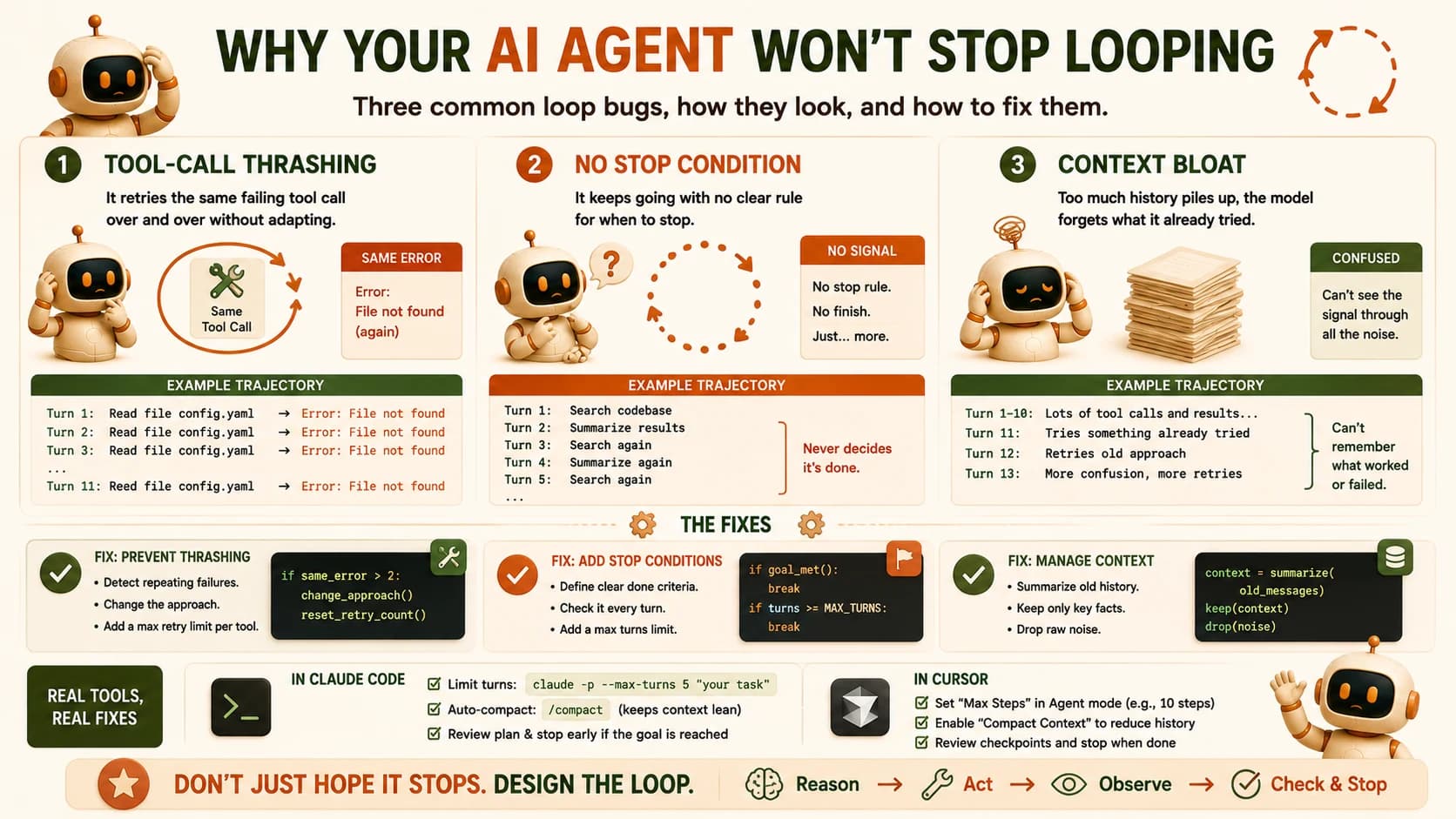
The context-growth fix is the same principle applied to memory instead of turns: once a file's review is done and recorded, summarize it to one line ("file 3, no issues") and drop the full diff from history. The loop doesn't need the raw diff anymore, it needs the conclusion.
The Same Fixes, Built Into Claude Code and Cursor
You don't have to hand-build any of this to get the benefit. Both tools expose the same three fixes directly, you're just turning a setting on instead of writing the harness yourself.
In Claude Code, the turn cap is the --max-turns flag. According to Claude Code's own CLI reference, it "limits the number of agentic turns" in print mode and "exits with an error when the limit is reached," with no limit set by default. For example: claude -p --max-turns 3 "your task". The verifier pattern shows up as the /goal command, which re-checks your stated goal after each turn using a separate evaluation pass instead of trusting the same agent to grade itself. Context growth gets handled through compaction, which summarizes older turns once the window starts filling. And hooks like PreToolUse, PostToolUse, and Stop let you attach exactly the kind of failure-handling logic that would have caught Scenario 1 before it repeated five times.
In Cursor, /loop gives you the same repeat-until-done structure, running inside a sandbox. Worktrees let you run several agent loops in parallel without them colliding on the same files. And per Cursor's own changelog, the /in-cloud command "spin[s] up a cloud subagent in its own VM to work on the next task you submit," so a long-running loop keeps working even after you close your laptop, and you can reconnect later to see what it found.
None of these are new capabilities hiding in tools you already own. They're the exact three fixes above, built in instead of hand-rolled.
Debugging Playbook: Symptom → Cause → Fix
Bookmark this table. It's the fast path back to this guide the next time an agent misbehaves.
Symptom, cause, and fix for the three loop failures
| Symptom | What's happening | Fix |
|---|---|---|
| Agent repeats the same tool call over and over | Tool-call thrashing, the model isn't registering that the call is failing | Add a retry limit, surface the error explicitly in the next prompt so the model sees it failed |
| Loop never seems to end | Missing or unreachable stop condition | Add a hard turn cap and an explicit, checkable goal condition (/goal in Claude Code) |
| Token cost balloons partway through a long task | Context bloat, accumulated history growing every turn | Turn on compaction, or manually summarize and trim older turns |
| Agent reports success but the output is wrong | No verification step, the same agent is grading its own work | Add a maker-checker split, a second pass with fresh context that checks the specific claim |
When You Don't Need Any of This
Not every task deserves this treatment. A single-turn question, a tightly scoped script that does one thing and exits, or an early prototype you're still shaping, none of these need a turn cap, a verifier, and a compaction strategy. Loop engineering earns its keep specifically when a task runs multiple iterations, calls tools repeatedly, or runs unattended for any length of time, which describes most of what you'll build across the rest of the agentic AI path, but not all of it.
So the honest, short answer to why your AI agent won't stop looping is one of three bugs, and now you've built, broken, and fixed all three yourself.
Try It Yourself
Set up a task that's easy to fail
In an empty folder, ask Claude Code to write a small script that reads a value called debug_mode from config.yml in the same folder, and prints it. Don't create config.yml yet.
Force the thrashing failure
Run the script, watch it fail, then tell Claude Code: "Run this script and fix any error you see, but do not create config.yml yourself." Watch what happens, most agents will run it again, hit the same missing-file error, and try a near-identical fix.
Cap it, on purpose
Kill the run and restart with claude --max-turns 3. Give it the same instruction and confirm it stops after three turns instead of retrying indefinitely.
Add the verifier
Let it finish the task this time (permission to create config.yml), then run /goal check_config.py runs successfully and prints a boolean value for debug_mode. Watch /goal re-check the specific claim after the agent says it's done.
Write down what you saw
In one paragraph in learning-log.md, name which failure mode you triggered, what the loop looked like without a fix, and which Claude Code feature closed it.
FAQ