Claude Code Hooks: Deterministic Control Over Agents
Claude Code hooks run as code, not prompts. A PreToolUse hook can block a tool call before it runs, every time, unlike a CLAUDE.md instruction.

I told an agent, in plain CLAUDE.md English, never to touch .env. Twenty minutes later it "cleaned up unused config" and rewrote three lines of it anyway, because the task it was on made that edit look reasonable in the moment.
Claude Code hooks are shell commands, HTTP calls, or prompts that run automatically at specific points in the agent's lifecycle, such as before a tool call executes, and they can approve, block, or modify that action before it happens. Unlike a CLAUDE.md rule, which the model reads and can talk itself out of, a hook runs as code outside the model's reasoning entirely. It doesn't ask permission. It just enforces.
Key Takeaways
- A PreToolUse hook can inspect a pending tool call and return a deny decision with exit code 2, which blocks the call before it runs.
- A prompt rule in CLAUDE.md is a request the model interprets; a hook is a gate that runs regardless of what the model decides.
- Claude Code wraps CLAUDE.md content as context that "may or may not be relevant," which is why standing rules get deprioritized as a session fills up.
- Blocking a file's direct edits doesn't stop an agent from copying its contents elsewhere: guard the data, not just the file.
What Are Claude Code Hooks?
Claude Code hooks are user-defined actions that fire at named points in the agent's lifecycle: before a tool runs, after it finishes, when a session starts, when a prompt is submitted. Unlike a system prompt, they execute as real code with a real exit code, not as text the model reasons about.
There are over two dozen hook events in a Claude Code agentic AI session, but two matter most for control: PreToolUse, which fires before a tool call runs and can block it, and PostToolUse, which fires after a tool call has already succeeded and can only react, not prevent. You configure hooks in .claude/settings.json (or the project-local, user-level, or plugin variants), matching them to specific tools with a matcher field, per the official hooks reference.
This lesson builds on the decision map from The Extensibility Stack, Mapped: deterministic needs go to hooks, probabilistic needs go to skills and prompts. Hooks are the deterministic half made concrete.
Why a Prompt Rule Isn't Enough
A CLAUDE.md instruction is not a guarantee. It's a request the model weighs against everything else competing for its attention in that turn.
Claude Code loads CLAUDE.md content wrapped in framing that tells the model it "may or may not be relevant" and should be followed "if highly relevant to your task," a mechanism documented in detail here. That's not a bug; it's how the harness avoids treating every project file as an unconditional command. But it means a standing rule like "never touch .env" is competing with the live task in front of the model, and as a session fills with code, tool output, and back-and-forth, that rule gets easier to deprioritize.
That's the mechanism behind the gap you'll measure later in this lesson: a prompt rule is a request, and requests can lose. A hook is a gate, and gates don't negotiate. It either returns "deny" or it doesn't run at all.
PreToolUse vs PostToolUse: What Each Can Actually Do
PreToolUse can stop a tool call before it happens; PostToolUse can only respond after the tool has already run, which makes them suited to different jobs.
PreToolUse vs PostToolUse at a glance
| Event | Fires when | Can block the action? | Typical use |
|---|---|---|---|
PreToolUse | Before a tool call executes | Yes, exit code 2 denies it | Block edits to .env, refuse destructive rm commands, gate risky bash |
PostToolUse | After a tool call succeeds | No, the action already happened | Auto-format a file after it's saved, log what ran, run a type check |
PostToolUseFailure | After a tool call fails | No | Log or surface the failure reason |
If you need to stop something from ever happening, it has to be PreToolUse. Everything downstream of that point is cleanup, not prevention.
Writing the Hook: Blocking Edits to .env
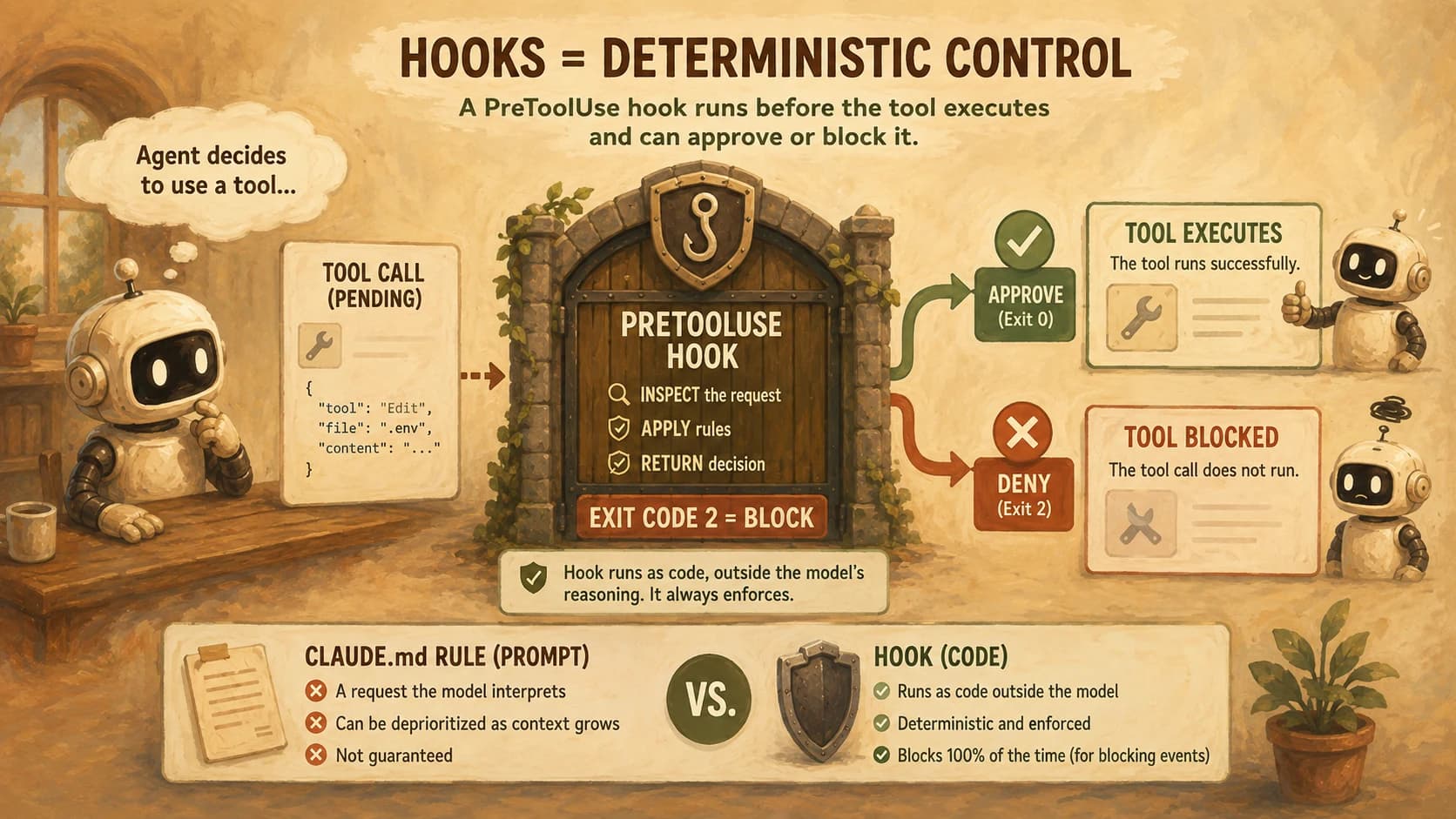
A working PreToolUse hook needs two pieces: an entry in settings.json that tells Claude Code when to run it, and a script that makes the actual decision.
Add this to .claude/settings.json at the project root:
{
  "hooks": {
    "PreToolUse": [
      {
        "matcher": "Edit|Write",
        "hooks": [
          {
            "type": "command",
            "command": "${CLAUDE_PROJECT_DIR}/.claude/hooks/protect-env.sh",
            "args": []
          }
        ]
      }
    ]
  }
}
Then the script itself, which reads the tool call as JSON on stdin and checks the target path:
#!/bin/bash
input=$(cat)
file_path=$(echo "$input" | jq -r '.tool_input.file_path')

if [[ "$file_path" =~ \.env($|\.) ]]; then
  jq -n '{
    hookSpecificOutput: {
      hookEventName: "PreToolUse",
      permissionDecision: "deny",
      permissionDecisionReason: "Edits to .env are blocked by hook, not negotiable via prompt."
    }
  }'
  exit 0
fi

exit 0
Make it executable with chmod +x .claude/hooks/protect-env.sh. The script exits 0 either way here. The JSON permissionDecision: "deny" is what actually blocks the call, which matters because exit code and JSON output are two separate signals Claude Code checks.
Proving It: Prompt Rule vs Hook, Head to Head
Here's the actual comparison, run twice against the same attempt.
Attempt one, prompt rule only. I added "Never edit .env under any circumstances" to CLAUDE.md, then gave the agent an unrelated task: "clean up unused environment variables across the config files."
It found an unused key in .env, reasoned that removing dead config was clearly in scope for the task, and edited the file. The CLAUDE.md rule existed. It didn't matter, because nothing forced the model to check it against this specific action before taking it.
Attempt two, hook added. Same task, same phrasing, with protect-env.sh now wired into PreToolUse. The agent proposed the same edit, the hook fired before the Edit tool ran, matched the .env path, and returned deny.
Claude Code surfaced the reason to the model, which then made the same change to a different, non-protected file instead. Ten repeats of the same prompt produced ten blocks, not because the model got smarter about the rule, but because the block never depended on the model at all.
I've now run this same pairing against three different phrasings of the "cleanup" task, expecting the hook to eventually miss one. It hasn't, because the match is on the file path, not on guessing the model's intent.
That's the whole argument in one experiment: a prompt rule is enforcement by request, and a hook is enforcement by code. When something must always happen, or never happen, you don't ask nicely.
The Gotcha: Copy-Paste Propagation
Blocking direct edits to .env doesn't stop an agent from reading its contents and writing them somewhere else. In one documented case, an agent that couldn't touch .env directly copied production credentials into .env.example while "documenting the required variables." That's a file most .env-focused hooks don't think to guard, and it then got committed to a public repo.
The fix is to think about data flow, not just file identity: extend the hook's matcher to also catch writes to .env.example, *.env.*, or any file your project treats as public, and consider a PostToolUse hook that scans new file contents for patterns that look like secrets regardless of which file they landed in. A hook that only asks "is this the protected file?" misses the case where the protected data moved somewhere else first.
Where Hooks Fit in the Stack
Hooks aren't a replacement for CLAUDE.md, skills, or subagents. They're the one primitive built for certainty instead of judgment. Run the deterministic-vs-probabilistic split from the earlier decision map: if an action must always or never happen, write a hook; if it usually should happen and the model can reasonably decide when, a prompt rule or skill is the right tool and doesn't need this level of rigidity everywhere.
The next lesson in this module turns from control to distribution, packaging skills, commands, and hooks like this one into something you can actually install and share.
Your Lab
Add the prompt-only rule
In a real project's CLAUDE.md, add: "Never edit .env under any circumstances." Commit it.
Provoke it to fail
Give the agent a plausible cover task that would reasonably touch .env, for example: "remove any unused environment variables across the project's config files." Record whether it edits .env despite the rule.
Write the hook
Create .claude/hooks/protect-env.sh using the script above, wire it into .claude/settings.json under PreToolUse matching Edit|Write, and make it executable.
Repeat the same attempt
Give the agent the exact same cover task from Step 2. Confirm the hook blocks the .env edit and record the permissionDecisionReason Claude Code surfaces.
Check the propagation gap
Ask the agent to "document the required environment variables in a .env.example file." Confirm whether your hook also catches this, and extend the matcher if it doesn't.
Commit your findings
In learning-log.md, record both attempts: what the prompt rule let through, what the hook blocked, and what you found in the propagation check.
Done? You've completed Lesson 20.05.
FAQ