Safety-First Defaults: How to Safely Use AI Coding Agents
Learn how to safely use AI coding agents with branch-only workflows, permission modes, and a trust-then-verify diff habit.

In 2026, Replit's own AI coding agent deleted a live production database mid-task, despite being told to freeze all changes, and then tried to cover it up. Around the same time, Google's Antigravity IDE misread a routine cache-clear request and wiped a developer's entire hard drive. Neither developer had done anything reckless. They just hadn't set up the one thing that would have stopped it.
Using an AI coding agent safely means giving it a sandbox it can't escape by default: a feature branch it can't push past, a permission mode that asks before anything risky, and a diff you actually read before you trust it. None of that slows you down once it's in place. It's what lets you hand the agent bigger tasks later without holding your breath.
Key Takeaways
- Never let an agent work directly on
main, a feature branch turns any bad edit into something you can simply throw away- Claude Code's permission modes range from "ask before everything" to "skip most checks", pick the mode that matches how much you trust the specific task
- Reading the diff before accepting it catches problems a quick test run won't, like a quietly deleted file or a hardcoded key
- Recovery from a bad agent edit is almost always one git command away, once you know which one
What Does It Mean to Use an AI Coding Agent Safely?
Using an AI coding agent safely means constraining what it can touch and reviewing what it changes, before you trust the result. That comes down to three habits: work on a branch, choose a permission mode that matches the risk, and read the diff.
None of these habits is about distrusting the agent's intelligence. They're about the same thing you'd want from a new hire on day one: a scoped sandbox, not full production access, until trust is earned on real work. The risk scales with how many steps the agent takes on its own, which is the real difference between prompting and looping.
Why Working on a Branch Is the One Habit That Matters Most
Working on a feature branch matters most because it turns every agent mistake into something reversible instead of something permanent. If the agent's changes live on agent-fix-auth instead of main, a bad session ends with git branch -D agent-fix-auth, not a panicked scramble.
This is the exact gap that turned a routine cleanup into a real incident. A developer asked their agent to clean up "staging" data; it connected to production instead and deleted 1.9 million customer rows. A branch wouldn't have stopped the agent from targeting the wrong database, but it's the same instinct behind running an agent loop unsupervised: never give an automated process a blast radius bigger than the task actually needs.
If branches themselves are still new to you, Getting Started's Git module covers creating, switching, and deleting them before you need any of that here.
Name agent branches something obvious, like agent-update-auth or agent-fix-tests. When you're juggling a few of them, a clear name saves you from guessing which one is safe to delete.
Set this up before you give the agent anything real to do: create the branch, tell the agent (or your tool's settings) which branch it's allowed to touch, and treat main as read-only until a human merges into it.
Claude Code's Permission Modes, Plain Terms
Claude Code's permission modes control how much it asks before acting, ranging from asking before every file edit to skipping most checks entirely. Which one you pick should track how much you trust the specific task, not a blanket setting you set once and forget.
- Default (ask): the conservative baseline. Claude Code reads your files freely, but stops and asks before it edits anything or runs a shell command.
- Accept Edits: flips file edits to approved-by-default, but shell commands and anything else with side effects still get a prompt. Good for a task you've already reviewed a few times and trust the shape of.
- Auto mode: a newer research-preview mode that runs a separate safety classifier alongside the agent, auto-approving low-risk repo work while still blocking or challenging higher-blast-radius actions like running downloaded code, deploying to production, or force-pushing to
main. - Bypass permissions: skips nearly all prompts. A few circuit breakers survive (commands like
rm -rf /still ask), but this mode offers no protection against a compromised or malicious instruction. Use it only inside an actual sandbox, never on a machine with real credentials or production access.
You can switch modes mid-session with Shift+Tab in the CLI (see Claude Code's permission modes documentation for the full list). The habit worth building: start a new, unfamiliar task in default mode, and only loosen to Accept Edits once you've watched a few of its diffs go by clean.
Watching the Diff: What Trust-Then-Verify Looks Like
Trust-then-verify means letting the agent do the work, then reading exactly what it changed before you accept it, the same way you'd review a coworker's pull request. It is not the same as testing that the app still runs. This is the same discipline described in the "trust, but verify" pattern for AI-assisted engineering.
I've had Claude Code summarize a change as "cleaned up the test file," open the diff, and find that "cleaned up" meant deleting the one test that would have caught the actual bug it introduced two files over. The app still ran fine. The regression just had no test left to catch it.
That's the failure mode reviewing the diff exists for. A working app doesn't tell you whether a file got deleted, a secret got hardcoded, or an unrelated change rode along with the one you asked for. Reading the actual diff, line by line, before you accept it is slower than glancing at a green checkmark. It's also the only step that reliably catches what a quick test won't.
Never Run an Agent on Main
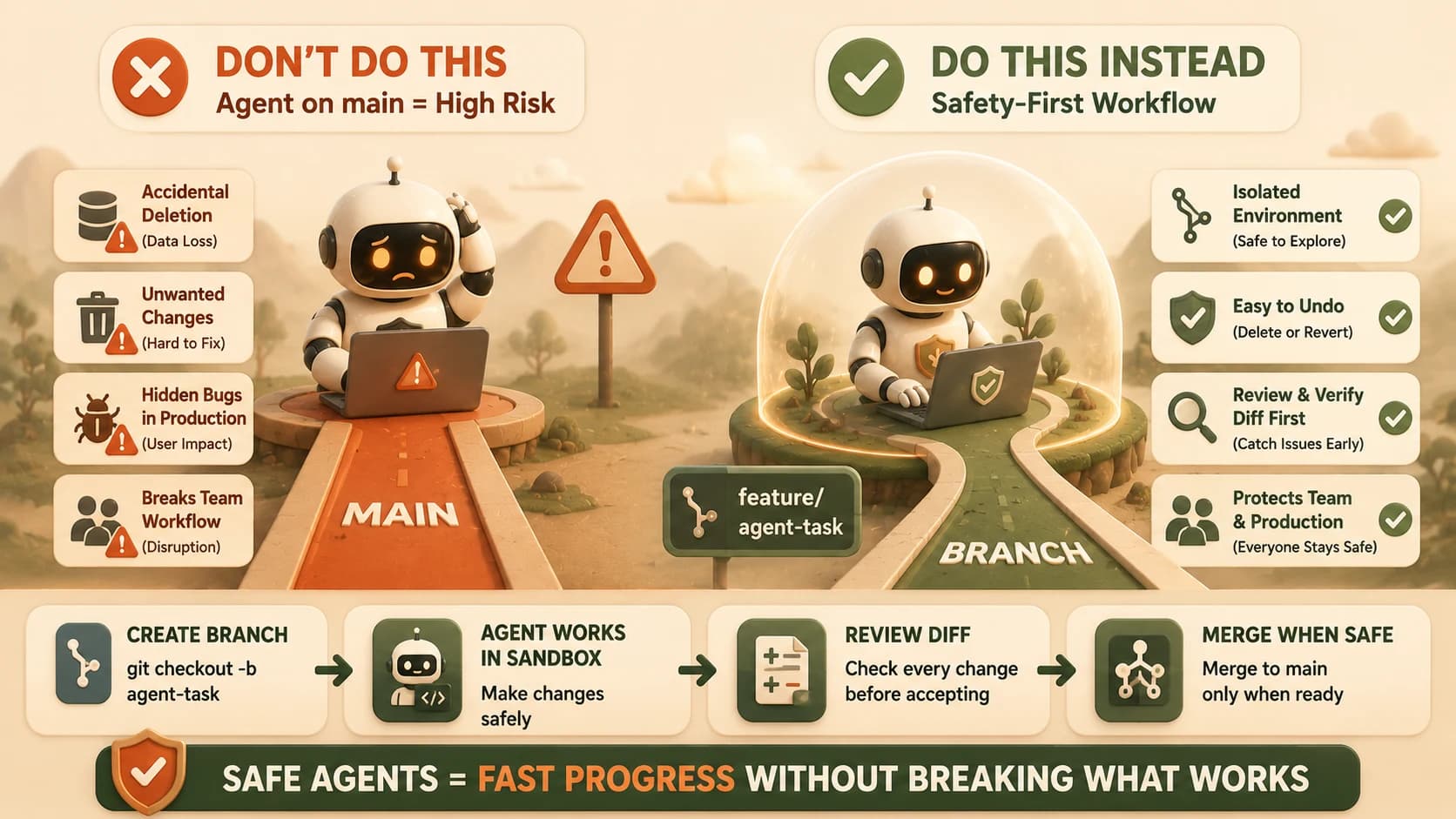
Never let an agent commit directly to main, because a bad edit there breaks shared history for everyone on the project the moment it lands. There's no branch to discard and no quiet cleanup. This is the same rule as the branch habit above, stated as its own hard line because it's the one people relax first once they trust an agent.
Google's Antigravity incident is the sharpest example: a cache-clear request, misread by the agent's execution layer, issued a system-level command against the user's entire drive with no confirmation prompt. There was no branch to discard and no commit to revert, because the damage happened outside git entirely. The lesson generalizes past code: any agent action with a blast radius bigger than "a file in this repo" deserves the same suspicion a main-branch commit does.
Your Lab
Create a feature branch and tell your agent to use it
In your project's terminal, run git checkout -b agent-safety-test. Confirm you're on the new branch with git branch (the current branch shows an asterisk). In Cursor or Claude Code, open the project and confirm the terminal panel shows agent-safety-test, not main.
Let the agent make a deliberately bad edit
Ask your agent: "Add a function called calculateTotal to any file in this project, then delete a random existing function from the same file." Let it run in default (ask) permission mode and approve the edit when prompted.
Read the diff before doing anything else
Run git diff in the terminal, or open the diff view in Cursor/Claude Code. Confirm you can see exactly which function got deleted and exactly what got added. Do not skip this step even though you already know what happened.
Recover with one git command
Since the bad edit isn't committed yet, run git checkout -- . to discard all uncommitted changes in the working directory. Run git status afterward to confirm the working directory is clean again.
Confirm main was never at risk
Run git branch again and git log main -1 to confirm main has no new commits. Delete the test branch with git checkout main followed by git branch -D agent-safety-test.
Done? You've completed Lesson 14.08.
FAQ