Build a Claude Code Plugin: Package and Publish It
Build a Claude Code plugin step by step: the plugin.json manifest, correct file structure, and publishing your own marketplace.json.

I once spent twenty minutes convinced my skill was broken. It wasn't. The skills/ folder was sitting one level too deep, tucked inside .claude-plugin/ alongside the manifest, and Claude Code was quietly ignoring it. No error. No warning. Just a plugin that installed cleanly and did nothing.
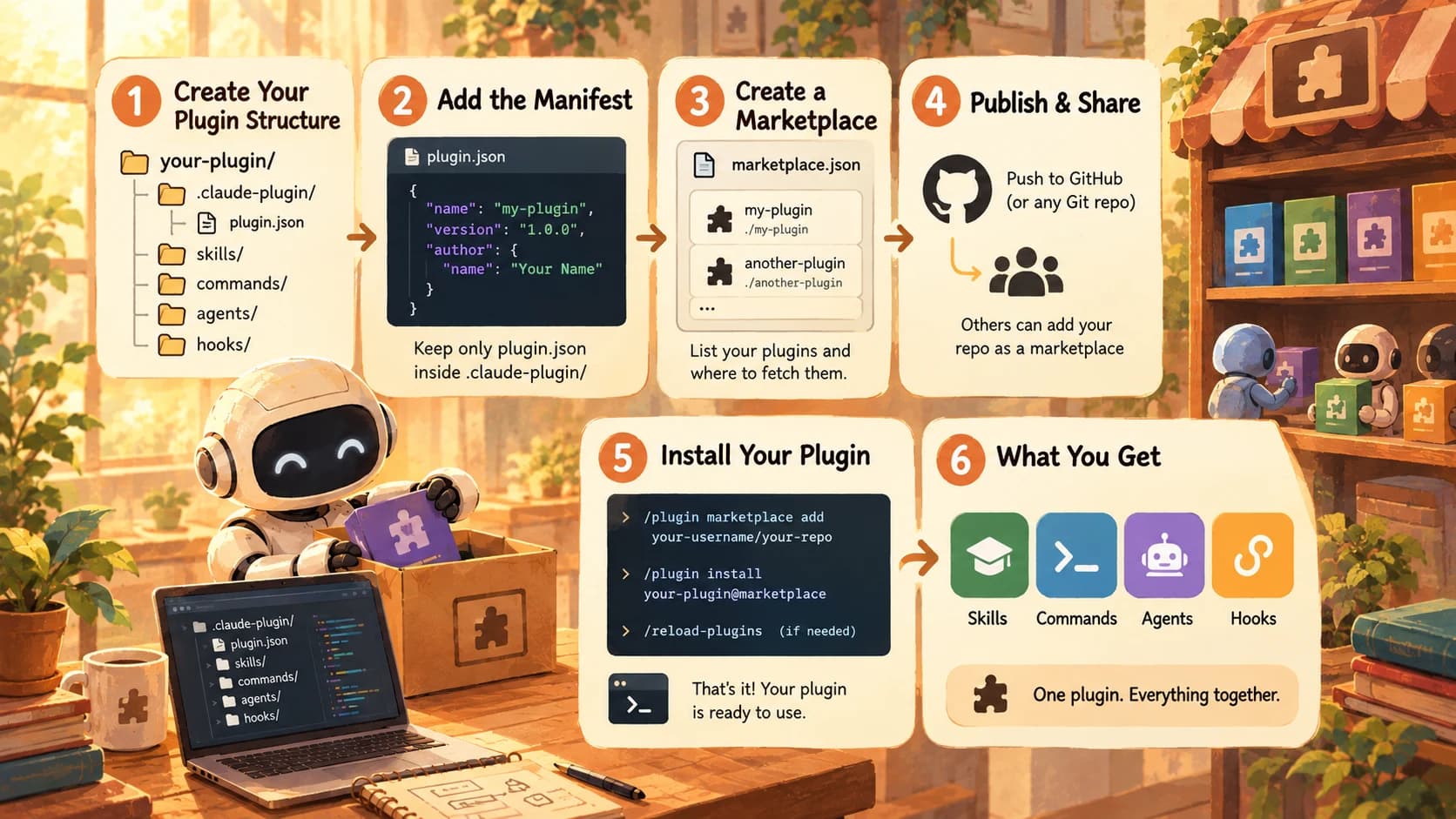
To build a Claude Code plugin, you bundle a .claude-plugin/plugin.json manifest with a skills/, commands/, agents/, or hooks/ folder at the plugin's root, then make it installable anywhere by publishing a marketplace.json that others add with /plugin marketplace add. No package registry, no hosting bill, no build step. Just files in the right places.
You've spent the last two lessons on the consumer side of this: adding marketplaces, installing other people's plugins, reading their hooks before you trust them. This lesson flips it. You already have a skill from Anthropic's skills documentation and the auto-triggering skill you wrote, plus the custom /review command from the lesson before it. Today you package both into one plugin and put it in front of other people.
Key Takeaways
- A plugin is just a Git repo with a manifest, no hosting, no package registry required
.claude-plugin/holds onlyplugin.json; skills, commands, agents, and hooks all live at the plugin's root, one level upmarketplace.jsonlists your plugins and where to fetch each one, relative path, GitHub, Git URL, npm package, or zip archive/plugin marketplace add owner/repothen/plugin install name@marketplaceis the entire install loop, for you or anyone else- Installing your own plugin from your own marketplace is the only real proof it works. "I pushed it to GitHub" is not a finished plugin
What a Claude Code Plugin Actually Bundles
A plugin bundles the same primitives you've already built by hand across this module: skills, slash commands, subagents, and hooks, into one shareable unit that installs with a single command instead of five separate copy-paste steps.
Think back to the plugin system lesson: you learned to run /plugin install name@marketplace and trust that whatever showed up was a coherent package. That coherence is what you're building now. A plugin can ship any combination of a skills/ directory, a commands/ directory (the older format, still supported), an agents/ directory for subagents, a hooks/ directory for deterministic event handlers, and an MCP server configuration: all wired together under one name, one version number, and one install command.
The instinct when building your first plugin is to reach for something new and impressive. Resist it. Narrow plugins that do one thing well get installed and kept; broad, do-everything plugins tend to be mediocre at all of it. You already have a working skill and a working command. Package those.
The plugin.json Manifest
Every plugin needs exactly one file most people get almost right on the first try: .claude-plugin/plugin.json, containing the metadata Claude Code reads before it loads anything else.
Here's the minimum that actually works:
{
  "name": "review-toolkit",
  "description": "A house code-review skill and a reusable /review command",
  "version": "1.0.0",
  "author": {
    "name": "Your Name"
  }
}
name and author.name are required. version is technically optional: omit it and Claude Code falls back to the Git commit SHA. But you want it set, because it's what lets you tell users "you're on 1.0.0, here's what changed in 1.1.0" instead of pointing at an opaque hash. Bump it on every real release.
One precedence detail worth knowing before it confuses you later: if you set a version in both plugin.json and the plugin's entry in marketplace.json, the plugin.json value wins, per Anthropic's plugin marketplace documentation. The marketplace listing is a pointer, not the source of truth.
Where Files Actually Go
The single most common mistake when authoring your first plugin is putting skills/ or commands/ inside .claude-plugin/ instead of next to it. It fails in the worst possible way: silently.
Here's the layout that actually loads:
review-toolkit/
├── .claude-plugin/
│   └── plugin.json          # manifest ONLY — nothing else goes here
├── skills/
│   └── code-review/
│       └── SKILL.md
└── commands/
    └── review.md
That was my twenty minutes lost. I'd built plugins in a different ecosystem before, where the manifest folder holds everything, so I dropped skills/code-review/ straight into .claude-plugin/ out of habit. Claude Code read the manifest fine and installed without a single error, then simply never surfaced the skill. Everything except plugin.json has to sit at the plugin's root, one level up.
If a skill or command "disappears" after install with zero error output, check this first. It's almost always a folder one level too deep.
There's a matching restriction worth knowing before you hit it: a component can't reference a path that escapes its own plugin directory (something like ../../shared-utils). If two of your plugins need to share a file, use a symlink rather than fighting the path resolver.
Publishing marketplace.json
A marketplace.json file turns your repo from "a plugin I use locally" into "a plugin anyone can install." It lists your plugin and tells Claude Code where to fetch it from.
It lives at .claude-plugin/marketplace.json, at the root of the repo, not inside your plugin's folder. A marketplace can list several plugins at once.
{
  "name": "your-plugins",
  "owner": {
    "name": "Your Name"
  },
  "plugins": [
    {
      "name": "review-toolkit",
      "source": "./plugins/review-toolkit",
      "description": "A house code-review skill and a reusable /review command"
    }
  ]
}
The source field is where most people get stuck, because it changes shape depending on how you're distributing the plugin.
Marketplace source formats
| Source type | Format | When to use it |
|---|---|---|
| Relative path | "./plugins/name" | Plugin lives in the same repo as the marketplace |
| GitHub | {"source": "github", "repo": "owner/repo"} | Plugin lives in its own repository |
| Git URL | {"source": "url", "url": "https://gitlab.com/team/plugin.git"} | Self-hosted Git, not GitHub |
| npm | {"source": "npm", "package": "@org/plugin"} | You already publish to npm |
If someone adds your marketplace by pointing directly at a raw marketplace.json URL rather than the repo itself, relative paths won't resolve for them. Use the github or url source type instead so the fetch always has a full address to work from.
The other trap carries over from the consumer side you already learned in 20.06: each person can register only one marketplace per name, and adding a second one with the same name silently replaces the first. Pick a marketplace name nobody else is likely to have claimed, and don't reuse a generic one like "tools."
Installing Your Own Plugin From Your Own Marketplace
Pushing a repo to GitHub is not the same as having a working plugin. The only real proof is installing it yourself, from your own marketplace, in a clean session: the exact path a stranger would take.
# Register your repo as a marketplace
/plugin marketplace add your-username/your-repo

# Install your plugin from it
/plugin install review-toolkit@your-plugins

# If Claude Code asks for it
/reload-plugins
Before you even get that far, validate the structure locally so you're not debugging a typo over a network round trip:
/plugin validate .
Run the /review command, confirm your code-review skill still auto-triggers on the right kind of task, and you've closed the loop: you wrote a skill, wrote a command, packaged both, published them, and pulled the finished product back down like anyone else would.
Your Lab
Scaffold the plugin
Create a new local folder. Inside it, add .claude-plugin/plugin.json with name, version, and author.name set. Then copy your 20.03 skill into skills/<skill-name>/SKILL.md and your 20.02 /review command into commands/review.md. Both go at the plugin's root, not inside .claude-plugin/.
Validate locally
Run /plugin marketplace add ./your-plugin-folder to register it as a local marketplace, then /plugin validate . to check the structure. Fix anything it flags before moving on.
Push and publish a marketplace.json
Push the plugin folder to a new public GitHub repo. Add a .claude-plugin/marketplace.json at the repo root listing your plugin with a "./" relative source (or a github source if the plugin lives in a separate repo from the marketplace).
Self-install and confirm
In a fresh session, run /plugin marketplace add your-username/your-repo, then /plugin install your-plugin@your-marketplace-name. Run /reload-plugins if prompted. Trigger your skill and run your /review command to confirm both work from the installed copy, not your local files.
Commit the proof
In learning-log.md, record the repo URL and paste the terminal output showing the successful install and a working run of both the skill and the command.
Done? You've completed Lesson 20.09.
FAQ