Just-in-Time vs Pre-Loaded Context: A Decision Framework
Choosing between just-in-time and pre-loaded context for AI agents comes down to latency, cost, and relevance. Here's how to decide.

Six frameworks, three blog posts, and one honest answer: most agents don't need to choose between pre-loading everything and fetching on demand, they need to know which one their specific task actually calls for.
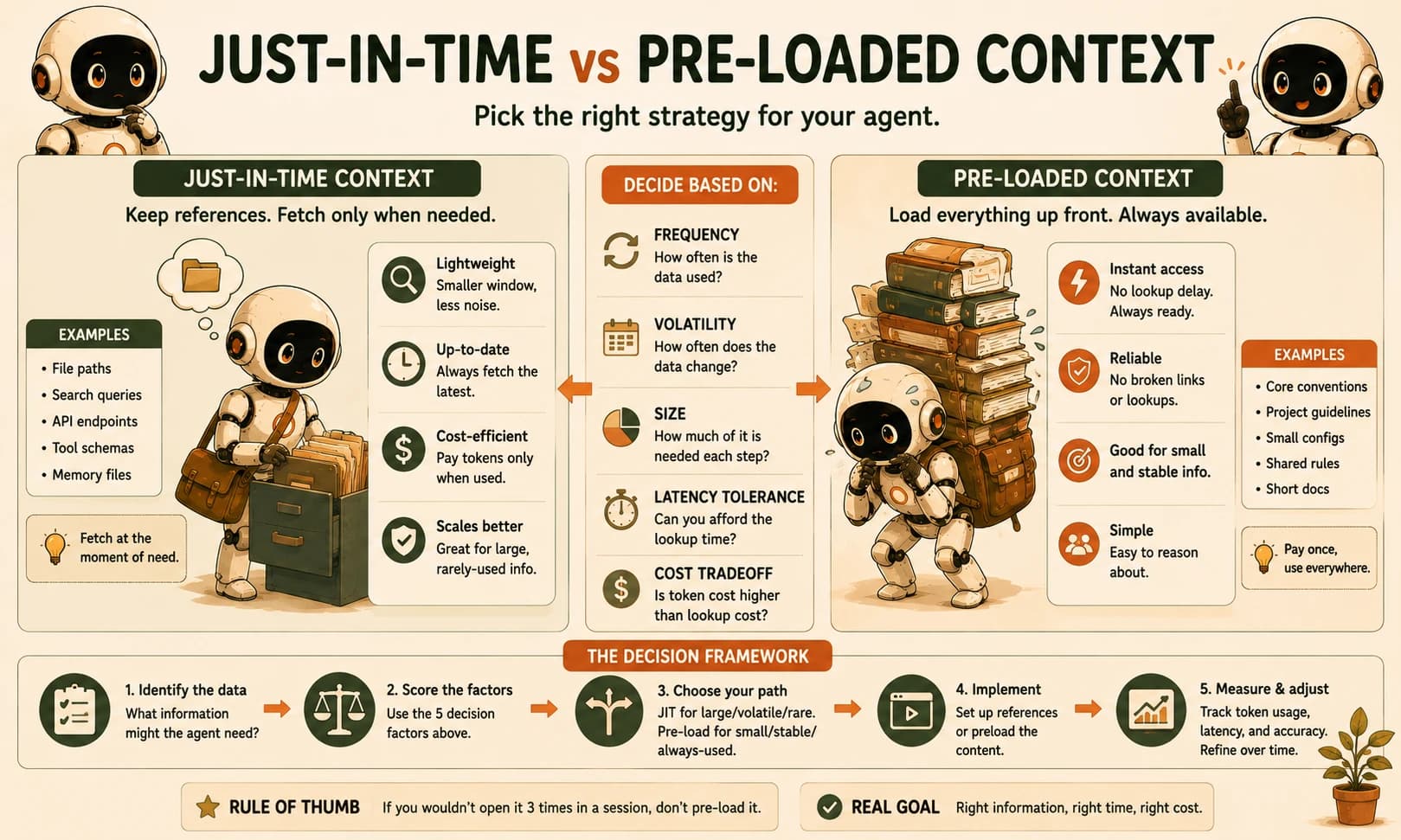
Pre-loaded context puts everything an agent might need into the window up front; just in time context keeps lightweight references there instead and fetches the real content only when a step actually needs it. The right choice depends on three things: how often the data changes, how much of it a given task actually touches, and how expensive a slow lookup is compared to a wasted token. Here's how to work through it.
What "Pre-Loaded" Context Actually Means
Pre-loading means stuffing the full content an agent might need into its context window before the task even starts, rather than fetching pieces as they become relevant.
Picture an agent that gets handed your entire 40-page onboarding doc at the start of every single run, whether the task is "fix a typo" or "redesign the auth flow." That's pre-loading: pay once, carry it everywhere, whether you use it or not.
The appeal is real. Pre-loaded data is already there, so there's no retrieval step, no network round-trip, no chance of a broken lookup mid-task. For something small and stable, like a project's core conventions or a 15-line CLAUDE.md, that tradeoff is almost always worth it. The problem shows up at scale: every extra page you pre-load rides along on every single model call for the rest of the session, whether or not it's relevant to the current step, and that's exactly the standing weight behind what one engineering team calls treating context strategy like a moving van: load everything the agent might conceivably need and hope it finds the right box later.
What "Just-in-Time" Context Actually Means
Just-in-time context means the agent carries references, not the full data, and only resolves those references into real content the moment a step actually needs it.
Instead of the full onboarding doc, the agent holds a file path or a search query. When a step genuinely requires that information, it calls a tool, reads the file, or queries a store, and only then does the real content land in the window. This is Anthropic's own description of the approach: references over payloads, resolved at the moment of use rather than pre-processed at session start.
You've already met a working example of this if you've used Claude Code. Its CLAUDE.md is preloaded on every session, but the moment it needs to know what's actually inside a file, it reaches for glob and grep instead of having the entire repository dumped into context up front. That's a hybrid, not a pure strategy, and that hybrid is closer to what most production agents actually run.
If you've built with agentic RAG, you've already implemented one specific version of just-in-time context: the agent decides when to query a document store instead of having every document pre-loaded. The tradeoffs below aren't a new topic, they're the general case of a decision you've already made once.
The Real Tradeoff: Latency, Cost, and Relevance
The tradeoff between pre-loading and just-in-time retrieval comes down to three dimensions: how fast you need an answer, how many tokens you're willing to spend carrying unused data, and how much of what you load actually gets used.
Neither strategy wins across all three at once, which is the entire reason this needs a framework instead of a verdict.
Pre-loaded vs. just-in-time context, across the three dimensions that matter
| Dimension | Pre-loaded | Just-in-time |
|---|---|---|
| Latency | Zero retrieval delay, data is already resident | A retrieval hop per lookup, usually small next to a model call but nonzero |
| Cost | Pays the same token tax on every single turn, used or not | Pays only for what a task actually touches, plus the retrieval calls themselves |
| Relevance | Degrades on long tasks as unused data crowds the window, a direct contributor to context rot | Stays lean, but introduces a new failure mode: an unresolvable reference, like a file path that's since been deleted |
I've watched a pre-loaded agent burn more tokens holding a 12,000-token API reference doc across nine idle turns than it spent on the two turns that actually needed it. Just-in-time retrieval would have paid a small latency cost twice and skipped the tax on the other seven.
The Decision Framework: Four Questions That Actually Decide It
Whether an agent should pre-load or fetch just-in-time comes down to answering four questions about the specific data in question, not the architecture as a whole.
- How often does this data change? Stable data (a style guide, a fixed schema) is safe to pre-load. Volatile data (today's ticket queue, a file that gets edited mid-session) should be fetched fresh, or a pre-loaded copy will quietly go stale.
- What fraction of tasks actually touch it? If nearly every task needs it, the retrieval overhead of fetching it just-in-time buys you almost nothing. If only a fraction of tasks touch it, pre-loading wastes tokens on the rest.
- What's your latency budget for this step? An interactive coding session in Cursor can absorb a quick file read. A pipeline with a hard per-request time limit may not be able to afford even a small retrieval hop.
- What does a stale or unresolvable reference cost you if it happens? If a broken lookup means the agent asks a clarifying question, that's cheap. If it means a wrong answer ships silently, pre-loading the small, high-stakes slice may be worth the token cost.
Run any piece of context through those four questions and the answer for that specific piece of data usually stops being ambiguous, even when the overall system ends up mixing both strategies.
The Hybrid Most Production Agents Actually Use
Most production agents don't pick one strategy for the whole system, they pre-load a small, stable core and fetch everything else just-in-time.
Claude Code's own split is the model to copy: a compact, always-loaded CLAUDE.md for the facts every single turn needs, and glob or grep calls for the specific file contents a given step actually touches. The always-loaded slice stays small on purpose, because a pre-loaded file that grows unchecked becomes the exact context rot this hybrid exists to avoid.
The honest version of this advice is that you probably don't need a sophisticated retrieval system for most of what you're tempted to pre-load. Start by asking the four questions above about your biggest single context cost. Most teams find one obvious candidate to move to just-in-time before they need to touch anything else.
Your Lab: Convert a Pre-Loaded Agent to Just-in-Time
Build the pre-loaded baseline
In Claude Code, write a short Python script that opens a small local "knowledge base" folder (five to eight text files, a few hundred words each, covering a fictional product's features, pricing, and FAQ) and concatenates every file's full contents into the system prompt on every call. Confirm it works by asking it one question from each file.
Define five tasks and log tokens
Write five short, specific questions, each answerable from exactly one of the files. Run each through the pre-loaded script, and log the total tokens sent per call. Commit this table as your baseline.
Convert to just-in-time retrieval
Rewrite the script so the system prompt lists only the file names and a one-line description of each, and give the agent a read_file(name) tool it can call to pull one file's contents in only when it decides that file is relevant to the current question.
Re-run the same five tasks
Run the same five questions through the just-in-time version and log tokens per call again, including the tokens spent on the read_file calls themselves. Note any task where the agent called read_file on the wrong file first.
Commit the comparison
In learning-log.md, record both token tables side by side, the percentage difference, and one sentence on which task, if any, you'd still pre-load for and why.
Done? You've completed Lesson 19.05.
FAQ