AI Agent Autonomy Levels: The Full Spectrum, Explained
AI agent autonomy runs on a spectrum, not a switch, from scripted automation to fully autonomous. Here's how to pick the right level for the stakes.

You've already let an agent run further than you planned to. Maybe it auto-approved a file edit you meant to review first, or you hit Shift+Tab one setting too far and it ran a command before you'd finished reading what it proposed. Nothing broke that time. That's usually how people first notice the setting exists at all.
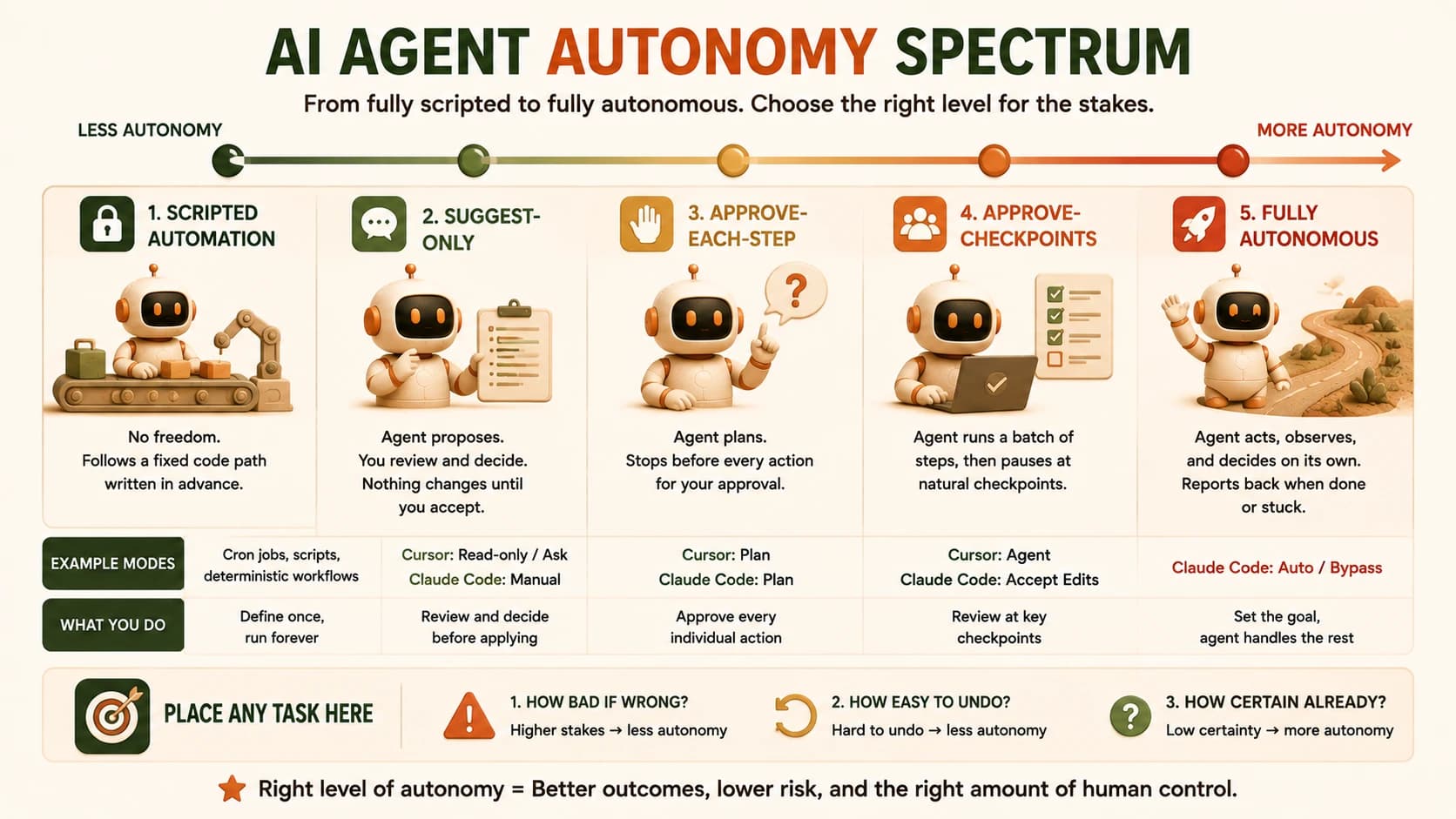
AI agent autonomy isn't a switch you flip on or off, it's a dial with real, working positions between "does nothing without you" and "acts and reports back." The five points on that dial, scripted automation, suggest-only, approve-each-step, approve-checkpoints, and fully autonomous, aren't a theory. You've already touched two real versions of this exact dial in Cursor and Claude Code, and the right position for any task is set by the stakes, not by how confident you feel that day.
Key Takeaways
- Autonomy is a spectrum with five usable points, not a binary, and Cursor's modes plus Claude Code's permission tiers are real instances of it, not analogies.
- Anthropic's own usage data shows autonomy and oversight rising together, not trading off against each other, as people use agents more.
- Three questions place any task on the dial: how bad if it's wrong, how easy to undo, and how sure are you already.
- A real Claude Code bug let a bypass flag silently override plan mode, proving autonomy can be granted by accident, not just on purpose.
- The four Module 14 tasks you already did each sit at a different, defensible point on this same spectrum.
What Is the AI Agent Autonomy Spectrum?
The AI agent autonomy spectrum is the range of control an agent holds over its own next action, running from fully scripted (a developer decided every step in advance) to fully autonomous (the agent decides what to do and when it's done, with no per-step check). Anthropic's own research into how people actually use agents treats this as a continuous line, not a fixed set of tiers with hard walls between them.
Five points are useful to name, because each one changes what a human is doing while the agent works:
- Scripted automation: zero freedom. A developer wrote every step in advance; the "agent" just executes a fixed path, the way a cron job or a repeatable workflow does.
- Suggest-only: the agent proposes, you decide. Nothing changes until you copy or accept its output yourself.
- Approve-each-step: the agent plans, but stops before every individual action for a yes or no.
- Approve-checkpoints: the agent runs a batch of steps on its own, then pauses at natural review points instead of every single action.
- Fully autonomous: the agent acts, observes results, and decides its next move without stopping, reporting back only once it's done or stuck.
None of these five is inherently "better," the same restraint that decides whether a task needs an agent at all also decides where on this dial it should sit once you've built one. A scripted job that runs the same transformation on two hundred files every time is doing its job correctly at zero autonomy. An agent triaging unpredictable support tickets is doing its job correctly running near-autonomous. The mistake isn't picking a low point on the dial, it's picking the wrong point for what the task actually needs.
The Dial You've Already Touched: Cursor and Claude Code
The autonomy spectrum isn't abstract, because you've already used two real, working versions of it. Cursor's four modes and Claude Code's permission tiers each map directly onto the five conceptual points above, just implemented as settings you can flip mid-session.
Cursor's Read-only mode looks and explains but writes nothing, which is scripted-to-suggest territory. Ask mode suggests code in the chat, but you copy it yourself, still suggest-only. Plan mode researches your repo and hands you a reviewable step list before touching a file, which is approve-each-step in practice. Agent mode reads, edits, and runs commands across files, pausing at checkpoints rather than every keystroke, which is approve-checkpoints.
Claude Code's five tiers, cycled with Shift+Tab, cover the same ground with finer resolution:
The autonomy dial in Cursor and Claude Code
| Spectrum point | Cursor mode | Claude Code tier | What a human is doing |
|---|---|---|---|
| Suggest-only | Read-only / Ask | Manual (default) | Reviewing every proposed edit before anything is written |
| Approve-each-step | Plan | Plan | Approving a full plan before a single file changes |
| Approve-checkpoints | Agent | Accept Edits | Auto-approving routine edits, still pausing on riskier actions |
| Near-autonomous | (no Cursor equivalent) | Auto | Prompts mostly gone; a separate model reviews each action instead of a human |
| Fully autonomous | (no Cursor equivalent) | Bypass | Nothing pauses, ever, no matter what the agent decides to do |
That last row is the one worth sitting with before you ever reach for it, and the section below explains why.
What Anthropic's Own Usage Data Shows
Anthropic's usage data shows autonomy and human oversight rising together as people get more experienced with agents, not trading off against each other the way you'd expect. New Claude Code users auto-approve full autonomy roughly one-fifth of the time; experienced users do it closer to two-fifths of the time, according to Anthropic's own research on measuring agent autonomy in practice. If autonomy and oversight were a simple trade-off, you'd expect that same experienced group to interrupt less. Instead, their interrupt rate rises too, from about five percent to about nine percent.
The same research found that on the hardest tasks, Claude's own self-initiated pauses to ask for clarification outpace how often a human interrupts it, and that gap widens as the task gets more complex. I've watched this happen on a genuinely ambiguous refactor: I'd set Claude Code to Auto expecting it to just push through, and it stopped mid-task to ask which of two valid interpretations of a vague instruction I actually meant. That's not the agent being cautious for its own sake. It's exactly the pattern the data describes: more autonomy doesn't mean less checking, it means checking moves to the moments that actually matter.
The Questions That Place a Task on the Dial
Three questions place any agent task on the autonomy spectrum, and none of them is "how confident do I feel." Ask them in this order, the way choosing a Cursor mode by blast radius already trained you to for editor settings, just generalized to any agentic task.
How bad is it if this goes wrong? A wrong guess on a coupon-filter bug costs you a re-run. A wrong guess on a database migration or a production deploy costs you an incident. Higher stakes pull the dial toward more approval, not less.
How easy is it to undo? A git revert on a feature branch is nearly free. A message already sent to a customer, a payment already processed, or a migration already run against a shared database can't be quietly walked back. Irreversible actions earn tighter oversight regardless of how likely they are to go wrong.
How certain are you already? If you already know the exact fix, an agent that stops to plan is adding review time you don't need. If the task is genuinely open-ended, that same planning step is what catches a bad approach before it spreads across a dozen files.
None of these three questions has a universal right answer. A task can be low-stakes and irreversible at the same time, like a public social post, and that combination should still pull you toward more oversight, not less.
When More Autonomy Is a Mistake
Giving an agent too much autonomy isn't only a mistake you make on purpose, and that's the part most explanations of this leave out. Anthropic's own account of building a safer auto mode for Claude Code points to its internal incident log of exactly this kind of failure, including a case of an agent deleting remote git branches from a misinterpreted instruction while running with permissions fully skipped. Anthropic's own framing is blunt: running with permissions fully skipped is "unsafe in most situations," full stop, not a setting to reach for out of convenience.
The sharper version of this failure is accidental, not deliberate. A confirmed, still-open Claude Code bug (Issue #17544 on the official repo) lets the full-bypass flag silently override an active plan-mode setting when the two are combined at startup, meaning a user could believe they were sitting in read-only review while every single action was actually running unreviewed underneath them. You didn't choose full autonomy. A flag interaction chose it for you.
The correct fix for both cases is the same: know which tier you're actually in before you trust it, and treat "prompts feel like friction" as a reason to check the setting, never a reason to skip it.
Your Lab
Place the install task
Recall Module 14's install and tour of Cursor and Claude Code. In learning-log.md, name where it sat on the autonomy spectrum during that lesson, then argue in two to three sentences where it SHOULD sit on a production team's repo instead of a practice one.
Place the three-way bug fix
Recall the same bug fixed once in Ask, once in Plan, once in Agent mode. Name which spectrum point each version actually used, then argue where a production team should require it to sit, and why the answer might not be Agent even though Agent was fastest.
Place the autonomous chore
Recall the chore you let Claude Code run with permission prompts on, annotating each prompt. Place it on the spectrum, then argue whether a production team should ever move this specific chore further toward Auto or Bypass, and what would have to be true first.
Place the branch-recovery task
Recall the branch-recovery task from Module 14. Place it on the spectrum, then argue where it should sit on a production repo given how reversible (or not) a bad recovery decision actually is.
Done? You've completed Lesson 15.06.
FAQ