Context Compaction: When to Use /compact and /summarize
Context compaction summarizes old turns before quality drops. Learn the 70% self-trigger rule and how to run /compact and /summarize yourself.

An hour into a Claude Code session, you notice something's off. The agent re-reads a config file it already read twice. It states a decision that contradicts the one it made forty turns ago. You didn't change anything: the context window is just getting crowded, and the model is starting to lose the thread.
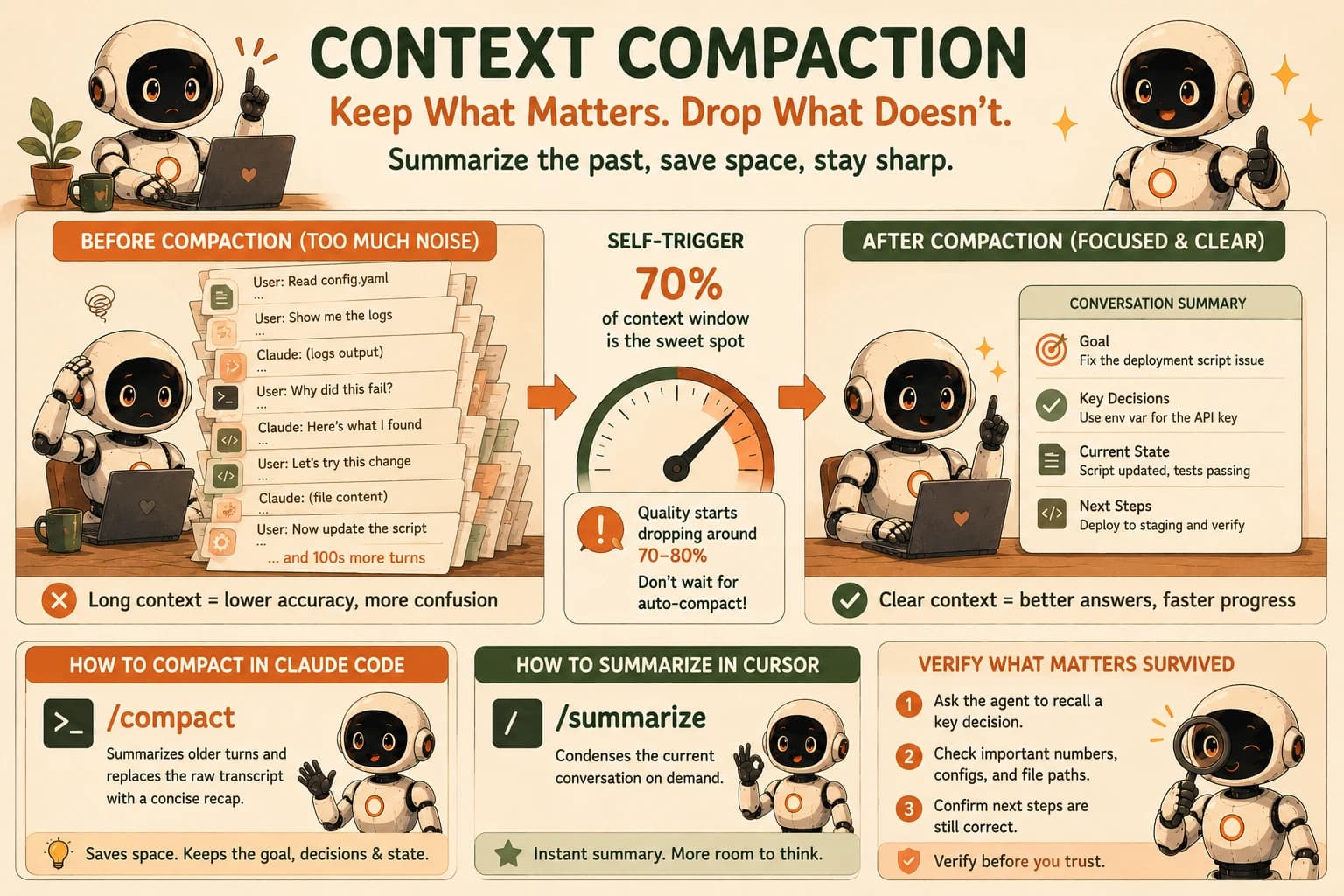
Context compaction is the fix: summarizing a conversation's older, resolved turns into a dense recap and replacing the raw history with it, so the agent keeps working without dragging every prior message along at full length. The commands you'll actually use are /compact in Claude Code and /summarize in Cursor, and the skill worth learning isn't knowing they exist. It's triggering them yourself, before the model's own automatic safety net finally kicks in.
Key Takeaways
- Context compaction summarizes resolved turns and drops the verbatim history, freeing up room without starting a new session
- Quality degrades starting around 70-80% of your context window, well before either tool's automatic compaction fires
/compact(Claude Code) and/summarize(Cursor) let you trigger compaction on your own schedule instead of waiting- Always verify a compaction kept what mattered by asking the agent to recall a specific earlier decision
What Is Context Compaction?
Context compaction is the practice of condensing a long conversation's settled history into a short summary so the model can keep working inside its window instead of running out of room. Context Engineering, Part 2 covers the full mechanics of this alongside tool-result clearing and memory tools, so this lesson won't re-explain them. What matters here is narrower and more practical: exactly when to trigger it, and in exactly which two tools you're already using.
The short version: a compaction pass reads everything so far, writes a summary of the goal, the decisions made, and the current state, and then continues the session using that summary in place of the raw transcript. Anything not captured in the summary is effectively gone.
Why Waiting for Auto-Compact Is Too Late
Waiting for automatic compaction means you're already working with a degraded model by the time it fires. Both Claude Code and Cursor will compact a conversation for you eventually, but "eventually" is much later than you'd want. The default trigger behind Claude's compaction feature sits at 150,000 input tokens. Claude Code's own auto-compact in the CLI holds off even longer, close to the effective window ceiling. By contrast, context rot sets in earlier than that: practitioner testing and current research put the onset of meaningful quality degradation around 70 to 80% of context capacity, not 95%.
That gap is the entire lesson. If you let the tool decide, you spend a real stretch of the session, sometimes a third of it, working with an agent that's already starting to misplace details, before anything gets cleaned up. Self-triggering at 70% closes that gap. You do the compacting while the model is still sharp, instead of after it's already started guessing.
I've run this comparison directly: the same debugging session, once left to auto-compact and once self-triggered near 70%. In the self-triggered version, the agent correctly recalled a schema decision from thirty turns earlier without being reminded. In the auto-compact version, it had already restated that same decision incorrectly twice before the automatic pass ever ran.
Triggering /compact in Claude Code
To trigger compaction in Claude Code, type /compact at any point in a session, and the agent summarizes everything so far into a short recap before continuing. You don't need to wait for a prompt or a warning; running it manually is the whole point.
/compact
If you want more control over what survives, add a focus to the command instead of running it bare:
/compact focus on the database schema decisions and the failing test we haven't fixed yet
A focused /compact instruction genuinely changes what gets kept. Naming the two or three things you can't afford to lose, an open bug, a config value, a naming decision, produces a noticeably better summary than compacting with no instruction at all.
Watch your context usage as the session runs (Claude Code shows this in the terminal) so you're compacting on purpose at roughly 70%, not reacting to a warning that fires much later.
Triggering /summarize in Cursor
Cursor's equivalent is the /summarize slash command, shipped in Cursor 1.6 and still the current way to compress a conversation on demand. Run it from the chat input when you want to free up space without abandoning the thread entirely:
/summarize
Cursor will also summarize automatically once its own context limit gets close, the same passive backstop Claude Code has. The point of running it yourself is identical: catch the crowding before it costs you accuracy, not after.
Verifying Context Compaction Kept What Matters
The only way to know a compaction didn't lose something important is to test it, immediately, before you keep building on top of it. After running /compact or /summarize, ask the agent a direct question about a decision from well before the compaction point: what value did we settle on for the retry timeout, or why did we choose that table name. If the answer is right, the summary did its job. If it's vague or wrong, you know now, while the mistake is still cheap to fix.
Compaction is genuinely lossy for anything the summary doesn't capture verbatim. File contents and API responses are usually cheap to re-fetch if the agent needs them again. An exact number, a precise decision, or a subtle piece of reasoning is not; if it matters, don't rely on the summary to have kept it exactly right, ask and confirm.
This single habit, verify then trust, is what turns compaction from a source of anxiety into a routine part of running a long session.
Your Lab
Fill a session with real work
In Claude Code, start a genuinely long task: pick a small existing repo (or clone one) and ask the agent to add a new feature that touches at least three files, then write and run tests for it. Let the session run for at least 30-40 turns, reading files, editing, running commands, and fixing whatever breaks.
Watch the context usage, don't wait for a warning
Keep an eye on your context usage in the terminal as the session runs. When you estimate you're around 70% of the window (not when Claude Code's own auto-compact would fire), stop and move to the next step.
Trigger /compact with a focus
Run /compact with a focus naming the two or three things you can't afford to lose from this session, for example the exact feature requirements and any test that's still failing. Read the summary it produces.
Verify the compaction
Ask the agent to state, from memory, one specific decision or detail from early in the session, something not restated anywhere in the last ten turns. Confirm the answer matches what actually happened.
Commit the before/after to learning-log.md
In learning-log.md, record: the turn count when you compacted, the focus instruction you used, the verification question you asked, and whether the agent got it right. Note anything the summary dropped that you had to re-explain.
Done? You've completed Lesson 19.03.
FAQ