Cursor @ Context: How to Feed the Model the Right Code
Learn how Cursor's @-mentions and codebase indexing work, and why any answer's quality is bounded by the context you deliberately choose to give it.

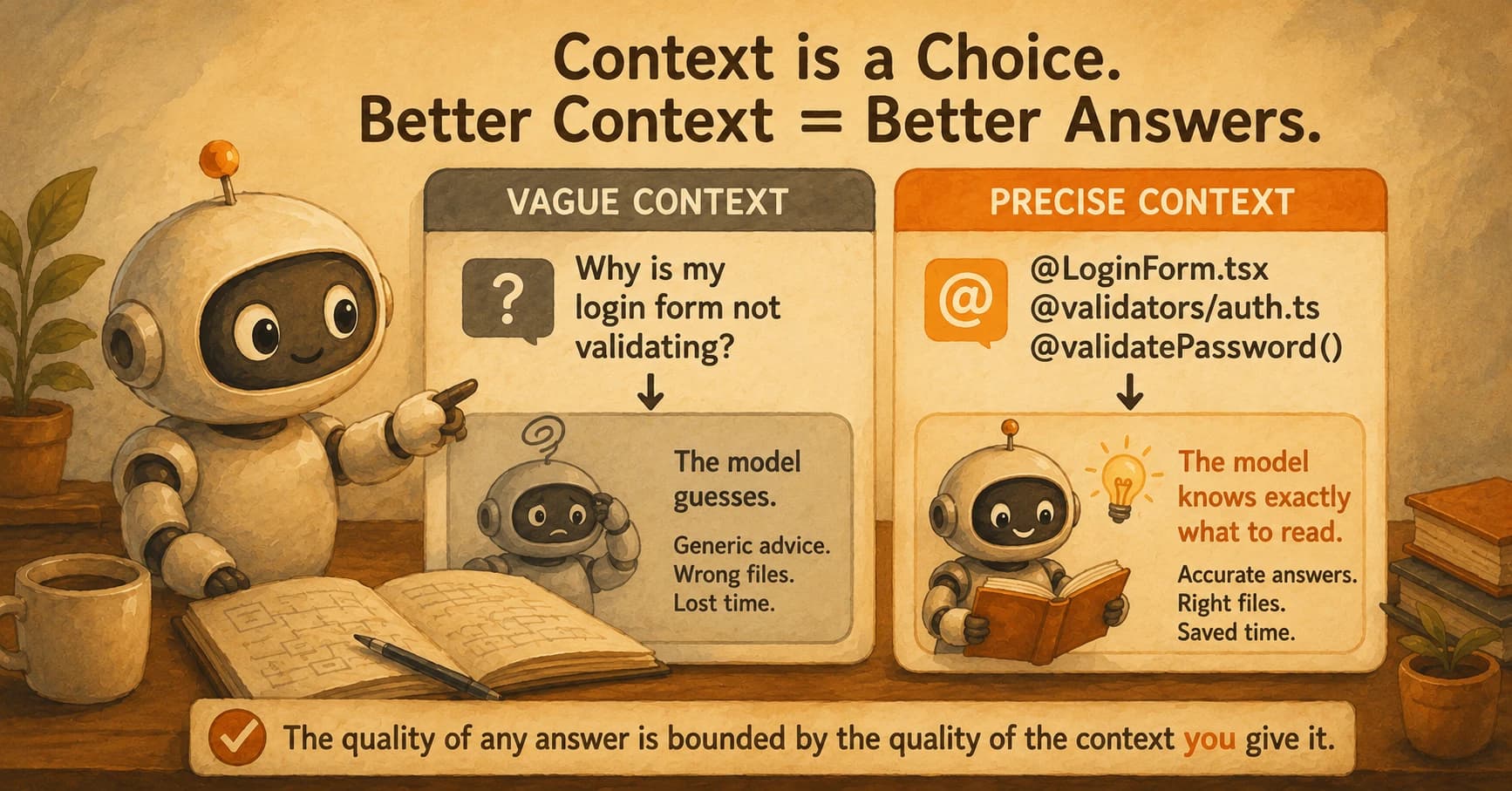
You ask Cursor why a login form silently accepts an empty password, and it answers with a generic explanation about React form validation, complete with a code sample that doesn't match a single file in your project. The model wasn't wrong about React. It was answering a different question than the one your codebase actually has a bug in, because nothing told it which two files to look at. This is a different failure than picking the wrong mode for a task: you can have the dial set correctly and still get a bad answer, because the mode controls how much the model is allowed to touch, not what it was shown in the first place.
Cursor @ context is the deliberate act of handing the model exactly what it needs to see. A file, a folder, a function, official docs, a live web page, or a semantic search across your whole indexed codebase, instead of leaving it to guess. That guess is powered by codebase indexing, a background process that chunks your project and stores it as searchable meaning, not just text. Get the @-mention right and the model reads the two files that matter. Leave it out and the model reads nothing in particular, and answers accordingly. This whole mechanism is retrieval, one of the three parts every agentic system is built from.
Key Takeaways
- Every @-mention pins something specific into the model's context window: files, folders, symbols, docs, the web, or a semantic search of the whole repo
- Codebase indexing works by chunking files into functions and blocks, embedding each chunk as a vector, and storing it remotely so @codebase can retrieve by meaning
- The index syncs on a short interval, not instantly, so a file you just edited can be briefly invisible to a semantic search
- Precise @-mentions consistently beat unscoped questions once you already know roughly where the bug lives
- The quality of any answer is bounded by the quality of the context you handed it: a rule this lesson makes you measure directly, not take on faith
What Does Cursor @ Context Actually Do?
Typing @ in Cursor's chat opens a menu of context sources, and each one pins something specific and named into the prompt instead of leaving the model to infer it.
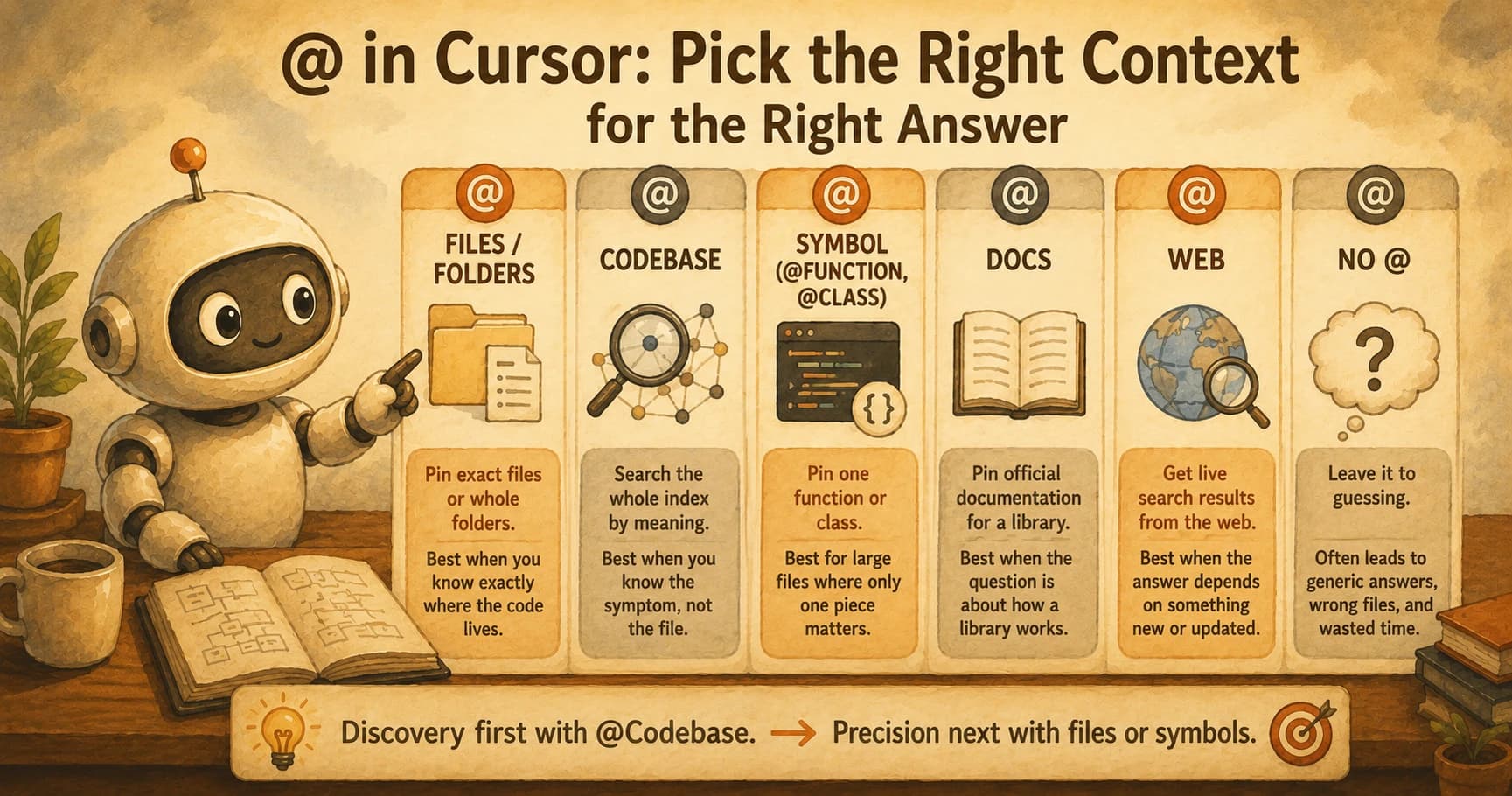
@Files and @Folders pin an exact path: one file, or an entire directory tree, verbatim. @Codebase runs a semantic search across your indexed project and pulls back whatever chunks look most relevant to your question, useful when you don't yet know which file the bug lives in. @Docs pins official documentation for a library you've registered, so the model reasons from the real API instead of a stale training memory of it. @Web runs a live web search when the answer depends on something newer than the model's training data, a changed API, a new CVE, a pricing update. @-symbol mentions go one level more precise than a file: you can point at a single function or class by name, which matters in a file with 800 lines and one broken one.
Comparing the @-mention types
| Mention | What it pins | Best for |
|---|---|---|
@Files / @Folders | Exact file or directory contents | You already know exactly where the code lives |
@Codebase | Semantically relevant chunks from the whole index | You know the symptom, not the file |
@symbol | One function or class, precisely | A large file where only one piece matters |
@Docs | Official library documentation | The bug is about how a library works, not your code |
@Web | A live search result | The answer depends on something newer than the model's memory |
The habit worth building is to use @Codebase for discovery when you genuinely don't know which files are involved, then switch to naming files and symbols directly once you do. Discovery first, precision second. Skipping straight to a vague question with no @-mention at all is what produced the login-form answer that had nothing to do with your actual form.
How Cursor Indexes Your Codebase
Codebase indexing is the process that turns your project into something searchable by meaning, and it runs mostly before you ever type an @-mention.
Cursor scans the folder you have open and splits your files into chunks, not by arbitrary line count but by logical unit: a function, a class, a coherent block, so each piece captures one complete idea rather than half of two. Every chunk is sent off and converted into a vector embedding, a numeric representation of what that code means, and those embeddings land in a remote vector database alongside metadata like the file path and the line numbers they came from. That's the machinery behind @Codebase. When you ask a question, Cursor doesn't grep your repo for matching words. It searches for chunks whose meaning is close to your question, which is why it can find the right validator function even if your question never uses the word "validator."
To avoid re-processing your entire project every few minutes, Cursor computes a Merkle tree, essentially a fingerprint of your whole file tree built from hashes, and compares it against the last synced version. Only files whose hash actually changed get re-chunked and re-uploaded, and the index resyncs on an interval of roughly five minutes rather than instantly, per Cursor's own indexing documentation. That's why a 40,000-file monorepo doesn't grind to a halt every time you save one file: the diff, not the whole tree, is what moves. The same Merkle structure also does double duty as a privacy mechanism: as Cursor's own writeup on secure indexing explains, a teammate reusing a shared index can only retrieve results for files they can already prove they have locally, not the whole repository.
Why this matters in practice: if your index is stale or your codebase is full of generated files nobody bothered to exclude, @Codebase searches over noise instead of signal, and the chunk it retrieves for your question might be a build artifact instead of your actual source. I've seen a @Codebase query return a minified bundle file as the "most relevant" match, purely because nobody had added it to the project's ignore rules, and it cost more time to notice than it would have taken to just name the real file directly.
The Limits of Indexing, and Why They Matter
Codebase indexing is fast and genuinely useful, but it has three real limits worth knowing before you trust it blindly.
Sync lag is the first. The index refreshes on a short interval, not the instant you hit save, so a file you changed ten seconds ago may briefly be invisible to a semantic search. If you just renamed a function and immediately ask @Codebase about it, you can get an answer built on the old name. This same discipline of curating exactly what the model sees carries straight into Claude Code's agentic loop, just with a CLAUDE.md file standing in for a deliberate @-mention.
No full-text matching is the second. @Codebase searches by meaning, which is powerful for "find the thing that validates passwords" but genuinely bad for finding an exact string like a specific error message or a literal config key. A plain search would beat semantic search every time on that kind of lookup.
A context window ceiling is the third, and the one people forget most. Even a perfectly indexed, perfectly synced repo can't have its entire relevant history stuffed into one prompt. Retrieval picks the top handful of chunks it thinks matter, not the whole codebase, so an incomplete or misleading answer can still happen even when indexing worked exactly as designed. This is exactly why agent memory grew into its own research field in 2026: a bigger context window was never the real fix, better management of what gets remembered and forgotten was.
None of these are bugs. They're the honest trade-offs of a system built for speed over exhaustiveness, and the practical response to all three is the same: when precision matters, don't rely on @Codebase alone, name the file or symbol yourself.
Context Is a Deliberate Act, Not a Given
The single idea worth carrying out of this lesson is that an answer's quality has a ceiling, and that ceiling is set by the context you handed the model, not by how smart the model is.
A model with no context about your login form has to reason from general React patterns, which is a reasonable guess and also nearly always the wrong one for your specific bug. The same model, handed @src/components/LoginForm.tsx @src/lib/validators/auth.ts, isn't smarter. It's reading the actual validation branch that's missing an empty-string check, instead of imagining what a typical form might do wrong. Nothing about the model changed between those two questions. Everything about what it could see did.
This is worth treating as a discipline, not an afterthought, because it compounds. Every session where you re-explain a file you already discussed, every question you leave unscoped because typing @ felt like extra effort, costs you either tokens, time, or a wrong answer you then have to debug on top of your original bug. We'll come back to this as its own discipline later in the path, once statelessness and multi-turn memory are on the table, but the core habit starts here: before you type a question, ask what the model would need to see to actually be right, and go get it. It's the same judgment this whole Inside the Agent path keeps circling back to: the tools are only as good as the deliberate choices you make while using them.
Your Lab
Ask a real question with zero @-context
Open any project in Cursor, ideally one with at least a few files (your own repo, or a small open-source project you have cloned locally). Pick a real question about specific behavior in it: why a particular function returns what it does, why a form validates the way it does, why a config value is set the way it is. Ask it in chat with no @-mention at all, just the plain question. Save the model's full answer somewhere.
Ask the identical question with precise @-context
Start a fresh chat. Ask the exact same question, worded the same way, but this time add the specific files or symbols involved: @path/to/relevant-file.ts, or a @symbol mention for the exact function if you can identify it. Save this second full answer too.
Write your 150-word comparison
In a plain text file or a comment at the top of your project, write exactly 150 words comparing the two answers. Name at least one concrete, specific difference: a detail the first answer got wrong or invented, a file or line the second answer correctly identified, a piece of your actual logic the first answer never could have known about. A vague "the second one was better" does not count; name the specific thing that changed.
Done? You've completed Lesson 14.05.
FAQ