Claude Code Extensibility: The Full Stack, Mapped
Claude Code can be extended seven ways: CLAUDE.md, skills, hooks, subagents, MCP, and more. One rule of thumb tells you which primitive fits.

I told an agent, in plain English, to never touch our .env file. It didn't touch it for eleven turns. On the twelfth, mid-refactor, it "helpfully" rewrote a variable name inside that file anyway, because nothing was actually stopping it, only asking it. I moved the same rule into a hook that blocks the edit at the file-system level, and it has held one hundred times out of one hundred since.
That gap between asking and enforcing is the whole idea behind Claude Code's extensibility stack. Claude Code can be extended in seven ways: CLAUDE.md, rules, skills, subagents, hooks, MCP, and plugins. The fastest way to pick the right one is to ask a single question first: does this need to happen every time, no exceptions, or does it usually need to happen, with room for judgment? The first case is deterministic and points to a hook or code; the second is probabilistic and points to a skill or a prompt. Once you've answered that, the rest of the stack sorts itself by scope: always-on, on-demand, isolated, or external.
Key Takeaways
- Seven primitives, one sorting question: deterministic (hooks, code) versus probabilistic (skills, prompts)
- CLAUDE.md and rules are always-on memory; skills are on-demand behavior; subagents isolate context; MCP reaches outside tools; plugins bundle all of it for sharing
- A hook fires on its event every time. It cannot be reasoned out of running
- Most people default to skills for everything and only discover hooks after a rule quietly gets skipped once
- This map is the frame the rest of Module 20 fills in, one primitive at a time
What "Extensibility" Means in Claude Code
Extensibility is everything you add on top of Claude Code's built-in tools to customize what it knows, connect it to the outside world, and control what happens automatically around its work. This whole map sits under the broader idea of agentic AI: giving a system the tools and structure to act, not just answer.
Claude Code ships with built-in tools for reading files, editing code, running commands, and searching the web, and those cover most day-to-day coding tasks on their own. The extensibility layer exists for everything else: teaching it your team's conventions, connecting it to a database it wasn't born knowing about, or making absolutely sure it never runs a destructive command by accident. Seven primitives cover that layer, and each one answers a different kind of need.
The One Rule of Thumb: Deterministic vs Probabilistic
Sort any new requirement by asking whether it must always happen or usually should happen, and you'll land on the right primitive almost every time.
A deterministic need is one where a failure is unacceptable: never edit this file, always run the linter after a change, block this shell command outright. These belong in code that runs outside the model, because a hook doesn't negotiate. It fires on its event every time, whether Claude "agrees" with the rule in that moment or not.
A probabilistic need is one where judgment genuinely helps: usually format a commit message this way, generally prefer this library, follow this checklist when reviewing a diff. These belong in prompts, because you want Claude reasoning about how to apply the rule to the specific situation in front of it, not blindly executing a script. A prompt-based instruction, whether it lives in CLAUDE.md or a skill, is a request the model interprets. That's a feature when the task needs interpretation, and a liability when it doesn't.
A common early mistake is reaching for a skill for everything, including things that should be hooks. If you've ever written "never do X" into a skill or CLAUDE.md and watched X happen anyway on a busy turn, that's not Claude being careless. It's a probabilistic tool being asked to do a deterministic job.
The Seven Primitives, One at a Time
Each primitive answers a specific scope question: is this always on, on-demand, isolated, external, or a bundle of the rest?
CLAUDE.md is always-on memory. Its full content loads into every session automatically, which makes it the right home for project conventions and "always do X" rules Claude needs to know without being reminded. Because it's loaded on every single turn, it's also the most expensive place to put things, so keep it lean. The CLAUDE.md hierarchy and @-imports cover how to split it up as it grows.
Rules, stored in .claude/rules/, are scoped memory. They load every session too, but can be restricted to specific file paths, so a rule about your test conventions only loads when Claude is actually working in the test directory. Rules exist to keep CLAUDE.md from growing into a wall of text that applies to files it has nothing to do with.
Skills are triggerable behavior. A skill is a markdown file Claude loads on demand, either because you typed its name or because your task matched its description. Skills cost almost nothing until they fire, which makes them the natural home for reusable workflows and reference material you don't need loaded all the time. The simplest version of this idea is a slash command: a saved prompt you trigger by typing /name instead of retyping it every session.
Subagents are isolated context. A subagent is a separate worker with its own context window that reads files, runs searches, or does research, then hands back only a condensed summary. The value isn't delegation for its own sake, it's keeping a noisy side-task from filling up your main conversation with details you'll never need again.
Hooks are deterministic control. A hook is a script, HTTP request, or tool call that Claude Code runs automatically at a specific lifecycle event, like right before a file edit or right after a tool runs. Hooks execute outside the model entirely, cost zero tokens by default, and cannot be talked out of firing (see hooks and deterministic control for a full build).
MCP, the Model Context Protocol, connects Claude to systems it otherwise has no way to reach: your database, a Slack workspace, a browser. It's the primitive for external connections, not internal behavior.
Plugins are the shareable bundle. A plugin packages skills, commands, subagents, hooks, and MCP configuration into one versioned, installable unit, so a whole setup can move to a new repository or to a teammate with a single install command instead of a folder of files copied by hand (see the plugin marketplace commands for the exact syntax).
Which Claude Code Primitive Should You Use?
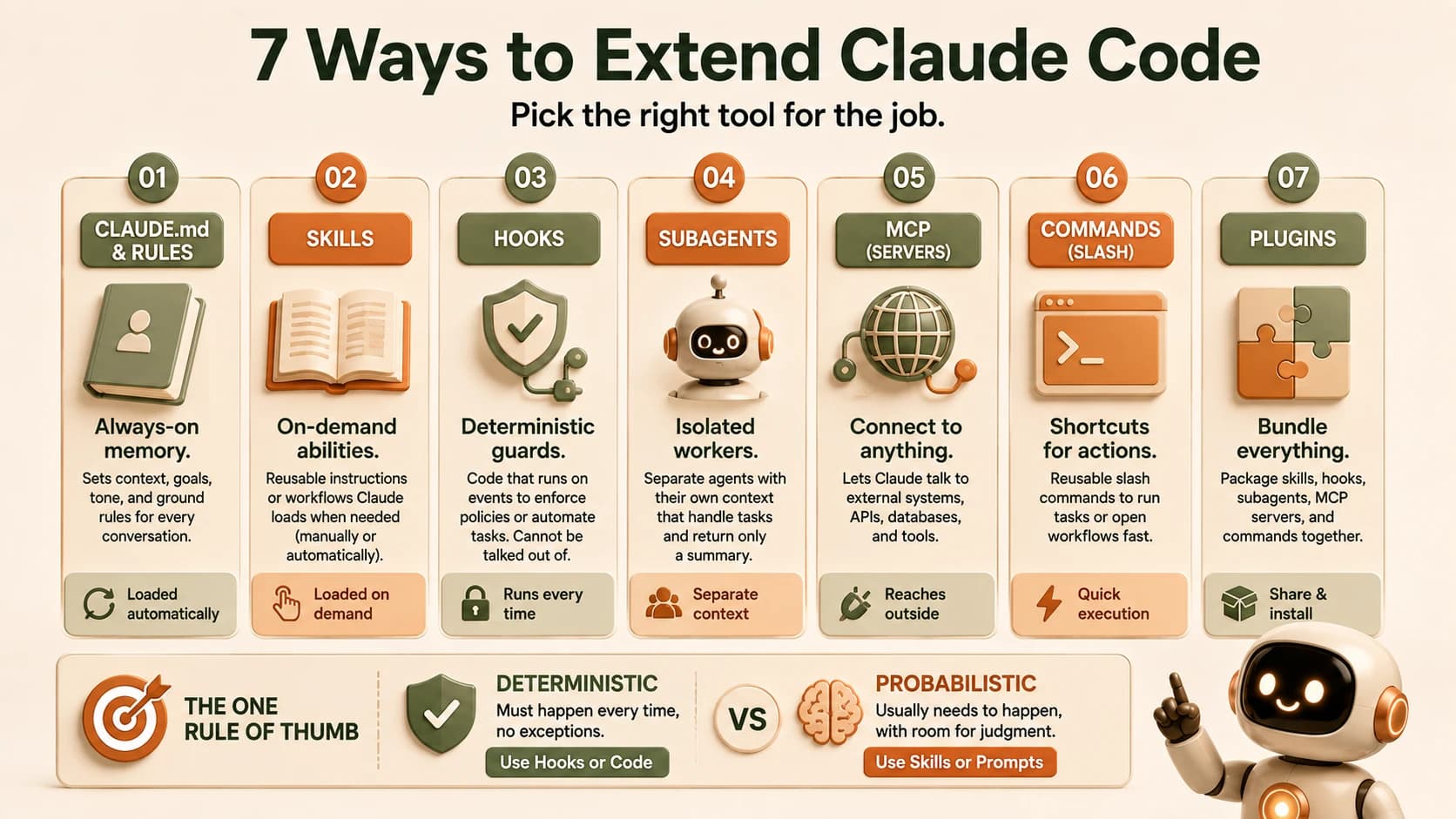
Match your requirement to a row below, and you'll usually have your answer before you've finished reading the row.
Claude Code primitive selection guide
| Your requirement | Determinism | Primitive |
|---|---|---|
| An always-on project convention | Deterministic-ish (always loaded, but interpreted) | CLAUDE.md |
| A convention specific to one folder or language | Deterministic-ish, scoped | Rules |
| A repeatable workflow you trigger by name | Probabilistic | Skill |
| A big research or exploration task polluting your context | Isolation, not determinism | Subagent |
| Something that must always or never happen | Deterministic | Hook |
| Reaching a database, API, or external tool | Connection, not determinism | MCP |
| Sharing a whole setup with a team or another repo | Packaging | Plugin |
Two rows don't fit neatly on the deterministic/probabilistic line, and that's by design. Subagents solve an isolation problem, not an enforcement problem, and MCP solves a connection problem. Neither competes with hooks or skills; they answer a different question entirely.
How Claude Code Extensibility Combines in a Real Setup
None of these seven primitives works alone in a real project. Instead, they layer.
A typical setup looks like this: CLAUDE.md holds your core conventions ("use pnpm, not npm"). A skill holds your deployment checklist, triggered with /deploy. MCP connects Claude to your production database so it can answer questions about real data. A hook runs your linter automatically after every file edit, whether or not anyone remembers to ask for it. Each primitive is handling exactly the part it's best at, and none of them is trying to do another one's job.
That's the real payoff of understanding Claude Code extensibility as one system rather than seven separate features: once you know which bucket a new requirement falls into, you stop guessing and start building the setup deliberately, one primitive at a time, instead of cramming every new need into whichever one you reached for last. Anthropic's own reference on extending Claude Code walks through the same combinations in more depth once you're ready to go deeper on any one piece.
Your Lab
Read the six requirements
Here are six real requirements a working Claude Code setup might need:
- Block any edit to the
.envfile, every time, no exceptions. - Give the agent a house code-review style it applies when asked to review a diff.
- Let the agent research an unfamiliar library's documentation without dumping 10,000 tokens of docs into your main conversation.
- Expose your project's Postgres database so the agent can answer questions about real data.
- Make sure every commit message follows your team's format, but leave room for the agent to phrase the summary well.
- Share your entire skill and hook setup with a teammate working in a different repository.
Assign each requirement to a primitive
For each of the six, write down which primitive fits best: CLAUDE.md, rule, skill, subagent, hook, MCP, or plugin. Justify each choice in one sentence, using the deterministic-vs-probabilistic question from this lesson.
Commit your answers
Save your six assignments and justifications to learning-log.md in a fresh repo, dated today.
Done? You've completed Lesson 20.01.
FAQ